


 12/05/2026
  404 views
Effective financial management is one of the core factors for a business to maintain and break through in business. To master the cash flow and financial resources of a business, the support of business financial management software is necessary. To help businesses choose the right software, the article below will share with users about the roles, benefits, and top most effective financial management software today.
Mục lục
I. Information about business financial management software
1. What is financial management software?
Financial management software is a support tool that helps businesses manage cash flow more professionally and effectively. The software helps managers track financial data, manage cash, manage capital, cash flow mobility, business assets, etc. This gives business owners a better overview of the company’s financial activities and allows them to make appropriate decisions for each stage.

2. Benefits of business financial management software
In today’s 4.0 era, applying software is a comprehensive and professional financial management solution chosen by many businesses. It helps businesses build effective business plans, tightly control cash flow, and manage revenue and expenditures efficiently.
Clear and accurate data
Previously, you had to manage data in separate document files across multiple systems. Now, business management software helps you update and share data on a common system, making it easy to retrieve when needed. This gives businesses a comprehensive overview, helping them track and manage data more accurately and quickly.
Understand the financial situation clearly
Based on statistical data and reports, business owners can grasp the financial situation easily and conveniently. The software helps business owners closely monitor the business situation and cash flow circulation. This helps the business promptly handle unexpected situations that affect the company’s finances.
Information security
Security is an issue that businesses always pay special attention to. With a financial management support tool, business owners can set up the system with specific permissions, helping the business grasp the situation most accurately.
As you can see, business financial management software is a smart, professional solution that helps businesses master their finances in the digital technology era. To optimize financial issues and manage revenue and expenditures effectively, let’s explore the top 7 most popular financial management software of 2025 in the content below.
II. Top 7 best business financial management software of 2025
1. Money Ex
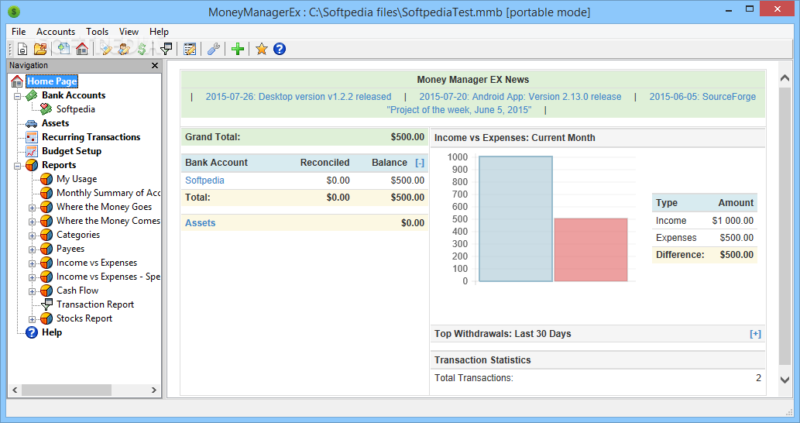
Money Manager Ex is a completely free business financial management software that helps solve the financial problems of an organization or business. With a simple interface and configuration, you can see the spending purpose of each cash flow and detailed reports. In addition, this application also lets you know when bills are due and can generate reports. However, the software’s disadvantage is that it does not support you in paying bills, depositing money into financial institutions, or calculating taxes.
2. Accounting Seed
Known as an accounting application with the feature of tracking the business’s financial situation through input data from the business life cycle: from project implementation, marketing processes, to sales results. From there, business owners will collect a lot of information from each revenue-expenditure item to support, set budgets, and orient development, suitable for all business plans.
3. 1Office
1Office is one of the best Vietnamese business financial management software available today. Possessing many outstanding features, the software is now trusted by more than 6,000 businesses with over 500,000 customers. The software brings high efficiency to businesses in managing revenue and expenditure in a synchronized and unified manner, helping to save time and costs in the work process.

Key functions of 1Office financial management software:
Cash book management function
- Create, edit funds: Declare the business’s funds and configure the cashier to approve receipt-payment slips for the fund
- Delete cash book: The delete action can only be performed when the opening balance for the fund has not been finalized
- Finalize balance: When a fund is newly created, the fund manager creates a finalized balance for the fund if any
>>Read now: 1CA Digital Signature Service – Remote Digital Signing Solution in the 4.0 Era
Receipt Voucher Management Function
- Create new receipt type: Declare sales receipts and other types of company receipts
- Create new receipt voucher: Allows users to create a receipt voucher based on the receipt type
- Edit, delete receipt voucher: After a receipt voucher is created, users can edit or delete it before it is approved by the cashier
- Approve/Reject: Action for the cashier who has permission to approve/reject the voucher. When approved, the fund’s account balance will be credited according to the voucher
- Reverse approval: Action for the cashier that can only be performed after the voucher has been approved/rejected
- Add documents: Allows users to upload documents related to the receipt voucher to the software
- Smart alerts: Filters receipt vouchers that meet the alert’s filter conditions
Payment Voucher Management Function
- Create new payment type: Declare sales payments and other types of company payments
- Create new payment voucher: Allows users to create a new payment voucher
- Edit, delete payment voucher: After a payment voucher is created, users can edit or delete it before it is approved by the cashier
- Approve/Reject: Action for the cashier who has permission to approve/reject the voucher. When approved, the fund’s account balance will be debited according to the payment voucher
- Reverse approval: Action for the cashier that can only be performed after the voucher has been approved/rejected
- Add documents: Allows users to upload documents related to the payment voucher to the software
Fund Transfer Voucher Management Function
- Create new voucher: Allows users to create a new fund transfer voucher
- Edit, delete voucher: After a voucher is created, users can edit or delete it before it is approved by the cashiers of both funds
- Approve/Reject: Action for the cashier who has permission to approve/reject the voucher. When both cashiers approve, the account balances of both funds will change accordingly
- Reverse approval: Action for the cashier that can only be performed after the voucher has been approved/rejected
- Add documents: Allows users to upload documents related to the voucher to the software
>> Read now: What is 3P Salary? 3 Benefits for Businesses When Applying the 3P Salary Method
4. AceMoney Lite
This is a simple and convenient business financial management software that does not require users to have prior accounting knowledge. It helps small and medium-sized enterprises quickly create suitable financial plans.
This software also helps businesses track cash flow (in and out) and continuously reports on the budget, giving management the most comprehensive overview of available funds. Additionally, AceMoney Lite has a feature to set budgets for each expense item, helping business owners understand actual costs to plan for capital optimization.
5. HomeBudge
Similar to Money Manager Ex, Home Budget is a business financial management software that helps businesses track cash flow, due invoices, and budget balances. Based on the input data, the application will provide a budget plan that allows you to analyze income and expenses in detail through charts and graphs.
6. Spendee
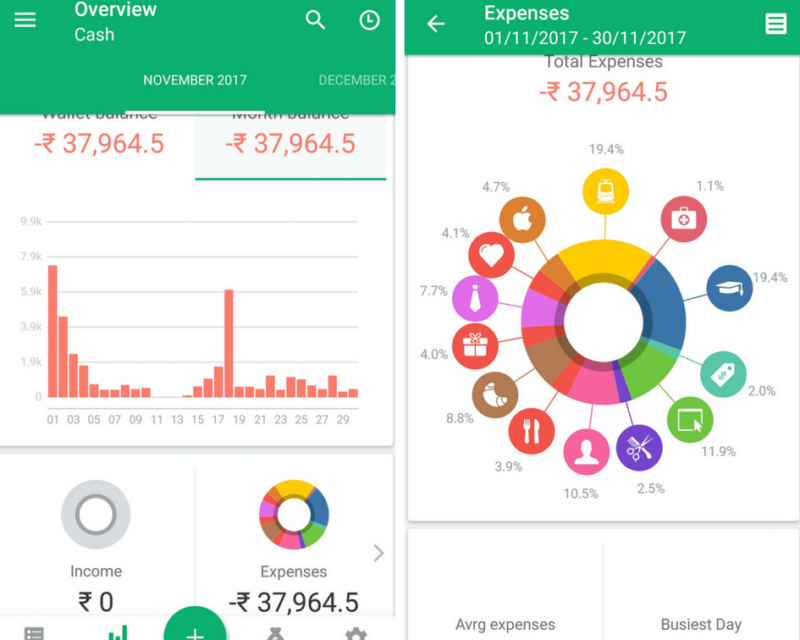
Spendee is known as an effective business financial management software that helps you control funds from bank accounts, e-wallets, and expenses or invoices.
With Spendee, you can track your cash flow, understand your spending habits and financial trends, and set up smart budgets to avoid overspending thanks to the “spending alert” feature. This helps you know exactly what you’ve spent money on for more reasonable spending, thereby helping you set up a reasonable savings plan.
7. Sage Live
Sage Live allows businesses to easily connect their finance, accounting, and customer management systems. The software helps businesses easily control cash flow with complex data volumes. Sage Live’s synchronization feature will help businesses save a significant amount of time by reconciling data from multiple sources in the shortest time possible.
Financial management has never been easy, but work flows more smoothly with the support of specialized applications. Depending on the business scale and organizational structure, business owners can choose the most suitable corporate financial management software. With over 250,000 users from more than 3,500 Vietnamese businesses choosing and trusting it, 1Office is a platform that helps link financial management features with internal business processes, allowing managers to easily track all employee tasks.
To register for a trial of the financial management software that helps optimize cash flow and manage revenue and expenses, please leave your information. 1Office’s team of experts will contact you for a consultation today.
For more detailed information, please visit:
Fanpage: https://www.facebook.com/1officevn/
Youtube: https://www.youtube.com/channel/UCeTIRNqxaTwk0_kcTw6SxmA
















