


 09/05/2026
  11307 views
Asset management software is currently solving one of the most challenging operations in businesses, especially for those with a large volume of high-value assets. To help businesses overcome challenges in asset management, 1Office would like to introduce the TOP 8 best free asset management software of 2025, along with tips for choosing the right asset management software for your business.
See more:
- TOP 12 Free Human Resource Management Software, Best HRM Solutions for 2025
- Top 8 Effective Online Task Assignment and Work Management Software for Employees
Mục lục
- 1. The Importance of Asset Management in a Business
- 2. Challenges in Business Asset Management
- 3. Top 8+ Best Free Asset Management Software for Businesses [Updated 2026]
- 3.1. 1Office Comprehensive Asset Management Software
- 3.2. BRAVO Machinery and Equipment Management Software
- 3.3. 365 Asset Management Software
- 3.4. Faceworks Asset Management Software
- 3.5. ERPVIET Asset and Equipment Management Software
- 3.6. MISA Asset Management Software
- 3.7. gAMSPro Centralized Procurement Investment and Asset Management Software
- 3.8. Hinet Asset Management Software
- 4. Criteria for Choosing Free Asset Management Software
- 5. Effective Asset Management Software Implementation Process
- 6. Combining Asset Management with a Comprehensive Operations Management System
- 5. Conclusion
1. The Importance of Asset Management in a Business
Assets are an organization’s resources and play a crucial role in maintaining operations and business development. Therefore, management must be prioritized to ensure the quality and optimize the utilization efficiency of assets to bring the most value to the business. Fixed asset management in a business includes the following benefits:
- Track asset performance to ensure they are being used effectively
- Control assets to prevent depreciation and loss
- Understand the depreciation status and lifecycle costs of assets
- Monitor the condition of assets to plan for timely procurement and liquidation
- Manage the asset utilization process by individuals and departments
2. Challenges in Business Asset Management
Currently, many businesses face difficulties in asset management due to non-standardized management processes, with related documents still being stored and entered manually, leading to many risks in the asset utilization process, such as:
- Assets are not classified correctly according to their nature
- Inaccuracies in calculating depreciation and the remaining value of assets
- Failure to promptly track increases/decreases in assets
- Lack of clarity on the condition of assets when transferred between users
- Difficulty in tracing responsibility when assets are damaged or lost
Therefore, implementing business asset management software is the optimal solution to help businesses manage and monitor asset activities easily and effectively, saving time, costs and minimizing the risks of damage and asset loss.
3. Top 8+ Best Free Asset Management Software for Businesses [Updated 2026]
Below are the 8 most highly-rated free asset management software available today, with a full range of basic features such as asset information management, user permissions, statistical reporting, and data synchronization. Each software has its own advantages suitable for different business scales — from small startups to corporations with multiple branches.
| Software | Suitable for | Key Features | Advantages | Type of Assets Managed |
|---|---|---|---|---|
| 1Office | Medium and large enterprises | Manage asset information, allocation & retrieval, depreciation, report increases/decreases, report loss | Integrates with HRM, accounting; alerts when offboarding employees still hold assets | General corporate assets |
| BRAVO | Manufacturing and engineering enterprises | Manage machinery and equipment; track maintenance; report usage status | Control machinery operations, reduce risk of breakdowns | Machinery, production equipment |
| 365 | Enterprises needing to manage fixed assets | Manage allocation, retrieval, report damage, liquidation; asset inventory | Centralized asset tracking, quick inventory checks | Fixed assets |
| Faceworks | Enterprises needing system customization | Manage asset portfolio, depreciation, asset handover | Flexible, can create custom modules based on needs | Fixed assets |
| ERPVIET | Manufacturing enterprises | Manage assets, maintenance plans, repair costs | Integrates with other ERP systems like inventory, purchasing | Machinery, production equipment |
| MISA QLTS | Government agencies, administrative units | Manage assets according to state regulations, track increases/decreases | Complies with circulars and regulations on public assets | Public assets, infrastructure |
| gAMSPro | Organizations managing investments, procurement | Manage procurement, suppliers, asset liquidation | Supports procurement planning and supplier management | Assets related to construction, investment |
| Hinet | Financial and insurance enterprises | Manage assets by user, by department; assess depreciation | Asset statistics by organizational structure | Corporate assets |
3.1. 1Office Comprehensive Asset Management Software
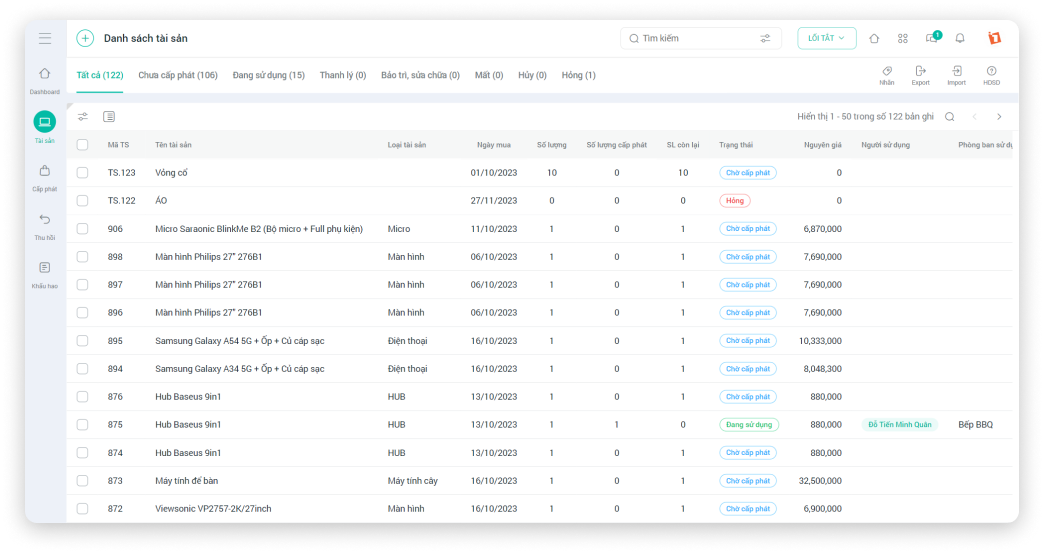
1Office is a leading enterprise asset management software on the market, helping businesses solve asset management challenges with features that support tracking, monitoring, and measuring asset value, such as: Issuing, recalling, reporting increases/decreases, reporting losses, repairing, calculating depreciation value, etc., for assets quickly and easily.
Key Features
Asset Information Management
- Track and capture the status and information of company assets and office supplies.
- Easily update asset usage activities based on the company’s actual current asset situation.
- Search for assets quickly and conveniently using advanced filters by asset group, user, etc.
Asset Issuance Management
- Supervise and track the asset issuance status for each individual and department in the company.
- Update the complete history of asset issuance to individuals and departments centrally on the software.
- Easily export or import Excel files with asset information for management and tracking purposes.
Asset Recall Management
- Manage the asset recall situation for each individual and department in the company.
- Update complete asset recall information for individuals or departments centrally on the software.
- Store a complete and detailed history of asset recalls for easy searching.
Asset Depreciation Management
- Track detailed depreciation and the specific inventory status of each asset in the company.
- Automatically update asset depreciation according to the actual real-time usage.
- Update details on depreciation period, depreciated value, and the remaining value of the asset.
Advantages
- 1Office’s asset management software has all the necessary features for businesses in asset management operations, helping to improve productivity and the efficiency of asset exploitation and use.
- The asset management software is linked with other modules of 1Office to serve human resource management and asset accounting tasks.
- Notably, 1Office provides a smart alert feature for management in cases such as: an employee resigning while still holding company assets.
- Receive consultation and installation support from leading experts in the digital transformation field.
Pricing
The pricing for 1Office asset management software is flexible and suitable for Vietnamese businesses. The cost is calculated based on the number of users; businesses only need to pay for their actual system usage without any other additional costs.
Get a free consultation & quote
3.2. BRAVO Machinery and Equipment Management Software
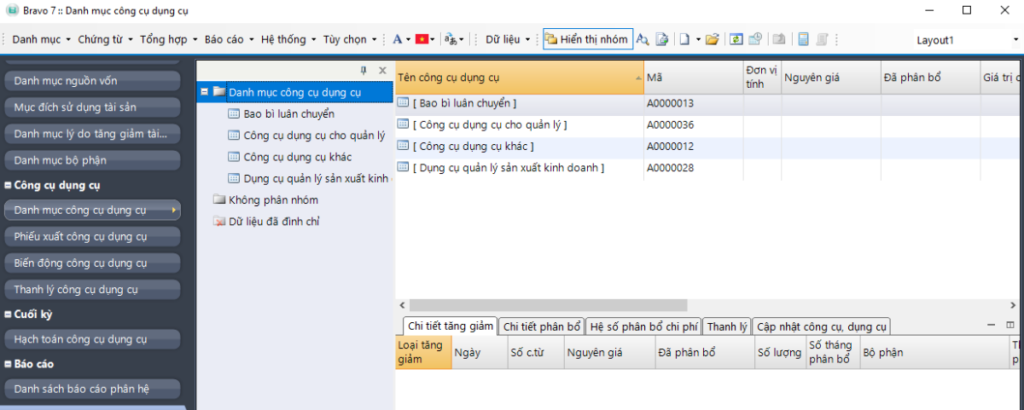
BRAVO is a software that supports administrative, mechanical, electrical, technical, and production departments in managing various types of assets such as factory systems, machinery, equipment, and transportation vehicles for the business.
Key Features
- Register equipment and fixed asset catalogs with information about the manufacturer, production year, technical specifications, operating capacity, etc.
- Update handover and issuance information for the using department/personnel.
- Manage machinery and equipment repairs: Record maintenance cycles and provide alerts when equipment is due for maintenance or replacement.
- Support the creation of asset reports such as: Usage demand reports, usage status reports, and machinery and equipment usage log reports.
Advantages
BRAVO’s features help control the operation process of the company’s machinery and equipment, minimize risks of damage and equipment wear, and optimize production costs. The software is suitable for businesses with mechanical/electrical or production departments.
Pricing: Contact for consultation
Asset Type Management: Machinery, production equipment
3.3. 365 Asset Management Software
365 is a software for managing fixed assets and information on issuance, recall, damage reports, and loss reports, all centralized on a single system.
Key Features
- Asset Information Management: Compile statistics and track the quantity of assets for each department and individual in the company.
- Asset Issuance and Recall: Create forms for issuing new assets, reusing, or recalling assets currently in use.
- Loss, Disposal, Liquidation: Track the status of assets and handle assets in cases of damage, unusability, or surplus.
- Asset Auditing: Compile statistics, create review forms, and reconcile assets at specific times during the operational cycle.
Advantages
The 365 software helps managers and employees closely monitor asset usage, conduct quick audits, and easily look up and retrieve information.
Pricing: Contact for consultation
Asset Type Management: Fixed assets
3.4. Faceworks Asset Management Software
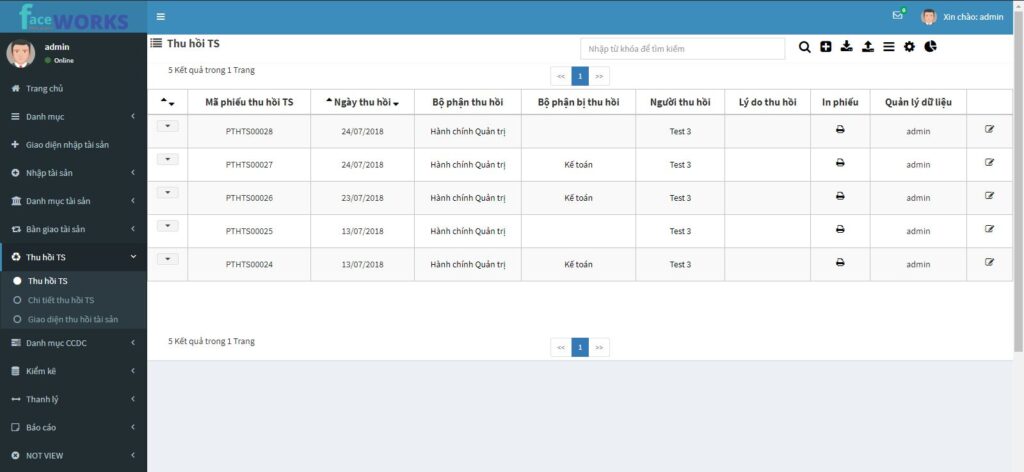
Faceworks fixed asset management software provides users with asset management features ranging from managing asset and equipment profile information to asset maintenance planning, and updating and looking up equipment operation logs…
Key Features
- Category Management: Manage asset-related categories such as manufacturer, asset group, asset type, unit of measurement, using department, etc.
- Detailed Asset Management: Supports information entry, conforming to the company’s asset management business processes, including asset quantity and updates on increases/decreases in asset quantity.
- Asset Status Management: Supports the calculation of wear and tear, depreciation, original cost, and the remaining value of assets.
- Manage Asset Issuance Requests, Asset Handover: Manage asset import, export, and inventory; provide asset issuance request form templates, and track asset handover history.
Advantages
- Characterized by high flexibility, users can create management modules suitable for their needs without having to change existing operational processes.
- All asset data is stored and managed securely on a single system, helping managers and employees across departments share documents easily and prevent loss.
Pricing: Contact for consultation
Asset Type Management: Fixed assets
3.5. ERPVIET Asset and Equipment Management Software
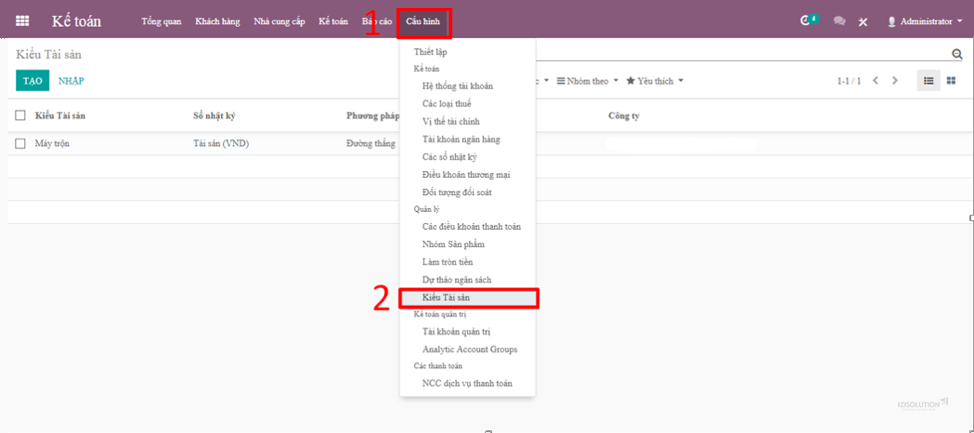
The ERPVIET asset management software system provides features to support asset and equipment management, such as: updating machinery status in real-time, effectively controlling maintenance costs for each type of machinery and equipment, etc., helping to meet the production and business needs of the company.
Key Features
- Asset Management Feature: Manage asset catalogs, plan procurement, rotate assets, handle depreciation, audit, and evaluate assets, etc.
- Equipment Maintenance Management Feature: Create/approve maintenance plans, manage maintenance and repair costs, update equipment status, update plans, parameters, machine hours, etc.
Advantages
- Allows operation based on various measurement parameters such as machine running hours, number of uses, kilometers, quantity of finished products, etc.
- Integrates with other systems such as purchasing, warehousing, production, etc.
- Suitable for manufacturing businesses.
Pricing: Contact for consultation
Asset Type Management: Machinery, production equipment
3.6. MISA Asset Management Software
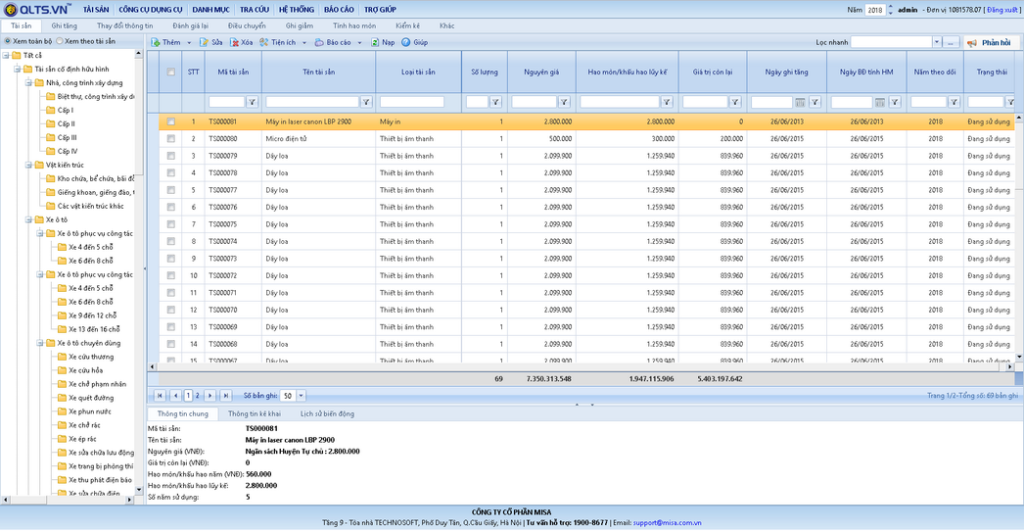
MISA Asset Management is a specialized asset management software for administrative agencies and state-owned enterprises, closely following the circulars and regulations on asset management and use laws.
Key Features
- Detailed Asset Management: Manage assets by asset type, by using department/division, track increases/decreases, evaluate assets, etc.
- Management of Road Infrastructure, Medical Equipment, Intangible, and Special Fixed Assets: Manage information related to road infrastructure assets, intangible fixed assets, and special fixed assets according to separate asset type catalogs as regulated by each province.
Advantages
- Timely updates on new state policies and regulations; Compliant with Circular 144/2017/TT-BTC and Circular 45/2018/TT-BTC.
- Suitable for state agencies, public service units, and communes/wards that manage and use public assets
Pricing
- Service package for subordinate units: 15,000,000 (first year), 3,000,000 for subsequent years.
- Service package for managing bodies and financial agencies: 29,000,000 VND for the first year, 6,000,000 VND for subsequent years.
Asset type management: Public assets, specific assets of functional agencies
3.7. gAMSPro Centralized Procurement Investment and Asset Management Software
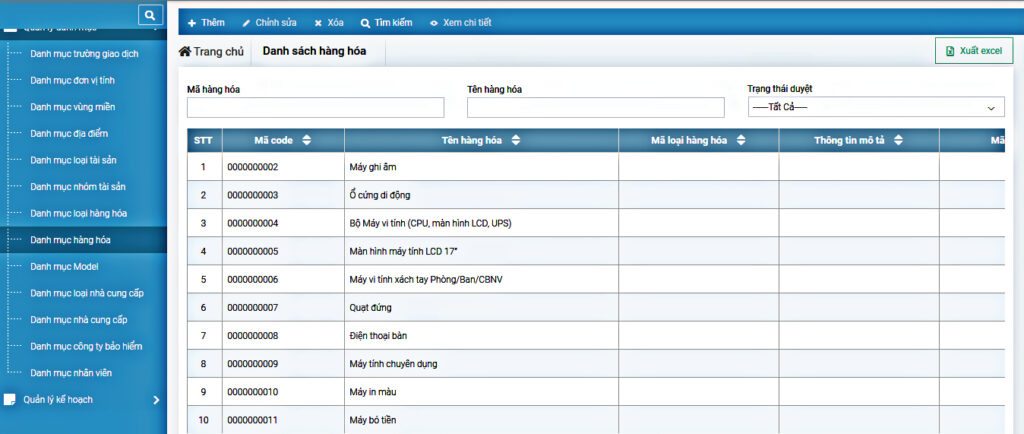
gAMSPro software provides a comprehensive solution to help organizations and businesses handle operations related to asset procurement and liquidation.
Key Features
- Goods management: Ensures quality and inspects for compliance with usage standards.
- Supplier management: Evaluates suppliers based on purchase history, maintenance, and asset repair records.
- Procurement management: Supports procurement planning, creating purchase requests, and tracking advances and final settlements.
Advantages
Helps businesses create detailed plans for asset procurement and liquidation. Manages warehouse entry, goods delivery, and supplier relationship management.
Pricing
- Popular package: 1,625,000 VND/month
- Advanced package: Contact for consultation
Asset type management: Fixed assets related to construction, real estate, etc.
3.8. Hinet Asset Management Software
Hinet asset management software provides tools to help businesses manage all purchased and invested assets in full detail.
Key Features
- Manage all existing assets, assign assets to the using department.
- Manage all data generated during the circulation and processing of documents such as work orders, submission forms, processing slips, etc.
- Evaluate assets after each use: depreciation, wear and tear, transfer, maintenance, warranty…
Advantages
The software features support for asset management by organizational structure, by asset user, and asset statistics by group.
Pricing: Contact for consultation
Asset type management: Assets in the Insurance, Finance sectors, etc.
4. Criteria for Choosing Free Asset Management Software
There are many free asset management software options on the market today that provide a full range of features for business asset management. However, to choose a quality software that suits your business’s management needs, you should evaluate based on:
- Asset Specifics and Business Type
Choosing asset management software must first be based on the specifics of the assets and the type of business. Some software is optimized only for certain sectors and specific asset groups, which may not meet all of the business’s asset management needs and can cause difficulties when new operations arise.
- Business Scale
The scale of a business’s operations is an important basis for selecting asset management software. Based on the quantity and value of fixed assets, the business will consider software packages with appropriate pricing within its budget.
- Integration of All Features on a Single Platform
Asset-related operations must be integrated into one system and linked with modules such as HR and accounting to ensure comprehensive and systematic asset management.
- Easy-to-Use Software
Asset management software must have a user-friendly, easy-to-understand interface suitable for various users. This will help minimize operation time and allow for quick and timely updates of asset information.
5. Effective Asset Management Software Implementation Process
Implementing asset management software is not just about installing the system and entering data; it is a comprehensive digital transformation process that impacts how a business controls, operates, and utilizes its assets.
To achieve maximum efficiency, businesses should follow these steps:
Step 1: Survey and Assess the Current State of Asset Management
The business needs to review its entire existing management process: how assets are recorded, classified, and tracked, and common issues such as data discrepancies, lack of transparency, or data duplication.
A thorough assessment of the current state helps to clearly define the improvement goals for software adoption (e.g., reducing inventory time by 50%, increasing data accuracy to 99%, automating depreciation, etc.).
Step 2: Select a Suitable Software Solution
Each business has a different scale, sector, and asset profile — so you shouldn’t choose software just because it has “many features”.
Instead, businesses should prioritize software that can:
-
Be flexibly customized to internal management processes.
-
Connect with existing accounting, HR, or ERP systems.
-
Offer on-site implementation support and training services.
Step 3: Standardize Data and Perform Initial Data Entry
This is a crucial step but is often overlooked. Asset data needs to be standardized in terms of code, type, unit, usage status, management location, etc., to ensure consistency and ease of lookup.
A team should be assigned to handle data entry, with cross-checking between departments (accounting, administration, technical) to avoid discrepancies.
Step 4: Train Users and Set Up Permissions
The software is only effective when users clearly understand how to use it and their responsibilities.
Businesses should organize training sessions based on roles (manager, user, accountant, etc.) and establish specific permissions to ensure security and control.
Step 5: Test, Operate, and Evaluate Effectiveness
Before the official launch, a pilot test should be run on a small scale (1 department or 1 asset group). After 1–2 weeks, gather feedback, adjust the process, and then roll it out to the entire system.
After implementation, the business needs to regularly evaluate its effectiveness, monitoring metrics such as processing time, data discrepancies, inventory accuracy rates, etc., for continuous optimization.

6. Combining Asset Management with a Comprehensive Operations Management System
In the digital era, businesses should not manage assets as a separate component.
Instead, the current trend is to combine asset management software with a comprehensive management system (ERP or All-in-one platform) to create a seamless management lifecycle — from investment and use to depreciation and liquidation.
Benefits of Integrating Asset Management into a Comprehensive System
-
Increased Data Connectivity: When asset management software is connected to accounting, HR, procurement, or CRM, data is updated instantly without manual entry. For example, when the procurement department records a new asset, the accounting system automatically creates an entry to increase assets.
-
Automated Depreciation and Maintenance Processes: The software can automatically calculate monthly depreciation and send maintenance reminders, helping accounting and administrative staff avoid oversights.
-
Optimized Operating Costs: With centralized data, management can evaluate asset utilization performance, identify redundant or degraded assets, and make decisions on reallocation or liquidation.
Systems That Can Be Integrated with Asset Management Software
-
Accounting & Finance: Automatically update asset value, depreciation, and record asset increases/decreases.
-
Human Resources: Manage assets by user and department to prevent loss.
-
Maintenance & Technical: Track maintenance schedules, repairs, and related costs.
-
Logistics & Procurement: Links information from ordering and acceptance testing to asset recognition.
Strategic impact on the business
When assets are managed in the same data system as other operational activities, businesses gain a comprehensive view of the costs, investment efficiency, and lifecycle of each asset.
This not only helps leadership make quick decisions but also lays the groundwork for a comprehensive digital transformation in business administration.
5. Conclusion
In the article above, 1Office has introduced readers to the TOP 8 best asset management software, complete with detailed reviews and analysis. We also provided reference criteria to help you choose the right software for your business and optimize your asset management process. For more detailed advice on 1Office’s asset management software, you can contact us via:
- Hotline: 083 483 8888
- Fanpage 1Office: https://www.facebook.com/1officevn
- YouTube Channel: https://www.youtube.com/c/1OfficeNềntảngquảnlýtổngthểDoanhNghiệp
- Zalo OA: https://zalo.me/3883877516951440238
















