


 11/05/2026
  17098 views
Assigning and managing tasks online is increasingly becoming a trend adopted by businesses. Especially after the social distancing period caused by the Covid pandemic, the need for remote work management applications has gradually played an important role in business operations. In this article, let’s join 1Office to explore the Top 8 best Task Assignment Software and Online Work Management tools today.
Mục lục
- 1. Why should you use task assignment software for employees?
- 2. Benefits of applying task assignment software in each department
- 3. The Impact of Task Assignment Software on Corporate Culture
- 4. Top 8 Best Task Assignment Software for Employees Today
- 5. Important criteria for choosing effective and easy-to-use task assignment software
1. Why should you use task assignment software for employees?
Task assignment software is understood as an application for managing work, tasks, and job requirements from start to finish in the best and most timely manner. All work processes are managed and easily accessible. Here are the reasons why you should use work management software:

A powerful tool to help individuals organize work
While performing assigned tasks, you have probably encountered issues like overdue tasks, forgotten tasks, or missed tasks. When using Work Organizer Apps, users can view detailed tasks, the deadlines for each task, and quickly report results to their manager. This not only helps you get an overview of the tasks that need to be done but also avoids missing assigned tasks.
Provides an overview for managers
When using an online task assignment system for employees, managers will get an overview of the progress of work items. Data is updated in real-time, helping managers quickly resolve issues as they arise.
In addition, transparency in work execution is also enhanced thanks to the automated work management platform. Managers can easily evaluate employee performance through the comprehensive reports provided by the system.
Enhances team collaboration efficiency
A positive benefit that task assignment and work management software brings is increased coordination among project teams. While a manual work management process causes many difficulties in data flow between departments, leading to slow task execution or low work efficiency, management software has effectively solved this problem.
Thanks to seamless data flow and modern, professional work features, users can discuss online and edit work documents directly on the software, no matter where you are.
For the reasons above, applying software in work management is certainly something every business aims for. However, how do you choose a system that suits your needs? Here are some suggestions for you:
2. Benefits of applying task assignment software in each department
Task assignment software not only provides an overall view for leadership but also solves specific problems for each department. Thanks to a transparent management system, tasks are clearly allocated and progress is continuously updated, thereby enhancing the work efficiency of every department.
2.1. Human Resources (HR) Department
In the human resources field, task assignment software helps reduce the paperwork load and increases systematic management.
-
Recruitment and interviews: HR can create a recruitment checklist for each position and track candidate status (applied – interviewed – offered – hired) without missing anyone.
-
Onboarding new employees: Steps like preparing documents, issuing email accounts, and arranging training are specifically assigned to each responsible person. New hires can easily grasp the integration roadmap instead of being left on their own.
For example: When a candidate is hired, the system will automatically create a task for IT to issue an account, for HR to prepare the contract, and for the department head to schedule training.
2.2. Sales Department
Sales teams are often under revenue pressure, so managing the pipeline and deal progress is crucial.
-
Sales pipeline management: The software displays the entire status of business opportunities (potential customer – quote – negotiation – contract signed), helping sales staff not to miss any opportunities.
-
Tracking quote and contract deadlines: Each deal has a clear deadline, and the software sends automatic notifications to ensure sales staff handle them in a timely manner.
-
Increase deal closing rate: When every step is tracked transparently, the sales manager can support staff immediately upon seeing a risk.
For example: If a customer requests a quote within 3 days, the software will send a reminder before the deadline and report if the salesperson has not acted, preventing missed deadlines.
2.3. Marketing Department
Marketing requires running multiple campaigns simultaneously, which can be difficult to control using Excel or email.
-
Plan and execute campaigns: A digital marketing campaign can be broken down into smaller tasks such as content writing, banner design, running ads, and measuring performance.
-
Measure KPIs on the system: Metrics like the number of leads, website traffic, and conversion rates are updated in real-time, allowing marketing managers to immediately grasp campaign effectiveness.
For example: When running a Tet holiday ad campaign, the software allows tracking of each task for the content, design, and performance teams, while also providing a KPI overview for timely adjustments.
2.4. IT Department
The IT department often receives numerous requests from other departments (technical support, system maintenance, new feature development). Without software, it’s easy for requests to be missed or handled slowly.
-
Manage maintenance tasks and incident handling: Each request is assigned a ticket number, assigned to the responsible personnel, and its progress is tracked.
-
Implement technology projects: Large projects like system upgrades or application development are broken down into sprints and milestones to ensure they stay on schedule.
-
Increase transparency and reduce pressure: Departments can track the status of their requests on the system without needing to send constant follow-up emails.
For example: When the system has a login error, HR submits a request through the software. IT receives it, resolves the issue, and updates the status (in progress → completed). The entire history is saved for reporting and analysis.
3. The Impact of Task Assignment Software on Corporate Culture
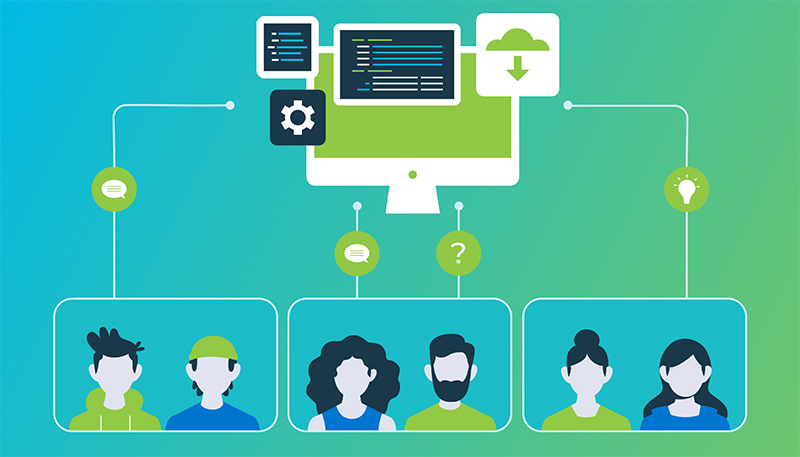
Task assignment software is not just a management support tool; it also acts as a “catalyst” for shaping a company’s work culture. When all tasks are managed with transparency, clear responsibilities, and specific deadlines, the corporate culture will evolve to be more positive, professional, and efficient.
3.1. Increasing Transparency in Work
One of the greatest values that task assignment software brings is transparency. All tasks, deadlines, responsible individuals, and results are clearly displayed on the system.
-
Employees can easily see who is doing what, what stage the work is in, and where any bottlenecks are.
-
Leaders can grasp the overall situation without needing frequent meetings to “interrogate” progress.
-
This culture of transparency helps limit “passing the buck” or working in an ambiguous, unsubstantiated manner.
For example: When a marketing project is managed on the software, from content writing and design to running ads, each step has a responsible person and a clear timeline. If there’s a delay at any stage, the entire team can see it and offer support instead of just assigning blame.
3.2. Encouraging a Sense of Responsibility
When tasks are directly assigned to specific individuals or teams, employees become more aware of their roles and responsibilities.
-
Proactive spirit: Employees know the deadlines and expected outcomes, allowing them to manage their work independently instead of waiting for reminders.
-
Higher commitment: Because progress is transparent, every team member understands that their work affects the entire group, leading to a greater sense of responsibility.
-
Improved performance: Clear responsibilities help prevent tasks from being missed or overlapping, thereby increasing work efficiency.
For example: When a business contract is assigned to a specific sales employee, they know they are responsible for closing the deal and cannot “forget” or pass it on to someone else.
3.3. Building Scientific Work Habits
Applying task assignment software also gradually fosters scientific work habits for the entire team.
-
Reduce sprawling meetings: Instead of holding meetings just to update progress, everyone can track it directly on the system. Meetings can then focus solely on problem-solving.
-
Clear task management: Each project is broken down into smaller tasks, assigned to specific individuals, and given a clear deadline. This helps employees focus on their main responsibilities instead of spreading their efforts too thin.
-
Save time, increase efficiency: When the workflow is clear, employees spend less time struggling to find information, asking for updates, or duplicating work.
For example: In the IT department, instead of holding a meeting every morning to assign system maintenance tasks, all tasks are recorded on the software. Employees just need to log in to view and update their status.

4. Top 8 Best Task Assignment Software for Employees Today
4.1 1Office Task Management Software
1Office is a professional task management solution with a full range of features such as creating tasks, assigning tasks, setting deadlines for tasks, managing work efficiency, and more. The software is not only useful for each individual in the company but also helps managers control and optimize their company’s workflow.
With 1Office, managers can easily plan and assign tasks to the right person or department on the platform, anytime, anywhere. The software automatically updates all parameters for each task, allowing managers to evaluate work efficiency, which helps optimize costs and improve performance.
- Assign tasks anytime, anywhere with any internet-connected device
- Assign tasks to individuals, departments, and teams
- Assign tasks from a plan, a meeting conclusion, or a chat message
- Multiple methods for reporting work progress
- Smart, automatic reminder and alert system to prevent tasks from being forgotten
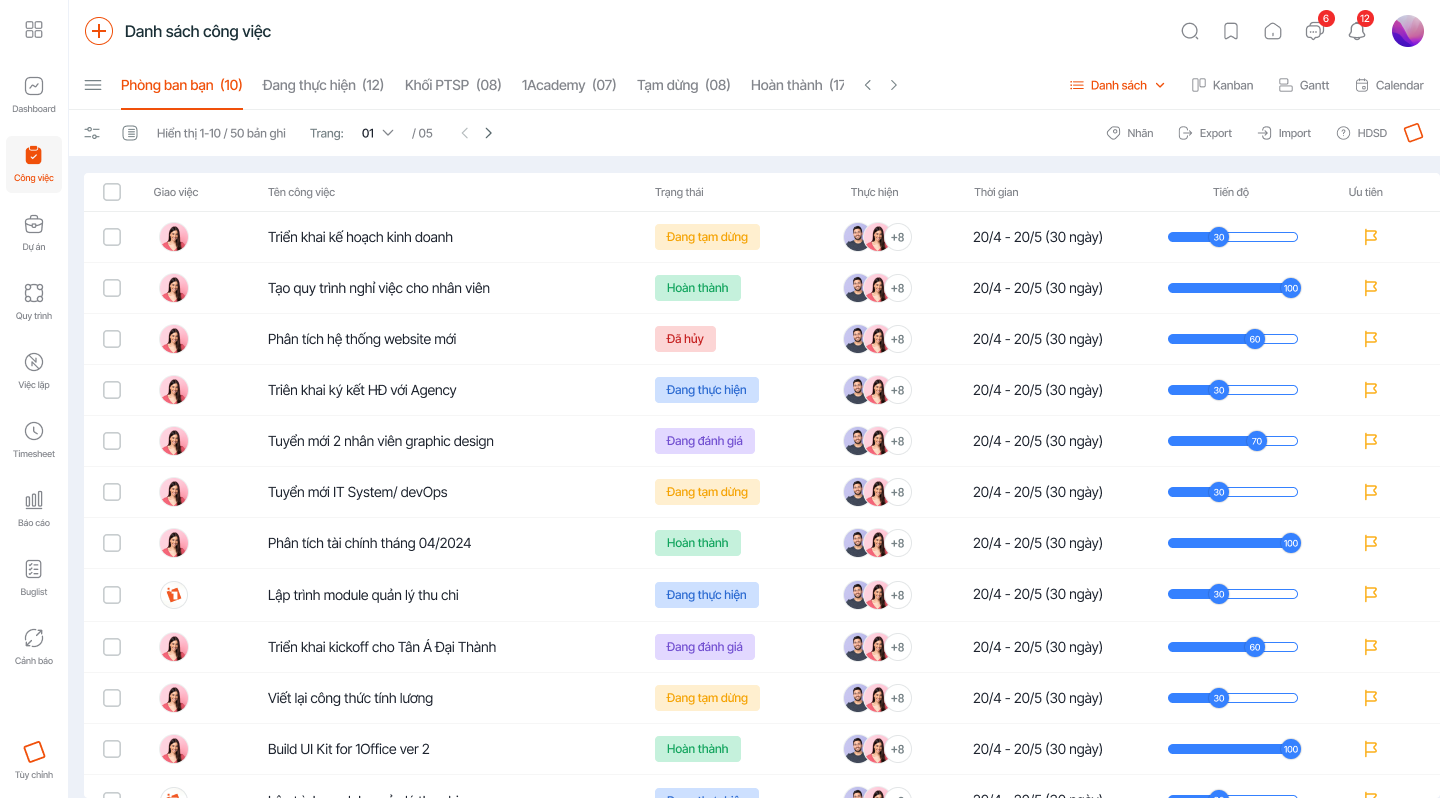
The task management software from 1Office can also automatically update progress report templates in highly intuitive, scientific, and easy-to-understand Gantt Chart & Kanban formats. Tasks automatically follow the sequence of the pre-established process on the software, making it easy to control progress for each business operation. From sales processes, marketing activities, and customer care to warehouse inventory management and coordination, the software can help managers grasp and track work progress in the most detailed and effective way.
In addition to professional task delegation features, the price of 1Office software is also more accessible to all customer segments compared to international software. See more: Latest Task Management Software Price List 2024
Get a free consultation & Demo
4.2 Trello Task Assignment Software
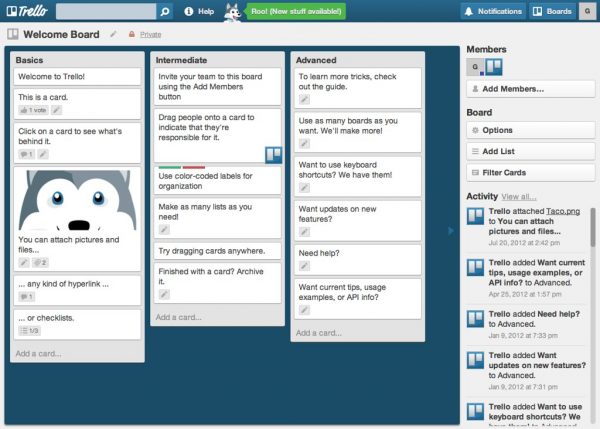
Trello is a free team task management software built on the Kanban method. Trello’s interface is a board that visualizes work with columns corresponding to statuses (e.g., To Do, Doing, and Done).
You can use it to organize cards into different lists. These cards can be tasks, notes, projects, shared files, or anything else that helps your team work better together.
Additionally, this team task management software integrates with Dropbox, Google Drive, and Confluence to provide users with the most convenient work exchange experience.
Pros:
- The platform’s interface is user-friendly, with a scientific and easy-to-observe layout of features.
- A free version of Trello is available for users to try.
- Automates task assignment operations, helping users optimize their time.
Cons:
Overall, the features of the task assignment software Trello are primarily for teamwork and collaboration, so it lacks many features such as:
- No group chat feature
- No permission delegation capabilities
- No work reports
- Ineffective for time management…
4.3 Microsoft To-Do Reminder Software
This is a pure reminder software used for task reminders and progress reporting, capable of meeting the most basic note-taking needs of users. Microsoft’s task management software has a feature to create sub-tasks within each task item. Users can even add notes and set deadlines for each sub-task.
Pros:
- Easy synchronization across multiple platforms like phones, laptops, PCs, etc., so you only need one account to use the software.
- Supports an online group discussion feature on the system for up to 150 people (reference data).
- Easily integrates with other tools from the same provider’s product suite.
- A free plan is available, or you can download the paid Microsoft task assignment software as part of the Microsoft 365 package.
Disadvantages:
However, as it is just a free task assignment software for employees, prominent features like task labeling and search filters are completely omitted in Microsoft To-Do. This makes managing tasks created within the application relatively difficult.
4.4 Asana Task Management Software
Asana is a top task assignment software on the market today, available on web and mobile app interfaces designed to help teams and businesses organize, track, and manage their work in the most streamlined and fastest way. With these features, Asana task management software is best suited for companies with a cross-functional collaboration model, where one person needs to participate in multiple projects/departments.
Advantages:
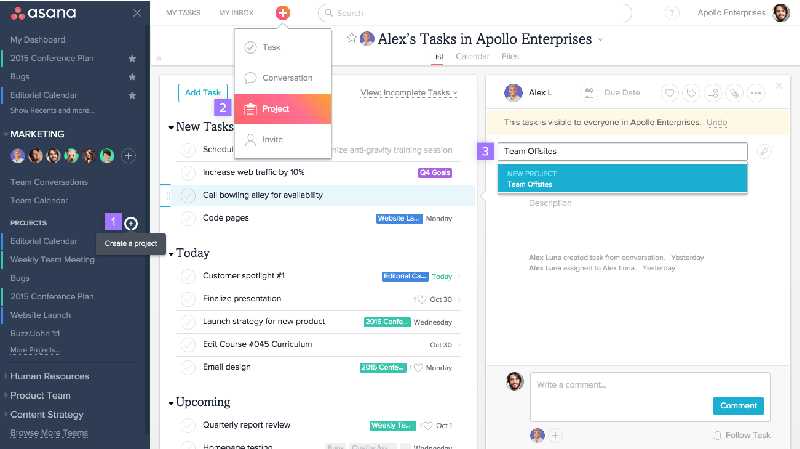
- The software allows users to convert a task into a project with just a few simple steps.
- The Calendar tool allows managers to continuously and visually track and control work progress.
- The software can be used on iOS phones and tablets.
Disadvantages:
Currently, Asana does not have a Vietnamese language version, which makes it difficult for users to utilize the platform’s features.
4.5 Todoist Task Management App
Todoist is an effective task assignment app for phones that helps organize and manage work easily. The software can quickly classify tasks by deadline, tag, and project while you are entering new data. You can simultaneously classify tasks by deadline, tag, and project quickly while entering new data on this online task reminder software.
However, the subtask feature does not work effectively, making it difficult for users to create complex, multi-branched tasks. The interface and features are the two biggest limitations of Todoist.
4.6 Any.do – Free Reminder App
Any.DO is an online task management application that helps users remember all the jobs and tasks they have to do daily. It lists tasks, marks them as done or not, and customizes reminders for times you set.
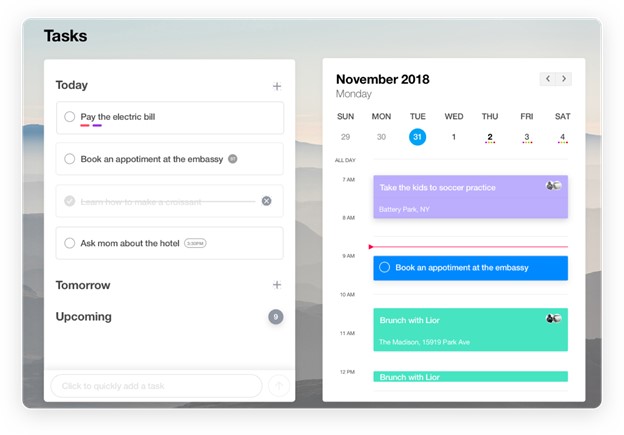
The software features a modern “drag & drop” interface, allowing users to arrange the sequence of tasks according to different priorities or mark the status of a task simply by dragging and dropping on their phone.
Advantages:
- Simple and easy-to-use management interface.
- Can mark completed tasks or delete tasks with just a few steps.
- The feature to compile a list of to-do items helps users easily assign tasks.
- Supports reminder sound options.
Disadvantages:
However, advanced employee task management features such as labeling task status, sorting by type, or creating subtasks are all omitted. The Any.DO software serves merely as a simple reminder application.
4.7 Wrike Task Management Platform
Wrike has a full range of features such as creating tasks, assigning tasks, commenting, tagging names, and the ability to link a task to multiple projects. Wrike’s task assignment software also enables faster collaboration with its Live Editing feature for attached documents and creating tasks directly from email with a single click. It is considered one of the effective task management solutions for small-scale businesses.
Advantages:
- The software has a full range of task management features such as: Creating tasks, Assigning tasks, Designating assignees and managers, linking tasks to multiple related projects, etc.
- Features task planning and tracking for overall project progress or for individual small tasks.
- Supports exporting project management report chart templates.
Disadvantages:
However, to use some advanced permissions such as the right to create, edit, and customize Workflows, or the right to view others’ work schedules, you need the paid version. The Business plan costs $24.8/user/month, which is a fairly high price to fully utilize this software.
4.8. Zwork
Zwork is a platform that allows you to effectively manage tasks and project progress. With a user-friendly interface, this online task assignment software lets you create work items, set deadlines, and assign tasks to individual employees quickly with just a few steps.
Additionally, the smart document sharing feature is an advantage of Zwork. It helps users quickly share work documents and allows for online document editing to facilitate easier collaboration among employees.
5. Important criteria for choosing effective and easy-to-use task assignment software
There are many solutions on the market today for managing task assignment and work management for businesses and individuals. So, how do you choose a task assignment tool that suits your business’s needs? Refer to the criteria we’ve listed below to effectively implement an online task assignment software for your business:
- Features:
A good software must have a full range of integrated features such as: planning, task creation, task assignment, status tracking, permission delegation, data storage, easy integration with other platforms, etc.
- Ease of Use:
The software interface must be user-friendly, with functions arranged scientifically to help users easily navigate. The software needs to support Vietnamese to avoid difficulties during use.
- Software Cost:
Carefully research the cost of each monthly or yearly subscription plan, or the price of additional services required to use the software (if any). This helps businesses plan their budget appropriately to make a decision on implementing the software solution.
- Vendor Support Services:
During the process of using the system, unforeseen errors will certainly arise. At this point, you will need the vendor’s support. Therefore, before implementing the task assignment software, carefully research the support services offered by the vendor.
- Implementation Feasibility:
Before implementing the system, carefully research whether the platform is compatible with the company’s technology infrastructure, or if the software can meet the business’s needs. Because each business has its own scale and operational process, the feature requirements for work management software will differ.
- Vendor’s Brand:
Of course, when choosing a software solution, you should research the vendor’s reputation and the results they have achieved.
- Platform Popularity:
You need to find out if the vendor’s software has been implemented by many businesses. What type of businesses is the software primarily implemented for?
Above are the best task assignment and work management software used by many businesses. We hope that through this article, you can choose a suitable work management platform for yourself. If you are wondering which work management solution to choose for your business, please contact us for dedicated consultation from our experts.
For more details, please see:
Hotline: 083 483 8888
Fanpage: https://www.facebook.com/1officevn/
Youtube: https://www.youtube.com/channel/UCeTIRNqxaTwk0_kcTw6SxmA
















