


 09/05/2026
  15857 views
Using the most effective task management software to replace manual tools is becoming a trend for all businesses. However, we understand that managers often face difficulties in researching and choosing a suitable solution for their business from the countless software options on the market. Let 1Office help you compare the top 28+ task management software in the article below!
Mục lục
- 1. Criteria for Choosing the Most Effective Task Management Software
- 2. Top 13+ Most Effective Task Management Software for Businesses (Updated 2026)
- 2.1. 1Office – The Most Professional and Effective Task Management Software
- 2.2. Asana – Simple work management software
- 2.3. Fastwork – Software for managing and assigning tasks by department
- 2.4. Wrike – Intelligent Task Management Software
- 2.5. Jira Software – Work progress tracking software
- 2.6. CloudOffice – Online Work Management Software
- 2.7. Weekdone – Goal-oriented work management platform
- 2.8. Monday.com – The best progress management software
- 2.9. myXteam – Task assignment management software
- 2.10. Bitrix24 – Effective work tracking software
- 2.11. Perdoo – Task assignment software for employees
- 2.12. Trello – Free work tracking software
- 2.13. Izwork – Task assignment platform for employees
- 2.14. Basecamp online task management software
- 2.15. Taskworld Task Management Software
- 3. Top 12+ Free and Convenient Personal Task Management Software (Latest 2026)
- 3.1. Evernote – Note-Taking App for Work
- 3.2. Notion – Note-taking and planning app
- 3.3. Lattice – Online Work Management Software
- 3.4. Vtranet – Online Task Management Tool
- 3.5. Microsoft Project – Personal Task Management Software
- 3.6. Tick Tick – Simple Task Management App
- 3.7. Any.Do – Task Management Software for Mobile
- 3.8. Todoist – Smart Task Management Software
- 3.9. Zapier – Personal Task Management Software
- 3.10. TicTop – Task Management Software
- 3.11. Microsoft To Do – Task Reminder Software
- 3.12. Google Task – Task Management Software
- 3.13. Redmine Task Progress Management Software
- 3.14. Taskque Task Management Software
- 3.15. MeisterTask Task Management App
- 4. How can businesses effectively apply work management software?
- 5. Discover the comprehensive work management solution with 1Office
- 6. Conclusion
1. Criteria for Choosing the Most Effective Task Management Software
To evaluate the most effective task management software, businesses need to consider various factors to ensure the software meets their specific needs. Below are 9 important criteria for evaluating a suitable task management software:
- Software Features: Provides all the necessary task management features a business needs, such as creating tasks, planning, setting deadlines, tracking progress, and reporting performance.
- User-Friendly Interface: Check if the user interface is friendly, easy to use, and allows new users to perform basic tasks quickly.
- Multi-Platform Integration: If your organization uses multiple operating systems and devices, this factor is important to consider.
- Pricing and Usage Costs: Consider the business’s budget and learn about initial costs and maintenance fees before making a purchase decision.
- After-Sales Support Services: You need to know if the provider offers technical support, regular updates, and user guides.
- Brand Reputation: Research the software provider and assess their reputation through quality products and good support services.
- Customer Feedback: Read reviews and opinions from current or former users to better understand the experience of using the software.
- Implementation Feasibility: Determine if the software requires special training for individual employees or departments and if it is compatible with existing devices and infrastructure.
- Application Popularity: A popular application often has a large community, ensuring stability and continuous development.
Carefully consider these criteria for selecting task and project management software and prioritize the factors that are most important for your business.
2. Top 13+ Most Effective Task Management Software for Businesses (Updated 2026)
In a context where businesses need to optimize performance and enhance team collaboration more than ever, task management software has become an indispensable tool. Below are the most effective task management software options that many organizations are choosing and trusting.
2.1. 1Office – The Most Professional and Effective Task Management Software
1Office is known as the leading task management software in Vietnam, with over 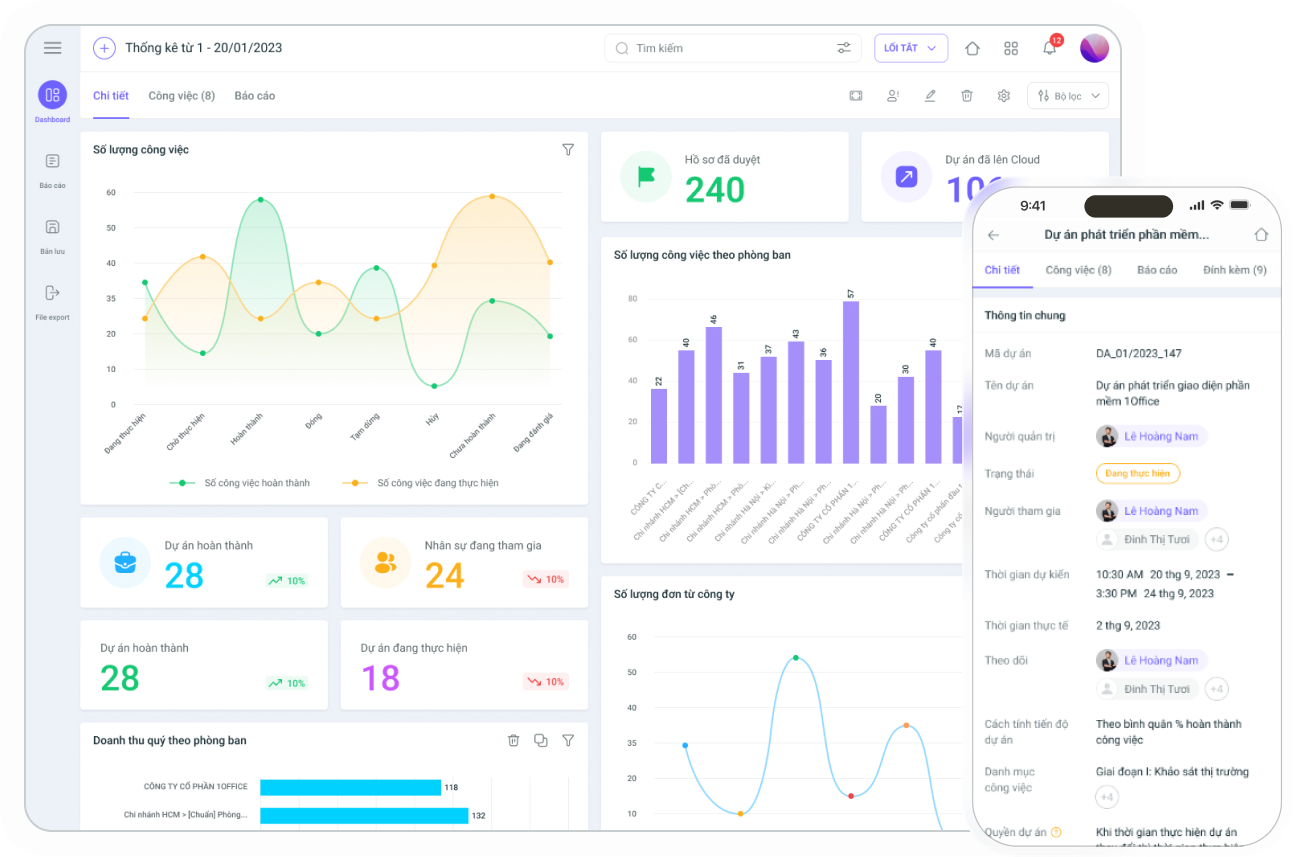
This is an intelligent task management software for departments, teams, and businesses with a simple interface and user-friendly operation. 1Office helps leaders manage employee tasks and performance effectively and scientifically.
Feature Table of 1Work – The Task Management Software by 1Office:
| Feature | Description |
|---|---|
| Intuitive Interface | The intuitive drag-and-drop interface allows every department to design their own workflows without IT assistance. Easily standardize and deploy both simple and complex processes in a short amount of time. |
| Seamless Connection | Connects and deeply integrates with the entire 1Office ecosystem and other systems: CRM, HRM, Accounting, Sales, etc. Data is connected automatically, eliminating repetitive data entry and errors. |
| AI Integration | AI monitors execution data to identify bottlenecks and suggest improvements. Processes are continuously optimized, helping managers make quick decisions and enhance operational efficiency. |
| Real-time Reporting | An intuitive, multi-dimensional reporting system. Execution data is aggregated in real-time: processing time, bottlenecks, SLAs, step-by-step performance, etc., enabling more accurate decisions and actions. |
| Safety and Security | A strict access control system. Every action and piece of data at each process step is recorded, helping to maintain a high level of security and ensure absolute transparency. |
In FMCG (Fast Moving Consumer Goods) commercial enterprises, coordinating work between the sales, logistics, marketing, and accounting departments often occurs at a high pace and requires tight control. However, if you only manage work with Excel spreadsheets, disparate emails, or group chats, errors, duplication, or omissions in task assignment and reception are inevitable. Especially when handling urgent product launch campaigns, changing promotional programs, collecting debts, or tracking inventory by region, managers can easily lose control of progress without a specialized tool.
With 1Office work management software, businesses can:
- Automatically create and assign tasks for each campaign/order, assigning responsible personnel by role (sales supervisor, warehouse staff, accountant, etc.).
- Track work progress in real-time via an overview dashboard, reducing reliance on meetings or summary files.
- Automatically send reminders for deadlines and delayed processing steps, helping managers identify bottlenecks for timely coordination.
- Store all related files (BOM, purchase orders, quotes, discount tables, etc.) within each task instead of having them scattered across multiple locations.
By digitizing the entire task assignment and reception process by department, managers no longer have to check individual emails or ask each person to know the progress of a task, saving hours each week and significantly increasing internal collaboration productivity.
Pros & Cons of 1Office software:
| Pros | Cons |
|
As the software includes numerous features for in-depth management, it may take some time to learn. |
Pros and cons analysis of 1Office software The pricing of 1Office work management software may vary depending on different service packages and access rights, based on the number of users and features used. See the detailed price list here!
Reference: 1Office work management software price list!
2.2. Asana – Simple work management software
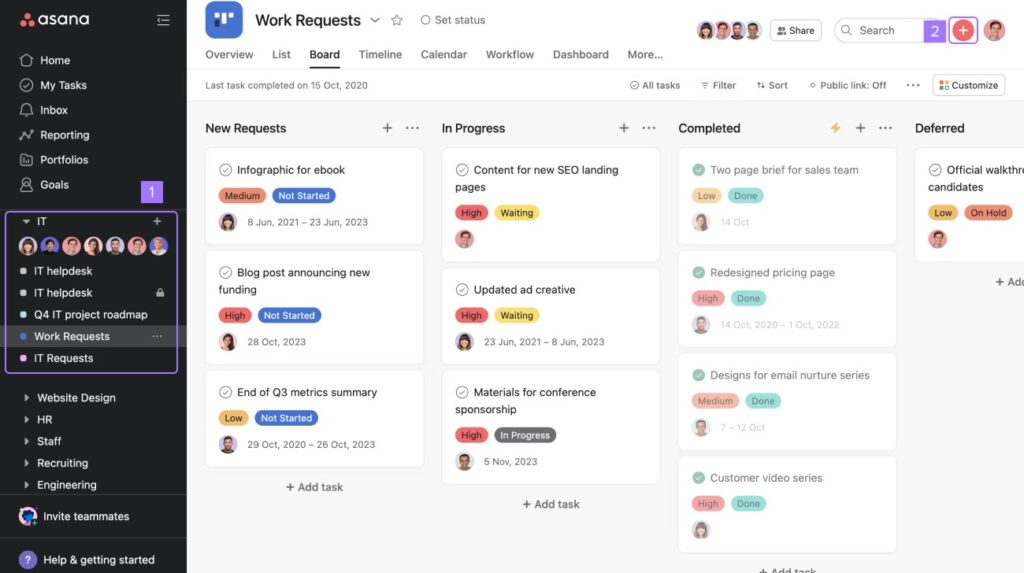
Asana is a powerful and flexible work management software. It provides many useful features such as creating task lists, assigning tasks to colleagues, planning projects, and tracking work progress.
- Asana work progress management software is available on both desktop and mobile versions.
- Easily manage projects and tasks; users can add descriptions, goals, assignees, and deadlines for each task.
- Plan, organize, and track work with an intuitive interface that allows for task assignment to team members.
Pros and cons of Asana software:
| Pros | Cons |
|
|
Analysis of Asana’s pros and cons. Asana’s pricing includes the following plans:
- Basic Plan: Limited to 15 members or fewer.
- Premium Plan: 260,000 VND/month
- Business Plan: 590,000 VND/month
- Asana Enterprise Plan: Contact for a quote
2.3. Fastwork – Software for managing and assigning tasks by department
FastWork is a software designed for small and medium-sized enterprises to manage tasks, track progress, and create to-do lists for each department. The software is flexible in meeting the requirements of each business and is available on both mobile and desktop platforms.

- FastWork online business management software
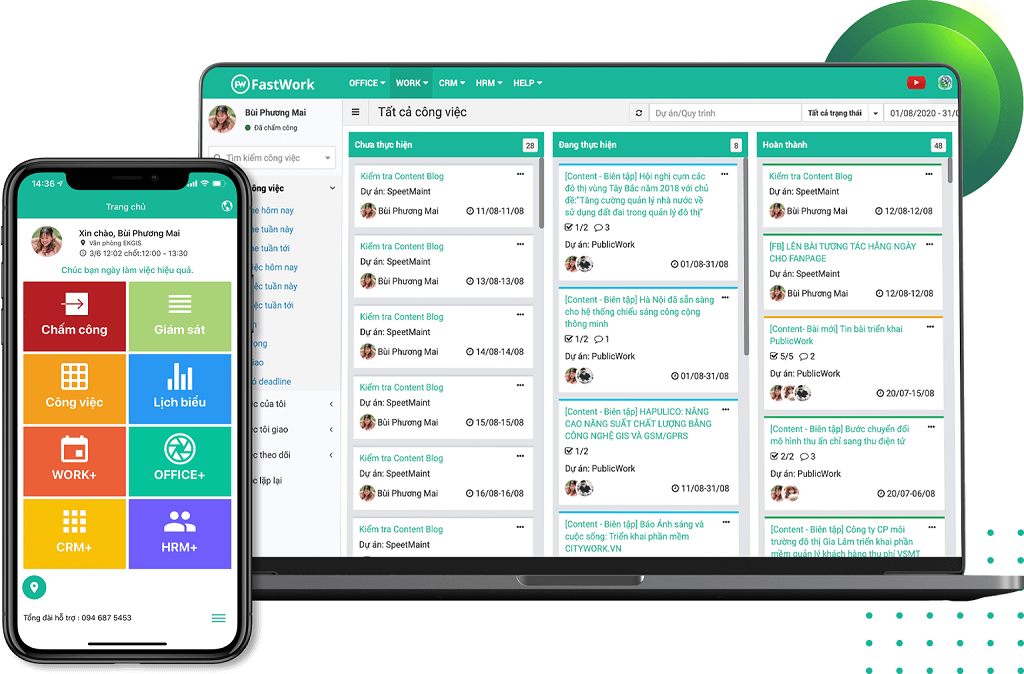
- Allows businesses to easily create and manage projects and tasks.
- Managers can assign tasks, delegate work, track progress, and create to-do lists for each department.
- Suitable for businesses that want to use one software to manage and assign tasks for each team and department.
Comparison table of Fastwork’s pros and cons:
| Pros | Cons |
|
The software was recently launched, and many new features are still under development. |
Analysis of Fastwork software’s pros and cons The pricing for FastWork task management software includes the following packages:
- TimeSheet Package: 20,000 VND/user/month, includes timekeeping and payroll features.
- HRM Package: 45,000 VND/user/month, solves human resource management & development challenges.
- WORK Package: 45,000 VND/user/month, solves work & performance management challenges.
- CRM Package: 60,000 VND/user/month, solves revenue and customer growth challenges.
- SME Package: 100,000 VND/user/month, a full feature set for SMEs.
2.4. Wrike – Intelligent Task Management Software
Wrike task management software is designed for large enterprises to manage and assign tasks on computers and phones. It offers many features, including project management, task division, progress tracking, and reporting. The platform’s standout features include:
- Manage projects and tasks in detail while creating to-do lists, assigning tasks, and tracking progress.
- Plan, organize tasks, and create project schedules to manage time and resources effectively.
- Divide work, assign tasks to team members, set priorities, and see who is doing what.
- Integrate email to send tasks, track feedback, and interact with project members.
- Provides tools to create reports on project progress, individual productivity, and resource utilization.

- Wrike software interface
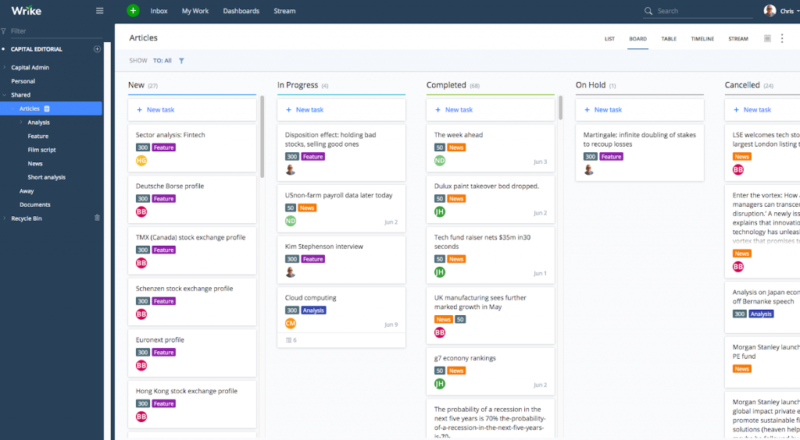
The software is suitable for businesses that want to use an intelligent work management software with effective task assignment and progress tracking features.
Pros & cons of Wrike:
| Pros | Cons |
|
|
Analysis of Fastwork software’s pros and cons Wrike’s pricing includes the following plans:
- Free: Suitable for small projects or individual users.
- Team Plan (For growing teams): 240,000/user/month
- Business Plan (For all teams in an organization): 600,000/user/month
- Enterprise Plan: Contact for pricing
- Pinnacle Plan: Contact for pricing
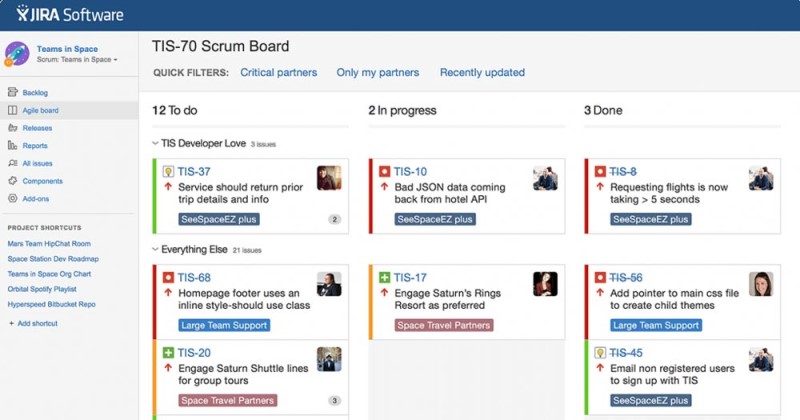
2.5. Jira Software – Work progress tracking software
Jira is an effective and highly-rated work and project management tool with in-depth features and powerful integration capabilities; however, the usage cost is quite high. The software allows you to create, track, and manage projects and tasks in detail.
- Create to-do lists, assign tasks, and manage project progress.
- Plan and organize tasks within a project.
- Divide tasks, set priorities, and track their progress.
- Integrate with multiple platforms like Email, Excel, and receive feedback notifications.
- Report on project progress, work productivity, and resource utilization.

- Effective project planning software Jira
Pros and cons of the Jira Software work tracking software:
| Pros | Cons |
|
|
Analysis of Jira software’s pros and cons. Specific pricing and features may vary depending on the plan type and number of users. Jira Software’s pricing includes the following plans:
- Free: A basic version, suitable for individuals or small teams.
- Standard: 184,000 VND/month – Supports small and medium-sized businesses.
- Premium: 360,000 VND/month – A plan suitable for large enterprises.
- Enterprise: A plan for large enterprises, providing custom features and support, with pricing based on specific requirements. Contact for a quote.
2.6. CloudOffice – Online Work Management Software
Cloud Office is essentially an online task assignment software designed to help users manage tasks and projects more effectively. With Cloud Office, users can easily create and assign tasks to colleagues or staff teams.

- CloudOffice – Online task assignment software
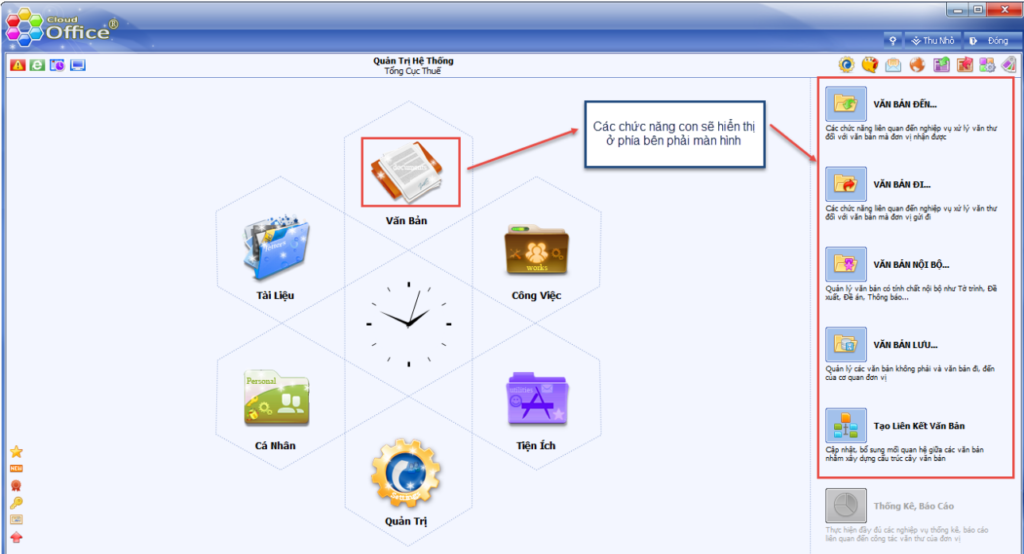
Cloud Office also has features for work planning and progress tracking, helping users know the status of each task and take necessary measures to ensure deadlines are met. Additionally, Cloud Office allows users to share information with colleagues or staff teams to collaborate effectively. Pros and cons of the software:
| Pros | Cons |
|
Lacks features for planning and creating to-do lists. |
Analysis of CloudOffice software’s pros and cons. Cloud Office software pricing currently includes:
- Basic Package: Free
- Professional Package: $6/user/month
- Enterprise Package: Contact for more details.
2.7. Weekdone – Goal-oriented work management platform

- Weekdone goal-oriented work management platform
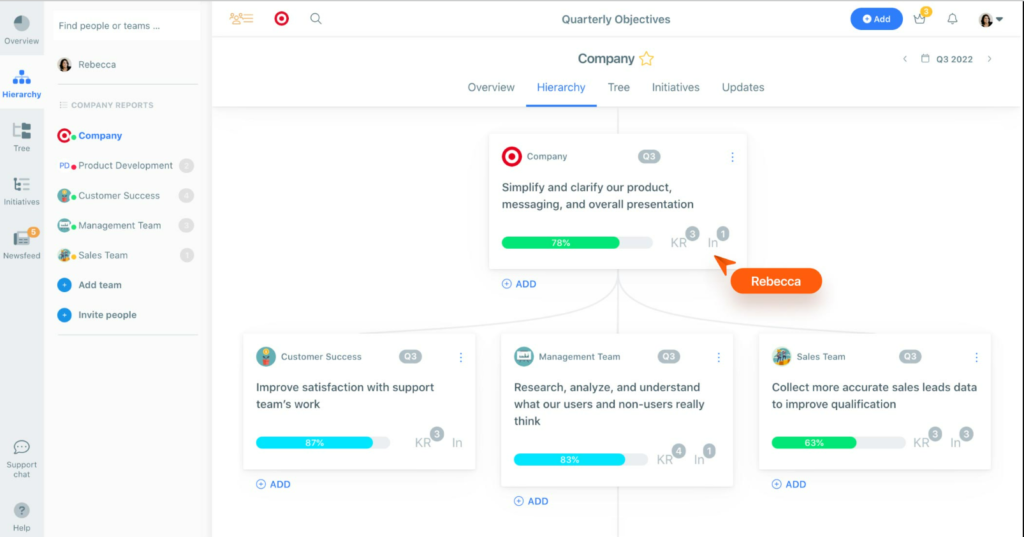
Weekdone is a goal-oriented work management platform that helps users track project progress and evaluate employee performance. Weekdone’s standout features include:
- Set goals and action plans to achieve them while easily tracking project progress.
- Provides overview reports on company and individual employee performance, helping managers grasp progress and accurately assess employee performance.
- Integrates with other applications such as Slack, Google Calendar, and Outlook.
Regarding pricing, Weekdone offers different service packages:
- Free Package: Supports up to 3 users, with a limited number of goals and reports.
- Starter Package: $4.8/user/month, supports up to 10 users
- Professional Package: $12/user/month, supports up to 50 users
- Enterprise Package: Contact for pricing, supports up to 500 users
2.8. Monday.com – The best progress management software
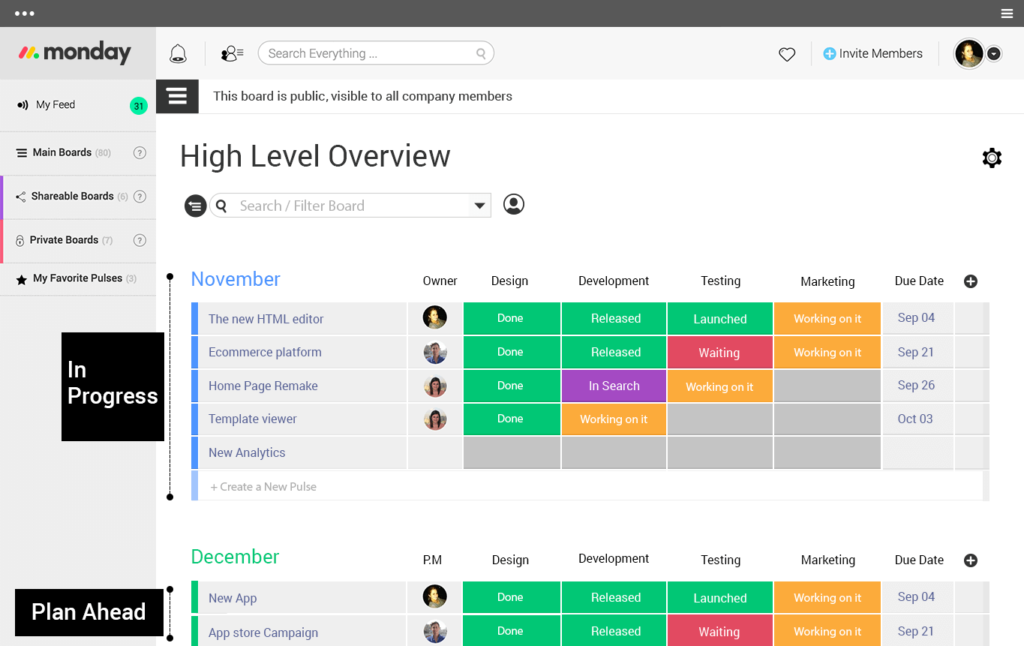
Monday.com is a highly popular work and progress monitoring software with many useful, user-friendly features. Its flexible task manager can be adapted to your company’s workflow, allowing you to design boards, set goals, track progress, and generate reports. It integrates with many other applications like Slack, Jira, and Google Drive, helping users easily interact with the tools they already use.

- Monday.com online work management app
Regarding pricing, Monday.com offers a paid version with different service packages:
- Basic Package: $8/user/month, supports up to 5 boards, integrates with popular applications.
- Standard Package: $10/user/month, unlimited boards, integrates with popular applications and offers API integration.
- Pro Package: $16/user/month, includes all features of the Standard package plus integration with a range of premium applications.
- Enterprise Package: Contact for pricing, supports up to 5000 users and includes advanced features like Active Directory integration.
2.9. myXteam – Task assignment management software

- myXteam task assignment management software
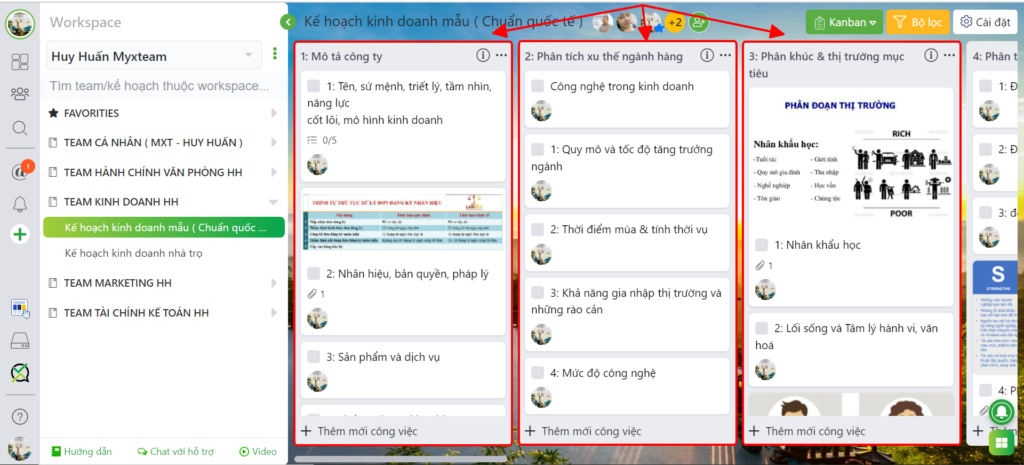
myXteam is a work management software designed to help users manage projects and assign tasks to employees, usable on various devices like computers or mobile phones. myXteam’s standout features include:
- Design a flexible task manager in their own way, thereby creating an effective work management process.
- Manage task assignments, assign tasks to employees, and track their execution progress.
- Provides overview reports on project progress and employee performance.
Regarding usage costs, myXteam software includes three different service packages:
- Standard Package: $9/user/month, supports up to 50 employees
- Advanced Package: $15/user/month
- Enterprise Package: Contact for pricing, supports up to 500 employees.
2.10. Bitrix24 – Effective work tracking software

- Bitrix24 ERP enterprise management software
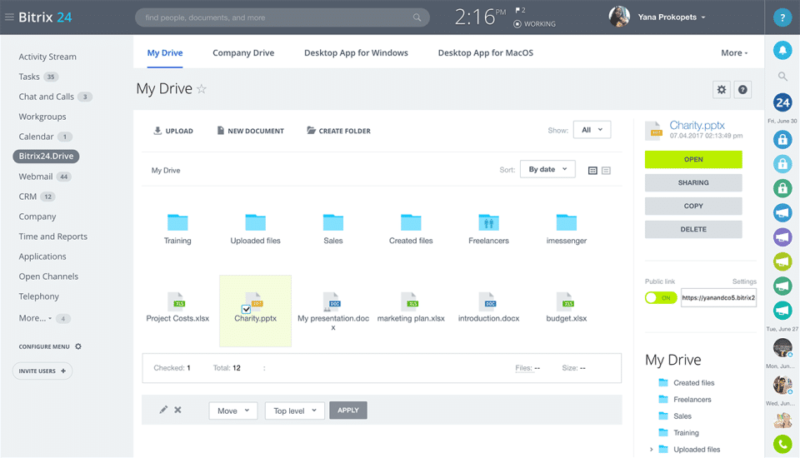
Bitrix24 work progress tracking software is a tool designed to help users monitor project progress and manage tasks. Standout features of this application include:
- Design a flexible task manager to fit the company’s workflow.
- Integrates communication tools like messaging, email, and phone calls, helping employees easily interact with colleagues and customers.
- Provides overview reports on project progress and employee performance.
Regarding pricing, Bitrix24 has free and paid service packages depending on the number of users, features used, and storage space, specifically:
- Free Package: Supports up to 12 users, with limited storage space and features.
- Standard Package: $19/user/month, supports up to 24 users.
- Advanced Package: $55/user/month, supports up to 50 users.
- Enterprise Package: Contact for a quote.
2.11. Perdoo – Task assignment software for employees

- Task assignment software for employees
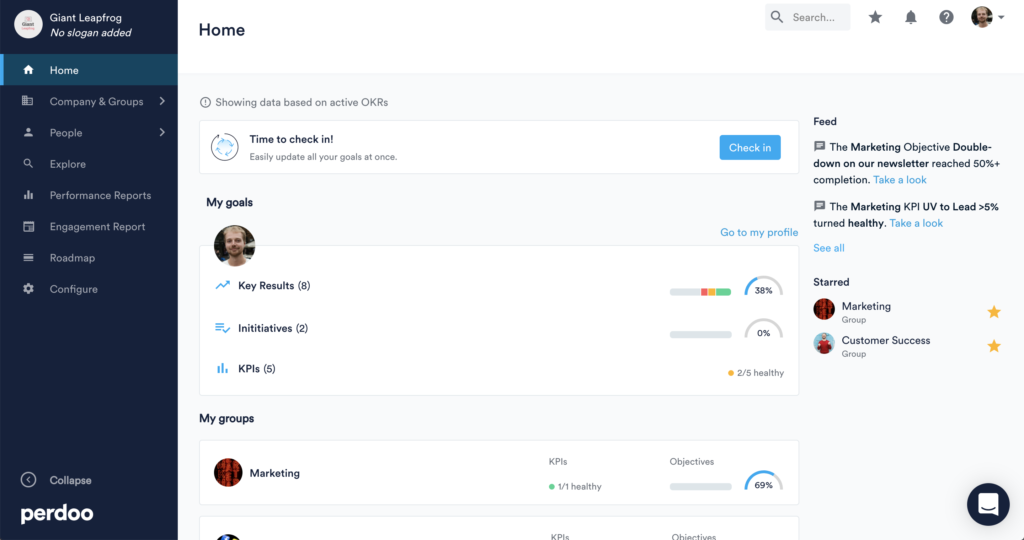
This is a work management software designed for employees to help them clearly understand the company’s goals and how they can contribute to achieving them. Perdoo’s standout features include:
- Design goals for employees: Perdoo helps users design specific goals for each employee and track their implementation progress.
- Overview reports: Perdoo provides overview reports on project progress and employee performance.
- Performance evaluation: Perdoo helps users evaluate employee performance and create performance improvement plans.
Currently, the Perdoo platform only offers paid versions with 3 package levels:
- Starter Package: $7/user/month, supports up to 5 employees
- Professional Package: $12/user/month, supports up to 50 employees.
- Enterprise Package: Contact for pricing.
2.12. Trello – Free work tracking software

- Detailed review of Trello’s features in work management
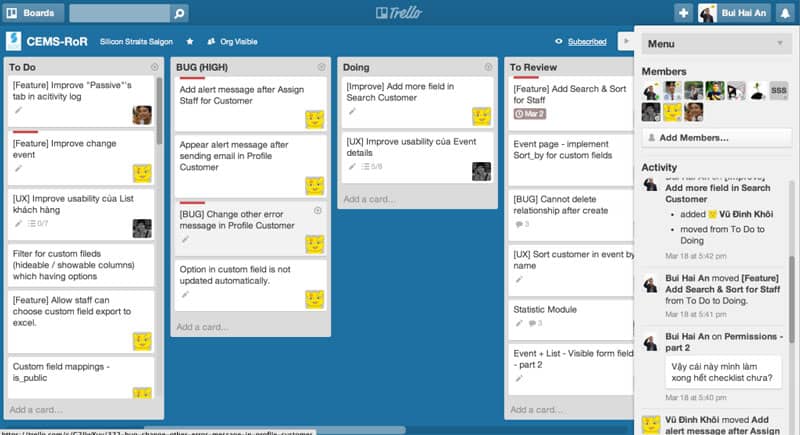
Trello is one of the most popular free work management software for small and medium-sized businesses. With Trello, users can create to-do lists and track work progress flexibly and conveniently. Some of Trello’s features include:
- Create to-do lists and track progress
- Assign and delegate tasks to team members
- Set deadlines for tasks
- Add notes and mark important tasks
- Simple, Kanban-style interface, easy to use
- Suitable for SMEs and Startups.
Currently, Trello has a free version and a paid version with more extended features, priced at around $9.99 USD/month.
2.13. Izwork – Task assignment platform for employees

- Task assignment platform for employees
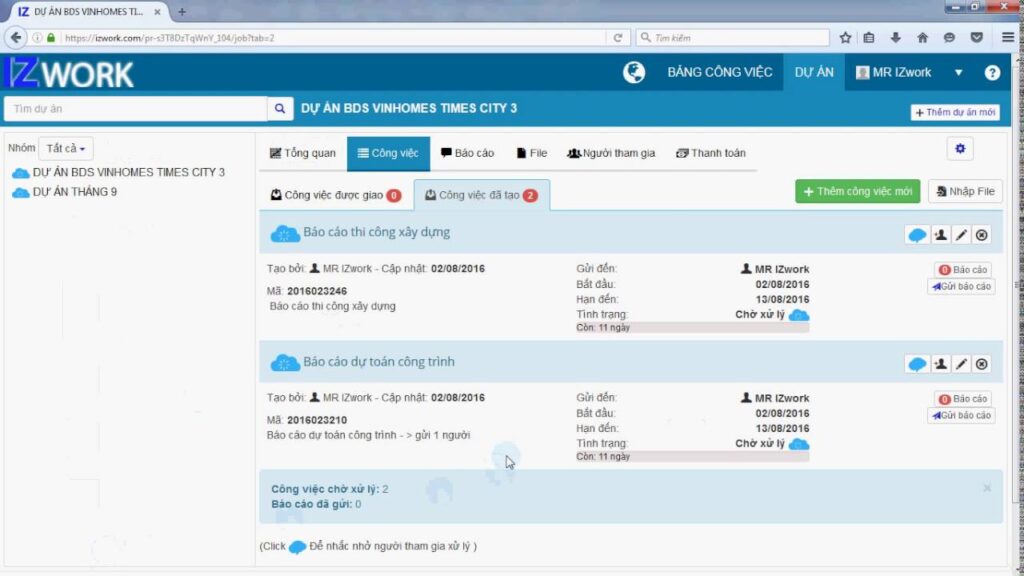
Izwork is a free task assignment platform used in businesses to manage employee work. With flexible project and resource management features, Izwork helps you organize your employees’ work easily.
- Manage and assign tasks to employees
- Track work progress and deadlines
- Evaluate employee work performance
- Report progress and share tasks with colleagues.
2.14. Basecamp online task management software
Basecamp is an online work management software launched in 2004. It is a popular tool used by teams to manage projects, tasks, and daily work.
Standout features:
| Feature | Description |
|---|---|
| Task Management | Create to-do lists, assign tasks, set deadlines, and track project progress |
| Work Schedule Management | Create and share calendars, link them to tasks to manage time & deadlines |
| Communication & Collaboration | Communicate directly within tasks, share documents, files, and discuss work |
Advantages and disadvantages:
| Pros | Cons |
|
|
Read more: Review: 8+ Best Work Schedule Management Apps for Mobile and Effective Online Scheduling
2.15. Taskworld Task Management Software
Taskworld is a task management software designed to help organizations and teams simplify their work management process by providing a diverse set of tools.
Key features:
- Task management: Users can create and manage task lists, set goals, and evaluate their progress. Tasks can be categorized by priority level, due date, and completion status.
- Direct discussion: Taskworld provides a discussion feature for users to exchange information and opinions within a project or task. This makes coordination and teamwork easier.
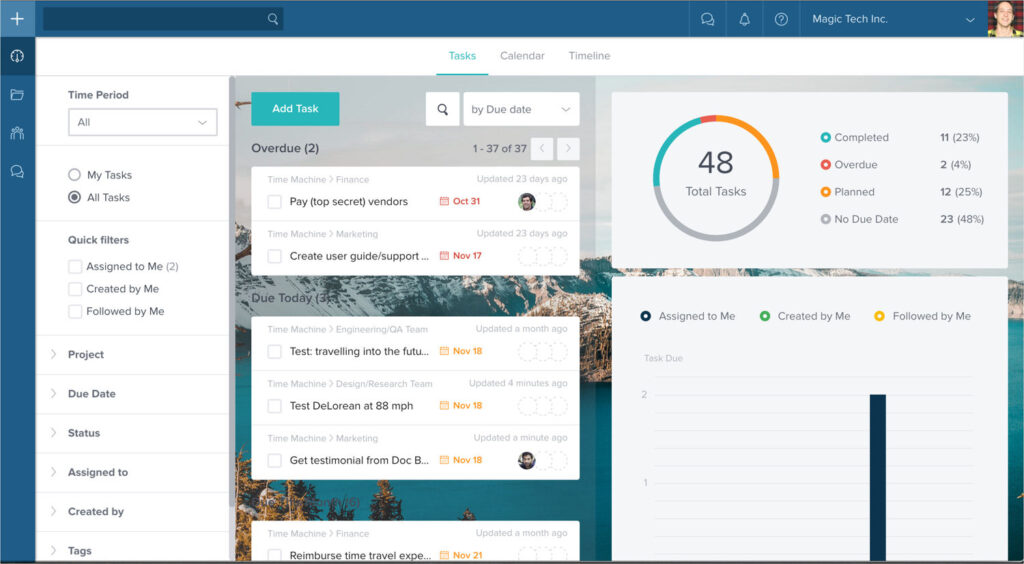
- Reporting: Visual reports help managers track and analyze the performance of each employee, monitor progress, and see the percentage of work completed.

- Taskworld task management software
Evaluation
| Pros | Cons |
| Supports multiple platforms, including computers, mobile devices, and tablets, allowing users to manage their work from anywhere. | Taskworld is quite expensive compared to some other task management software on the market. |
3. Top 12+ Free and Convenient Personal Task Management Software (Latest 2026)
3.1. Evernote – Note-Taking App for Work

- Evernote work note-taking app
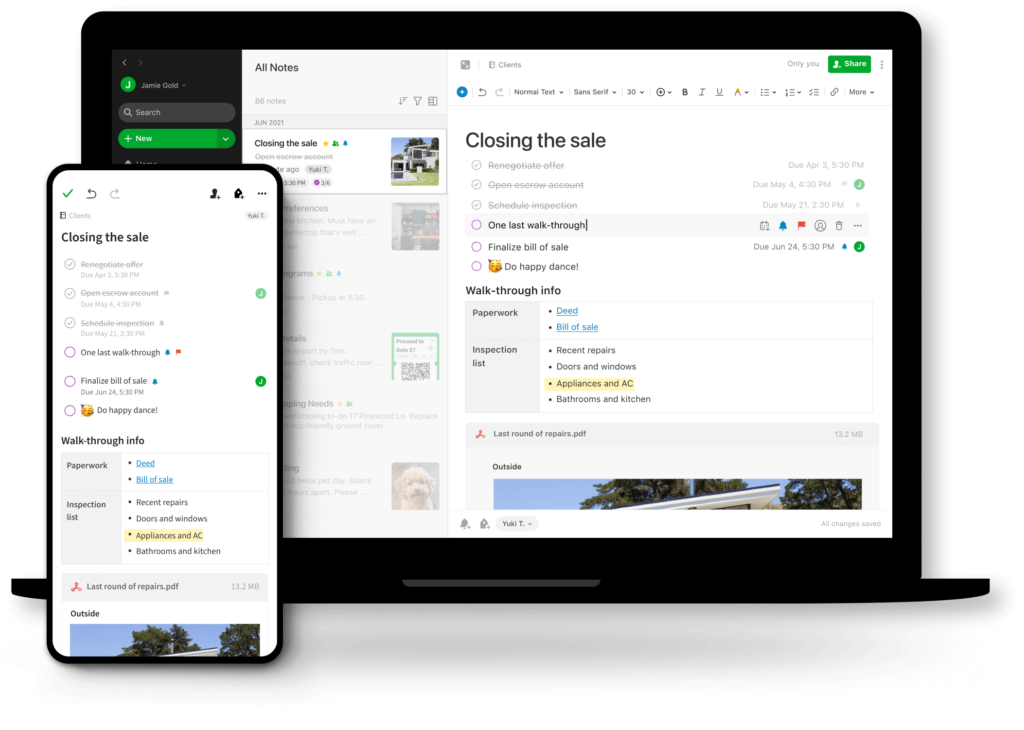
Evernote is a flexible note-taking application that can be used on many different devices. With the software, users can create unlimited notes and organize them by category, tag, or notebook. In addition, Evernote allows users to add attachments, images, and audio to their notes for increased flexibility and convenience. With the Evernote app, users can use reminder features to receive notifications about tasks that need to be done. Users can set time-based or location-based reminders, helping them not to forget important tasks during their work process. Furthermore, Evernote also allows users to share notes and task lists with colleagues or friends to collaborate.
| Pros | Cons |
|
|
Analysis of Evernote’s pros and cons. The Evernote note-taking app offers 3 plans:
- Basic Plan: free but with limited users and features
- Premium Plan: $7.99/month or $69.99/year
- Business Plan: $14.99/month/user
3.2. Notion – Note-taking and planning app
Notion is a note-taking and planning app with many flexible features, such as creating note pages and organizing them into tables, lists, or grids for easier work management.
- Notion note-taking and planning app
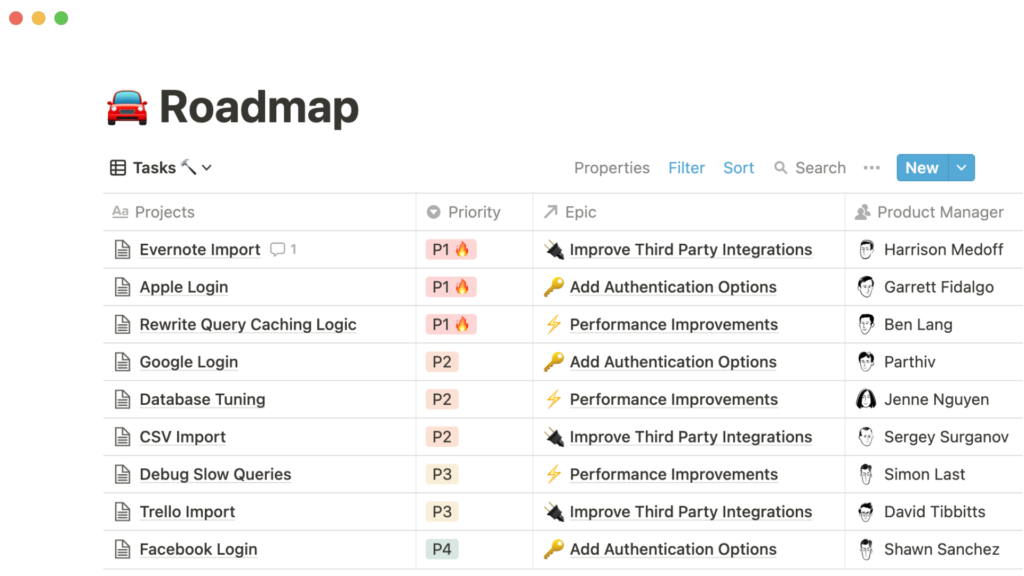
Notion also has a work planning feature, allowing users to organize tasks by week or month to ensure efficiency in the work process. Users can set reminders to not forget important tasks. In addition, Notion allows users to create task templates to save time and increase accuracy in the work process.
| Pros | Cons |
|
Higher price point compared to other software on the market. |
Analysis of Notion’s pros and cons. Notion’s pricing plans:
- Personal Plan: Free
- Personal Pro Plan: $4/month or $48/year
- Team Plan: $8/user/month or $96/user/year
- Enterprise Plan: Contact for more details.
3.3. Lattice – Online Work Management Software

- Lattice online work management software
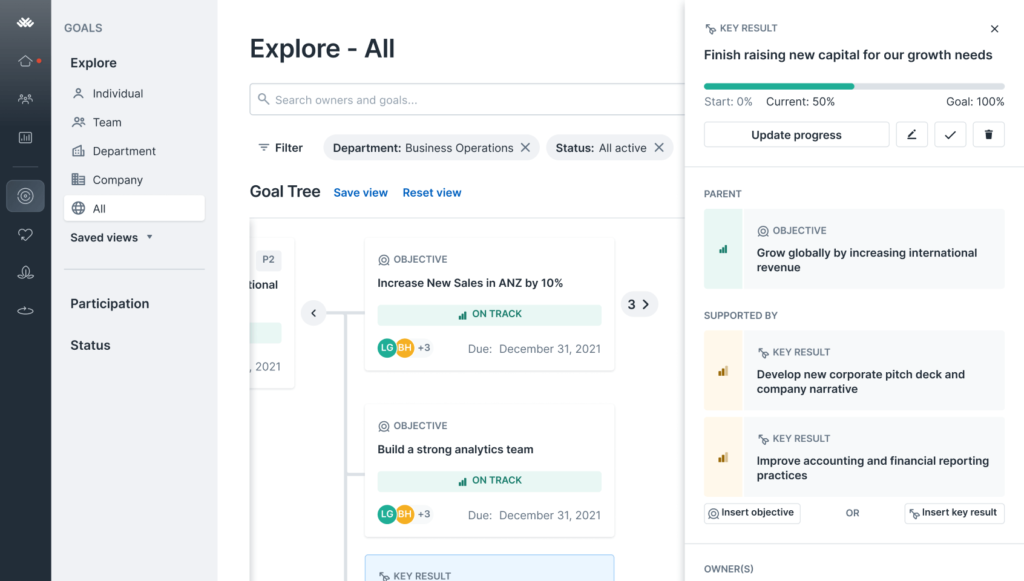
Lattice is an online work management software designed to help businesses effectively manage projects and tasks. Lattice offers many features such as plan management, work progress tracking, task allocation, and assignment for teams.
- Create detailed work plans with specific goals, timelines, and statuses for each task.
- Allows users to allocate tasks to individual employees and set different priority levels to ensure efficiency in the work process.
- Track work progress, helping users know the status of each task and take necessary measures to ensure deadlines are met.
- Automatically sends reminders when deadlines are approaching so users don’t forget tasks.
| Pros | Cons |
|
|
Analysis of Lattice software’s pros and cons. Currently, Lattice offers 2 pricing plans:
| Plan | Price |
|---|---|
| Professional | $9/user/month |
| Enterprise | Contact us |
3.4. Vtranet – Online Task Management Tool
Vtranet is an online task management tool designed to help businesses effectively manage projects and tasks. With this software, users can create projects and notify their teams about the tasks that need to be done.

- Vtranet – Online Task Management Tool
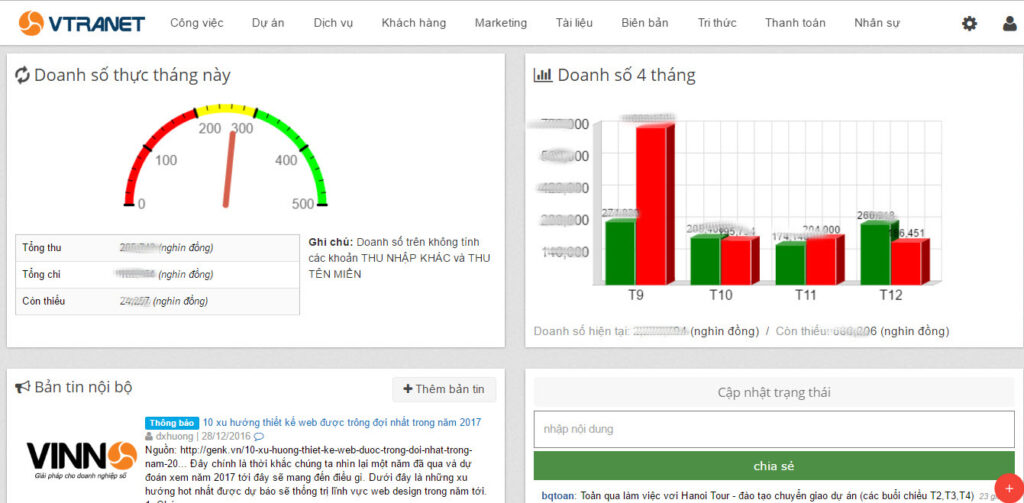
The feature for assigning tasks and tracking the work progress of each employee helps managers view the status of each task and take necessary measures to ensure deadlines are met. Additionally, Vtranet allows users to set different priority levels for more effective task management.
| Advantages | Disadvantages |
|
|
Vtranet Software Pros and Cons Analysis. For Vtranet’s current pricing and detailed information on initial costs, businesses should refer to the software’s official website:
- Standard Package: $7/user/month
- Premium Package: $9/user/month
- Enterprise Package: Contact for details.
3.5. Microsoft Project – Personal Task Management Software

- Popular task management app Microsoft Project
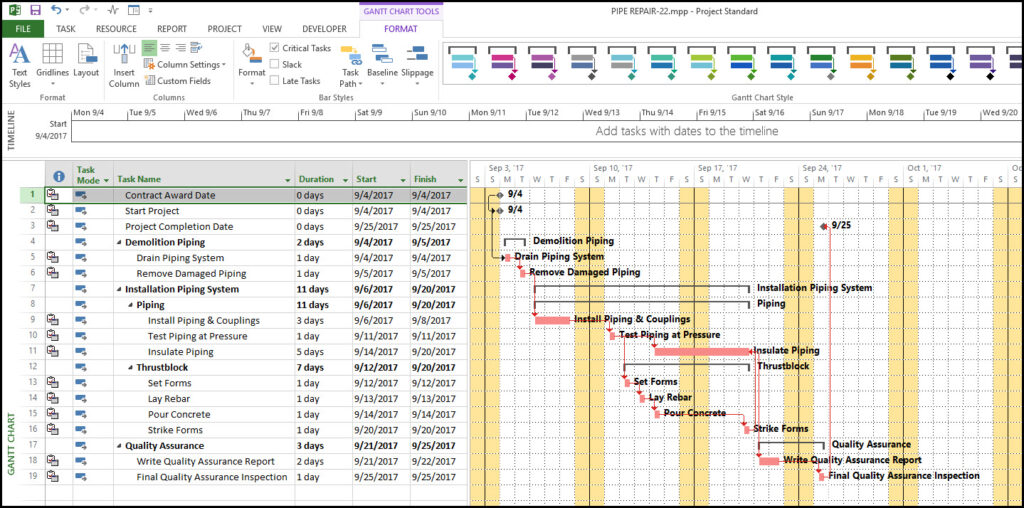
This is one of the leading personal task management applications developed by Microsoft. The software helps users plan, track progress, and manage tasks professionally.
- Manage projects and work progress
- Plan and analyze resources
- Track costs and progress
- Assign and delegate tasks to team members
Microsoft Project software has a relatively high price, suitable for large enterprises. However, if you are an individual and want to use Microsoft Project, you can use the personal version available on the Microsoft website. This version costs about $7 USD/month.
3.6. Tick Tick – Simple Task Management App

- Tick Tick personal work schedule organizer
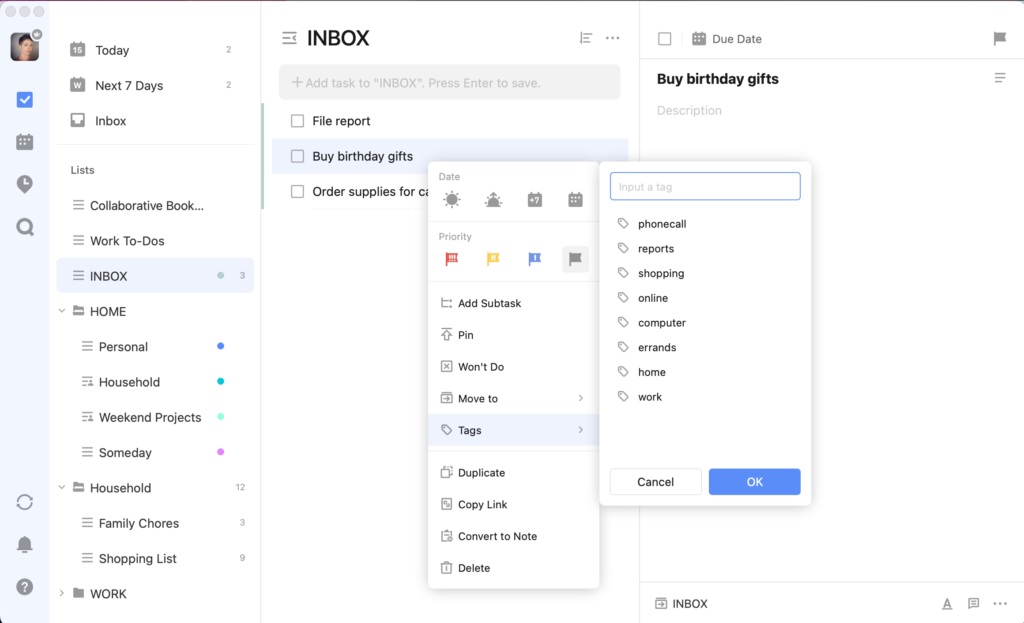
Tick Tick is a simple and easy-to-use task management software for mobile phones. With a friendly interface and flexible features, Tick Tick helps you manage your daily tasks effectively.
- Set up & manage to-do lists by day, week, month
- Task reminders via email and message notifications
- Synchronize tasks across different devices
- Take notes, attach files, and mark important tasks
The Tick Tick app has a free version and a paid version with more advanced features, priced at around $2.79 USD/month.
3.7. Any.Do – Task Management Software for Mobile
Any.Do is a task management software for mobile phones that allows you to manage daily tasks easily. With smart reminders and contact list integration, Any.Do helps you never forget a task.

- Any.DO task reminder software
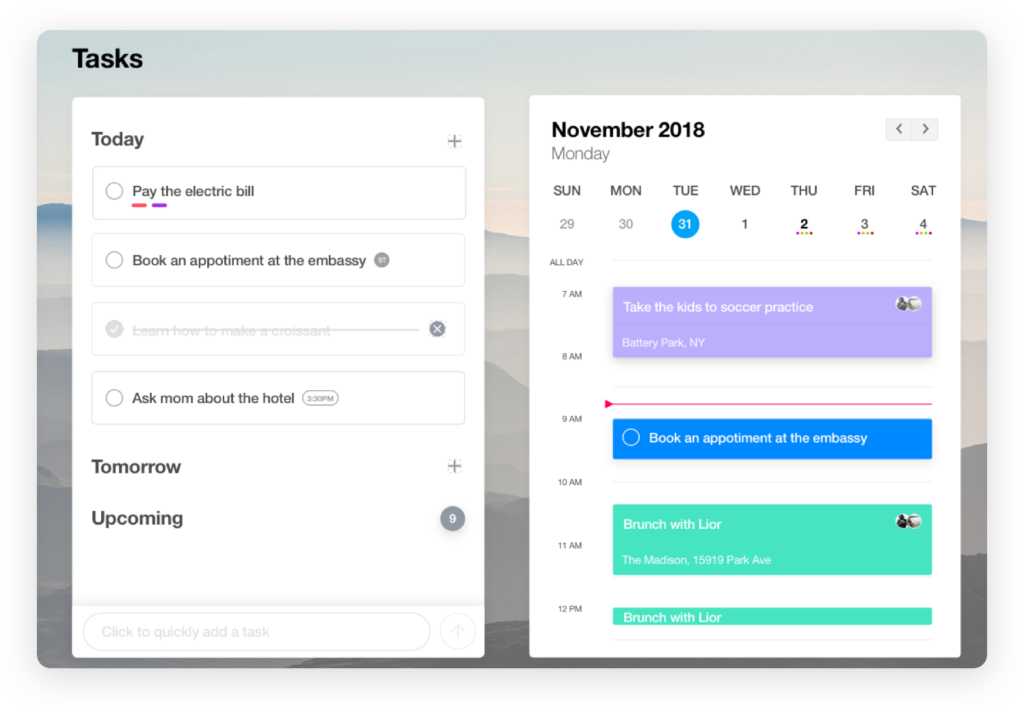
- Create task lists and notes
- Track work progress
- Task reminders via message or email
- Assign and share tasks with others
- Synchronize tasks across different devices
Similar to the app above, the Any.Do tool also has a free version and a paid version priced at around $2.99 USD/month.
3.8. Todoist – Smart Task Management Software

- Todoist reminder app for desktop
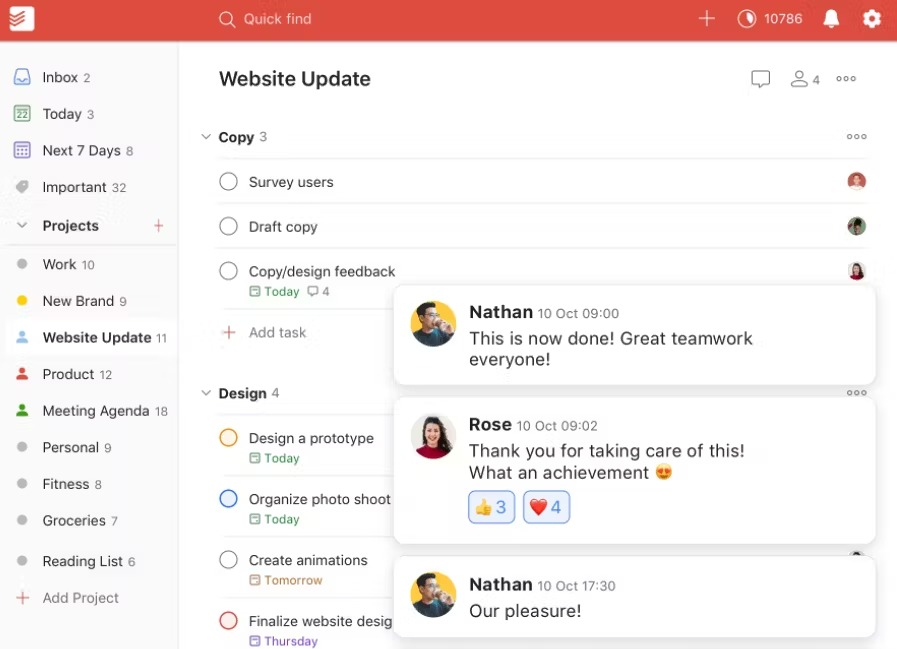
Todoist is a smart task management software that allows you to manage your daily tasks effectively. With a friendly interface and flexible features, Todoist helps you plan, track progress, and manage tasks professionally. Todoist has features such as creating prioritized to-do lists, setting reminders, taking notes, and attaching files to tasks. Additionally, this application allows you to add tasks to your list via email and integrates with Google Calendar. Currently, the Todoist progress management app has both free and paid versions.
3.9. Zapier – Personal Task Management Software

- Personal task management software
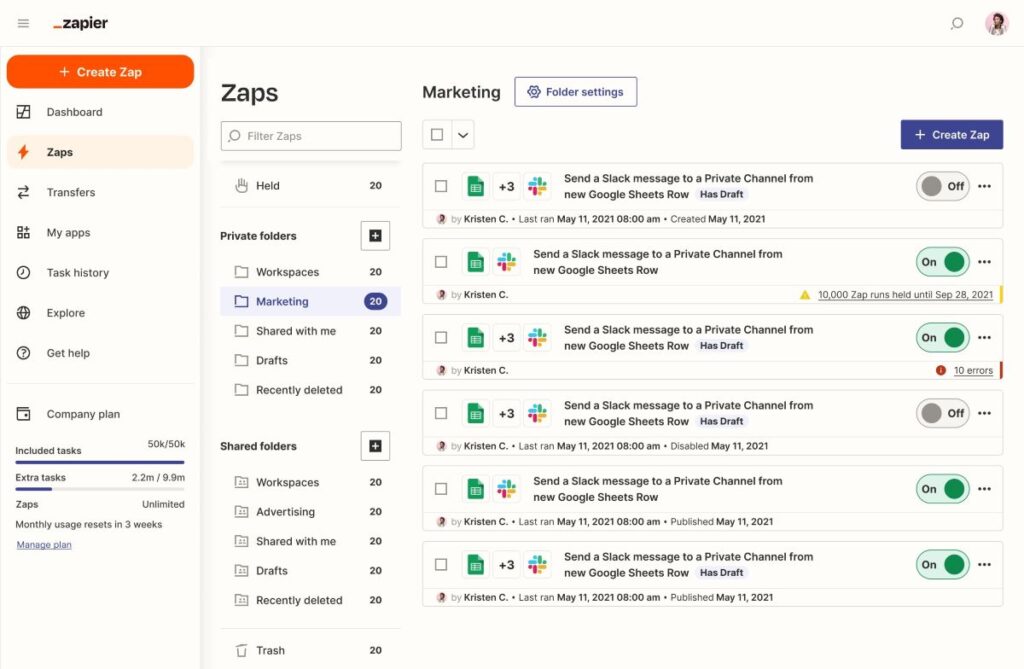
Zapier is a personal task management software that helps you automate daily tasks effectively. With the ability to connect apps on your phone and computer, Zapier helps you save time and work more efficiently. Zapier has features like connecting different applications, creating automated workflows, and setting up rules to track progress. Additionally, this application allows you to integrate with Google Calendar and Microsoft To Do for task management. Currently, Zapier software offers 5 different free and paid service packages:
- Free Plan: up to 5 Zaps, 1 Action per Zap, and 100 tasks/month.
- Starter Plan: $19.99/month for 750 tasks/month
- Professional Plan: $49/month for 2000 tasks.
- Team Plan: $299/month for 50,000 tasks.
- Company Plan: $599/month for 100,000 tasks.
3.10. TicTop – Task Management Software

- TicTop – Task Management Software
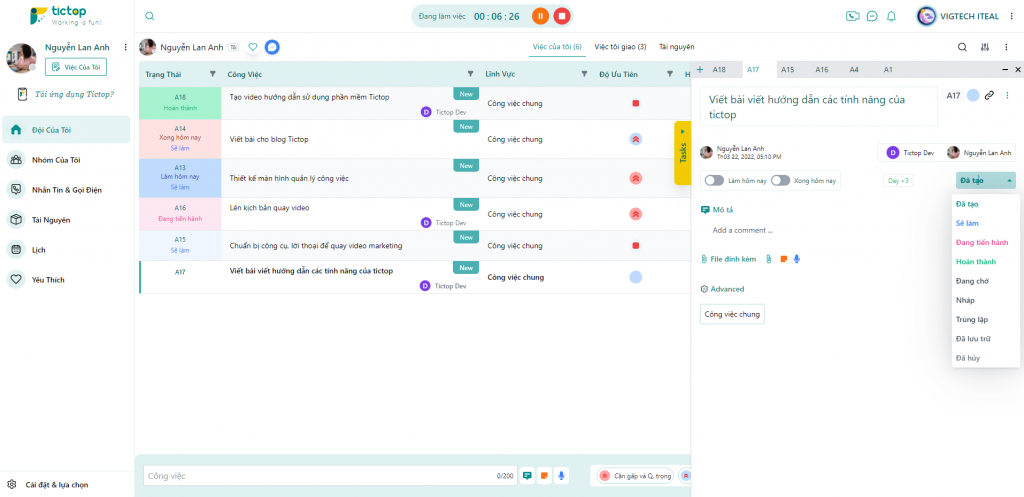
TicTop is a free task management software that does not require user registration/login, allowing you to manage daily tasks easily. With smart reminders and contact list integration, the application will help you never forget any task.
- Create to-do lists and track daily progress
- Assign and delegate tasks to team members
- Set completion times for tasks
- Smart alerts to avoid forgetting or missing tasks.
3.11. Microsoft To Do – Task Reminder Software

- Microsoft To Do schedule management app
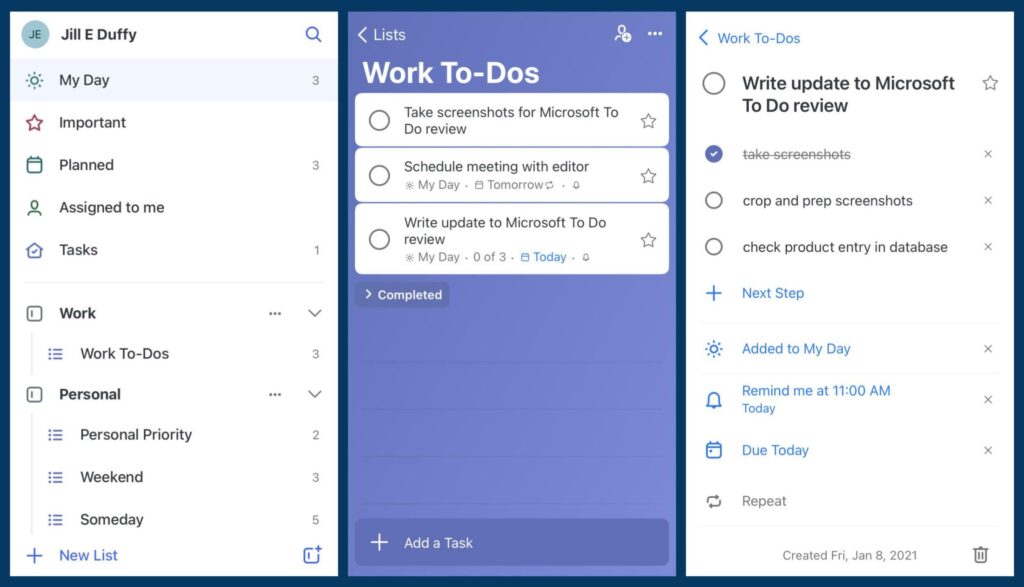
Microsoft To Do is a free task management software developed by Microsoft. This application helps you manage your daily tasks effectively and simply. Microsoft To Do has features such as creating to-do lists, setting reminders, taking notes, and attaching files to tasks. Additionally, this application allows you to track tasks on your mobile phone and computer.
3.12. Google Task – Task Management Software
- Google Task schedule tracking platform
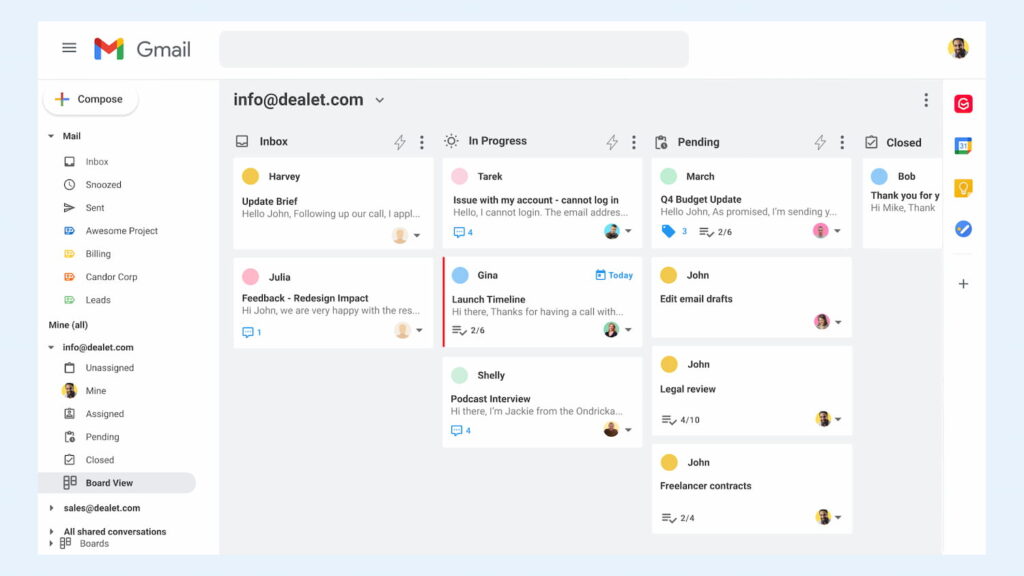
Google Task is a free task management software integrated directly into Google Calendar. With flexible and easy-to-use features, Google Task helps you manage your daily tasks effectively. Google Task has features such as creating to-do lists, setting reminders, taking notes, and attaching files to tasks. The application also allows users to add tasks from Gmail and Google Keep, but a drawback is the lack of features for managing complex projects or tasks.
See more: The Secret to Building an Effective Work Management System to Increase Productivity by 200%
3.13. Redmine Task Progress Management Software
Redmine is a useful task management software that helps users plan and track work progress effectively and optimally.
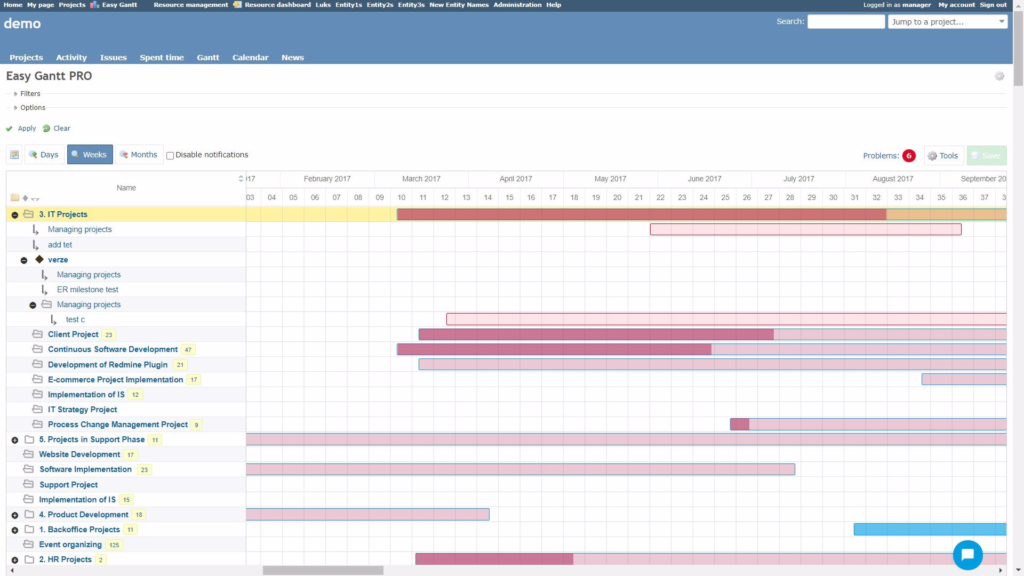
- Redmine progress management software
Key Features
- The Gantt chart screen displays detailed progress and deadlines for each task, helping managers easily grasp and manage task execution time effectively
- The filter search tool allows users to filter out important, urgent tasks in a large project to prioritize their execution
- Ability to calculate and report the time required to complete a task or an entire project
Review
| Pros | Cons |
|
|
3.14. Taskque Task Management Software
Taskque is an outstanding task management software that helps users organize and manage tasks systematically and effectively by priority level.
Key Features
- Task Assignment: Taskque allows you to create and manage tasks using boards and columns. Users can assign tasks to team members and set specific deadlines for each task.
- Task Notifications: Taskque automatically sends notifications about tasks and projects to each team member, helping to prevent forgotten or missed tasks.
- Customizable Boards: Taskque allows users to customize boards and columns to fit their needs.
Review
| Pros | Cons |
| Simple, easy-to-use, and user-friendly interface, especially for those new to work management software. |
|
3.15. MeisterTask Task Management App
MeisterTask is an online task management application with many useful features that is highly rated by users.
Key Features
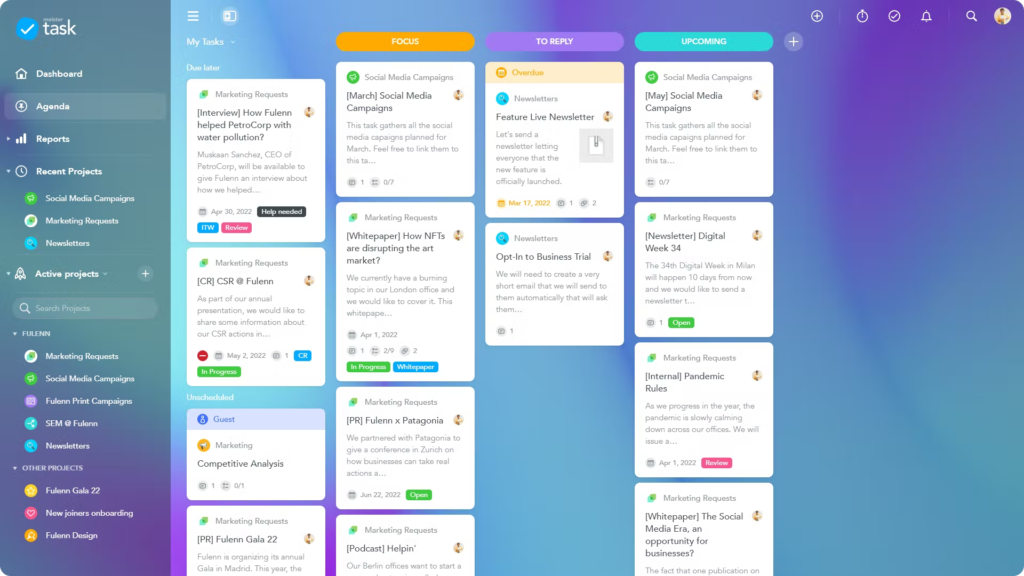
- Task Management: MeisterTask allows users to create, manage, and assign tasks for their projects. Users can create to-do lists, set titles and descriptions for tasks, establish deadlines, and assign tasks to other team members.
- Task Adjustment: MeisterTask allows users to adjust their tasks, including updating progress, time, priority, and adding comments.
- Notifications: MeisterTask provides email notifications to help users stay updated on the latest changes related to their tasks and projects.
- MeisterTask management app
| Pros | Cons |
| Integrates with many other applications such as Trello, Dropbox, etc., providing users with a flexible and efficient working ecosystem. |
|
4. How can businesses effectively apply work management software?

- Benefits of work management software for employees and managers

The challenge for managers when exploring work management software is how to effectively control tasks and projects, optimize resources, and increase productivity for teams and personnel. To address this, work management software needs to fully solve two main problems:
- Creating transparency in the task assignment and reception process between managers and employees, thereby clarifying individual responsibilities;
- Planning and supporting employees to collaborate and work centrally on a single platform.
However, in a business, it’s not just top managers who use work management software, but also mid-level managers and employees. Therefore, as a manager, you need to find a solution that brings value and benefits to all three levels within the company as follows.
For business administrators:
- Enhance business management capabilities, oversee projects, monitor work anytime, anywhere, and effectively manage employee performance.
- Create specific plans for each work project, including execution time, responsible person, supervisor, etc., thereby distributing tasks more synchronously among employees.
- Track employee work progress while providing accurate reports to evaluate performance and make strategic decisions.
- Make timely and quick decisions when issues arise, based on accurate, real-time data from the software.
- Help managers adapt quickly to changes in the business environment and apply new technology to business administration.
- Manage unnecessary costs by optimizing work processes and minimizing risks during execution.
For mid-level managers:
- Easy work monitoring: Track work progress and status in real-time, better manage resources.
- Optimal task assignment: Assign tasks clearly, to the right person, at the right time, increasing team productivity.
- Transparent and accurate reporting: Automated data helps evaluate performance quickly and accurately.
- Inter-departmental coordination: Improve communication and coordinate work smoothly between departments.
- Reduce management burden: Automate reminders and task tracking, reducing manual management.
- Fast and accurate decision-making: Visual data analysis helps mid-level managers make precise decisions.
For individual employees:
- Create autonomy in managing their work, from prioritizing tasks to tracking progress and managing time.
- Reduce the chances of forgetting or missing tasks with alerts and schedule reminders, helping them stay on track and reduce stress during execution.
- Increase employee satisfaction and balance work with personal life by allowing access from anywhere on various devices.
- Enable employees to work online individually, by team, or by department, making it easier to share information and update progress.
5. Discover the comprehensive work management solution with 1Office
In a context where businesses increasingly need to optimize operational efficiency and enhance coordination between departments, choosing a suitable work management software not only helps control progress but also creates a foundation for more transparent, flexible, and effective management. This is also why many businesses are prioritizing comprehensive management solutions instead of just using single-purpose task assignment tools.
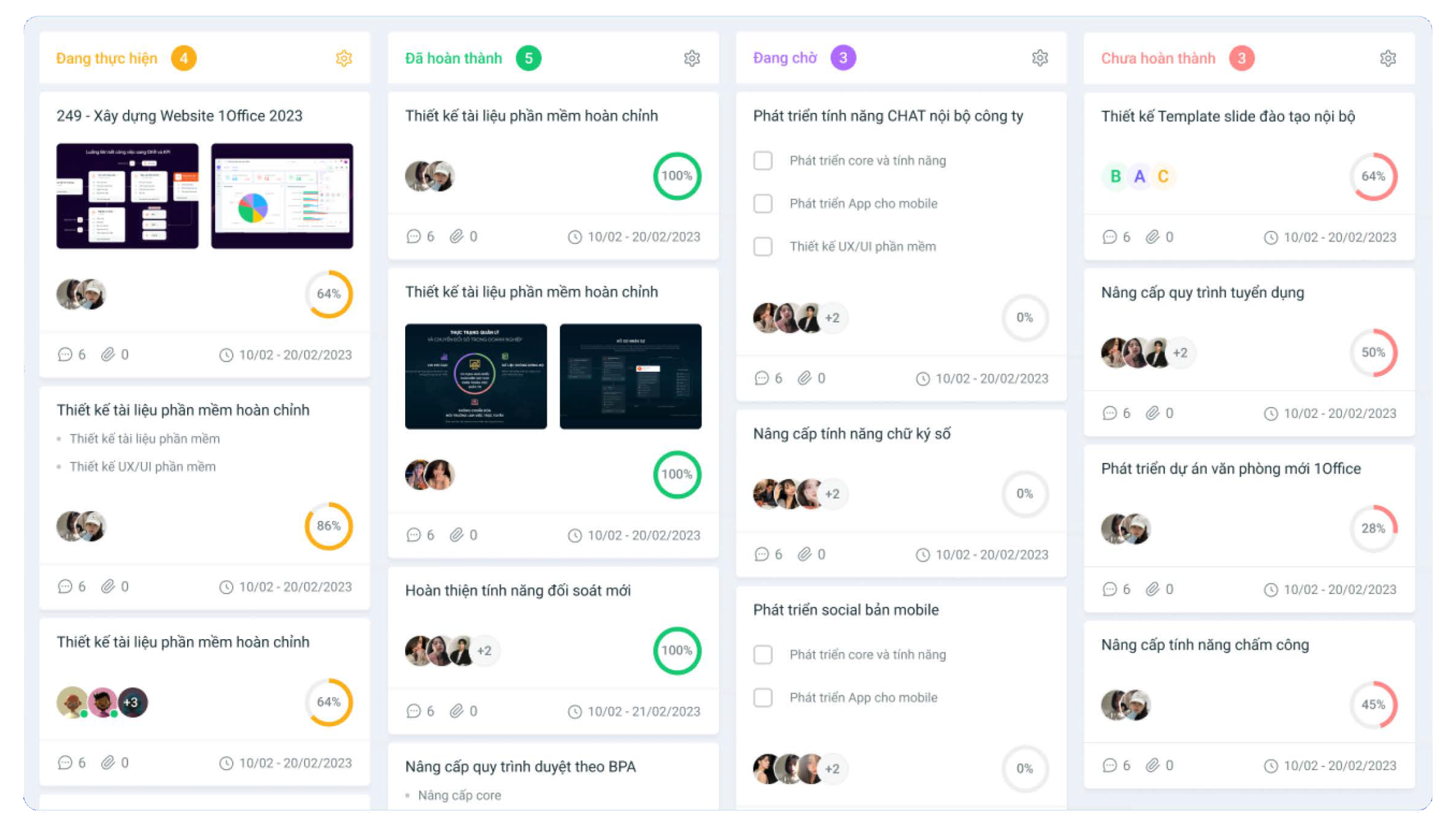
1Office provides a comprehensive work management solution, helping businesses assign tasks, track progress, monitor performance, and connect for collaboration on a unified platform. Not limited to work management, 1Office also seamlessly integrates many important functions such as HR, processes, documents, and operations, helping businesses standardize operations and sustainably improve productivity.

- Comprehensive work management solution 1Office
Register for a free feature Demo!
6. Conclusion
The best effective work management software is a useful tool for enhancing efficiency and organization in daily work. From assigning tasks and tracking progress to evaluating task completion, work management software helps users optimize their workflow and achieve better results. Choose a work management software that suits your needs and start leveraging the benefits it offers. We wish your business success!
- Hotline: 083 483 8888
- Facebook: https://www.facebook.com/1officevn/
- Youtube: https://www.youtube.com/@1office-chuyendoisodn
- Zalo OA: https://zalo.me/3883877516951440238
















