


 10/05/2026
  12476 views
Many HR professionals currently face difficulties in timekeeping for shift-based employees because working hours vary for each person, and there is no standard shift-based timesheet template to use. To solve this problem, we will provide you with the latest 2026 Excel shift-based timesheet template and a solution to make timekeeping no longer a “nightmare” for HR.
Mục lục
- 1. What is a shift-based timesheet template?
- 2. Things to note when creating a shift-based timesheet
- 3. Guide on how to fill out the shift-based timesheet template
- 4. Sample Shift-based Timesheet Excel File & User Guide
- 5. Challenges businesses face with traditional timekeeping methods
- 6. 1Office HRM Software – Automating the timekeeping process
- 7. Frequently Asked Questions about Shift-Based Timesheet Templates
1. What is a shift-based timesheet template?
A shift-based timesheet template is a timesheet, usually in Excel format, used to track the working days of shift-based employees in companies and businesses with a 3-shift work schedule.
Additionally, there are many other types of timesheets, such as:
- Hourly timesheet templates are used to specifically track the working hours of employees during the day.
- Daily and monthly timesheet templates are used to track the number of working days of employees throughout the month.
Depending on the nature of the work, businesses can choose the appropriate timesheet template to use.
See more: Current timekeeping methods in businesses
2. Things to note when creating a shift-based timesheet
2.1. Necessary criteria in hourly and shift-based timesheets
- Employee information (Name + employee ID)
- Timekeeping date
- Clock-in/out time
- Which shift the employee worked on that day and how many hours they worked in that shift
- How many overtime hours the employee worked during that shift
- Total official working hours
- Total overtime hours
- Besides working hours, other factors need to be identified, such as: paid leave, unpaid leave, statutory leave, etc.
2.2. Other notes
- A day can be divided into 2-3 work shifts, each lasting 8 hours
- Employees can rotate shifts weekly or monthly
- Employees can work overtime within their shift
- An employee officially works only one shift per day; any excess time will be counted as overtime
See more: A simple and easy-to-understand guide on how to create a timesheet in Excel
Or check out: Top popular and easy-to-use timekeeping apps in 2026
3. Guide on how to fill out the shift-based timesheet template
To ensure the shift-based timesheet is accurate and easy for payroll calculation, the person in charge needs to follow these steps correctly:
3.1. Fill in the general information of the timesheet
-
Company/Department name
-
Applicable month
-
Employee’s full name or the personnel list of the entire department
-
Employee ID (if any)
Accurate information helps systematize data and avoid confusion between employees.
3.2. Define timekeeping symbols
Before filling it out, the company needs to standardize the symbols for each type of shift, for example:
-
W – Main/regular shift
-
S1, S2, S3 – Morning shift, afternoon shift, night shift
-
L – Leave
-
S – Sick leave
-
P – Present
-
A – Absent without reason
-
OT – Overtime
-
…
Note: The symbols should be clearly defined in the “Notes” section at the end of the timesheet so that all employees can understand and follow.
3.3. Fill in the timekeeping information for each day
-
Each cell corresponds to a day of the month.
-
Enter the symbol corresponding to the employee’s work shift for that day (S1, S2, S3 or P).
-
If the employee works overtime → add the OT symbol or record the number of overtime hours, depending on the template.
-
If an employee is on leave → use the correct symbols P, Ô, KL (unpaid leave), etc.
Example:
-
Day 5: employee works the morning shift → enter C1
-
Day 7: employee is on paid leave → enter P
-
Day 10: works the night shift + 2 hours of overtime → enter C3 + 2hTC
3.4. Summarize the monthly workdays
The end of the timesheet usually has the following columns/totals:
-
Total workdays
-
Total workdays by shift
-
Total night shifts
-
Total overtime hours
-
Total days off (paid/sick/absent)
Note: You should double-check the number of days in the month (28–31 days) to avoid missing or extra columns.
3.5. Signature and confirmation by the creator and Head of Department
-
The timesheet creator signs and writes their full name
-
The Head of Department or direct manager signs for approval
-
If the business has an HRM system → perform the approval on the software
4. Sample Shift-based Timesheet Excel File & User Guide

Download the FREE shift-based timesheet template Excel file HERE
How to use the shift-based timesheet template
| Timekeeping Symbols | |
| Workday | X |
| Paid Leave | P |
| Unpaid Leave | K |
| Overtime (OT) | Marked as a number = the number of overtime hours worked by the employee |
| Formulas in the table | |
| Day of the week | =DATE(year;month;day) |
| Number of work shifts in the month (X) | =COUNTIF([Attendance area], “X”) |
| Number of paid leave days (P) | =COUNTIF([Attendance area], “P”) |
| Number of unpaid leave days (K) | =COUNTIF([Attendance area], “K”) |
| Number of overtime hours | =SUM([Overtime area]) |
For example: In August 2002, employee Nguyen Van A has the following timekeeping data
- Worked shift 1: 11 shifts
- Worked shift 2: 11 shifts
- Worked shift 3: 4 shifts
- Overtime: 8 hours
- Paid leave: 1 shift
- Unpaid leave: 1 shift
5. Challenges businesses face with traditional timekeeping methods
As businesses grow, so does their workforce. For companies with hundreds or even thousands of employees, the traditional method of timekeeping with Excel reveals many disadvantages:
- Too much data leads to time-consuming processes and a high risk of errors when compiling timesheets.
- Difficult to track employees’ paid leave and compensatory time off balances.
- Employees cannot easily track their own work shifts, making it difficult to keep up with their schedule and increasing the likelihood of missed shifts.
- Frequently dealing with complaints about workdays and leave days, especially at the end of the month, consumes a lot of time and human resources.
- Subjectivity and fraud remain significant issues, especially in branches that use manual timekeeping via Excel or roll calls.
General reference: Popular daily timesheet templates for businesses
6. 1Office HRM Software – Automating the timekeeping process
It’s time for businesses to automate their timekeeping process with the 4.0 solution – the 1Office HRM module. 1Office employee timekeeping software 1Office is a superior toolset that fully meets the flexibility, diversity, and ever-changing timekeeping policies of businesses in the current 4.0 era.
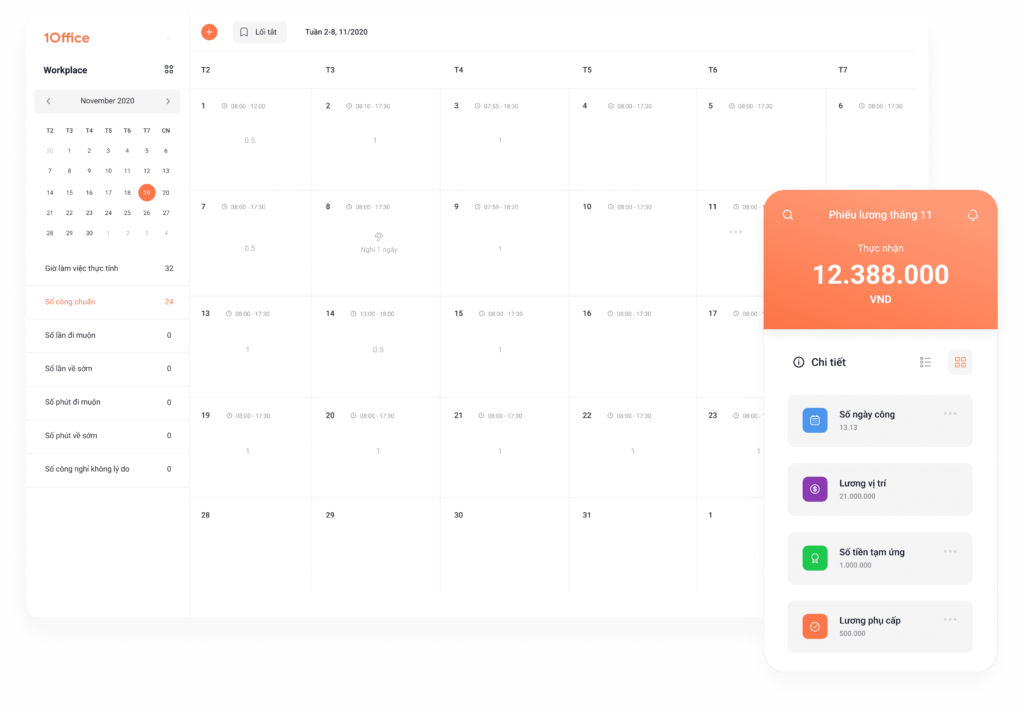
By digitizing leave requests and automatically connecting with time clock devices, the system reduces the time spent on compiling HR management data.
- Set up timekeeping policies according to company regulations, including: shift approvers, shift assignments, timesheet display methods, etc.
- Easily assign specific shift times to staff and establish timekeeping regulations for the business using formulas and keywords within the software.
- Time clock data is automatically pushed to the timesheet, saving hours of monthly compilation work.
- Manage all types of requests such as leave requests, late arrival requests, early departure requests, etc., and track detailed employee working hours.
- Staff can easily track their workdays and shifts on the system.
- Notably, the timekeeping system automatically syncs, calculates, and updates payroll information, significantly shortening payroll processing time.
7. Frequently Asked Questions about Shift-Based Timesheet Templates
Is the shift-based timesheet required to follow a government-mandated template?
No. Businesses can create their own templates, as long as they ensure:
- It fully reflects working hours
- There is a clear basis for calculating salary
- Transparency between the business and the employee
Can time be tracked by hours instead of shift codes?
Yes. Some businesses replace codes (S1, S2…) with actual hours worked, especially in flexible work models or for hourly pay.
Do employees need to make a separate note when swapping shifts?
It is recommended to make a note to avoid misunderstandings during payroll calculation.
For example: “Swapped from S1 to S2 on the 12th per department request.”
Can a shift-based timesheet be used for multiple departments?
Yes, but it is recommended to:
- Add a department column
- Clearly define each shift code
- Have the department head sign each page if the timesheet is long
This article has provided you with the latest standard shift-based timesheet template for 2023 and a solution to automate the timekeeping process with the HRM module of 1Office to replace traditional Excel sheets. Register to experience 1Office HRM today!
















