


 10/05/2026
  200 views
The end of the year is a time when every business must rush to prepare reports and create work plans for the new year to achieve all set goals. Therefore, a work plan template is an extremely important and necessary solution for executing, tracking, and evaluating work quickly and effectively. If you are struggling to find a solution to help manage and create work plans, don’t miss this article.
Mục lục
- I. What is a work plan template?
- II. What does a work plan template include?
- III. How to Fill Out a Work Plan Template
- IV. Work Plan Templates by Timeframe
- V. How to Create an Effective and Professional Work Plan Template for 2026
- VI. Work Planning Software to Quickly Double Work Performance
- VII. Frequently Asked Questions about Work Plan Templates
I. What is a work plan template?
1. Definition
A work plan is understood as a set of charts or tables created to outline daily, weekly, and monthly tasks to achieve set goals. Each individual and department will have different quarterly or yearly work plans.
A work plan template is a pre-made chart or form that displays all relevant tasks in a project, who is responsible for each task, and when you expect to complete the tasks. With a plan template, you will save maximum time and effort because you just need to fill in the necessary information.
2. Essential components of a work plan template
A work plan template is a written document that helps streamline tasks in project planning. The main goal is to provide you with a visual reference for the tasks, objectives of your plan, and the team members responsible for each area. To measure the progress and status of your plan, you should create your own work plan template. Below are some essential components for a work plan:
- Set goals and objectives
- Establish responsibilities for each member
- Set project planning milestones
- Create an implementation budget
| >> Read more: 8+ work checklist templates for common tasks + Tips for effective use |
II. What does a work plan template include?
A complete work plan template typically includes the following sections:
General Information
- Full name of the planner
- Department – Position
- Applicable period (day/week/month/quarter)
Work Objectives
- Overall objective
- Specific objectives for each group (SMART)
Task List
- Tasks to be performed
- Priority level (High/Medium/Low)
- Collaborator
- Required resources
Detailed Implementation Plan
- Implementation steps
- Deadline
- Status (Not Started – In Progress – Done)
Key Performance Indicators (KPIs)
- Main KPIs
- Measurement method
- Evaluation milestones
Risks & Handling Plans
- Potential risks
- Preventive measures
- Contingency plan
Summary – Support Request
- Support needed from management / other departments
- Recommendations on resources / tools
Confirmation Signature
- Planner
- Direct manager
III. How to Fill Out a Work Plan Template
1. Define clear objectives before filling it out
-
Write objectives following the SMART principle (Specific – Measurable – Achievable – Relevant – Time-bound).
-
Large objectives should be broken down into smaller sub-goals for easier tracking.
2. List all necessary tasks
-
Sort by priority level:
A – Important & Urgent, B – Important but not urgent, C – Can be done later. -
Each task should be described in a single short line.
3. Specify time and collaborators
-
Avoid general terms like “this week”; instead, specify the exact date/deadline.
-
For inter-departmental tasks, clearly state the supporting person or department.
4. Fill in KPIs based on objectives
-
Choose appropriate KPIs: number of tasks, sales figures, number of customers, completion rate, etc.
-
There should be 3–5 main KPIs to ensure easy tracking.
5. Assess risks
-
For example: processing delays, lack of data, dependency on other departments, changes in the plan.
-
Clearly state the contingency plan for easier management approval.
6. Review before submitting
-
Check if the deadlines are reasonable.
-
Check if objectives – tasks – KPIs are aligned.
-
Complete the signature, name, and date of the plan.
IV. Work Plan Templates by Timeframe
Depending on the position, role, and nature of the work, there will be different work plan templates. To find a suitable work plan template, you can refer to some of the available samples below:
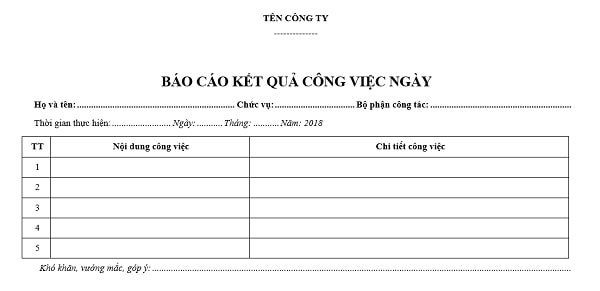
1. Daily Work Implementation Plan Template
For a daily work plan, it is necessary to ensure objectives and details such as completion timeframes and the specific time required for each task. You can use work management software to track and implement it most conveniently and effectively. Below is a daily work plan template you can download for free.
DOWNLOAD HERE
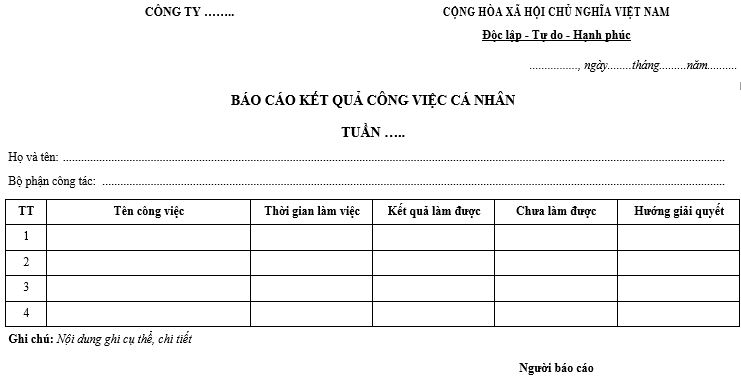
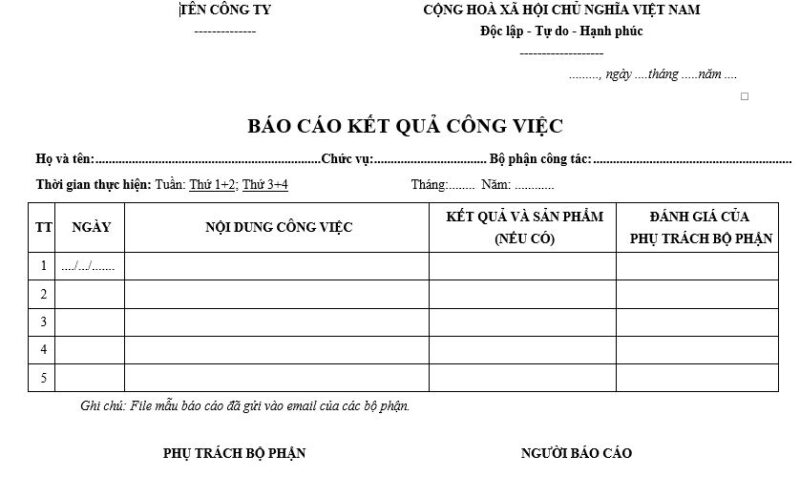
2. Weekly and Monthly Work Plan Templates
If you want to create a long-term work plan, creating a detailed plan by week and month is the ideal choice. Unlike a daily work plan, a weekly plan requires more information so that managers can easily participate, track work progress, understand what needs to be done, and accurately evaluate work performance during the implementation process. You can refer to some weekly and monthly work plan templates below:
DOWNLOAD HERE
DOWNLOAD HERE
You might be interested in: Standard and Latest Work Plan Templates in Excel
V. How to Create an Effective and Professional Work Plan Template for 2026
Creating a work plan template requires a lot of effort and time, plus gathering as many details as possible. Here are the things you should focus on when creating your program or work plan template:
1. Define Basic Information
This information includes your project’s name, its purpose, and the general schedule to inform stakeholders about your project. Whatever the ultimate purpose of the project is, you should state it clearly from the beginning.
2. Put the Plan in Context
To better outline your work timeline project and the reasons you need to undertake it, you need to write an effective introduction along with a background that aligns with your goals. Creating this context and establishing the main problem helps justify why you need a solution.
3. Establish Project Goals and Objectives
In reality, people often confuse goals with objectives, but they are not the same. Goals are more specific in the sense that they are often long-term. Similarly, ensure that you can measure your project objectives. Here are the SMART goal metrics you should apply:

- Specific goals (instead of vague or confusing)
Measurable (you can measure it)
Achievable (and realistic)
Relevant (to the problem) - Work performance evaluation criteria
Time-bound (meaning you can complete it within the timeframe) - Identify your resources, methods for evaluating work performance, and allocate them
- Ensure you address these questions when identifying and allocating your resources in the work plan template:
What is your budget?
See more: How to create a work plan with 1Office work planning software
VI. Work Planning Software to Quickly Double Work Performance
Besides the methods mentioned above, using 1Office work planning software is a superior and effective solution that helps you save time and effort in creating your work plans. With many smart and outstanding features, you can easily track progress and remind employees to perform tasks with features such as:
- The work planning tool supports users in creating specific and realistic work plans, making operations easy and delivering the highest efficiency.
- Task assignment software that automatically assigns tasks to individuals or groups by job position or department for quick execution.
- Automatically updates tasks to personal calendars, helping employees easily keep a close watch on their work.
- Exchange and discuss work directly within the workflow of each task.
- Automatically updates progress and tasks, helping managers grasp the detailed status of work.
- Visual work reports in formats like Dashboards, Gantt Charts, and dynamic reports.
- Easily evaluate employee work performance accurately and fairly.
The article above has provided users with work plan templates and a guide on how to create a detailed and effective work plan. It also offers a professional, intelligent work planning solution to help quickly optimize productivity.
VII. Frequently Asked Questions about Work Plan Templates
1. Is it mandatory to follow a fixed format for a work plan template?
No. Businesses can customize the template according to their specific industry, department, or management objectives. However, important sections like objectives, tasks, deadlines, and KPIs should be retained for easy tracking.
2. Should work plans be made on a daily, weekly, or monthly basis?
It depends on the nature of the work:
-
Operational work, task processing: suitable for daily/weekly plans.
-
Project-based or strategic work: suitable for monthly/quarterly plans.
Businesses can combine multiple templates for comprehensive management.
3. What are the benefits of work planning?
-
Increases work efficiency and time management skills.
-
Helps managers track progress and provide timely support.
-
Reduces forgotten tasks, missed deadlines, and confusion over responsibilities.
-
Optimizes resource allocation and avoids overlapping work.
4. How should KPIs be filled in the plan template?
KPIs should be based on main objectives and be measurable, for example:
-
% of work completed
-
Number of tasks processed
-
Number of errors that occurred
-
Revenue, customer, and quality metrics
You should only choose 3–5 KPIs for easy management.
5. Do I need to send the work plan to my manager for approval?
Yes. The approval process helps ensure the plan aligns with the overall direction and avoids goal deviation. Additionally, it serves as a basis for end-of-period performance reviews.
6. Can the work plan be used for monthly/quarterly performance reviews?
Absolutely. The plan clearly outlines objectives, tasks, and KPIs, making it highly suitable as a document for performance evaluation.
We hope the article above provides you with useful knowledge to create a successful work plan. For consultation and user support, please leave your phone number, and 1Office’s team of experts will contact you for a consultation today.
For more detailed information, please visit:
Hotline: 083 483 8888
Website: https://1office.vn/
Fanpage: https://www.facebook.com/1officevn/
Youtube: https://www.youtube.com/channel/UCeTIRNqxaTwk0_kcTw6SxmA
Related keywords: work implementation plan template, work plan table template, work implementation plan template, daily work plan template

















