


 10/05/2026
  25072 views
Internal reports help businesses summarize work status, operational results, and issues that need to be addressed between departments. A clear report will help managers grasp data faster, evaluate progress more accurately, and make timely decisions. This article will help you understand what an internal report is, what types exist, and how to write a report that is easy to apply in practice.
Mục lục
- I. What is an internal report?
- II. Guide to creating an internal report on the organization’s business situation
- III. 5 standard internal report templates according to Circular 200/2014/TT-BTC
- IV. The role of internal reports in business administration
- 1. Provide an immediate overview of operations
- 2. Support strategic and operational decision-making
- 3. Control and risk management
- 4. Optimize efficiency and productivity
- 5. Aligning goals and ensuring transparent governance
- 6. Supporting internal audits and compliance
- 7. An effective internal communication tool
- V. Frequency of internal reporting in a business
- VI. Tracking Business Results with CRM Software
I. What is an internal report?
1. Definition
An internal report, also known as an internal business performance report, is a document used by a company to report on its business situation. Some of the revenue and expense items mentioned in this report include: revenue status, inventory status, internal company revenues/expenses, profit, etc.
2. Common Types of Internal Reports
Typically, when creating reports, businesses will divide them into 4 separate report types:
- Internal financial reports
- Internal inventory reports
- Reports on costs, product prices, etc.
- Reports on the increase/decrease of fixed assets
Learn more:
II. Guide to creating an internal report on the organization’s business situation
1. Required content when creating a report
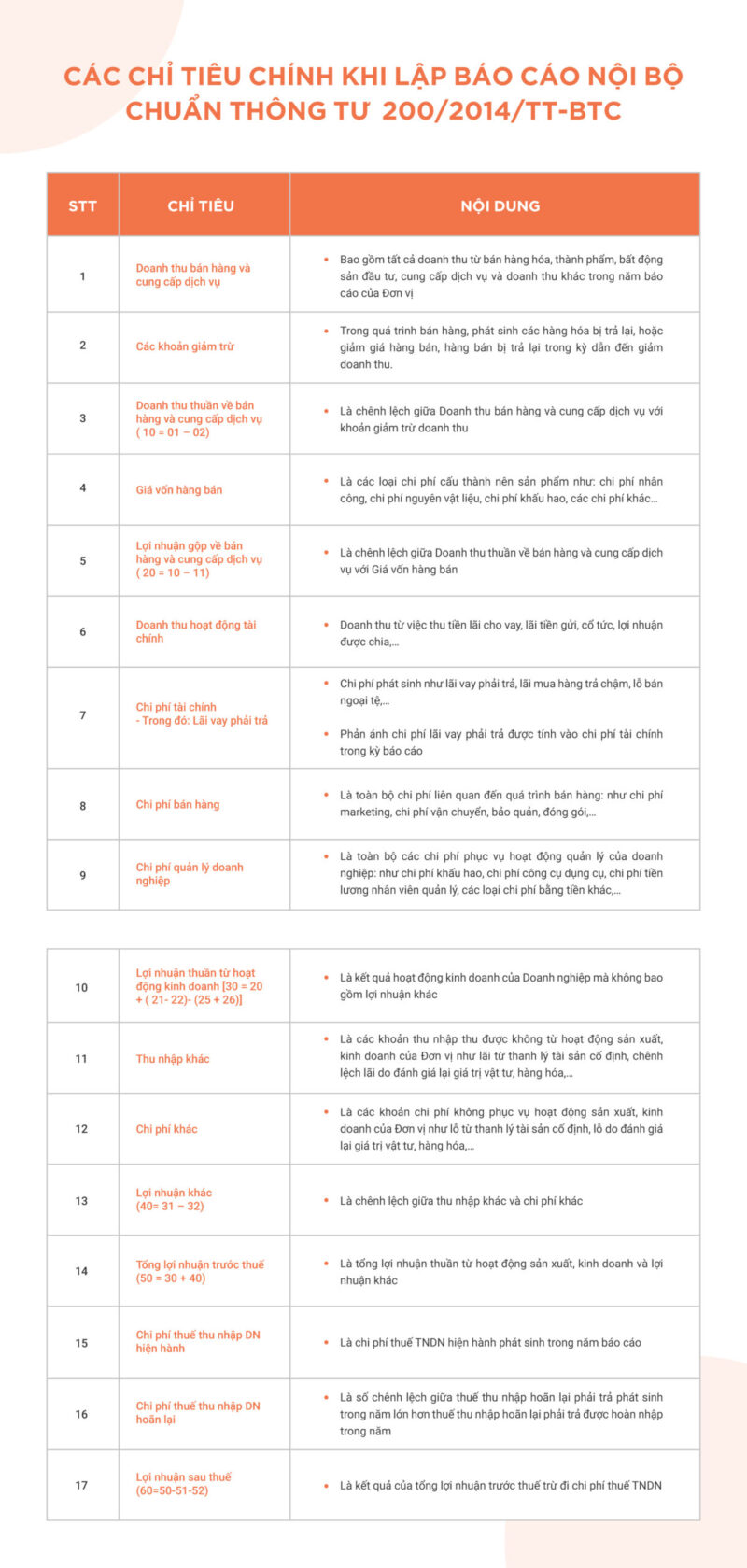
Currently, internal reports are created according to the standard form under Circular 200/2014/TT-BTC. In general, a report will include the following main contents:
- Revenue from sales, obtained from providing products/services
- Revenue deductions
- Capital spent on product support stages
- Revenue from financial activities: income from investment, recovery, and liquidation of debt packages, etc.
- Interest expenses
- Employee salary expenses
- Selling expenses, etc.
- Taxes that the business is obligated to pay
- …
Read more: The 4.0 era business reporting system built quickly to optimize management activities
2. Guide to creating an internal business performance report
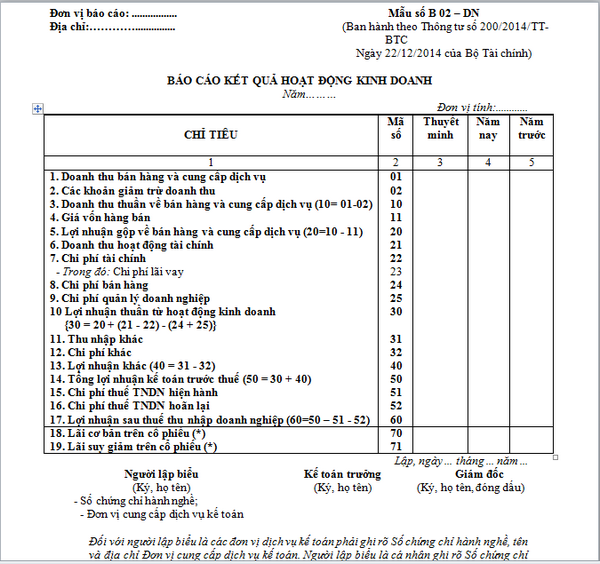
A standard report form will consist of 5 columns:
- Column 01: The indicators mentioned in the report.
- Column 02: The code for the corresponding indicators mentioned in column 01.
- Column 03: The corresponding number for the indicators of this report as shown on the company’s quarterly/annual financial statements.
- Column 04: The total amount incurred for that indicator during the reporting period.
- Column 05: Comparison with the previous year’s data.
| Read more: Business Performance Report: The Meaning of Key Metrics and How to Read It Accurately |
III. 5 standard internal report templates according to Circular 200/2014/TT-BTC
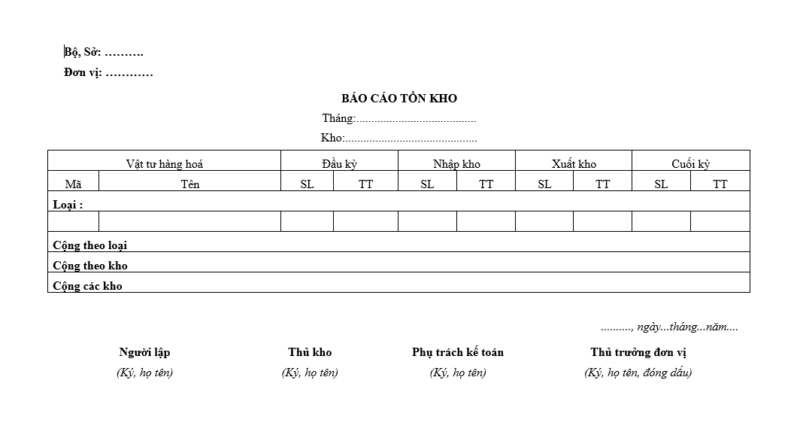
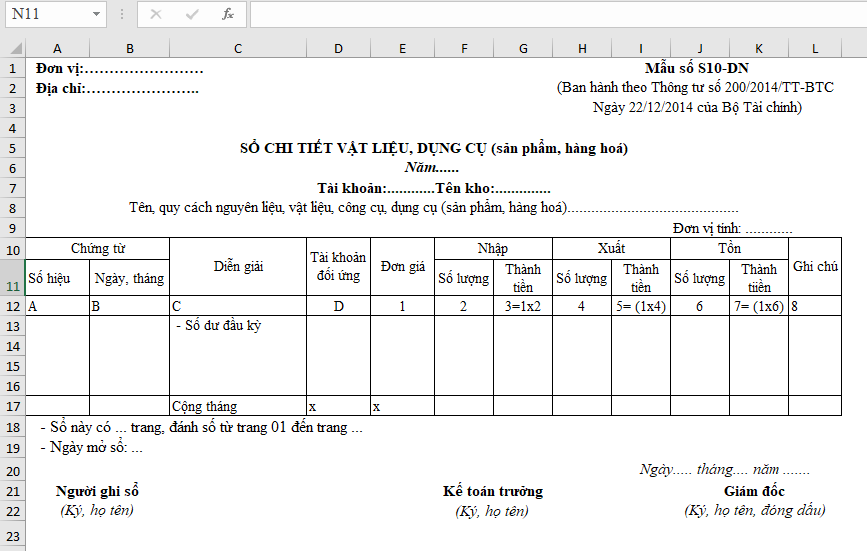
1. Inventory status report template
Typically, the Inventory group will include items such as: Goods in transit, Raw materials, Tools and supplies, Work in progress, Finished goods, Merchandise, and Goods sent for sale
2. Business performance report template
The standard form for this report is as follows:
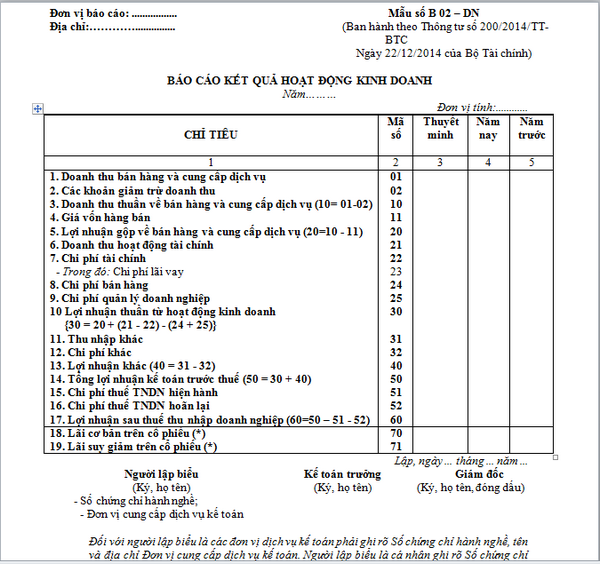
This business performance report outlines the entire operational process of the enterprise on a quarterly/annual basis. As shown in the demo image above, the two items marked with an asterisk (*) are only applicable to joint-stock companies.
You might be interested in: Standard work performance report template
3. Standard internal report on the increase/decrease of fixed assets
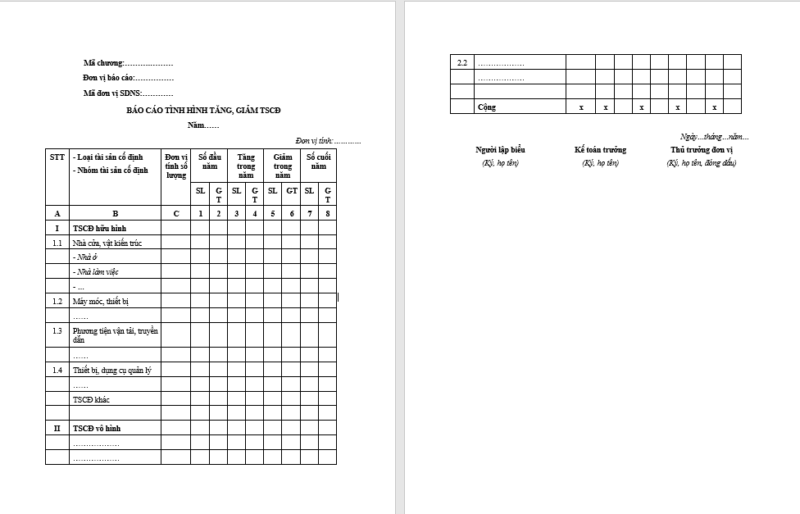
Typically, this report template includes headings such as: Number of fixed assets at the beginning of the year, number of fixed assets increased during the year, number decreased during the year, and a summary of fixed assets at the end of the year.
4. Internal report template for SMEs
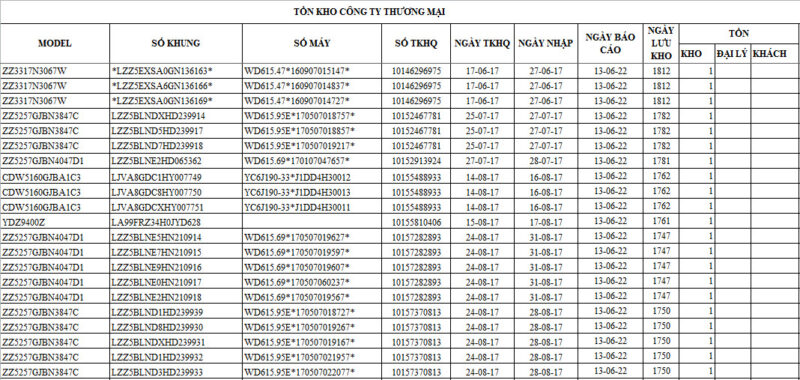
In this article, we will provide readers with an example of an internal report template for SMEs, specifically for industrial machinery products, such as:
5. Internal debt report for businesses
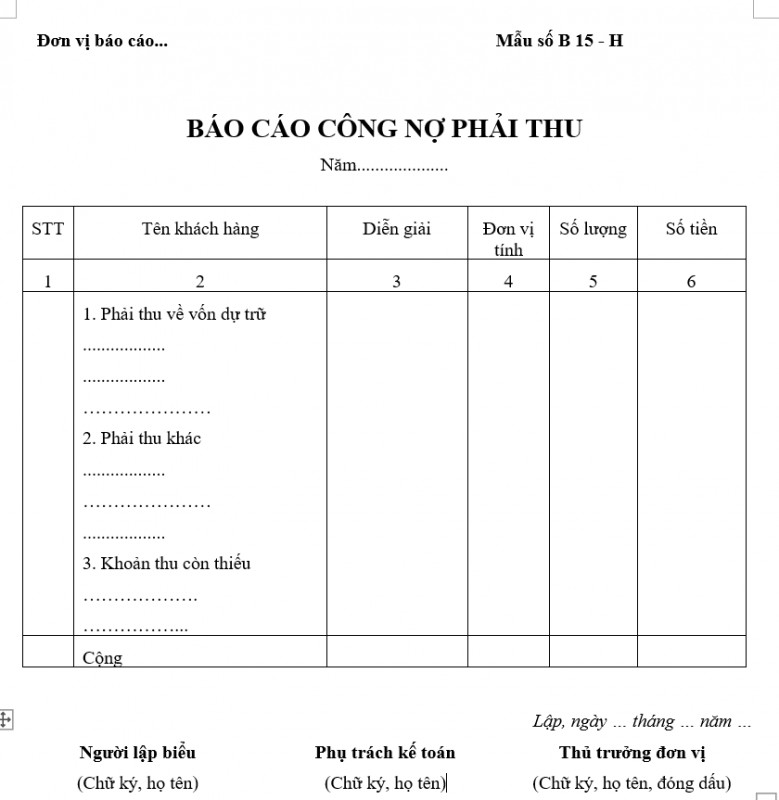
This type of report is created to help the organization proactively control and closely manage accounts receivable, debts due, accounts payable, etc. This helps managers and business leaders build appropriate and effective cash flow and financial management plans.
IV. The role of internal reports in business administration
Internal reports are a key management tool, not only summarizing figures but also transforming raw data into management information that helps leaders make fast, accurate, and timely decisions. The specific roles of internal reports include the following aspects:
1. Provide an immediate overview of operations
Summarize revenue, expenses, profit, inventory, debt, etc., by period (day/week/month). This helps leadership quickly grasp the “health” of operations without waiting for year-end financial statements.
-
Example: daily/weekly revenue figures allow for timely adjustments to promotional campaigns.
2. Support strategic and operational decision-making
Serves as a basis for comparing actual results against the plan (Actual vs. Plan), identifying the causes of discrepancies, and implementing corrective measures. It supports decisions on: increasing/decreasing production, adjusting prices, allocating marketing budgets, recruiting, or cutting costs.
-
Example: low inventory turnover figures → adjust purchase orders, optimize inventory.
3. Control and risk management
Early detection of risks: unusual increases in debt, negative cash flow, large cost fluctuations, etc. This allows for the implementation of mitigation measures (tightening customer credit, renegotiating supplier terms, pausing non-essential expenses).
4. Optimize efficiency and productivity
-
Measure KPIs by department (Sales/salesperson, machine efficiency, order processing time…).
-
From reports, identify bottlenecks, improve processes, and allocate resources reasonably.
5. Aligning goals and ensuring transparent governance
-
When internal reports reflect goals (revenue, profit, KPIs), every department can clearly see its responsibilities and contributions.
-
Creates a culture of transparency, making it easy to compare and evaluate performance.
6. Supporting internal audits and compliance
-
Detailed reports combined with records and documents help internal auditors review quickly and avoid errors.
-
Serves as a basis for demonstrating compliance with internal policies and legal regulations when needed.
7. An effective internal communication tool
-
Reports convey information between management, departments, and employees, reducing misunderstandings and ensuring everyone is working towards common goals.
-
For example: a weekly sales summary helps the marketing and sales departments coordinate campaigns.

V. Frequency of internal reporting in a business
The frequency of internal reporting depends on management objectives, the type of report, and the specific nature of the business’s operations. There is no “one-size-fits-all” rule—it should be based on decision-making needs. Below is a detailed, immediately applicable guide, including reasons and practical recommendations.
1. Principles for determining frequency
-
The frequency must reflect decision-making needs. Short-term decisions (daily/weekly) require high-frequency reports; strategic decisions require lower-frequency reports (monthly/quarterly).
-
The cost of creating reports must be proportional to the benefits. Reporting too frequently is inefficient if it consumes significant human resources.
-
Prioritize automation for high-frequency reports. Use a system for automatic updates (dashboards) instead of manual reporting.
2. Recommended frequency table by report type
| Internal Report Type | Suggested Frequency | Primary Audience | Purpose |
|---|---|---|---|
| Revenue & Order Report (sales daily snapshot) | Daily | Head of Sales, COO | Monitor sales, handle backlogged orders |
| Inventory Report (vital SKUs) | Daily / 2-3 times/week | Warehouse, Production, Sales | Control stockouts, plan production |
| Short-term Cash Flow Report (cash position) | Daily | CFO, Chief Accountant | Manage liquidity, schedule payments |
| Departmental KPI Report (good) | Weekly | Department Heads, Executive Board | Track goal progress, react quickly |
| Detailed Sales Report | Weekly | Sales Manager, Marketing | Adjust campaigns, optimize channels |
| Summary Financial Report | Monthly | Board of Directors, Executive Board | Evaluate performance, compare against budget |
| Profitability Analysis Report | Monthly / Quarterly | CFO, Executive Board | Analyze profit margins, make pricing decisions |
| Labor & HR Performance Report | Monthly | HR, Department Heads | Control personnel costs, recruitment |
| Marketing Campaign KPI Report | After each campaign or weekly | Marketing, Sales | Measure ROI, optimize channels |
| Strategy Review Report | Quarterly | Board of Directors, Executive Board | Adjust long-term strategy |
| Internal Control / Audit Report | Semi-annually / Annually | Supervisory Board, Executive Board | Review risks, ensure policy compliance |
Note: manufacturing/supply businesses require higher frequency of inventory, production, and cash flow reports; service businesses can focus on project performance and daily/weekly revenue reports.
VI. Tracking Business Results with CRM Software
1Office is one of the comprehensive business management solutions that helps all personnel in the company (leaders, mid-level managers, team leaders, department heads, and sales staff) stay connected.
<iframe title="
We can conclude that when using 1Office CRM, businesses will receive a series of benefits such as:
- Automatically track a series of reports: Sales reports, purchase reports, revenue and expenditure reports, etc.
- Track project progress and the operational efficiency of multiple Marketing projects
- Monitor the allocated budget and the amount spent for each specific project, etc.
- Optimize the sales process, “Standardize” the sales process to maximize the productivity of employees and managers.
The article above has given you a general overview of the internal report templates used in businesses. Hopefully, with these report templates, you can quickly and easily create a highly effective work report.
- For more detailed information, please visit:
- Fanpage: https://www.facebook.com/1officevn/
- Youtube: https://www.youtube.com/channel/UCeTIRNqxaTwk0_kcTw6SxmA
















