


 12/05/2026
  494 views
Business Process Management (BPM) software is an optimal tool that helps businesses remove bottlenecks in workflow management, contributing to a streamlined operational structure and cost savings. However, not all software can meet every business need. The key is to choose the right software to achieve optimal results and ensure flexibility and efficiency in operations. Join 1Office to explore the TOP 9 best automated workflow management software on the market and assess their suitability for your business in the following article.
Mục lục
- Summary of the 9 reputable business workflow management software in 2026
- 1Office Process Management & Automation Software
- WEONE Business Automation System
- Process Street Workflow Management Software
- Nintex Business Process Management Software
- Zoho Creator Workflow Management Software
- iWorkflow: Business Process Automation Software
- SAVIS BPM Paperless Automated Digital Process Management Software
- Base Workflow Business Process Connection App
- MISA AMIS process system management software
- Criteria for choosing a process management software for businesses
- Why is managing business workflows a challenge?
- How does workflow management software help businesses?
- Automating Financial Processes in E-commerce with 1Office Software
- Frequently Asked Questions When Choosing Process Management Software
Summary of the 9 reputable business workflow management software in 2026
| Software | Origin | Main Focus | Key Features | Pros | Cons | Best For |
|---|---|---|---|---|---|---|
| 1Office | Vietnam | Comprehensive management platform + BPA | – 100% process digitization – Branching workflows – AI + Low-code – Digital signature | – All-in-one – Custom process design – Smart analytics | – Can be complex for full implementation | Medium & large enterprises aiming for comprehensive digital transformation |
| WEONE | Vietnam | Business automation system | – Inter-departmental workflows – Real-time reporting – Centralized management | – Integrates multiple business functions – Reduces data fragmentation | – Long implementation, requires resources | Large enterprises with complex processes |
| Process Street | International | Checklist & workflow management | – Process templates – Progress tracking – Collaboration | – Easy to use – Flexible | – High price | SMEs, operations teams |
| Nintex | International | BPM + Advanced Automation | – Workflow design – SAP, Salesforce integration – Automation | – Strong integration – Easy to implement | – Language limitations | Enterprise businesses, multi-system environments |
| Zoho Creator | International | Low-code workflow builder | – Create workflow apps – Powerful database – API integration | – Low price – Easy to customize | – Lacks advanced features | SMEs, startups |
| iWorkflow | Vietnam | Basic management workflow | – Customizable processes – Monitoring & reporting – Integrated forms | – Easy to use | – Not strong for complex processes | Small to medium enterprises |
| SAVIS BPM Paperless | Vietnam | BPM + process digitization | – Process design & tracking – System integration – Automated UI | – Optimizes operations – Paperless | – Requires training | State-owned / enterprise businesses |
| Base Workflow | Vietnam | Workflow + task management | – Gantt, Kanban – Task assignment – Progress tracking | – Visual – Good integration | – A bit complex for small teams | Medium enterprises |
| MISA AMIS | Vietnam | Business management platform | – Workflow setup – Inter-departmental feedback – Reporting | – High security – Good support | – Features are not very in-depth | Medium enterprises & SMEs |
1Office Process Management & Automation Software
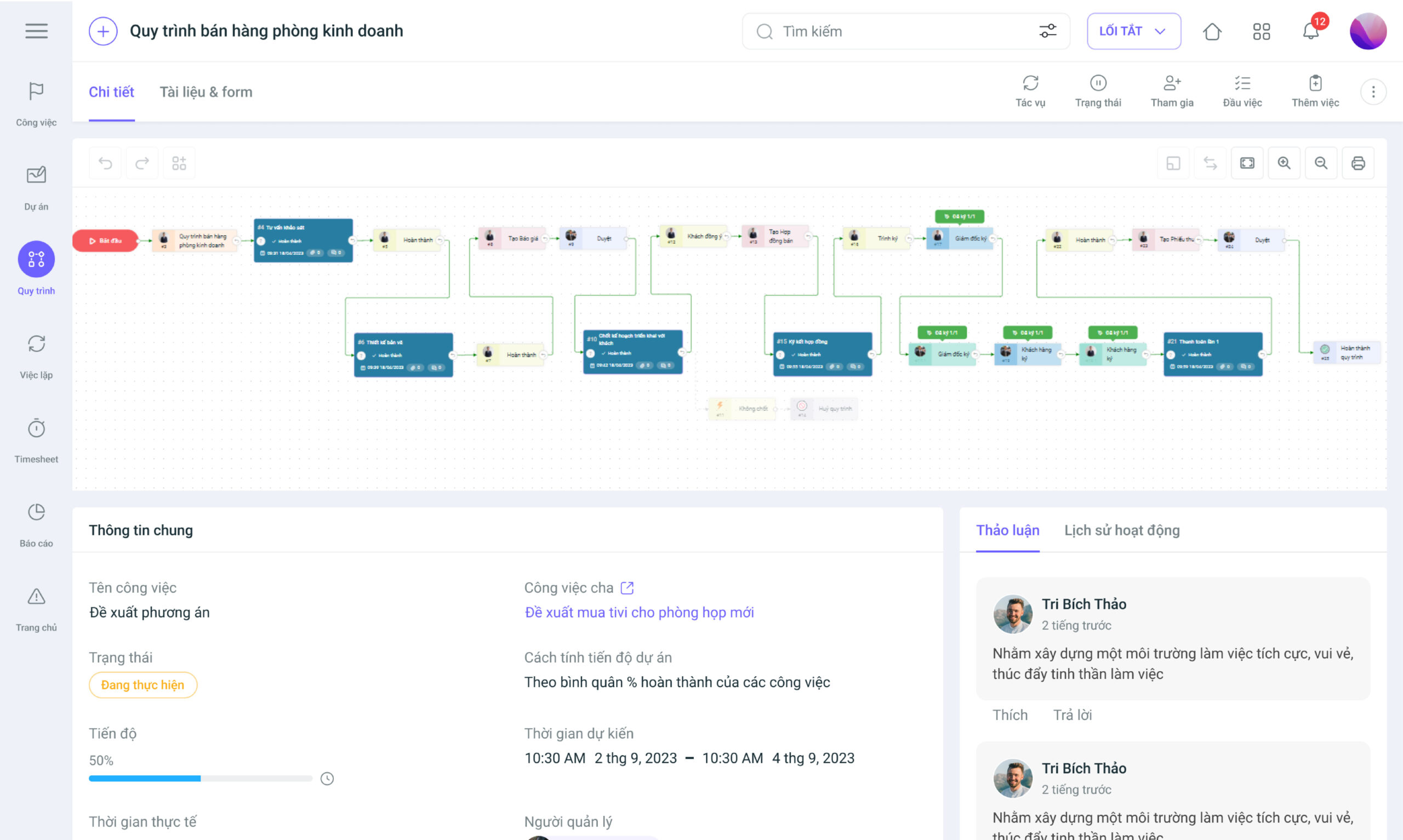
1Office is the leading total enterprise management platform on the market today. Among its features, BPA – Business Process Automation is a solution highly valued by businesses for its ability to optimize process operations. This is a toolset that supports the automation of business processes beyond typical data manipulation and record-keeping activities by using advanced technologies. It focuses on “running the business” rather than “counting the work” types of automation.
Key Features
1Office process management software offers many outstanding benefits that other management tools cannot, helping businesses to:
- Digitize all business operating processes on a single platform.
- Define 100% of process types, including linear and branching processes.
- Set up and assign tasks quickly, reducing the time for allocation and review.
- Track and monitor progress accurately in real-time.
- Detailed reports on progress, number of tasks in each process, and each step within the process.
- Automatically measure efficiency, provide alerts, and optimize “hotspots” in the process.
- Supports digital signatures directly within the process, completely eliminating manual paperwork.
Get a free consultation & software demo
Additionally, 1Office integrates Low-Code and AI, creating a powerful platform that allows businesses to freely design and optimize processes without requiring extensive programming knowledge.
Low-Code:
- Set up business processes by dragging and dropping available Nodes
- Trigger automation based on events such as data changes, calls from other systems, etc.
- Flexible integration with external systems via API, Webhook
AI:
- AI-powered Workflow: AI helps automate and optimize business operating processes.
- Business Data Analysis (BI + Predictive Analytics): Automatically analyzes statistical reports to suggest decisions to the CEO or even make decisions on their behalf.
WEONE Business Automation System
WEONE is a business automation system designed to help businesses optimize their operations and control work management processes, thereby enhancing efficiency and productivity.
Key Features
- Automate and standardize interconnected workflows between departments.
- Centralized task management on a single system.
- 24/7 report updates to closely monitor processes and make quick decisions.
| Advantages | Disadvantages |
| Provides an integrated platform for business operations, from process management, human resource management, and customer management, to financial management. This helps minimize data fragmentation and optimizes the company’s information management. | Implementing WEONE requires a rather complex preparation and implementation process, demanding time and resources. Therefore, businesses need to carefully calculate the implementation time before deciding to use this system. |
Read more: 7 Best Work Management Apps on Mobile for iPhone/Android
Process Street Workflow Management Software
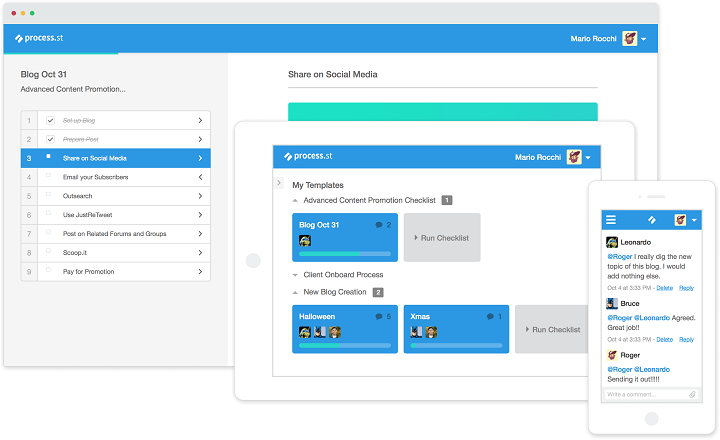
Process Street workflow creation software is a popular tool for business process management and quality control. The software helps businesses organize and manage workflows easily and effectively thanks to its highly intuitive process design features and real-time progress tracking.
Key Features
- Allows users to create workflow templates to help employees perform tasks easily and effectively.
- Supports users in managing and tracking the progress of workflows, including defining task statuses and creating schedules to ensure tasks are completed on time.
- Allows users to share workflows with team members or external parties. This helps ensure that all members understand and work according to consistent workflows.
Process Street automated workflow management software
| Advantages | Disadvantages |
|
The software has a higher cost compared to some other workflow management software on the market. This can be an obstacle for small businesses with limited budgets. |
See more: TOP 10 best task management software – detailed review
Nintex Business Process Management Software
Nintex is one of the best business process management software on the market today.
Key features
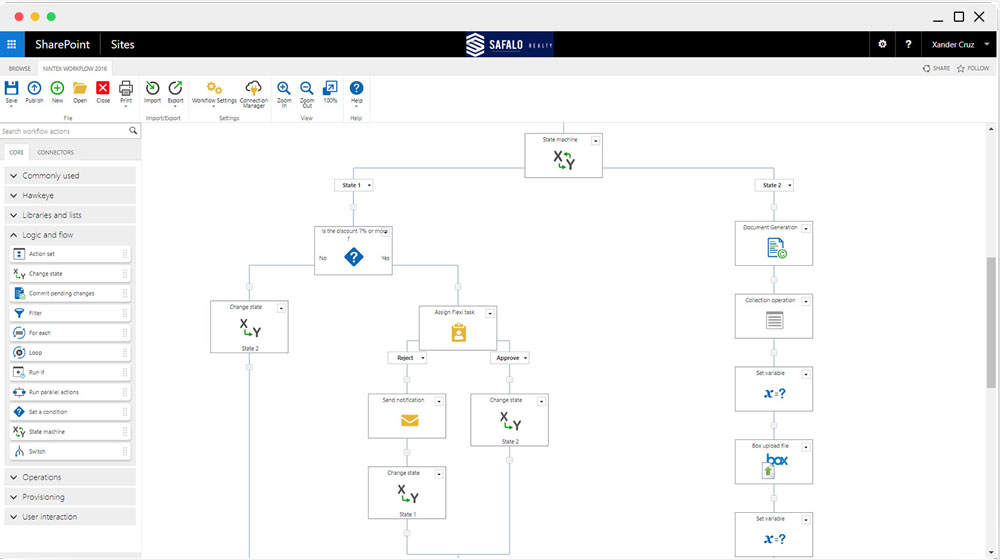
Allows users to flexibly design and manage business processes, while also supporting processes related to finance, human resources, construction project management, and manufacturing.
Nintex integrates with many other popular applications like SharePoint, Office 365, Salesforce, and SAP, as well as standalone management software such as human resource management software, project management software, and manufacturing software. This helps users easily connect with existing systems and optimize their workflows.
Nintex automates many tasks in the business process, from handling registration forms and processing requests to notifying employees about important events within the workflow.
| Pros | Cons |
| Nintex is designed to be easy and user-friendly. Users can design and deploy their business processes quickly and easily. | Currently, Nintex only supports a few major languages, which limits the software’s accessibility for users from different countries. |
Zoho Creator Workflow Management Software
Zoho Creator is a helpful workflow creation software that improves business management by allowing users to set up custom workflows and effectively automate work tasks.
Key Features
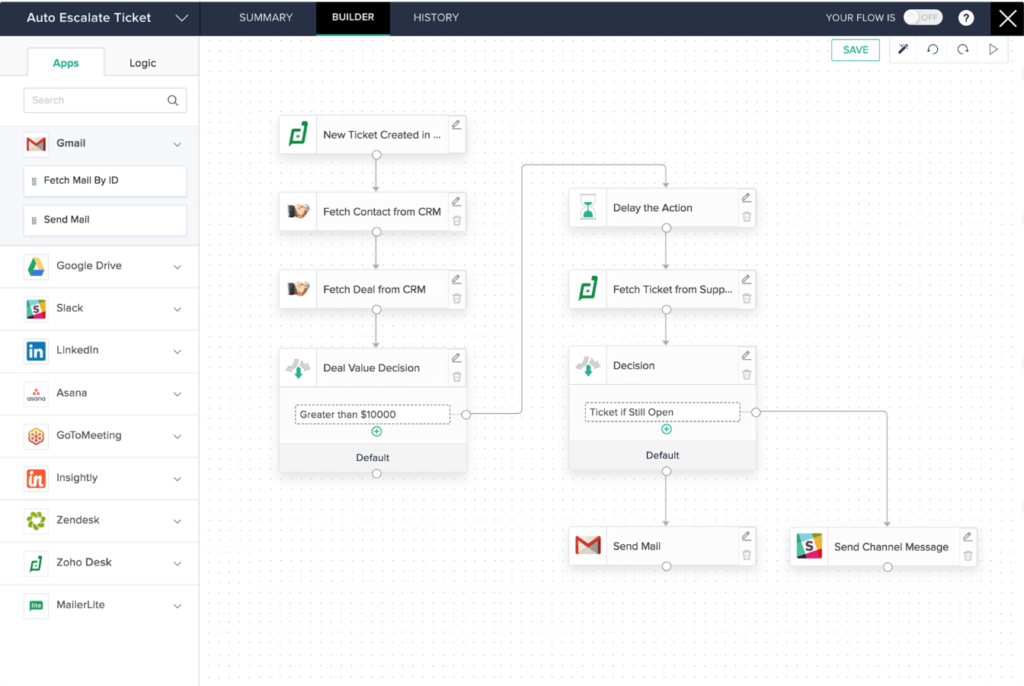
- Flexible features allow users to customize their workflows, including data filtering, form formatting, notification configuration, and access permissions.
- Zoho Creator provides a powerful database to store and manage the business’s workflow data. It supports various data types, including text, numbers, dates, email addresses, URLs, images, attachments, etc.
- Integrates with other applications such as Google Sheets, Zapier, MailChimp, and Salesforce.
| Pros | Cons |
|
|
iWorkflow: Business Process Automation Software
iWorkflow is a business process automation solution that provides centralized management for business processes and services, enhancing flexibility and boosting operational productivity.
Key Features
- Allows users to add or remove steps, change the process structure, and define conditions for automatic process execution.
- Monitors and reports on the status of business processes, helping managers detect and resolve issues more quickly and efficiently.
- Integrates and provides necessary pre-built forms, allowing them to be attached to process steps.
| Advantages | Disadvantages |
| iWorkflow is very easy to use, even for those with no experience with operational process management software. | Although iWorkflow has many good features, it is still limited in managing complex processes and coordinating across departments. |
SAVIS BPM Paperless Automated Digital Process Management Software
SAVIS BPM Paperless automated digital process management software is a business process management software solution developed by SAVIS Technology Co., Ltd. This software helps businesses optimize their business processes by automating process-related activities.
Key Features
- SAVIS BPM Paperless helps businesses easily manage, control, and optimize their business processes by providing features such as business process design, implementation, management, and monitoring.
- Integrates with existing business systems and applications to ensure flexibility and compatibility.
- Allows users to define their own process flows, business processing steps, and automatically design user interfaces (UI) for use.
| Advantages | Disadvantages |
| SAVIS BPM Paperless helps businesses optimize their business processes by automating process-related activities, helping them save time and increase work efficiency. | SAVIS BPM Paperless has some complex features and may require training and technical support to be used effectively. |
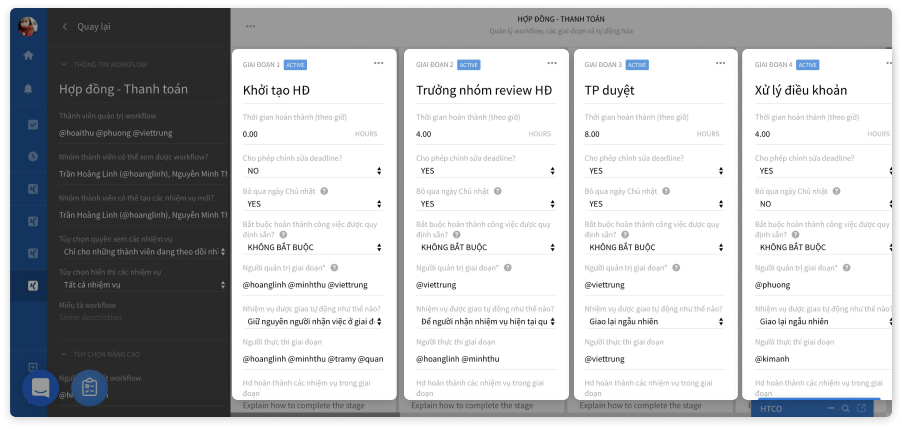
Base Workflow Business Process Connection App
Base Workflow is an application for managing and automating various types of business processes within an enterprise. The software is designed to help businesses manage and organize workflows more effectively, thereby optimizing work productivity.
Key Features
- Workflow Management: Base Workflow allows users to create, define, track, and optimize workflows.
- Task Allocation: Users can assign tasks to team members, set completion times, and track the progress of each task.
- Gantt Charts and Kanban Boards: Base Workflow is an effective project management software that provides tools to visually display work progress with Gantt charts and Kanban boards.
| Pros | Cons |
|
Base Workflow can be overly complex and unsuitable for small workgroups |
MISA AMIS process system management software
MISA AMIS is a software that digitizes management processes on a single, centralized platform, helping businesses enhance productivity and improve operations with a seamless, automated workflow system.
Key features
- Provides workflow management features such as process setup, task assignment, progress monitoring, and result evaluation.
- Allows users to design and customize their workflows according to specific needs.
- Provides two-way, interconnected feedback between departments to enhance interaction and respond promptly to bottlenecks in the process.
| Advantages | Disadvantages |
|
Some features of MISA AMIS may be limited compared to other work and process management software. |
Criteria for choosing a process management software for businesses
Process management software plays a crucial role in optimizing business operations. However, choosing a software that suits the needs of a business is not a simple task. Below are some important criteria for selecting and implementing process management software solutions for your business.
Ability to solve specialized problems
A good process management software must be able to solve specialized problems within a business’s processes. For example, linear, branching, conditional, and department-based processes, etc. The system must be able to display and manage the steps in the process clearly, making it easy for users to track.
Easy to use
Process management software needs to ensure a user-friendly and easy-to-use interface. Users should not need specialized knowledge in programming or IT to use the software. Additionally, the system should be customizable to fit the specific needs of each business.
Easy to deploy and apply
Process management software should be easy to deploy and apply to a business’s existing business processes. It also needs to be able to integrate with the business’s existing applications and systems to ensure flexibility and compatibility.
Reasonable cost
Process management software must have a reasonable cost that fits the business’s budget. This ensures that businesses do not have to invest too much money in this software and can still achieve optimal efficiency in process management.
Why is managing business workflows a challenge?
Process management is the core for sustainable business development and achieving certain successes. It’s evident that in today’s management landscape, businesses face many obstacles related to process challenges, such as:
- Difficulty in tracking which stage a process is at. Is it delayed? Who is causing the delay? Employees involved in the process are prone to forgetting or missing tasks
- Lack of smooth coordination between departments, leading to blame-shifting and project delays
- Wasting time and money on repetitive tasks
- Inability to accurately assess employee performance
- CEOs cannot identify process bottlenecks to address them in a timely manner
- Processes have been established, but employees still execute them incorrectly
- Process bottlenecks and hotspots arise but are not resolved in time
- Difficulty in tracing the responsibility of individual employees and departments
A study by McKinsey shows that, on average, each business spends nearly 2,000 hours per year on manual tasks, with productivity at only 50%.
How does workflow management software help businesses?
The solution to the aforementioned situation for businesses is a standardized operating platform with full features that can cover the entire enterprise, helping to streamline and optimize workflows. A process management software can bring unexpected benefits to a business:
- Save time & operational costs
Process management software can automatically perform manual tasks according to pre-set conditions. Reduce 1 hour of work per day, optimizing the salary fund and personnel efficiency
=> Helps managers: Save 7 working hours/week, increase employee work efficiency by 150%, thereby enhancing business operational effectiveness.
- Multi-tasking, multi-department execution
All tasks within a process are assigned according to the departmental structure, so the CEO doesn’t have to worry about remembering who is responsible. It’s possible to combine various task groups in one process, such as revenue/expenditure, contract processing, payments, etc.
=> Helps managers: Understand the work of each department. Departments coordinate smoothly. Track and monitor the work of the entire business on a single platform.
- Smooth work coordination
With process management software, departments can communicate, interact, and provide feedback directly within the process.
=> Helps managers: Increase interaction, improve information dissemination, and help employees understand and feel more connected to the business.
- Minimize errors & enhance productivity
Repetitive tasks are handled automatically by the system based on pre-set conditions. This significantly reduces the error rate. An employee can then not only complete 100% of their work but can increase their output to 150% or even 200% with the support of automation technology.
=> Helps managers: No more headaches from checking work, receive immediate results, boost employee productivity, and accelerate the quality development of personnel.
See more: Notes on Business Automation – How to Optimize Operational Processes
Automating Financial Processes in E-commerce with 1Office Software
E-commerce businesses, such as online stores in Ho Chi Minh City, need to manage financial processes (reconciliation, payments, debt) quickly and accurately. Kissflow or Pipefy support process automation, but they are costly and lack integration with e-commerce platforms like Shopee or Lazada. 1Office software provides an optimal financial automation solution for e-commerce.
1Office allows for setting up automated reconciliation processes, integrating with e-invoices and e-commerce platforms. An online store in Hanoi used 1Office to manage debt, reducing payment errors by 40% thanks to real-time reports and automated approval workflows. The 1CRM module helps track customers, combining with financial processes to send invoices quickly. Compared to Kissflow, which costs from 10 USD/user/month and has an English interface, 1Office offers a cost-effective “subscription” model and supports Vietnamese. Pipefy, despite being strong in integration, does not have a specialized financial module like 1Office.
In the article above, 1Office has introduced to readers the best process management software with detailed reviews. For more detailed advice on the 1Office work process management software, you can contact us via:
Try the features of 1Office BPA
Frequently Asked Questions When Choosing Process Management Software
Should I choose domestic or international software?
- Vietnamese Software: suitable for domestic businesses, easy to implement, supports Vietnamese, reasonable cost
- International Software: strong in technology, deep integration, suitable for large or multinational enterprises
What are the important criteria when choosing BPM software?
- Customization capabilities and suitability for internal processes
- Ease of use (no advanced technical skills required)
- Ability to integrate with existing systems
- Implementation and operating costs
- Technical support and training
What is process management software (BPM)?
Process management software (Business Process Management – BPM) is a tool that helps businesses design, automate, monitor, and optimize internal operational processes. Instead of manual processing, BPM helps digitize the entire process to increase efficiency and reduce errors.
















