


 12/05/2026
  473 views
Project Software from Microsoft is a product that is very familiar to businesses for project management. However, is this software truly optimized and does it meet all of a business’s needs? Let’s explore the detailed reviews of Microsoft Project’s features in the article below.
Mục lục
1. What is Microsoft’s Project Software?
Microsoft Project (MS Project) is a project management and scheduling software developed by Microsoft. This software offers powerful features to support users with project management, planning, task assignment, resource allocation, budget management, progress tracking, and project reporting.
The target users who are encouraged to use Project software to streamline their workflow include:
- Project managers in businesses.
- Businesses that frequently execute projects of all sizes.
- Managers and staff who want to execute projects in a scientific, systematic, and professional manner.
| Read more: Which project management tool is the most effective and convenient today? |
2. Key features of Microsoft Project
- Create detailed project plans by defining tasks to be performed and their corresponding completion milestones
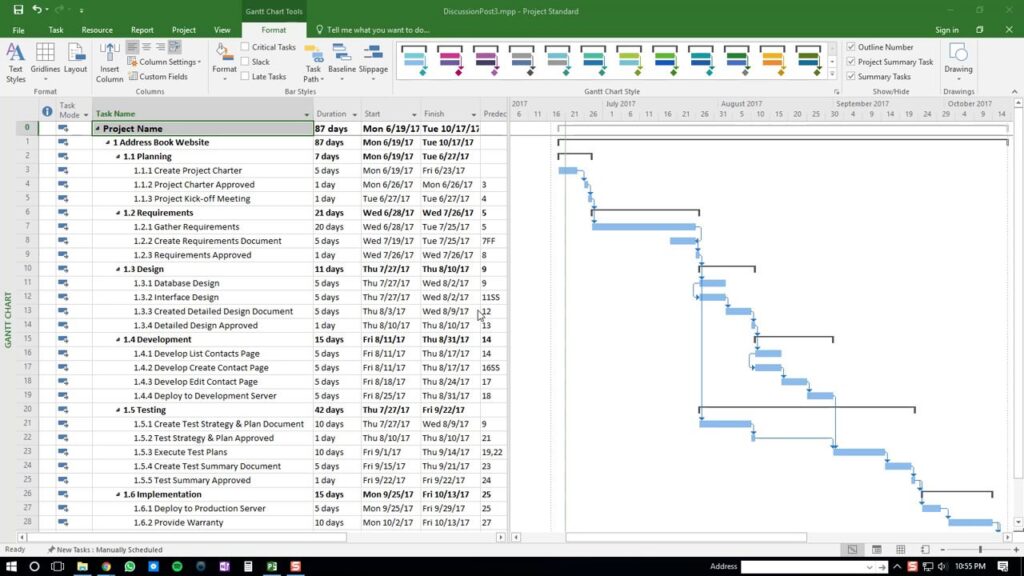
- Assign tasks with specific execution times for each project member.
- Allocate resources and assets for tasks in a logical manner.
- Plan and manage the budget for project items.
- Store and share data with project members for collaboration and coordination to increase work productivity.
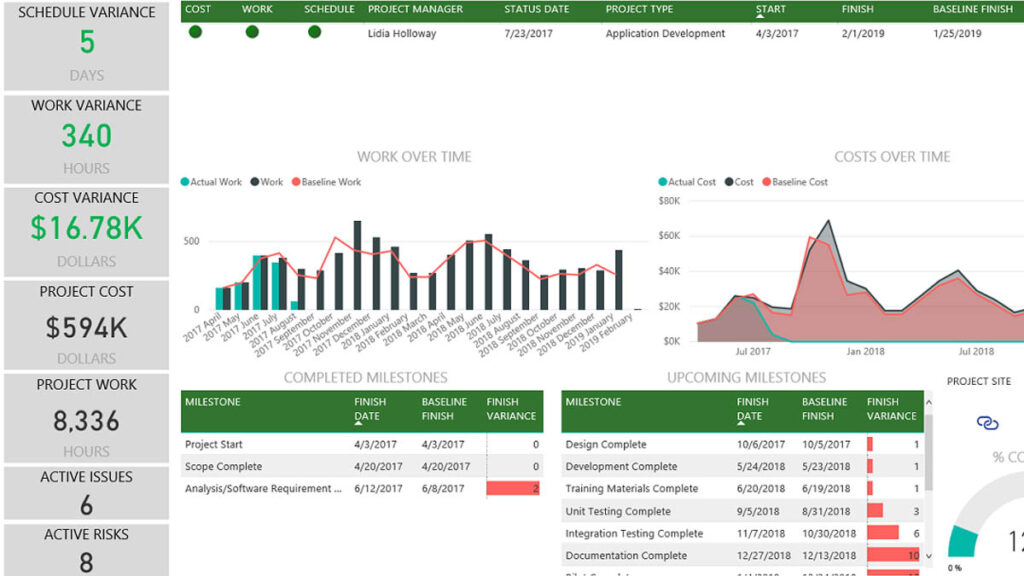
- Update and closely monitor progress to stay informed about the project’s implementation status.
- Adjust operational strategies to align with time, cost, and resources at each stage.
- Create professional project reports to evaluate project results and progress.
|
3. Microsoft Project Pricing
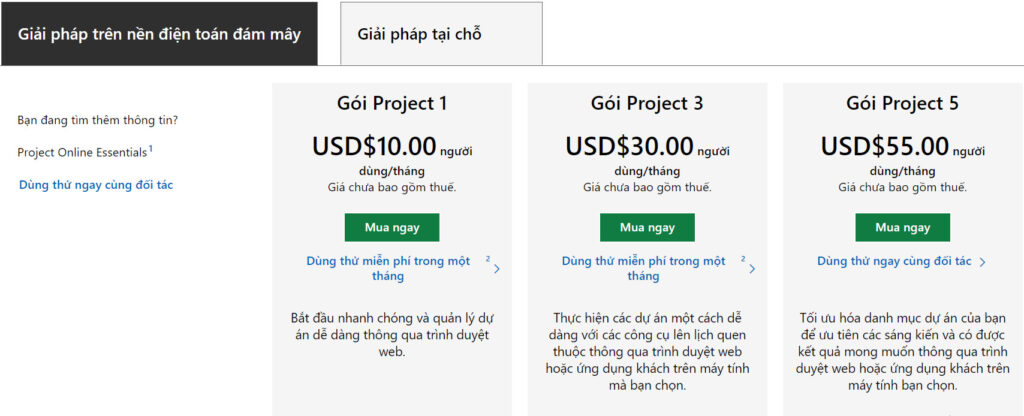
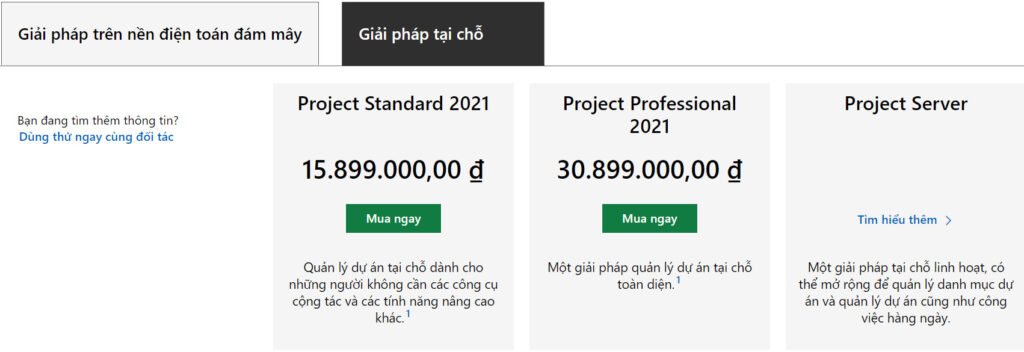
MS Project software offers 2 solution packages for businesses to choose from: cloud-based and on-premise.
| Reference: What is Asana? A detailed review of the Asana software for work & project management |
4. Evaluating the Features of Project Software
Advantages
- Microsoft’s Project software provides most of the necessary features, from basic to professional, for businesses to plan projects.
- Microsoft Project supports users in managing projects using two popular, easy-to-understand methodologies: Agile and Waterfall.
- The software integrates with other applications in the Microsoft 365 Office suite, creating a seamless and efficient work solution.
Limitations
- As an international software, the price of Microsoft Project is quite high, making it a costly investment for small and medium-sized businesses.
- The configuration and usage of MS Project are quite complex as the software is designed for professional project managers, so it can be time-consuming for employees to learn how to master its tools and features.
- The lack of Vietnamese language support is also a significant barrier for businesses using the Project management software, as it contains many specialized English terms.
| Read more: The most effective construction project management software today |
5. 1Office – The Most Complete Project Management Solution Today
It’s clear that Microsoft Project is a popular project management software with powerful features that bring great value to businesses. However, this software also has drawbacks that are not entirely suitable for the characteristics of Vietnamese businesses today. Therefore, we bring you a cost-effective, flexible, and user-friendly alternative – project management software 1Office.
1Office is a “made in Vietnam” business management platform developed by leading technology engineers and experts in the field of digital transformation. 1Office possesses a superior and diverse feature set that helps businesses manage projects easily and effectively, on par with MS Project but at a much lower cost.
Key features of 1Office project management software include:
Create Projects and Allocate Resources
- Supports detailed project planning so that participants and departments understand the work.
- Users can create new projects or edit old ones to create new projects.
- Flexibly allocate resources and assign tasks by position or by implementing department.
Manage and Monitor Projects
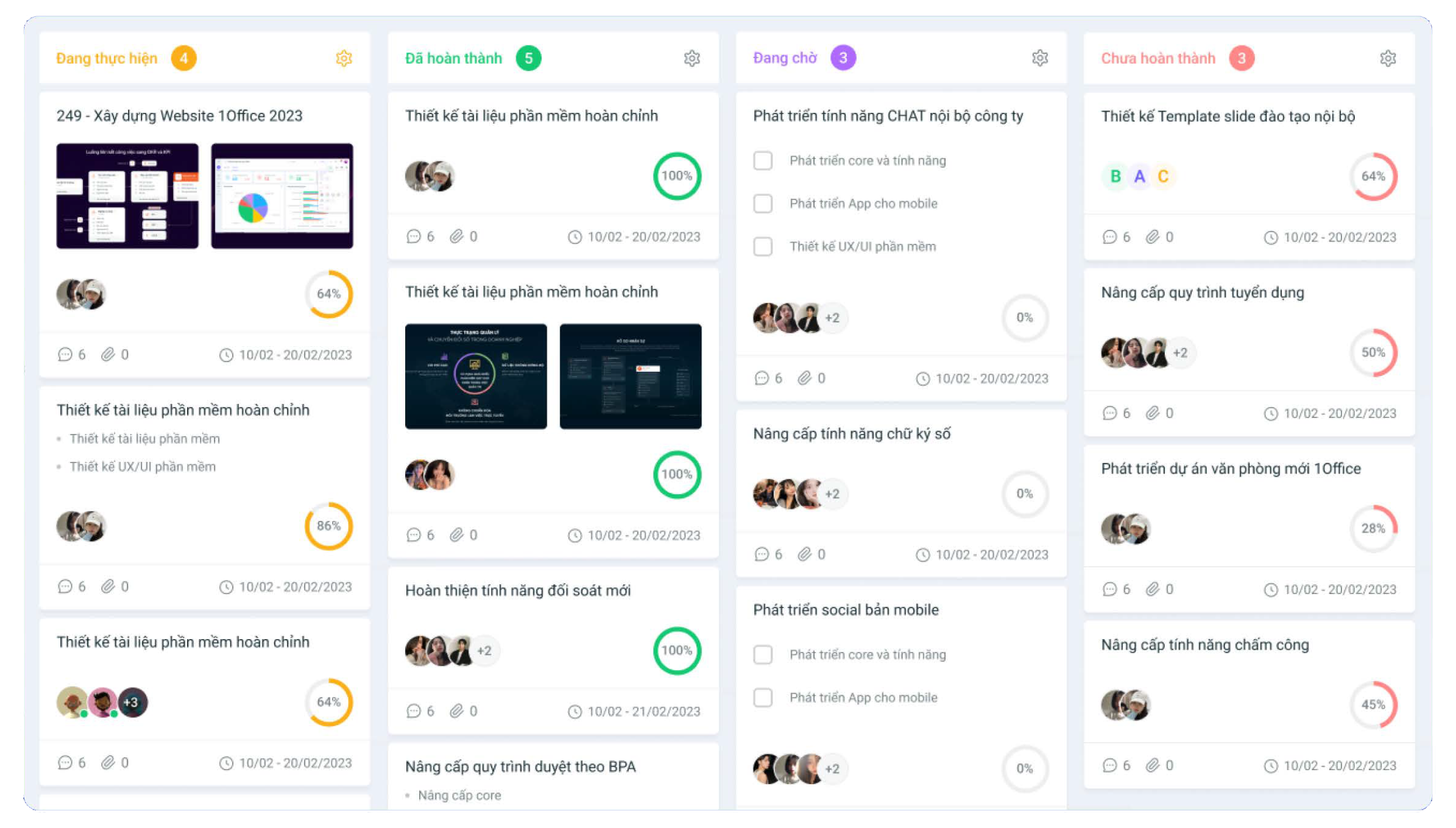
- Easily update project status: Completed, In Progress, Canceled, Paused with drag-and-drop for easy control.
- Continuously track and update every issue that arises in the project for timely resolution.
- Manage and track project progress visually and dynamically in multiple formats: Kanban, Gantt chart, Grid, list
Project Interaction
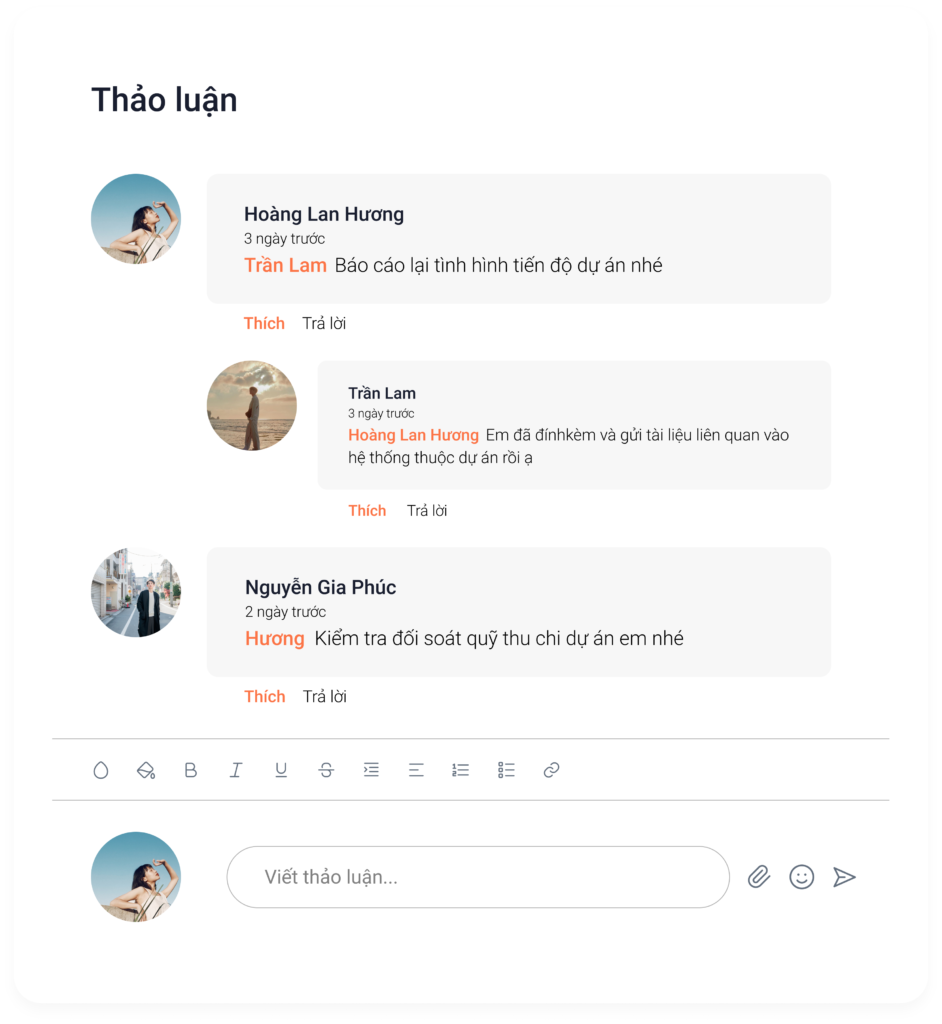
- Instead of chatting in groups, project participants can communicate directly within the project software without fear of messages getting lost.
- Allows users to upload related documents within the project, making it convenient to reference information.
- When tasks are assigned in a project, they are synchronized with the personal schedules of the participants.
Report and Evaluate Project Effectiveness
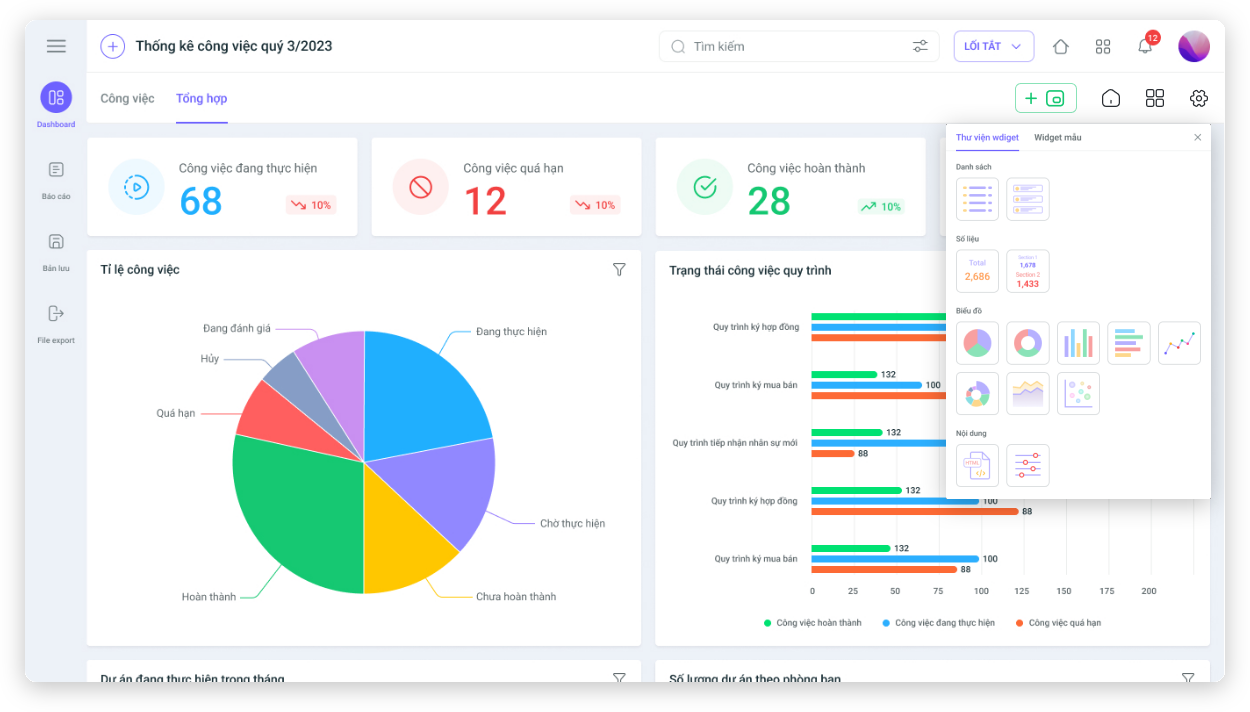
- Automatic project progress statistics help managers plan adjustments to project tasks accordingly.
- Automatically update visual reports based on project progress with just one click.
- From the report results, managers can evaluate the work performance of participating individuals and departments.
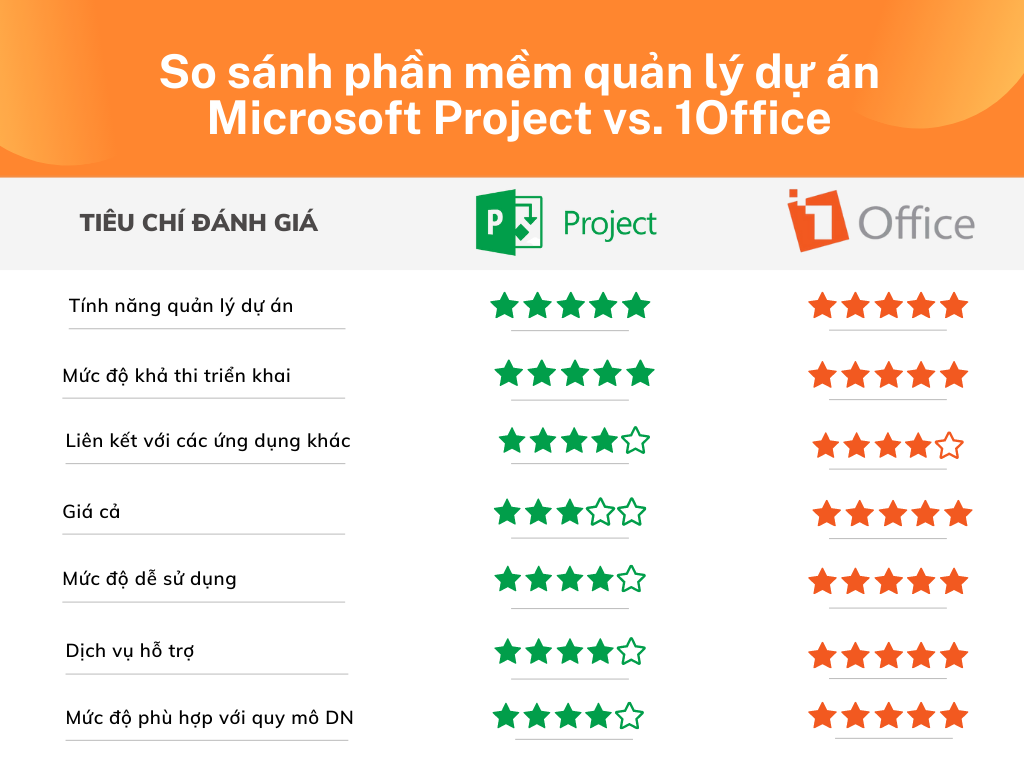
6. Comparison of Microsoft Project vs. 1Office Project Management Software
-

Comparison of Microsoft Project vs 1Office software
The article above has provided a detailed review of Microsoft’s Project software. To ensure that a project manager software is suitable for your business, managers need to clearly understand their company’s needs and capabilities to make the right choice.
For more detailed information, please contact:
- Hotline: 083 483 8888
- 1Office Fanpage: https://www.facebook.com/1officevn
- YouTube Channel:https://www.youtube.com/c/1OfficeNềntảngquảnlýtổngthểDoanhNghiệp
















