


How to find candidates on Linkedin quickly and effectively


LinkedIn has become the leading social media platform for recruiters and job seekers worldwide. With over 706 million users in more than 200 countries, LinkedIn recruiting generates 277% more effective leads than Facebook and Twitter. Today, LinkedIn has become the top destination for recruiters and job seekers. So, do you know how to recruit on LinkedIn for the best results? Let’s find out in the article below.
Mục lục
What is LinkedIn?
LinkedIn is a social networking site designed specifically for the business community. While other social networking sites like Facebook and MySpace focus more on social and personal networking.
LinkedIn allows professionals to create and maintain career-oriented business connections and promote their professional services or skills. From these networks, recruiters can find their information, and they can also communicate directly on the social networking site.

A LinkedIn member’s profile page emphasizes their skills, work experience, and qualifications. Depending on the user’s purpose and needs, you can use LinkedIn’s features for free or with a paid subscription.
LinkedIn is an excellent social network for entrepreneurs, recruiters, and job seekers. LinkedIn allows you to connect with friends and colleagues and see where they are. You can create your personal profile by adding the skills and experience you have accumulated throughout your career.
I- Benefits of recruiting on LinkedIn
According to research, up to 90% of recruiters use LinkedIn for recruiting and connecting with personnel. Just like other social media sites, LinkedIn allows users to update and share content on their walls quickly and easily. The LinkedIn recruiting platform offers many great benefits for recruiters, such as:
- Reach potential candidates: With LinkedIn, recruiters can quickly reach people outside their LinkedIn network, thereby easily expanding to candidates on other social media platforms like Facebook, Twitter, etc.
- Bulk messaging: LinkedIn Recruiter offers a bulk messaging option, which significantly reduces the time you spend reaching out to potential candidates.
- Establish credibility for your employer brand: LinkedIn is an excellent platform to make your business stand out. You can showcase the products or services you offer and interact with users and other candidates. When candidates see your profile on LinkedIn for recruiting, it helps increase your company’s credibility and builds trust among applicants for that job position.
- Build a digital presence: Having a LinkedIn page is one of the most effective ways to draw attention to your business. If you focus on improving it regularly and posting good content, you will appear on Google whenever people search for your products/services.
Read more: What is Employer Branding? How to build a successful employer brand in 2022
II – Steps to post a job on LinkedIn to attract candidates
1. Post a job for free
Step 1: Create a Company Page
Before posting a job, you need to create a personal profile on LinkedIn that includes your full name. To set up an account, click “Join now” on the LinkedIn homepage and follow the prompts. Once this is complete, you can start creating a Company Page.
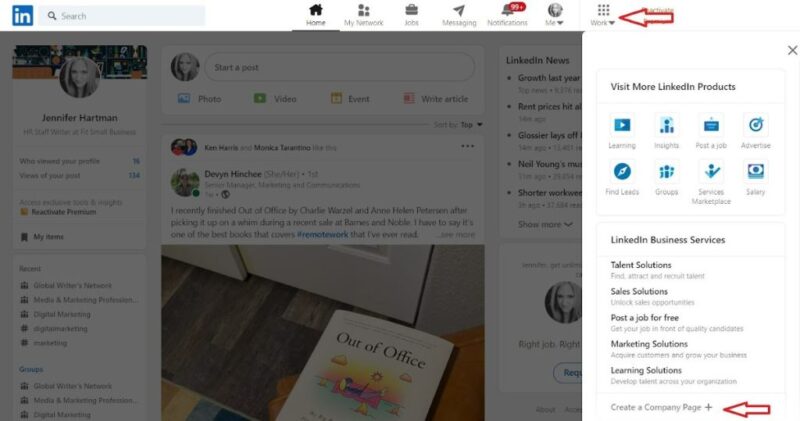
To set up your Company Page, follow these steps:
Click the Work icon in the top-right corner of your personal LinkedIn homepage. This will bring up a drop-down menu where you can select Create a Company Page at the bottom of the list.
Next, follow the prompts and choose the type of page you want to create:
- Company Page
- Showcase page (for individual brands, initiatives, etc.)
- Educational institution
When you select the page type you want, you will be prompted to enter your company page details. Here, provide your company name, URL, and industry details; then upload your business logo. After entering all the information fields, check the verification box at the bottom and click “Create Page”. Here, write a concise and succinct company description that includes key content such as: corporate culture, goals, and vision.
Step 2: Post a job for free on LinkedIn
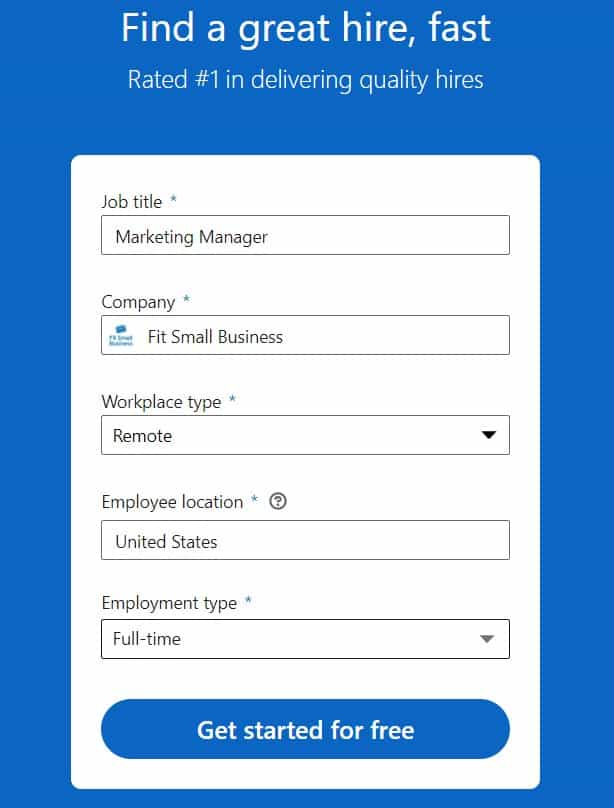
For the free job posting option, click the Jobs icon and then select the “Post a job” icon from the drop-down menu. This will take you to a form to fill in your job information. Enter the job title, company name, workplace type (i.e., on-site, hybrid, or remote), employee location, and employment type. Once you have filled in all the fields, click Start for Free.
Step 3: Create your job details
After entering your job information (e.g., title, company, and location), the next screen will prompt you to enter the job details, including the job description and any skill requirements. Once you have filled in the job details in this section, you move to the next section by clicking Continue at the bottom of the screen. Once you have filled in the details in this section, you can move to the next section by clicking “Continue” at the bottom of the screen. Proceed to enter the following information:
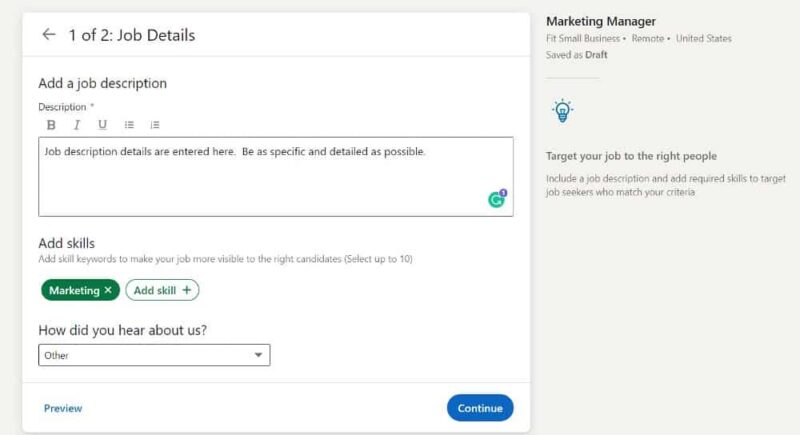
Job description: Enter your job description (required) in the text box. Be as specific as possible and include job duties, skill requirements, and educational requirements.
Skills: Specify the skills required for the job by clicking the Add skill icon.
Step 4: LinkedIn recruiting applicant options
After filling in the job details, click Continue in the bottom right corner of the page and choose your applicant options. Here, decide how you want to receive applications—via email or an external website.
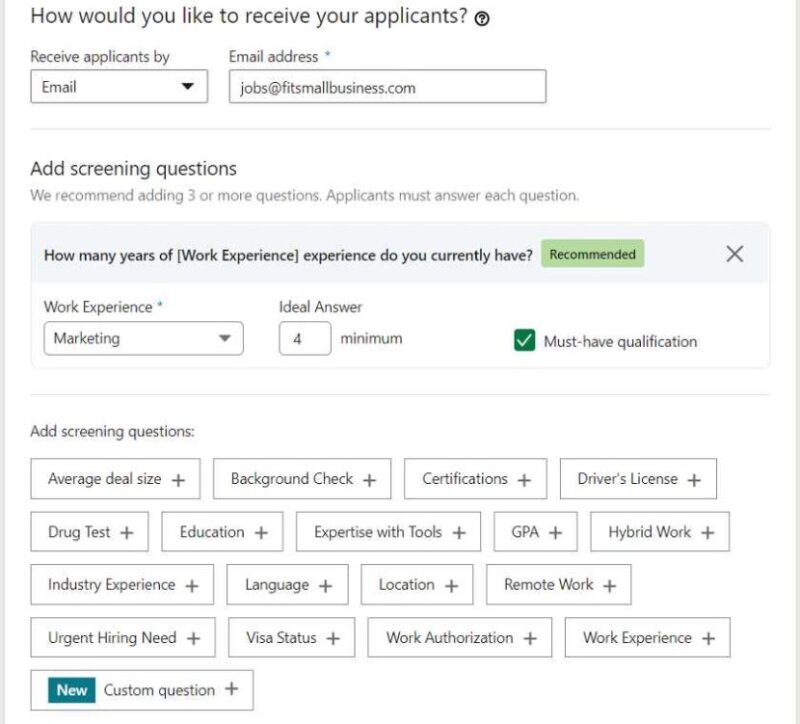
Choosing to receive applications via email allows you to add screening questions, which help eliminate or identify specific criteria you want candidates to confirm before submitting their profiles. LinkedIn will provide two suggested questions, which you can use or click the X to delete them and add your own questions or choose from LinkedIn’s list of questions. If you use this option, LinkedIn will automatically filter applicants and send a rejection email to anyone who does not meet those standards.
See more: Top 10 Most Comprehensive and Effective Recruitment Management Software
Step 5: Post the job
After completing the job post, you can proceed with a free post or pay to have it reach more people. Alternatively, you can post a link to the job on your careers website. This is a completely free way to get applicants on LinkedIn without setting a budget.
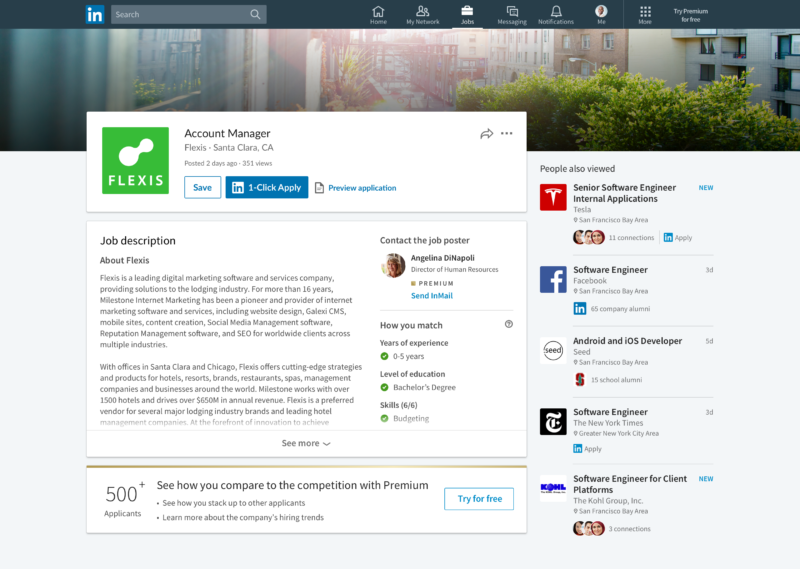
Additionally, you should encourage your employees to share your job post to reach more people in their networks.
LinkedIn Groups are where many professionals in the same industry gather to share useful content, make business connections, and find jobs. In many LinkedIn recruiting groups, a dedicated Jobs section is created for posting job information.

To reach more potential candidates relevant to the position you are hiring for, you can post the job there to expand your applicant network. However, note that joining the group requires approval from the group administrator. Therefore, try to build an attractive profile to gain access to the group.
Step 7: Improve your job post
Finally, once you have completed the details in the steps above, you can improve your job posting in the following ways:
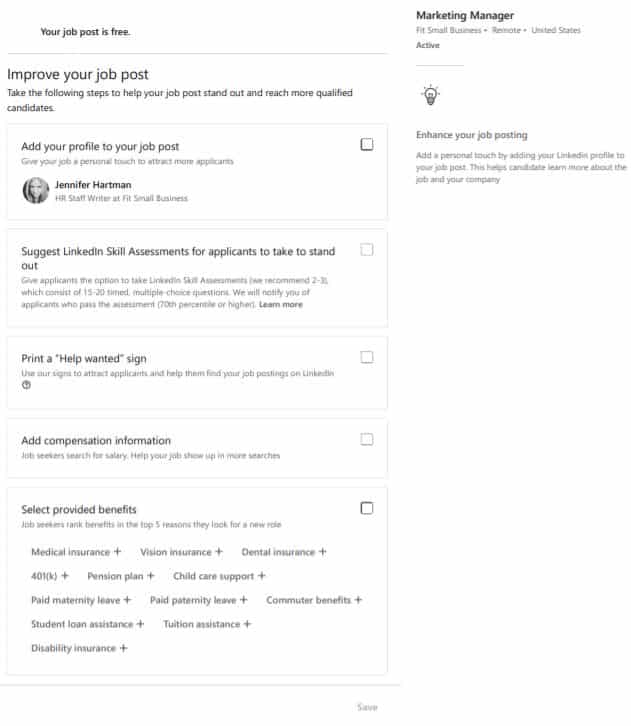
- Add the new job post to your personal profile
- Use LinkedIn Skill Assessments (notifies you when a candidate passes an assessment with a score of 70% or higher)
- Add salary information (displayed in the job details, helping your job appear in more search results)
- Select the benefits your company offers to display on your ad
| Read more: How to Create a Detailed and Standard Recruitment Plan for 2022 |
2. Paid Recruitment
To use this account, you’ll need to pay $29.99 a month. This gives you access to the basic functions of a standard LinkedIn account, plus 3 InMail messages. InMail allows you to message any LinkedIn user for recruitment purposes without needing to connect with them first.
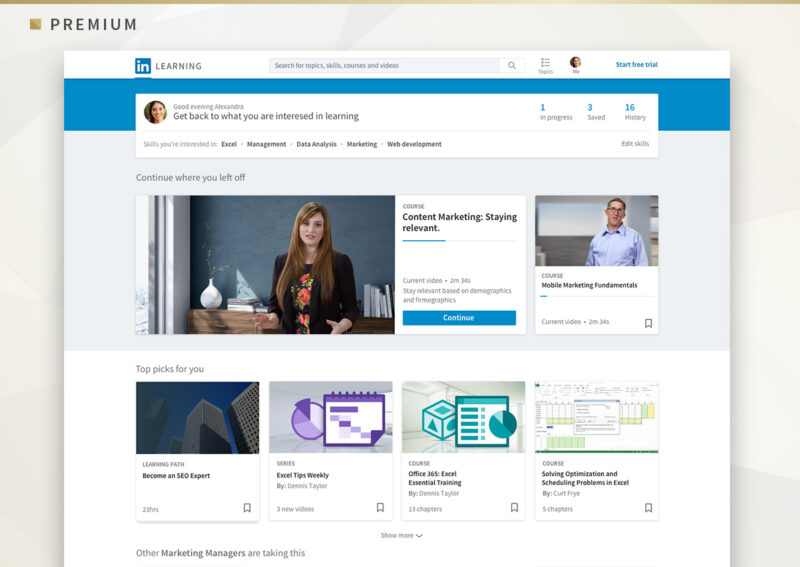
LinkedIn Premium Career also allows you to see who has viewed your profile and gives you access to LinkedIn’s library of professional courses, LinkedIn Learning. While it’s an excellent tool for anyone seriously looking for a new job, it’s not the most compelling membership level for recruiters.
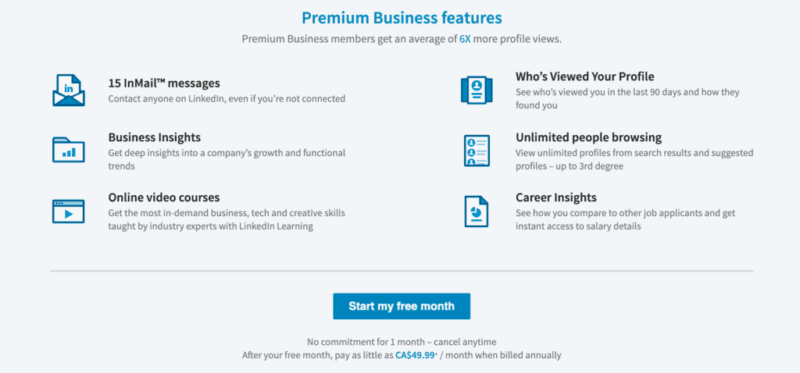
LinkedIn Premium Business is one of LinkedIn’s business solutions designed to effectively assist business owners with recruitment. It provides you with 15 InMail messages, detailed insights into competitor data and performance analytics, advanced search filters, and more search allowances.
Using LinkedIn Recruiter Lite
Recruiter Lite is “ideal when your hiring needs are limited or if you’re only hiring a few employees this year.” To use LinkedIn Recruiter Lite, you must pay a fee of $2,399/year. You will receive benefits such as:
- 30 InMails
- Over 20 filters you can apply to your candidate searches.
- Easily view your connections’ contacts to expand your talent pool.
- A comprehensive report on the effectiveness of your InMail efforts.
See more: Standard recruitment process template for businesses
III- How to find candidates on LinkedIn
How can you make your posts attract candidates and gain more attention? This is a common challenge when posting jobs on LinkedIn. If you want to recruit on LinkedIn faster, you can refer to some of the effective recruitment methods below to attract candidates.
Post complete recruitment information
This is an important step that you need to remember. A recruitment post should include an eye-catching image, a relevant headline, and a summary. Therefore, make sure that all these elements contain the keywords your candidates will be searching for.
Add keywords to each post
Just like searching on Facebook, you need to ensure that your posts, pages, and job ads on LinkedIn for recruitment contain all the keywords that your candidates are likely to use in their searches.
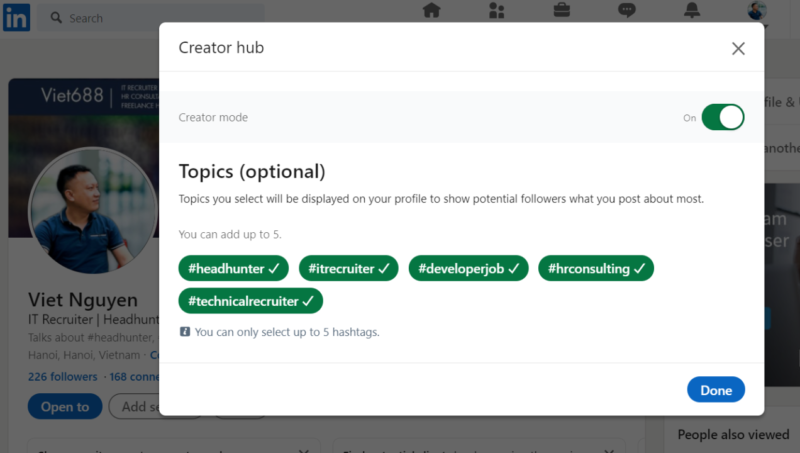
Use privacy setting options
If you want to restrict who sees your posts, you can hide your activity from certain connections and control what they see when they visit your profile to ensure your privacy.
Follow connection etiquette
When connecting with candidates, avoid spammy behavior and focus on maintaining your connections. This is similar to how you interact with your professional network to keep them engaged with you and your activities. Therefore, you should actively manage this social media page by posting compelling articles and comments to attract attention.
Check your analytics regularly
LinkedIn provides analytics and insights, so measure them regularly. Checking and analyzing data helps you eliminate guesswork in marketing roles and advertising services to optimize these costs effectively.
The article above has introduced you to how to post jobs on LinkedIn in two ways: free and paid, as well as how to post to reach many candidates quickly and easily. We hope this content will help you save on your recruitment budget for a successful hiring campaign.
For more details, please see:
Hotline: 083 483 8888
Fanpage: https://www.facebook.com/1officevn/
Youtube: https://www.youtube.com/channel/UCeTIRNqxaTwk0_kcTw6SxmA




