


 10/05/2026
  21276 views
A personal work plan template is a form commonly used in businesses, agencies, and organizations. This set of forms is standardized according to regulations, helping users operate quickly, accurately, and with complete information.

Mục lục
- I- Personal Work Plan Template
- II- Why create a personal work plan
- III- How to create a personal work plan
- IV- Guide to filling out a personal work plan template
- V- Types of personal work plan templates
- VI- Effective Personal Task Management Solution with 1Office Software
- VII- Frequently Asked Questions about Personal Work Plan Templates
I- Personal Work Plan Template
1. What is a personal work plan?
A personal work plan outlines short-term or long-term tasks to help us plan and understand the specific tasks that need to be done daily, monthly, or even yearly. From there, you can map out what needs to be done and optimize your personal plans for the future.
A personal planning template is understood as a pre-made table or form that displays all related tasks within a project. Using a plan template helps individuals save maximum time and effort, as they only need to fill in the form.
2. Content in a personal plan template
In a personal work plan template, the creator must detail each task to be done and the desired results. A personal plan template has the following main contents:
- Time from the start to the completion of the task
- Detailed content of the work to be done
- Estimated time to complete the work
- Results to be achieved upon completing the task
- Name of the department or unit
- Contingency plan for arising issues
- Plan to request support from other parties
Depending on the purpose, whether it’s a short-term or long-term plan, you can adjust your personal work plans to be most suitable. This helps ensure close monitoring and timely completion on schedule.
See more: Work Plan Template to Help Double Work Efficiency
II- Why create a personal work plan
Having a work plan template will guide and direct you, helping you make decisions faster and reminding you of the goals you will easily achieve. In other words, creating a personal work plan increases the probability of success and reduces the risk of errors along the way. This will help you control all your work and be best prepared for any adverse situations that may arise.
Here are some benefits of personal planning:
- Helps you achieve your work goals as quickly as possible
- Shortens the time to complete the set tasks
- Ensures you take well-planned and appropriate actions.
- It helps you improve your time management skills to achieve your goals.
- Helps track progress, motivating you when you feel like giving up.
- Reduces pressure and stress, improves life balance, and boosts self-confidence
With the benefits mentioned above, it’s clear that a personal work plan template is an indispensable tool for accurately measuring the steps to achieve your goals. It helps you know what you are doing and check your progress throughout the implementation process. However, how can you follow the roadmap to achieve your goals and get the best results? Let’s explore some ways to create a personal work plan in the content below.
III- How to create a personal work plan
Creating a work plan is an involved process that requires as much detail as possible before you present it to stakeholders. You can refer to the following steps to create a personal plan:
1. Identify the work or project to be done
First, you need to determine how long the work or project will take: 1 month, 1 quarter, or 1 year. Additionally, you should inform your manager of the purpose of your work or project. Will your project better meet customer needs? Perhaps your competitor has released an upgraded version of your product, and you need to scale up to meet market demand. Whatever the ultimate goal is, make sure it is clearly stated.
2. Set your goals
Your goals may be similar to your purpose, but they are a bit more specific in that they are more long-term oriented. Your project goals must be measurable. For example: the goal of this project after launch is to increase the number of monthly active subscribers by xx% or generate a certain amount of revenue.

3. Identify and coordinate your resources
When you identify and coordinate your resources, be sure to address the following questions:
- How much budget will be allocated to this project?
- From which department will the budget be allocated?
- Who do you need on the team?
- What software tools to help evaluate work performance (such as time tracking, team collaboration, project management tools) will be required to streamline the project?
4. Understand your constraints
Next, you need to consider whether your work plan is constrained by time, budget, and resources. Because at this point, you have already listed the three previous steps, you can now account for risks that might hinder those processes. For example, you might have to perform unexpected tasks; some of your tools might malfunction, requiring more money from the budget. Whatever your constraints may be, or any factor that feels like a risk that could lead to comprehensive limitations, could affect the completion of your deliverables or even your project’s goals and objectives.
IV- Guide to filling out a personal work plan template
A personal work plan template helps employees set goals, allocate time, and manage work progress scientifically. When filling out the template, you can follow these 5 steps:
1. Personal information & job position
Fill in the basic information:
-
Full name
-
Department
-
Position
-
Direct manager
-
Planning period (week/month/quarter)
Providing clear information helps managers easily track and approve the plan.
2. Work objectives by phase
Define SMART goals (Specific – Measurable – Achievable – Relevant – Time-bound).
For example:
-
Complete 20 potential customers/week
-
Reconcile debts before the 25th of each month
-
Increase document processing efficiency by 15%
3. Detailed task list
List each task in a table format:
-
Task name
-
Expected objective
-
Execution time
-
Priority level
-
Coordinator (if any)
This section helps managers understand the content and allocate resources appropriately.
4. Expected results & evaluation metrics
Specify:
-
Expected work output to be completed
-
Related KPIs
-
Potential risks and handling measures
This content serves as the basis for comparing the plan against actual results.
5. Confirmation signatures
Includes:
-
Employee creating the plan
-
Direct manager’s approval
Helps ensure consistency in work execution.
V- Types of personal work plan templates
For each position, title, and job, each person will choose a different personal work plan template. To have a professional and complete work plan, you can refer to some of the available templates below:
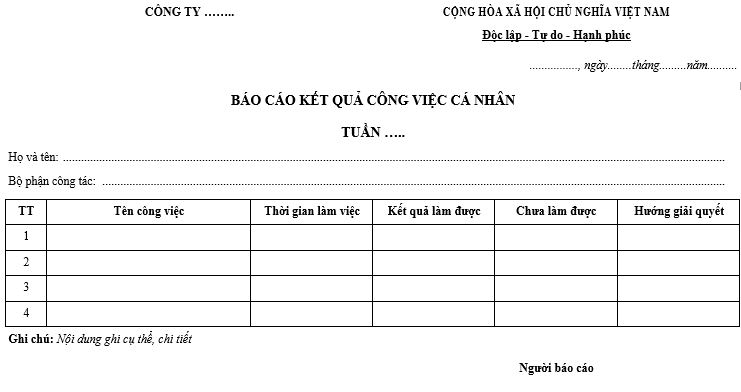
1. Daily personal work plan template
The daily personal planning template allows individuals to carry out sub-tasks with items such as: execution time, completion time, and work quality assessment. To evaluate work efficiency, you can use personal work management software to help you track work progress quickly and conveniently.
DOWNLOAD HERE
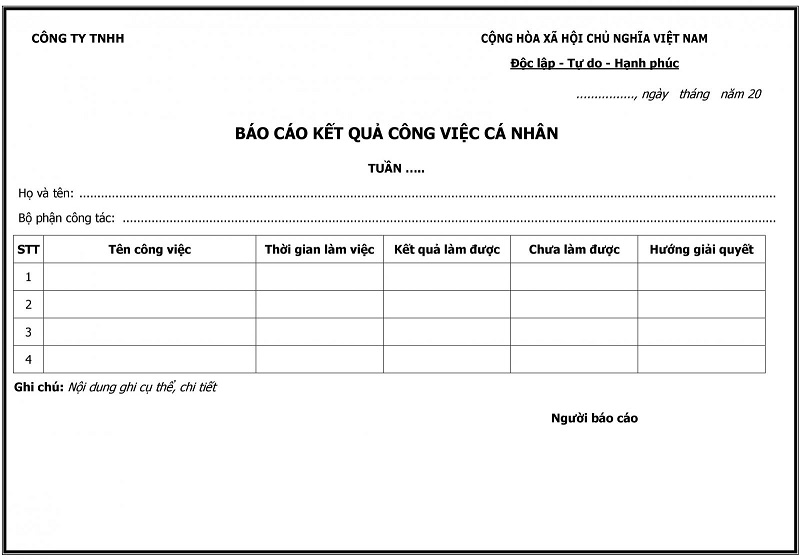
2. Weekly and Monthly Personal Work Plan Templates
If you want a long-term work plan for tracking, creating a weekly or monthly plan is the perfect choice. To have a complete weekly or monthly work plan, you need detailed and specific information to monitor progress and establish accurate performance evaluation criteria. Refer to some weekly and monthly personal work plan templates below:
DOWNLOAD HERE
VI- Effective Personal Task Management Solution with 1Office Software
In the Industry 4.0 era, using a task management software is a smart and effective solution to help you manage personal tasks quickly and easily. And 1Office is one of the reputable providers of the best task management tools on the market today. With many outstanding features, the software helps you:
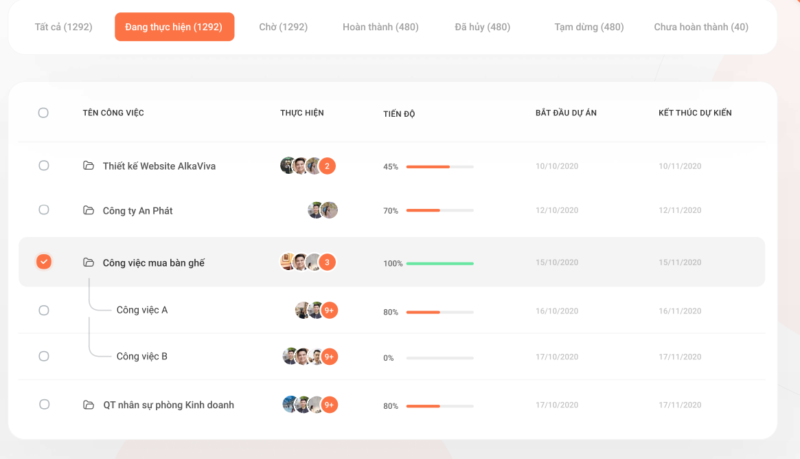
- The tool helps users create specific and realistic personal work plans, enabling quick task execution for maximum efficiency.
- Quickly assign tasks and responsibilities to individuals or groups based on their roles and positions.
- Automatically updates tasks to your personal calendar, allowing you to easily track them anytime, anywhere.
- Quickly updates the progress of tasks and projects, helping managers grasp the details of all the work you are performing.
- Discuss and collaborate on tasks directly within each workflow.
- Provides detailed, visual reports of work in formats like Dashboards, Gantt Charts, and dynamic reports.
- Helps users evaluate work performance fairly and accurately.
VII- Frequently Asked Questions about Personal Work Plan Templates
1. Are personal work plan templates mandatory by regulation?
No. This is not a legally required form, but it is an important tool for managing performance and organizing work systematically.
2. Should the template be created daily, weekly, or monthly?
It depends on the nature of the work.
-
Operational tasks: create daily/weekly plans
-
Office work: create weekly/monthly plans
-
Management positions: create monthly/quarterly plans
3. Is it necessary to include KPIs in the work plan?
It is recommended. KPIs help measure progress and transparently assess the level of goal achievement.
4. Can the plan template be customized to fit departmental needs?
Yes. Each department can add specific objectives, tasks, or metrics relevant to their unique functions.
5. Is it mandatory for a personal work plan to be approved by a manager?
Approval is encouraged to ensure consistency, especially for roles that involve multiple departments or KPIs.
6. Can the plan be used for month-end performance reviews?
Yes. It is one of the key documents for comparing planned objectives with actual results.
Thus, the article above has introduced users to various personal work plan templates and highlighted the benefits and role of applying task management software to create a detailed and effective personal work plan. We hope this article provides you with useful knowledge to successfully apply to your own personal work planning. For consultation and support, please leave your phone number, and the expert team at 1Office will contact you for a consultation today.
For more details, please see:
Hotline: 083 483 8888
Website: https://1office.vn/
Fanpage: https://www.facebook.com/1officevn/
Youtube: https://www.youtube.com/channel/UCeTIRNqxaTwk0_kcTw6SxmA

















