


What is BPMS? The Role and Core Functions of Business Process Management Software


The business process is like the backbone of an organization. Therefore, how to optimize processes and streamline the operational apparatus is always a top goal for businesses. Today, with the flourishing development of technology and the explosion of the 4.0 revolution, the term BPMS has emerged, completely redefining how organizations manage their business processes, creating a major leap forward in business operations. So, what is BPMS? What core functions does Business Process Management Software include? Let’s find out with 1Office in the following article.
Mục lục
1. What is BPMS? Understanding the term BPMS
Before understanding what BPMS is, we first need to understand the definition of BPM – Business Process Management. BPM is the process of modeling, automating, executing, controlling, measuring, and optimizing business workflows to support the key goals and outcomes of a business.
BPMS stands for Business Process Management Software or Business Process Management System. Regardless of the interpretation, BPMS is essentially understood as a tool for implementing a management method to improve an organization’s business processes by building, operating, then analyzing, and continuously improving to optimize those processes.
2. Why businesses need to invest in implementing BPMS
The business process is the backbone of an organization because it is the central hub connecting all workflows towards a common goal and is the mechanism that transforms resources into meaningful outputs, bringing economic value to the business.
Applying technology to business process management is a breakthrough in business operations, helping to optimize all active processes and enhance the internal strength of the organization. Implementing BPMS can bring the following significant benefits to a business:
-
Improve operational performance
One of the most important benefits of BPMS is its ability to improve the organization’s operational performance by standardizing business processes, while minimizing errors and waste during operation.
A business process management software can simultaneously monitor multiple projects and processes running in parallel, providing the opportunity for near real-time management of the organization’s resources. It also allows organizations to reduce redundancy in data collection and analysis, which wastes valuable time and resources.
-
Reduce operational costs
One of the key goals for businesses amidst the recent volatile economy is to save on operational costs to increase the sustainability of their business model.
Therefore, Business Process Management Software plays a crucial role in optimizing operational costs for businesses. For example: By automating the onboarding process, organizations can reduce the amount of time and resources needed to introduce and train a new employee because the data within the process is inherited.
Additionally, business process management systems can help organizations automate tasks such as invoicing and complaint handling, which can help reduce the amount of time and resources required to complete these tasks.

-
Minimize risks and errors in the process
This is one of the top benefits of BPMS for an organization’s senior management, as it allows them to promptly detect breakdowns in the process, find the reasons for process stagnation or delay, and from there, devise plans for improvement and optimization.
Furthermore, a business process management system also helps standardize all business processes within the company, setting regulations and criteria for operational stages. As a result, the staff always has a standard frame of reference to perform their functional activities, minimizing errors during work.
-
Improve product and service quality
A Business Process Management System (BPMS) can improve the quality of products and services by ensuring that processes are executed consistently and accurately, thereby ensuring output quality is always controlled and defects are minimized.
At the same time, BPM software is also capable of tracking and monitoring the performance of the entire process, making it easy to identify factors and stages that can be improved to enhance product and service quality.
3. BPMS Functions and How It Works
Process Definition and Design
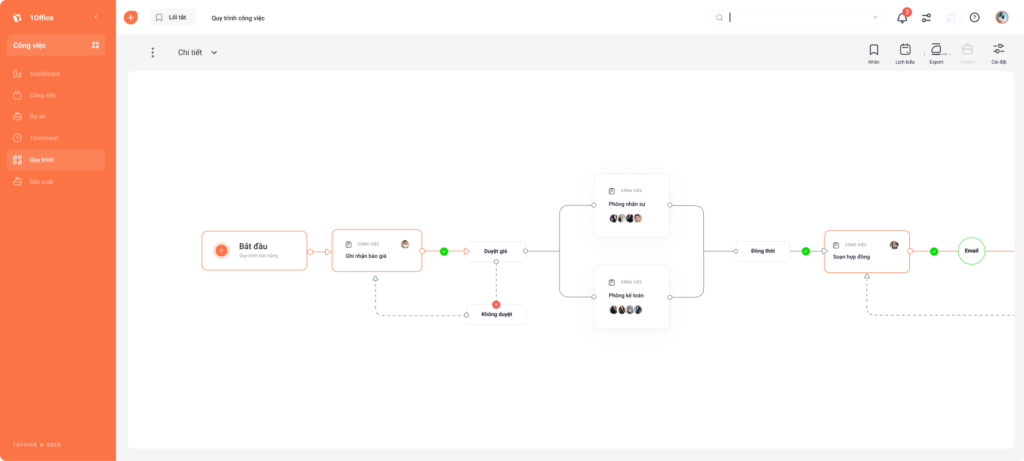
A process is a series of activities performed to achieve a specific result. Before automating a workflow, the operator must define that process. BPMS will support management in this stage by allowing them to identify the most appropriate and effective actions to complete the task.
Then, once the tasks and jobs to be performed have been identified, the entire process will be modeled and digitized on the software in the form of a flowchart.
Process Implementation
A process becomes operational when a job is created and assigned to it. The job sequences will run according to the pre-configured process sequence. Participants will be notified when it is their turn to perform a task. At each step, the performer has the right to update the execution status. The system will rely on the status updated by the personnel to forward the job. In this way, the process flow will be continuously forwarded and operate smoothly on the system until the final step.
Process Automation
The essence of process automation is to reduce the majority of repetitive work and manual operations performed by humans by transferring them to a pre-programmed system with pre-set rules to automatically trigger tasks and forward them to other steps.
For example, when a director signs and approves a contract document, that document will be automatically forwarded to the accounting department’s storage without the intervention of the responsible employee.
Process Analysis and Improvement
BPMS tools provide different levels of reporting or integrate with reporting tools to provide analysis of process performance. The reports are linked to KPIs (key performance indicators) and provide data on the performance of each action, process, and participating member.
The analytical function of BPMS can identify process bottlenecks and create opportunities for continuous process improvement.
4. 1Office – The Solution for Business Process Management and Automation
As a pioneering solution in enterprise digital transformation, 1Office offers a superior process management toolkit capable of digitizing and automating 100% of business processes within an organization, helping businesses operate smoothly, enhance performance, and significantly save on management costs.
Key Features
- Standardize and digitize 100% of business processes, including the most complex ones.
- Detailed reports on progress, number of jobs in each process, and each step within the process.
- Automatic alerts for upcoming deadlines.
- Operate interconnected processes across all departments accurately and effectively.
- Integrate multi-platform digital signatures directly into the process.
- Measure the effectiveness of each step in the process, thereby helping businesses optimize their processes.
Get a free consultation & demo
In the article above, 1Office has introduced readers to useful knowledge about what BPMS is and how a business process management system operates. 1Office is the most superior enterprise management solution on the market today, helping businesses optimize their business process management. For a consultation and software trial, please contact us using the information below:
- Hotline: 083 483 8888
- Fanpage 1Office: https://www.facebook.com/1officevn
- Youtube Channel: https://www.youtube.com/c/1OfficeNềntảngquảnlýtổngthểDoanhNghiệp




