


 11/05/2026
  952 views
A work progress report is a valuable document that showcases your achievements as well as any issues that require a superior’s decision to resolve. When progress is slow and reports are unclear, every decision becomes risky. That’s why CEOs, department heads, and project managers cannot do without an accurate and transparent progress reporting system. In this article, 1Office shares the 9 most practical work progress report templates – along with professional creation methods and a solution to digitize the entire process in just a few minutes.
Mục lục
- I. What is a work progress report?
- II. Common types of work progress reports
- III. Daily, weekly, and monthly work progress report templates for individuals and businesses
- IV. 4 basic steps to create a work progress report
- V. What are the benefits of creating a work progress report?
- 1. Sales Department – Accelerate sales, avoid missing opportunities
- 2. Marketing Department – Control multi-channel campaigns
- 3. Production / Construction Division – Ensure project safety and progress
- 4. HR / Administration Department – Ensure compliance and employee experience
- 5. Service – Technology Industry – Enhance project performance
- VI. Automate work progress reports on 1Office with AI Agent
- VII. Frequently Asked Questions
I. What is a work progress report?
A work progress report is a detailed explanation of the completion level of assigned tasks by an individual or an organization. It is a work management tool that can take various forms, such as a report table or a report file.
A standard report is one where the writer must answer the following questions:
- The amount of work completed
- The portion of work not yet performed
- Problems that occurred during task execution
- The overall status of the project at the time of reporting
II. Common types of work progress reports
Typically, report templates are divided by timeframes such as weekly/monthly/yearly. Depending on who is writing the report, whether you are an individual or a representative of a department, the work items in the report will differ. Below are some common work progress report templates you can refer to:
- Purpose of use: To objectively identify the difficulties and problems faced by an individual/organization and to record them to avoid repeating the issue in the future
- Report creator: An individual in a workgroup, a team leader who needs to report the work status to a superior.
- Report approver: A manager, an authorized person in the business.
Main items required:
-
- Name of the company/organization the individual works for.
- Employee name, department, and position.
- Date of the report.
- Content of tasks handled.
- Results of implementation.
- Comments, questions, suggestions.
Note when writing:
Using subheadings also makes it easier to remember information.
Typically, when framing questions, the writer can use the PPP method:
- Progress: This includes milestones, goals achieved, tasks completed, and confirmed items that contribute to the project’s completion.
- Plan: Things to do, short-term and long-term goals, and other plans that affect the project’s completion.
- Problems: These are the obstacles and issues affecting the project’s completion.
III. Daily, weekly, and monthly work progress report templates for individuals and businesses
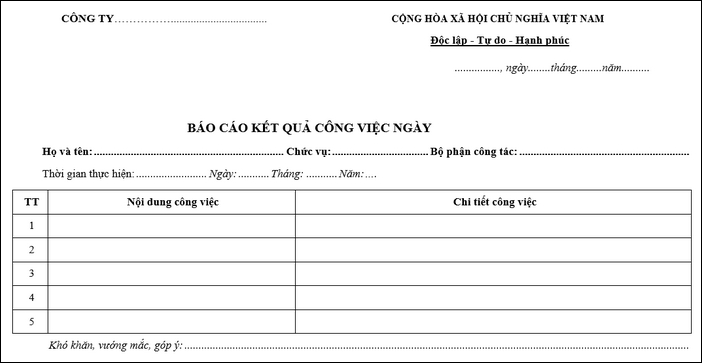
1. Daily work progress report template
This is a report template for the results of work an individual has done in one day. A daily work report needs to show detailed content, work progress, and have a clear, standard format. Below is the latest daily work report template in Excel that you can refer to.
2. Weekly work progress report template
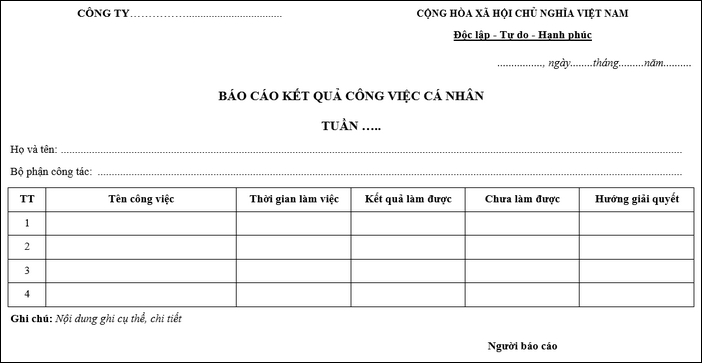
It shows all the tasks that have been completed and those that are not yet finished, as well as any unexpected issues that have arisen. This report will contain more information than a daily report. Through this, it helps leaders make adjustments and arrangements for work to proceed more smoothly.
Build an effective, cost-optimized work management process with:
> > Secrets to building an effective work management system to increase productivity by 200%
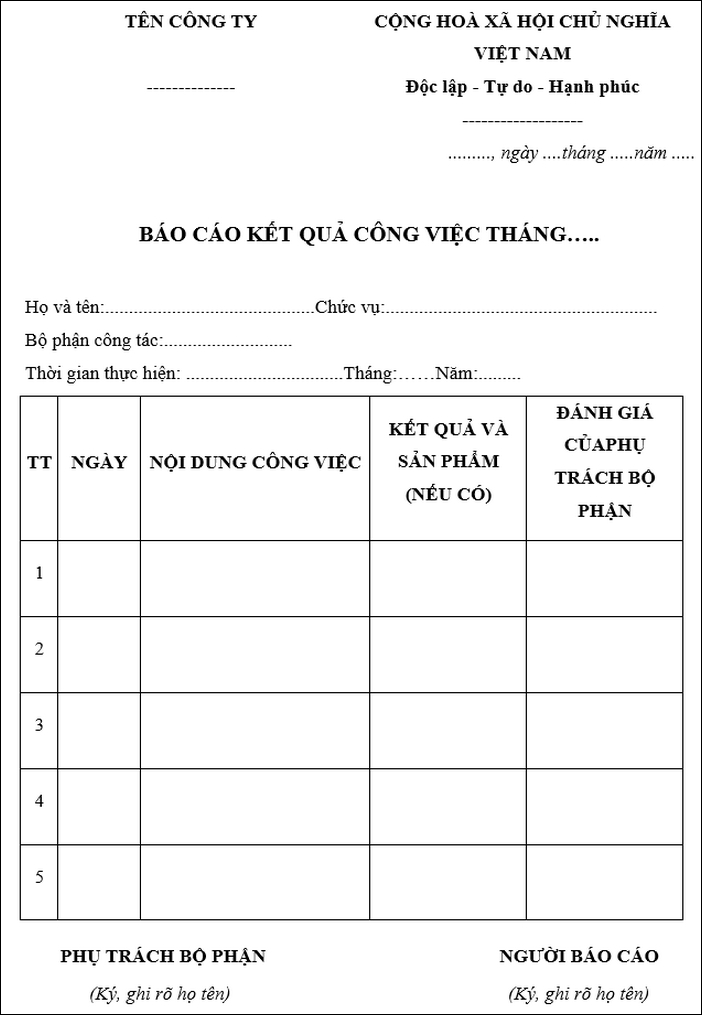
3. Monthly report template
Unlike the two types of work reports above, the monthly work report includes additional columns for a broader scope of tasks, and the volume of completed and uncompleted work. If you are looking for a monthly work report template, you can refer to the one below.
See more: 1Office Work Progress Management Software – The best solution for task assignment and evaluation
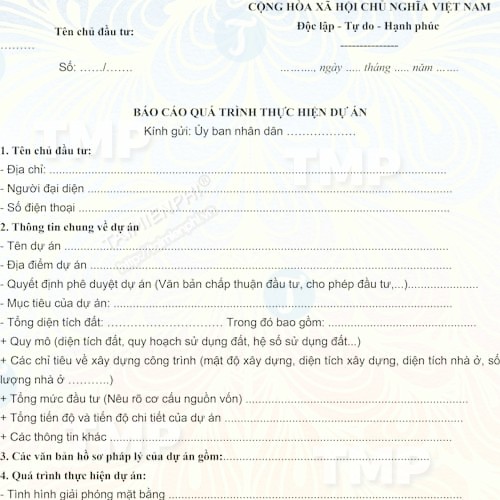
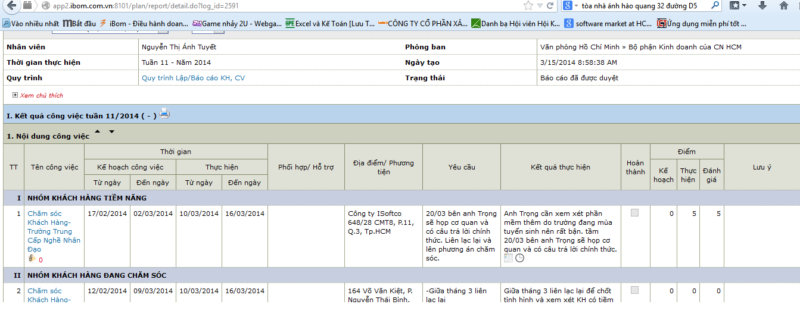
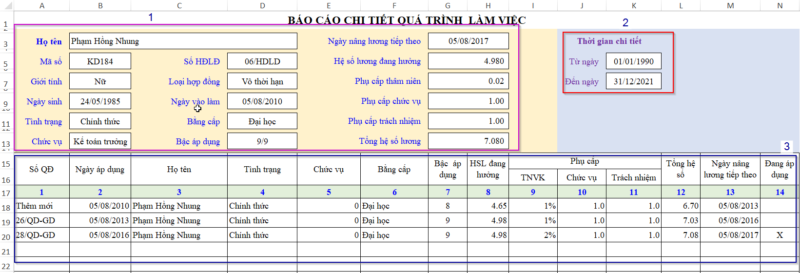
4. Some work progress report templates by department and project
IV. 4 basic steps to create a work progress report
For a work progress report to be truly valuable, businesses need a clear process instead of fragmented notes or subjective summaries. Understanding the basic steps not only helps managers easily track task completion levels but also supports employees in reporting key points, saving time for both sides.
Below are 4 important steps that any individual or organization can apply to create an effective work progress report.
1. Prepare to write the report
- Determine the purpose of the report: The most common purpose is to summarize the progress and status of a project. Typically, it is written periodically but can also be written at the request of management (for sudden or unusual reasons).
- Collect the necessary data for the report: To gather the required data, you must have good communication skills at work. Data can be collected from various sources such as: Field surveys; figures from departmental reports; feedback and opinions from agency staff, and relevant individuals, etc.
- Compare and analyze the collected information: The person writing the report will process the data manually or through tools to provide specific figures to support the report.
- Anticipate, evaluate the situation, draw lessons, and propose suggestions
2. Structure of a work progress report
Based on the collected information and data and by identifying issues related to the report’s topic, the information included in the report needs to be summarized and presented as condensed data.
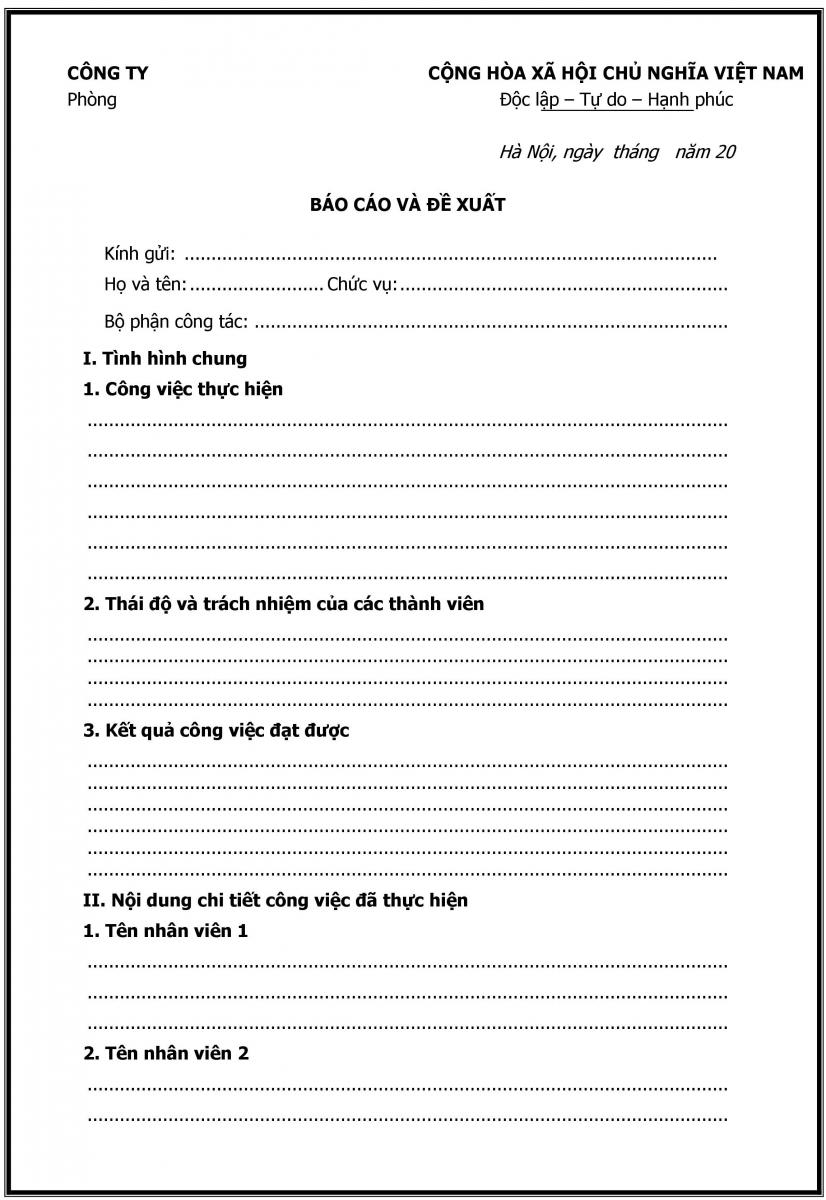
Introduction:
- State the main points of the assigned task
- Describe the circumstances of task implementation and the difficulties encountered
- Advantages encountered by the person writing the report.
Body:
- Provide a summary, evaluate the results achieved against the initial plan.
- Propose directions and tasks to be carried out in the upcoming period.
Conclusion:
- A brief overview of the projected schedule.
- Explanation of future steps.
- Reasons for any delays.
- Projected completion date
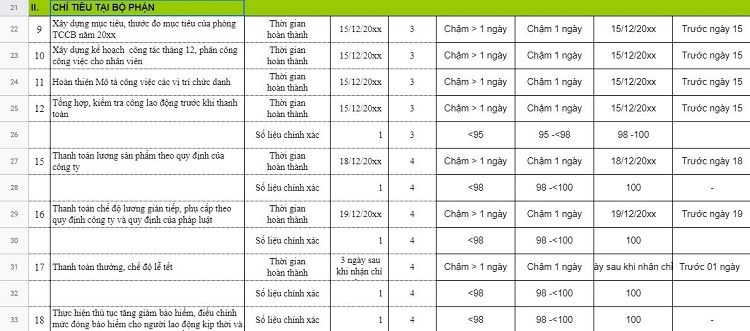
3. Create a list of completed tasks by milestones
The task list is created based on the report outline approved by superiors and uses collected information and materials to write the report.
4. Finalize the report and submit it for leadership approval
For important reports (such as annual, 5-year, or 10-year summaries), the report writer needs to rely on the outline to revise, supplement, and edit it completely before submitting for leadership approval.
V. What are the benefits of creating a work progress report?
A progress report not only helps track how far along the work is, but also brings different values to each department and field. When designed specifically for its purpose, the report becomes a tool that helps leaders make more accurate decisions.
1. Sales Department – Accelerate sales, avoid missing opportunities
Progress reports help the Sales Department track target completion rates, the number of closed deals, and the number of pending opportunities. As a result:
-
Managers can easily identify which employees are behind schedule to provide timely support.
-
The sales team is motivated to track targets and not miss potential customers.
-
The business can better control the pipeline, avoiding the risk of missing sales targets at the end of the period.
2. Marketing Department – Control multi-channel campaigns
For Marketing, campaign progress directly determines the effectiveness of a product or brand launch. Progress reports offer these benefits:
-
Track each item (content, design, running ads) to avoid missing deadlines.
-
Easily evaluate the effectiveness of channels and optimize the budget.
-
Help leadership get a comprehensive view and clearly understand the campaign’s success level.
3. Production / Construction Division – Ensure project safety and progress
In production or construction, any delay leads to increased costs. Progress reports play a key role by:
-
Helping monitor which items are completed and which are delayed.
-
Tracking the use of labor, machinery, and raw materials.
-
Limiting emerging risks, ensuring the project is handed over on time and safely.
4. HR / Administration Department – Ensure compliance and employee experience
Even for the HR/Admin department, work progress reports are equally important. They help:
-
Track the completion status of HR procedures, contracts, and benefit policies.
-
Control deadlines for paying salaries, bonuses, and allowances.
-
Enhance transparency, strengthening employees’ trust in the company.
5. Service – Technology Industry – Enhance project performance
In the service and technology sectors, progress is linked to team performance and customer satisfaction. Progress reports allow you to:
-
Accurately measure the percentage of work completed in each sprint/project.
-
Identify bottlenecks to reallocate resources.
-
Ensure output quality, avoiding missed deadlines with customers.
VI. Automate work progress reports on 1Office with AI Agent
Writing daily or weekly work progress reports can be time-consuming for employees. So, have you ever looked for a solution to make your work reporting process easier?
1Office is one of the best work management software that helps all personnel in the enterprise (leaders, mid-level managers, team leaders, department heads, and sales staff) connect within a single ecosystem. This solution integrates all management tools, from managing work and people to specific business activities such as: HRM – CRM – Workplace.
Creating progress reports will no longer be a time-consuming burden if the business applies the 1Office platform. Not only does it help summarize, present, and analyze progress visually, but the software also integrates a smart AI Agent – providing the ability to monitor, evaluate, and warn about delays in real-time.
-
✅ 1AI Process automatically records the status of work at each step of the process. Whenever a task is completed, updated late, or deviates from the plan, the system will automatically sync the progress to the report – no manual action required.
-
✅ 1AI Monitor acts as an “operations controller,” continuously monitoring the entire work system within the business. The AI will detect anomalies, such as processing bottlenecks or departments with low completion rates, and then automatically alert managers as soon as there is a risk of missing a deadline.
-
✅ 1AI Assistant helps managers retrieve progress reports directly within the chat window, with flexible Q&A such as:
“What is the progress of project X?”
“Where is the Marketing department falling behind?”
“Compare this month’s progress with last month’s for me!”
With the combination of process automation, intelligent monitoring, and natural language data communication, the progress reporting system on 1Office not only reflects the current situation accurately – but also becomes a tool to support accurate and timely decision-making for CEOs, department heads, and project managers.
VII. Frequently Asked Questions
Should work progress reports be sent daily, weekly, or monthly?
It depends on the nature of the work. Tasks that require daily monitoring should be reported daily, tasks with a stable cycle can be reported weekly, and monthly reports are suitable for seeing the overall picture.
How is a work progress report different from a work plan?
A work plan states what will be done, while a progress report shows what has been done. Simply put, one is the forward-looking direction, and the other is an update on actual results.
Should a progress report also include difficulties and suggestions?
Yes. This section helps managers identify bottlenecks and provide timely support, rather than just knowing a task is delayed without understanding why.
What metrics should a manager look at first in a progress report?
They should first look at the completion level, deadlines, delayed tasks, the person in charge, and any major obstacles. This information helps managers grasp the situation most quickly.
Is there any software that helps businesses automate work progress reporting?
Yes. If a business wants to assign tasks, track progress, and consolidate reports on a single system, they can consider 1Office work management software to centralize task updates and reduce manual reporting.
The article above has given you a general overview of the Work Progress Report Template used in businesses. We hope that with these report templates, you can quickly and easily create a work report that is both efficient and effective.

















