


 10/05/2026
  23751 views
In human resource management, storing and organizing employee records is an essential task. An effective employee records management system helps simplify processes, enhance accuracy, and save maximum time. In this article, 1Office will share some tips for businesses on how to manage employee records effectively using Excel and provide free downloadable template files for HR to reference.
Mục lục
- What is Managing Employee Records with Excel?
- Which businesses should manage employee records with Excel?
- Components of an Excel file for managing employee records
- 10 Standard Excel Templates for HR to Manage Employee Records
- Template for managing current employee records
- Employee contract management template
- New Employee Management Template
- Employee Offboarding Management Template
- Salary and Bonus Fluctuation Tracking Template
- Detailed Comprehensive Employee Profile Management Template
- Employee Timekeeping Management Template
- Employee KPI Management Template
- Employee Training Management Template
- Employee Asset Management Template
- Limitations of Using Excel for Employee Record Management
- How to Optimize HR Record Management with Excel If Your Business Must Still Use It
- 1Office HRM – Effective HR Information Management Software
- Frequently Asked Questions
What is Managing Employee Records with Excel?
Managing employee records with Excel is the practice of using an Excel file (or Google Sheets) to store, track, and process all of a company’s personnel information instead of using specialized HR software.
This is the most common method in Vietnamese businesses with 5 to 150 employees (accounting for ~78% according to a survey by VietnamWorks & TopCV 2025).
Practical Pros and Cons of Using Excel for HR Management
| Criteria | Advantages | Disadvantages / Real-world Risks |
|---|---|---|
| Cost | 100% free (only requires Excel or Google Sheets) | When the company has >80 employees, it consumes a lot of HR’s time (making it more expensive than software) |
| Easy to Start | Everyone knows Excel, can be set up in 1–2 days | Prone to formula errors, duplicate data, and accidental deletions |
| Customization | Freely add/edit columns according to company needs | Over-customization leads to large files, formula errors, and difficult maintenance |
| Security | Can be password-protected | Very weak: easy to copy the entire file, no edit history, no protection against leaks of salary or ID card data |
| Features | Can handle 80–90% of basic needs: timekeeping, payroll, leave, contracts… | Lacks: probation period reminders, automatic birthday emails, contract expiration alerts, onboarding checklists… |
| Reporting | Easy to create beautiful dashboards with PivotTable | Takes many hours each month to compile reports |
| Teamwork | Google Sheets allows multiple users to edit in real-time | Desktop Excel only allows one person to edit at a time → easy to overwrite and lose data |
Which businesses should manage employee records with Excel?
Every business needs a process for managing employee records to fully capture personnel information and effectively resolve issues that arise in business operations. Today, there are many ways for businesses to store and manage records, such as using Excel for management support or using HR management software. However, the choice between using Excel or HR management software depends on the size and needs of each business.

For small, newly established businesses with a limited number of employees, using Excel to manage employee records is a reasonable choice. Excel provides a simple and flexible interface that allows managers to easily create and customize spreadsheets according to their needs.
Conversely, for large businesses with a large number of employees, using employee management software is the best choice. Today, HR management software is specially designed to meet needs ranging from the simple requirements of small and medium-sized businesses to the complex demands of large organizations. This includes managing personal information, payroll, timekeeping, benefits, training, and many other features. Additionally, employee record management software offers automation, high security, and the ability to process large amounts of data, helping to increase efficiency and reduce errors for the HR department.
However, the choice between Excel and employee record management software also depends on other factors such as financial resources, technological proficiency, and the complexity of the HR management process within the business. For small businesses or those with a small workforce, using Excel can be a cost-effective and efficient option. Meanwhile, for medium and larger businesses, using HR management software will help optimize processes and enhance employee performance.
Components of an Excel file for managing employee records

Some basic components of an Excel file for managing employee records include:
- Employee ID: This is a unique code assigned to each employee to identify and differentiate between employee records.
- Full Name: Information about the employee’s full name.
- Date of Birth: The day, month, and year of the employee’s birth.
- Address: The employee’s contact address.
- Phone Number: The employee’s contact phone number.
- Job Position: The title or position the employee holds in the company.
- Department: The department or division where the employee works.
- Start Date: The official start date of employment at the company.
- Salary: The salary or benefits paid to the employee.
- Other Information: Additional information about the employee such as educational background, special skills, work experience, or any other important information related to the employee’s record.
>> See more: The role and functions of the HR department in a business
10 Standard Excel Templates for HR to Manage Employee Records
In a business, creating and maintaining employee records is a crucial part of the HR Department’s responsibilities. To help manage personnel information effectively, Excel templates for managing employee records have become a useful tool for HRMs. Let’s explore the following Excel templates for managing employee records with 1Office:
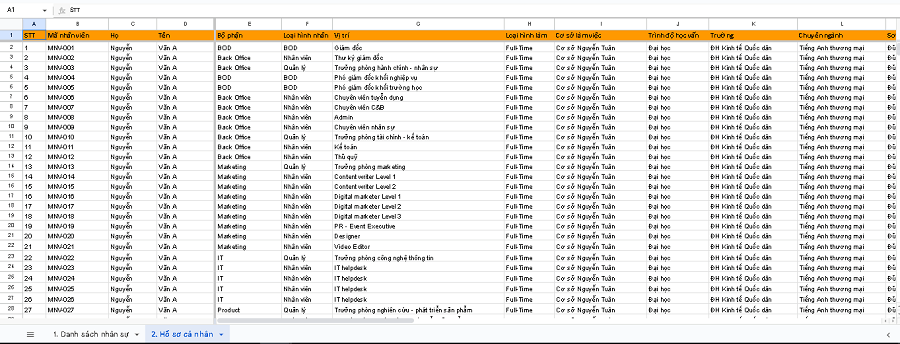
Template for managing current employee records
This employee record management template helps managers track basic employee information such as name, date of birth, address, phone number, and email. This allows HR to easily access and search for necessary information about current employees.
Free Download: [1OFFICE] Current Employee Record Management Template.xlsx
Employee contract management template
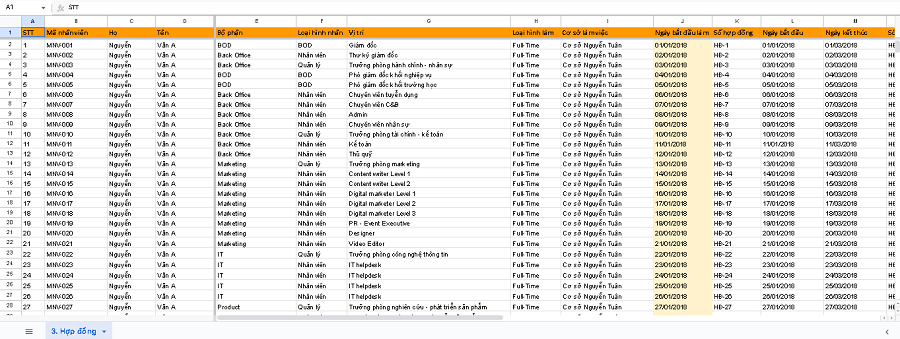
This template helps manage employee labor contracts, including information about the contract start and end dates, contract type, and related terms, in order to control and track important information about employee labor contracts.
Free download: [1OFFICE] Employee Contract Management Template.xlsx
New Employee Management Template
The new employee management Excel template helps manage the recruitment process and personnel records of new employees, including information on name, job position, start date, and work profile. This template helps HR track the recruitment process and ensure that necessary information about new employees is managed accurately.
Free download: [1OFFICE] New Employee Management Template.xlsx

Employee Offboarding Management Template
This is a file for managing the employee offboarding process, including information on termination date, reason, and related documents to help the HR department maintain an accurate record of former employees and manage related procedures.
Free download: [1OFFICE] Employee Offboarding Management Template.xlsx

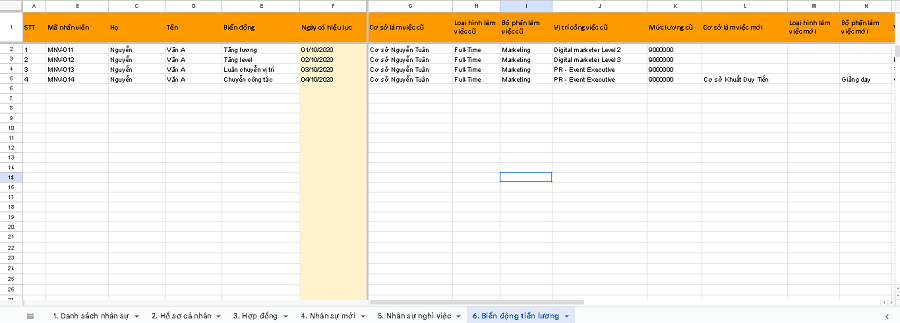
Salary and Bonus Fluctuation Tracking Template
The salary and bonus fluctuation tracking template helps businesses monitor changes in employee compensation over time. It includes information on salary levels, allowances, and other bonuses to evaluate personnel and accurately track changes in employee compensation.
Free download: [1OFFICE] Salary Fluctuation Tracking Template.xlsx

Detailed Comprehensive Employee Profile Management Template
This is a comprehensive form that gathers all necessary employee information, from basic details to educational background, work profile, and employment history. This helps HR get a complete overview of employee profiles and easily search for and access information.
Free download: [1OFFICE] Complete Employee Profile Management Template.xlsx
Employee Timekeeping Management Template
The timekeeping management template tracks clock-in/clock-out times, hours worked, overtime hours, and leave status for each employee daily. Data from this sheet is crucial input for calculating payroll, overtime, and evaluating work performance.
Free download: [1OFFICE] Employee Timekeeping Management Template.xlsx
Employee KPI Management Template
The KPI management template tracks goals, weights, achieved results, and KPI scores for employees in each evaluation period. The data helps in performance evaluation, employee ranking, and serves as a basis for considering bonuses, salary increases, or personnel adjustments.
Free download: [1OFFICE] Employee KPI Management Template.xlsx
Employee Training Management Template
The training management template records the training courses employees participate in, including course name, format, instructor, duration, cost, and evaluation results. The data is used to track employee competencies, development plans, and training budgets.
Free download: [1OFFICE] Employee Training Management Template.xlsx
Employee Asset Management Template
The asset management template is used to record the equipment and tools provided to employees, including asset information, serial number, status, recipient, and handover date. This template helps control company assets and prevent losses when employees leave.
Free download: [1OFFICE] HR Asset Management Template.xlsx
Limitations of Using Excel for Employee Record Management
Although Excel can be used to manage employee records, it has several limitations that businesses should be aware of. Here are some disadvantages of using Excel for employee record management:

- Data Size Limitation: Excel has a limit on the amount of data it can handle. When a business needs to manage a large number of employee records, Excel can become slow, causing freezing and lagging.
- Lack of Data Security: Excel does not offer robust security features like professional HR management software. It does not support access permissions and is vulnerable to data theft and unauthorized copying.
- No Multi-User Support: Excel is not designed to support multiple users updating data simultaneously. This can lead to conflicts and data loss if multiple people access and edit the same Excel file at the same time.
- Difficulty in Creating Complex Reports: Excel can be limited when it comes to creating complex reports or statistical data. When you need to generate complex reports and analyze data, a dedicated HR management tool can provide more powerful features.
To overcome these limitations, businesses can consider using specialized employee record management software or an HR management (HRM) suite to optimize employee record management.
How to Optimize HR Record Management with Excel If Your Business Must Still Use It
While Excel is not the most optimal tool for managing HR records, if your business isn’t ready to switch to specialized software, you can apply the following tips to reduce errors and increase efficiency:
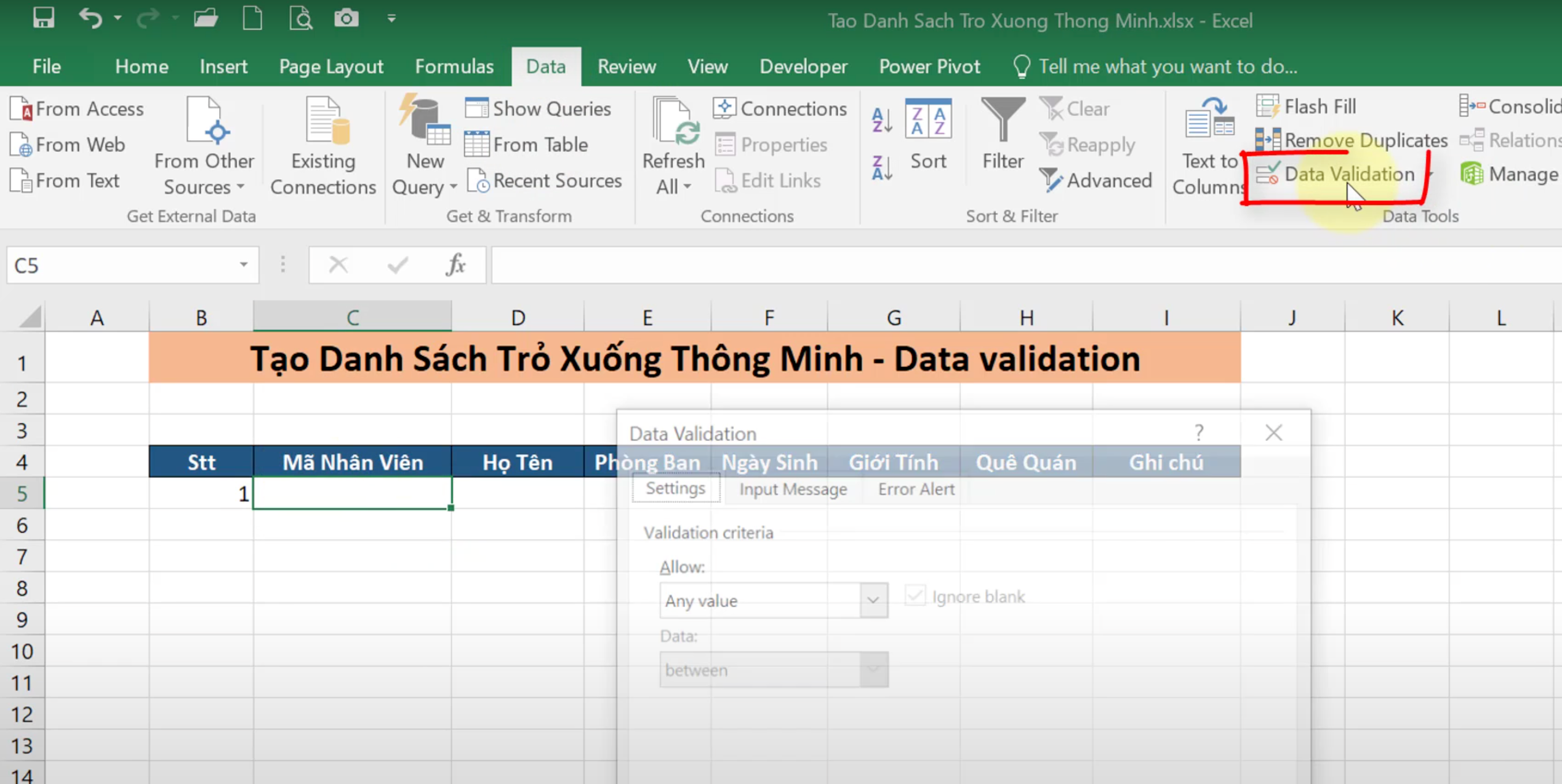
Use Data Validation to Restrict Incorrect Data Entry
Data Validation helps control data entry to ensure it follows the correct format.
How to do it:
- Select the column or cell you want to apply it to (e.g., the “Date of Birth” column).
- Go to the Data → Data Validation menu.
- Under Allow, choose the appropriate data type (Date, Whole number, List…).
- If you want to create a pre-defined dropdown list, select List and then enter the values (e.g., “HR, Sales, Marketing”).
When someone enters incorrect data, Excel will immediately display a warning message.
Set Passwords to Protect Files and Data Sheets
HR information must be kept strictly confidential.
How to do it:
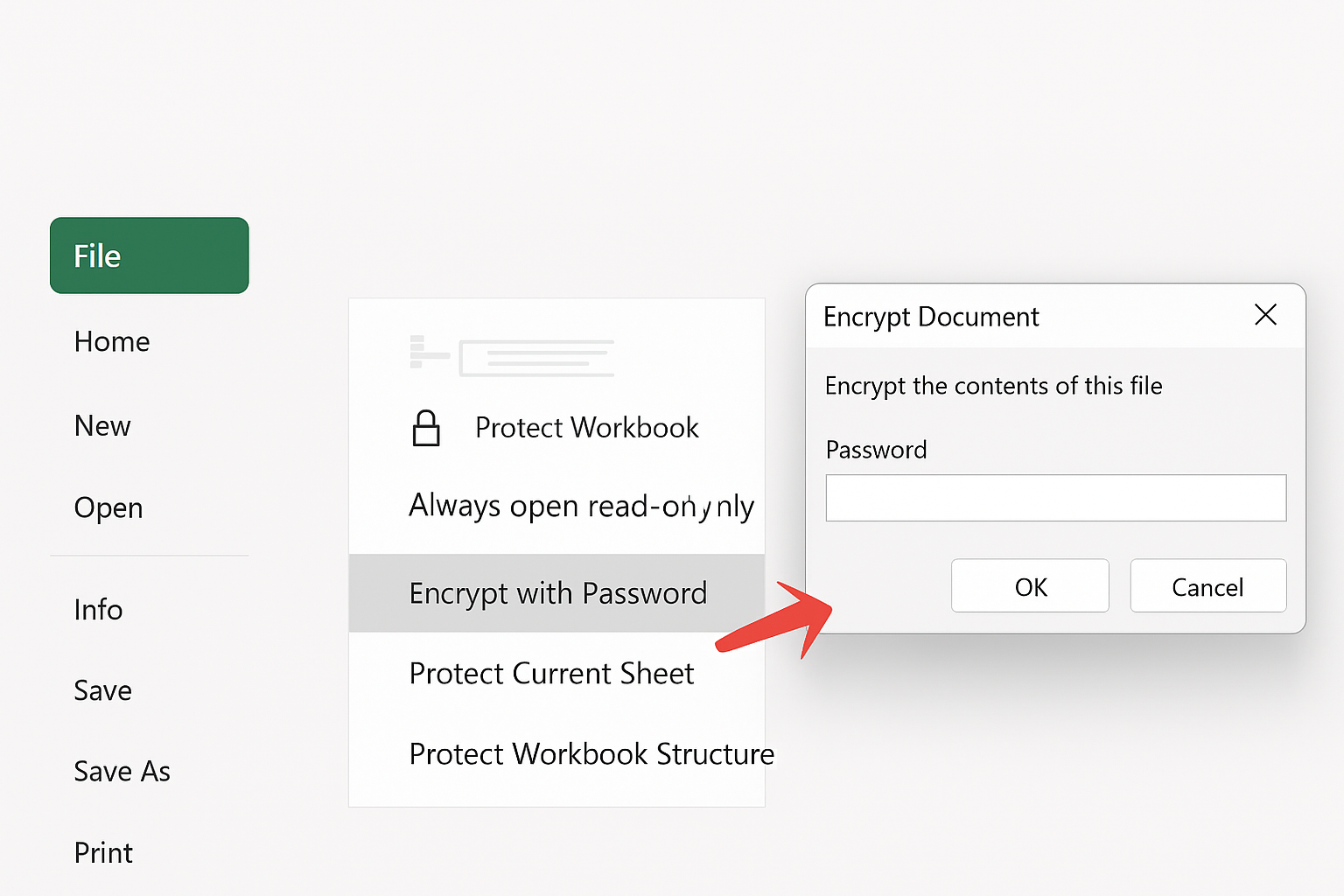
- Protect the file: go to File → Info → Protect Workbook → Encrypt with Password, and enter a password.
- Protect a sheet: right-click on the sheet name → Protect Sheet → enter a password.
- To allow only certain people to view the file, save it on OneDrive/SharePoint and set permissions.
Centralize Data into One File and Back Up Regularly
To avoid data loss and duplication:
How to do it:
- Consolidate all HR information into a single file, divided into multiple sheets: “Personal Information,” “Contracts,” “Insurance,” “Salary & Bonuses.”
- Use a standard naming convention for the file, for example: HR_Master_2025.xlsx.
- Back up regularly: copy the file to Google Drive/OneDrive every week, adding the date to the file name (e.g., HR_Master_2025_18Aug.xlsx).
- With Excel 365, turn on AutoSave to continuously save changes and prevent data loss.
Automation with Macros and VBA
If you have to create repetitive HR reports, Macros will help save time.
How to do it:
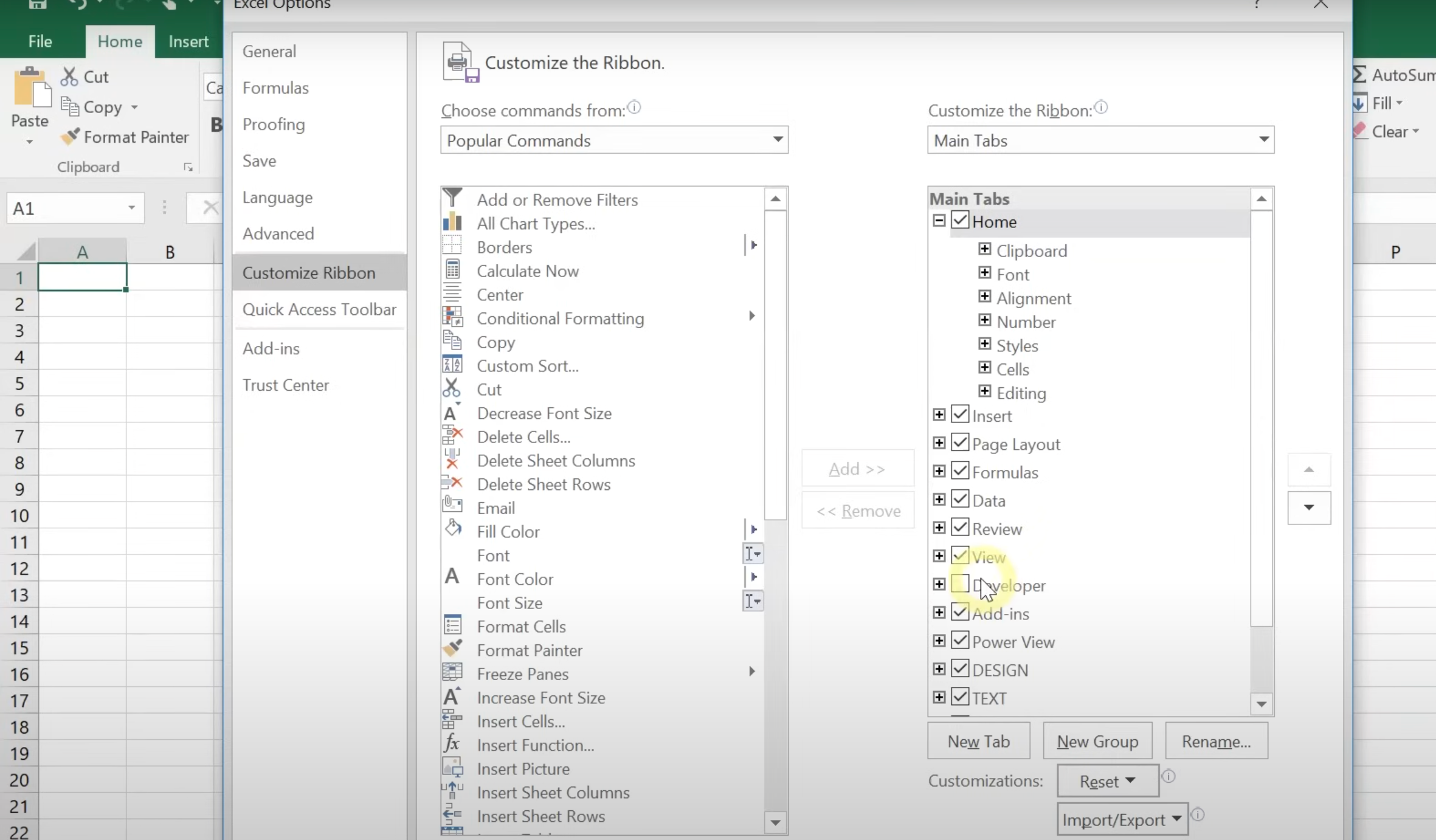
- Enable the Developer tab: go to File → Options → Customize Ribbon → check Developer.
- Select Developer → Record Macro → perform the actions (e.g., filter data, calculate totals) → click Stop Recording.
- Assign the Macro to a button to run it automatically.
- For more complex requests (e.g., automatically sending email reminders for expiring contracts), you can write VBA code in Developer → Visual Basic.
In summary, by setting up data entry rules (Data Validation), securing files, centralizing data, performing regular backups, and applying Macros/VBA, Excel will become much more scientific, secure, and effort-saving, although it cannot yet replace professional management software.
1Office HRM – Effective HR Information Management Software
HR management is always one of the biggest challenges for businesses, especially as the scale expands and employee data becomes more complex. Manual storage using Excel or paper records is time-consuming, prone to errors, and difficult to secure. 1Office HRM was created as a comprehensive solution to help businesses digitize all HR information and manage it centrally on a single platform. Not only does it support quick storage and retrieval, but the software also helps optimize HR processes, save operational costs, and enhance the work experience for both employees and managers.
What is 1Office HRM personnel record management software?
1Office HRM is a powerful and effective HR management software for businesses. It is a comprehensive solution that replaces managing personnel records with Excel, helping organizations manage HR activities efficiently and save maximum time. Below are some of the outstanding features of this software:
- Comprehensive recruitment process management: 1Office HRM helps manage and track the recruitment process from job posting, screening, and accepting candidates to signing employment contracts. This helps increase accuracy and efficiency in personnel recruitment.
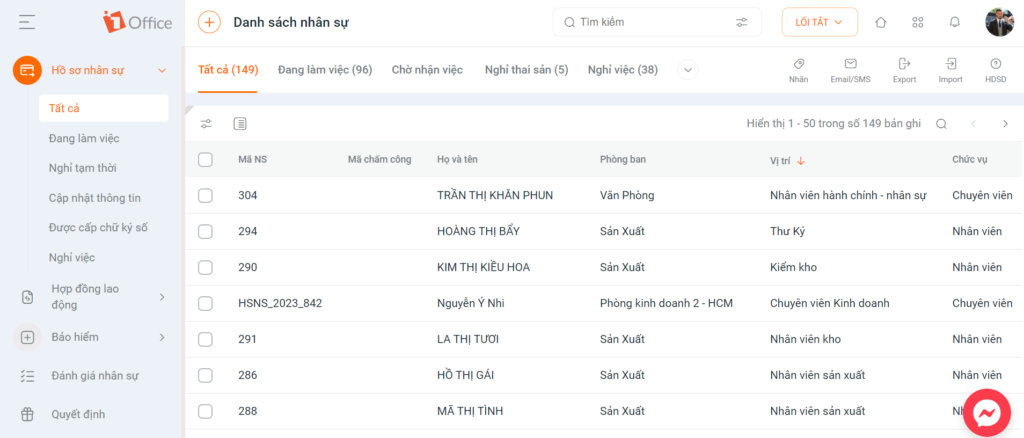
- Digitization and storage of personnel records: Includes personal information, work history, labor contracts, and other related documents. This helps the HR department easily access and manage employee information quickly and conveniently.
- Visual employee competency assessment: The software provides a set of tools for assessing employee competency, from tracking progress to evaluating skills and work performance. It also supports customizing formulas for calculating criteria scores and average competency scores to provide a clear development path.
- Synchronization of timekeeping data across all branches: The software allows for the synchronization of timekeeping data from different branches into a centralized system. This helps businesses manage easily while ensuring the accuracy and consistency of the data.
- Flexible automatic salary calculation, 24/7 payroll: 1Office HRM supports automatic salary calculation based on rules and configuration parameters customized by the business. This helps save time and increases accuracy and transparency in the payroll process.
- Visual & detailed KPI management: The tool allows managers to track and evaluate employee KPIs. Visual and detailed reports help managers better understand the performance and contribution of each employee in the organization.
- Management of corporate asset information: Provides features for managing corporate asset information, including equipment management, access permissions, and asset usage tracking. This helps simplify the process of managing and controlling the company’s assets.
Real business example: Discover the YODY brand’s digital transformation story here
Previously, Yody – a fashion brand with over 4,000 employees and 160 stores – managed its personnel records using Excel, which led to slow updates, frequent errors, and difficulty synchronizing between branches. After implementing 1Office HRM, all data was digitized and managed centrally, from timekeeping, request approvals, and contracts to payroll. As a result, Yody saved significant time, reduced payroll discrepancies, enabled instant information retrieval, and ensured smooth operations across the entire system.
Mr. Dinh Trung Son, HR Director of Yody, shared:
“Before 1Office, we managed the complete records of 4,000 employees using Excel files. After implementing 1Office HRM, we only need to enter data once, and the system automatically stores it, making it convenient and accurate to look up employment status, track attendance, manage requests, and calculate payroll.”
Comparing Employee Record Management with Excel and 1Office’s HRM Software
| Criteria | Excel | HRM Software |
| Initial cost | Almost free (only requires Microsoft Office or Google Sheets) | Higher (paid monthly/annually or based on the number of employees) |
| Implementation | Easy, just install and create a spreadsheet | Requires time for implementation, configuration, and training |
| Customization | Flexible, users design their own tables | Many templates available, but advanced customization requires vendor support |
| Data management | Manual storage, easily becomes messy with large amounts of data | Automated, centralized data, and clear access permissions |
| Scalability | Limited when the number of employees exceeds 50 | Easily scales for hundreds/even thousands of employees |
| Automation | Limited (requires manual work or complex formulas) | High (automatic timekeeping, payroll calculation, contract expiration reminders…) |
| Security | Depends on individual computer security, easily copied | Multi-layered security, data encryption, detailed access permissions |
| Integration features | No direct integration with other systems | Integrates with timekeeping, payroll, recruitment, CRM… |
| Reporting & analysis | Requires manual work, time-consuming | Automatic reports, visual charts, trend analysis |
When a business has over 30 employees, managing employee records with Excel can become cumbersome, time-consuming, and prone to errors. Check out 1Office’s AI-integrated HRM solution here for more effective, secure, and cost-efficient personnel management.
Contact us now for a detailed consultation on the features of 1Office HRM and experience the intelligent personnel management solution for your business!
Frequently Asked Questions
Is managing employee records with Excel still suitable?
It is still suitable in the early stages, when the business has few employees and management needs are simple. But as the number of records increases, Excel often begins to show limitations such as difficulty in synchronization, data errors, and time-consuming updates.
Is managing employee records with Google Sheets better than Excel?
Google Sheets is more convenient for its ability to share and co-edit online. However, for long-term employee record management, both Google Sheets and Excel share the same weaknesses: difficulty in controlling data, security, and change history as the scale increases.
Is using Excel for employee record management secure?
Not really optimal. Excel allows for password protection, but it’s still difficult to set detailed permissions, control who has viewed or edited data, and it’s easy for risks to arise when files are sent by mistake or saved in various locations.
When an employee resigns, transfers departments, or changes information, is Excel easy to update?
It can be updated, but if there is a lot of data or many related files, it’s very easy for them to become out of sync. This is why many businesses find Excel becomes confusing when there are frequent personnel changes.
Is there any software that can replace Excel for more centralized employee record management?
Yes. If a business wants to manage employee records centrally, and track work history, contracts, and personnel changes more clearly, they can consider 1Office’s employee record storage software. 1Office’s solution is more suitable when a business needs systematic management instead of storing records in separate files.
- Hotline: 083 483 8888
- Facebook: https://www.facebook.com/1officevn/
- Youtube: https://www.youtube.com/@1office-chuyendoisodn

















