


 11/05/2026
  579 views
Is your business looking for a simple yet effective solution to track and analyze sales revenue? Do you, as a leader, want to enhance business management capabilities and make more accurate, data-driven decisions? Sales revenue report templates in Excel are the solution your business is looking for. Right now, 1Office will share with you 7 of the latest and most comprehensive sales revenue report templates. Let’s explore them in the article below!
Mục lục
- 1. What is a sales revenue report? Why do businesses need it?
- 2. Pros and cons of using Excel for sales revenue reporting
- 3. What content is needed in an Excel revenue report template?
- 4. Top 7 Sales Revenue Report Templates in Excel
- 4.1 Sales Revenue Report Template by Time Period
- 4.2 Sales Revenue Report Template by Product/Service
- 4.3 Sales Revenue Report Template by Distribution Channel
- 4.4 Sales Revenue Report Template by Region/Location
- 4.5 Sales Revenue Report Template by Customer
- 4.6 Sales Revenue Report Template: Target vs. Actual Comparison
- 4.7 Inventory Revenue Management Report Template
- 5. What to Consider When Creating a Revenue Report in Excel?
- 6. Which Businesses Should Use an Excel Revenue Report Template?
- 7. 1Office CRM: An effective sales management solution for businesses
- 8. Frequently Asked Questions
1. What is a sales revenue report? Why do businesses need it?
A sales revenue report is a summary of data related to a company’s sales performance over a specific period (daily, weekly, monthly, or quarterly). Its content typically includes: total revenue, revenue by product/service, by sales channel, by sales representative, or by region.
Why do businesses need revenue reports?
-
Monitor business performance: Instantly identify which products are best-sellers and which channels are most effective.
-
Manage cash flow: Helps estimate cash inflows and outflows, enabling reasonable cost planning.
-
Evaluate employee performance: Revenue per employee or team serves as a basis for rewards and KPI adjustments.
-
Make faster decisions: Based on report data, managers can devise strategies for pricing, promotions, or market expansion.
2. Pros and cons of using Excel for sales revenue reporting
Advantages of using Excel for revenue reporting
-
Popular and accessible: Almost every employee knows how to use Excel at a basic level, with no additional software installation required.
-
Low cost: No additional investment in specialized management software is needed.
-
Flexible customization: Reports can be designed to meet the specific needs of the business, from calculation formulas to charts.
-
Easy to handle small datasets: Suitable for small and medium-sized businesses with a manageable number of transactions.
-
Numerous support tools: Functions, PivotTables, Power Query, charts, etc., help automate parts of the reporting process.
Disadvantages of using Excel for revenue reporting
-
Prone to errors: Manual data entry, copy-pasting, or incorrect formulas can lead to inaccurate data.
-
Difficult to manage large datasets: When data reaches tens of thousands of rows, the Excel file becomes large, slow, and prone to freezing.
-
Lack of security: Excel files can be edited and shared without control, posing a risk of data leakage.
-
Not updated in real-time: Businesses must compile data manually, causing delays when quick data is needed for decision-making.
-
Limited collaboration: When multiple people work on the same file, errors or data loss due to overwriting can easily occur.
3. What content is needed in an Excel revenue report template?

To provide a detailed and accurate reflection of the company’s revenue, a standard Excel sales revenue report template will include the following main sections:
| No. | Content | Detailed Content |
| 1 | Report Title | Clearly state “REVENUE REPORT” to identify the report. |
| 2 | Report Information | Includes the report date and information about the reporting period (month, quarter, year). |
| 3 | List of Products/Services | – The sequential number of the product/service in the list.
– The name of the product or service. – The quantity of products or services sold. – The unit price of the product or service. – Revenue generated from the product/service (Quantity sold x Selling price). |
| 4 | Total Revenue | Calculate the total revenue from all products/services sold. |
| 5 | Revenue Analysis by Time | – Time: Month, quarter, or year corresponding to the reporting period.
– Revenue: Total revenue generated during that period. |
| 6 | Revenue Chart by Time | Create a bar or line chart to represent revenue over time for data visualization. |
| 7 | Revenue Analysis by Product/Service | – The name of the product or service.
– Total revenue generated from the product/service. |
| 8 | Revenue Chart by Product/Service | Create a bar or line chart to represent revenue by product/service for data visualization. |
Note: In addition to the content above, you can customize the revenue report template to fit your business’s specific needs, including other financial metrics like profit, costs, and profit margins, to meet your revenue analysis requirements and goals.
4. Top 7 Sales Revenue Report Templates in Excel
Depending on the scale and business goals of each company, leaders can customize and select suitable types of revenue reports, thereby providing crucial information to evaluate, manage, and optimize business operations.

4.1 Sales Revenue Report Template by Time Period
A sales revenue report by time period is used to analyze and evaluate a company’s revenue situation over a specific period. This report provides detailed information on revenue and growth by month, quarter, or year, helping managers better understand growth trends and business performance.
- Daily sales report template in Excel: Used to track daily revenue fluctuations and reflect short-term influencing factors such as events, marketing campaigns, or purchasing trends.
- Weekly revenue report template: Provides an overview of revenue development over a shorter period and helps identify weekly growth or decline trends.
- Monthly revenue report template: Helps track business performance by month, detect monthly patterns, and compare business results between different months.
- Quarterly revenue report template: Provides a clearer view of business performance each quarter, helping to identify long-term trends and adjust business strategies.
- Annual revenue report template: Offers a comprehensive view of business performance throughout the year, evaluates development, and sets goals for the following years.
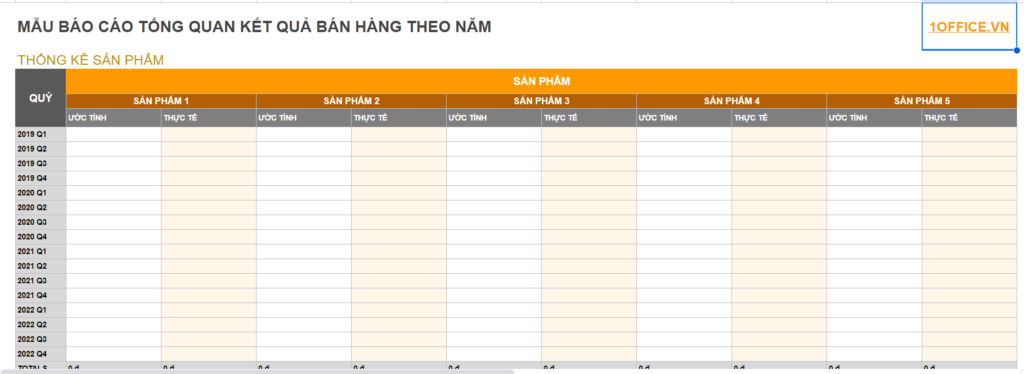
>> DOWNLOAD: Sales Revenue Report Template by Time Period
4.2 Sales Revenue Report Template by Product/Service
A revenue report by product or service helps analyze the revenue for each type of product or service the business offers. It helps determine the contribution of each product or service to total revenue, evaluate the business performance of each item, and support decisions regarding products, pricing, and marketing.
>> DOWNLOAD: Sales Revenue Report Template by Product, Service
4.3 Sales Revenue Report Template by Distribution Channel
A revenue report by sales channel or distribution channel helps classify revenue from each sales channel, such as direct sales, online sales, sales through agents, etc. It helps track and evaluate the effectiveness of each sales channel and make decisions on distribution and channel development.
>> DOWNLOAD: Sales Revenue Report Template by Sales Channel
4.4 Sales Revenue Report Template by Region/Location
A sales revenue report by sales region is an important tool for analyzing and evaluating a company’s business performance in each specific region or location. This revenue report allows for comparing business performance between regions, identifying potential markets, and supporting decisions on resource allocation and expansion strategies.
>> DOWNLOAD: Sales Revenue Report Template by Sales Region
4.5 Sales Revenue Report Template by Customer
Revenue report by customer segment: This type of report summarizes revenue from each customer segment, such as retail, wholesale, corporate clients, etc. It helps evaluate business performance by each customer segment, adjust outreach strategies, and develop customer segments.
Revenue report by customer: This type of report tracks revenue from each individual or corporate customer. It analyzes and evaluates the value of each customer, identifies important and potential customers, and creates a database to promote customer care and develop business relationships.
>> DOWNLOAD: Sales Revenue Report Template by Customer
4.6 Sales Revenue Report Template: Target vs. Actual Comparison
The sales revenue report template comparing target vs. actual is an important tool for evaluating a business’s performance and determining the extent to which revenue goals have been achieved.
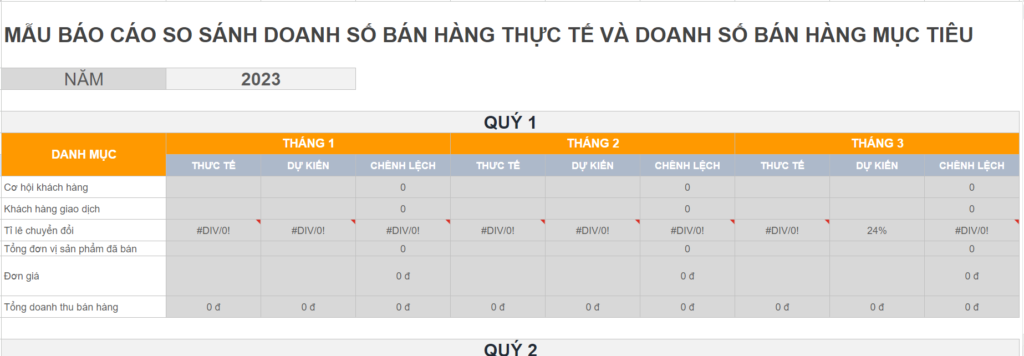
This report includes information on the set revenue targets and the actual figures collected over a specific period. By comparing the target and actual figures, businesses can assess the alignment between their plan and reality, thereby making necessary analyses and adjustments.
>> DOWNLOAD: Sales Revenue Report Template by Target and Actual
4.7 Inventory Revenue Management Report Template
The inventory revenue management report template is a crucial tool for effectively monitoring and managing a business’s revenue and inventory. This report provides detailed information on revenue and inventory status, helping management make strategic decisions to manage and optimize business processes.
>> DOWNLOAD: Inventory Management Report Template
5. What to Consider When Creating a Revenue Report in Excel?
Use formulas and functions in Excel to automate the calculation process, avoiding errors and saving time for the business. For example, managers can use SUM, AVERAGE, IF, VLOOKUP, and other functions to calculate total revenue, averages, and categorize data.
Use charts and graphs to visualize data in the report, helping to display patterns, trends, and relationships between figures in an easy-to-understand way. You can use column charts, line graphs, pie charts, and other types of charts suitable for your analysis.
Use conditional formatting to highlight important information or to issue warnings in the report, such as applying colors, icons, or other text formatting to data cells based on specific conditions.

Review and adjust the report to ensure the accuracy and correctness of formulas and functions. Additionally, carefully check for spelling errors, numerical mistakes, and data formatting to ensure the report functions accurately and professionally.
Protect data by setting access permissions in the Excel file. This helps restrict unauthorized access to the report and ensures that only authorized individuals can modify or view its content.
Ensure consistency and updates – this is a crucial factor to make sure that input data is updated in a timely manner and that formulas and functions are automatically updated to reflect changes in the business’s revenue. Regularly update the report to keep it a reliable tool for evaluating and managing business performance effectively.
6. Which Businesses Should Use an Excel Revenue Report Template?
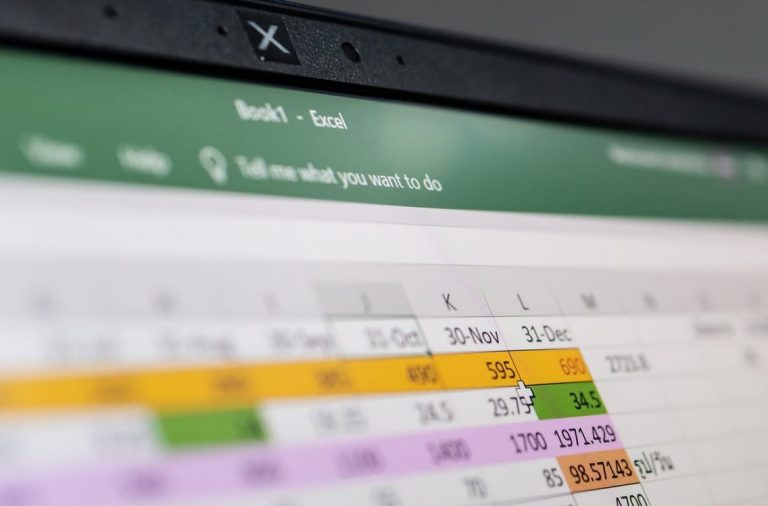
Small and medium-sized enterprises or startups are the most suitable candidates for using an Excel sales revenue report template. Because these businesses often have limited resources and tight budgets, using an Excel revenue report template is a flexible, cost-effective, and user-friendly solution. It allows them to track and analyze their revenue simply and effectively.
However, for large-scale enterprises with a large number of employees and complex business processes, using an Excel sales revenue report template is not suitable. Instead, to manage and analyze revenue effectively while organizing and managing data tightly, businesses should switch to using sales management software. The software provides many features and automation processes to manage, track, and analyze revenue efficiently.
>> See more: TOP 10 CRM Software Most Favored by Businesses Today
7. 1Office CRM: An effective sales management solution for businesses
1Office CRM is a comprehensive sales management software solution that helps businesses intelligently manage operations related to sales, orders, inventory, goods, and accounts receivable. The software overcomes all the drawbacks of managing sales revenue with Excel and supports businesses in managing sales processes, finances, revenue and expenses, accounts receivable, tracking inventory automatically, creating reports, and more.
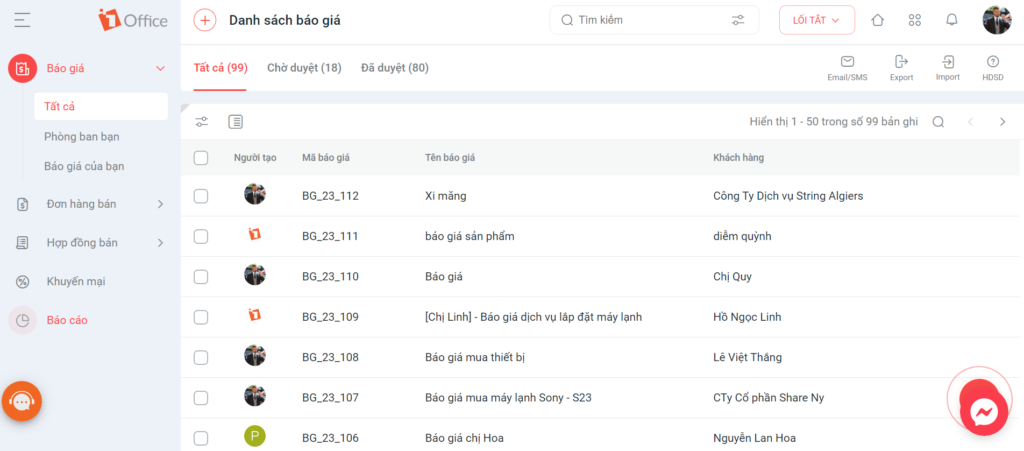
Centralized data management: The software allows businesses to manage and store all information about customers, products, orders, and transactions in a centralized database, which helps increase data integrity and minimize information loss.
Contract list management: Businesses can track contracts, manage deadlines, terms, and other related information, ensuring that contract management is carried out accurately and in a timely manner.
Access permission support: The software allows businesses to set up access permissions based on the roles and responsibilities of each employee, which helps increase data security and control for the business.
Real-time and visual reports: 1Office CRM provides visual reports on revenue, orders, inventory, and other business metrics that are updated in real-time. Managers can quickly track and analyze data to make strategic decisions and adjust business plans.
Get a demo to try the features
8. Frequently Asked Questions
Should revenue reports be made daily, weekly, or monthly?
It’s best to combine all three. Daily reports help track rapid fluctuations, weekly reports help see short-term trends, and monthly reports are suitable for overall evaluation and comparison against targets.
When should you use revenue reports by sales channel?
You should use them when your business sells through multiple channels such as offline, online, agents, or e-commerce platforms. This approach helps to clearly see which channels are effective and which need further optimization.
What are the most important columns for an Excel revenue report?
Typically, you should include columns such as date, product or service, customer, quantity, revenue, sales channel, region, employee in charge, and target vs. actual.
If multiple people update it, is an Excel revenue report file prone to errors?
Yes. When multiple people edit the file, it’s very easy to have version conflicts, incorrect formulas, or a lack of data synchronization between departments.
Is there any software that helps businesses consolidate revenue reports more centrally?
Yes. If a business wants to track revenue, customers, and sales activities on a single system, you can refer to 1Office’s sales management software to consolidate reports centrally and reduce manual work with separate files.
In this article, 1Office has provided you with a new and professional sales revenue report template in Excel. We hope this set of documents will help your business manage sales activities more effectively. If your business wants to learn more about 1Office’s sales management software, please contact us via:
- Hotline: 083 483 8888
- Facebook: https://www.facebook.com/1officevn/
- Youtube: https://www.youtube.com/@1office-nentangquanlytongt573

















