13/05/2026
  408 views
Are you about to leave your old company? But do you understand all the procedures you need to complete before you leave? Among all the procedures, what would happen if you missed the work handover report? A series of questions arise for both the company and the departing employee. Let’s explore the Excel work handover process template with 1Office right below.
Mục lục
What is a work handover report?

In short, a work handover report is a necessary requirement when an employee resigns. A complete work handover template can demonstrate that employee’s spirit and responsibility. Without a handover report, errors and disputes can easily arise later.
Purpose of the work handover process
- The work handover process involves compiling all papers, official letters, books, documents, and work tools related to the position of the departing employee. It also involves documenting the work that employee is currently doing related to the company’s projects.
- The person handing over the work will be responsible for the tasks and data up to the point of handover. The person receiving the handover will then assume responsibility for the transferred papers, records, and books.
Main content of a work handover report
- Description of the tasks being managed and responsible for, for the person receiving the handover.
- Handover of company-provided equipment and documents.
- Provide a list of managed employees. Hand over everything to the recipient.
- Guide the new employee on how to take over and perform the work.
Read more: Top 5 best business management software for small and medium enterprises
Components of a work handover Excel file
A work handover Excel file includes the following sections:
- General personal information: Full name, date of birth, address, phone number, gender, address, ID card number.
- Personal email: When an employee resigns, their company email will be deactivated. Therefore, providing a personal email will be more convenient for future communication.
- Internal email
- Employee ID
- Department
- Position
- Some information from their time at the company: Start date, offered salary, base salary, and information about salary, bonuses, and allowances.
- Reason for resignation
- Resignation date
- Work handover content
Disadvantages of using Excel files in the work handover process

Scattered data, difficulties during handover
When using Excel files to manage data, the data becomes scattered across multiple files. When a search is needed, HR staff will spend a lot of time filtering and searching for data. This not only wastes time and resources but also hinders reporting and data consolidation.
Does not ensure security
Of course, every manager wants to secure their company’s information. However, there will be Excel files that are not secure and do not have access permissions set. Many people can access your company’s confidential files.
Difficult for the next person to take over the previous person’s work
Suppose a new employee joins and receives the data from the previous person. But the new person cannot understand how the previous person arranged and managed their Excel files. As a result, the new employee has to spend time reorganizing and consolidating everything.
Prone to errors from incorrect data entry
All human operations, from data entry to calculations, are performed manually. Therefore, errors are difficult to avoid. Mistakes will be even more frequent if multiple people access and edit the same Excel file. This makes errors highly likely.
Read more: How to manage internal revenue and expenditure for small businesses
What other Excel templates should be combined with the work handover process?
To manage personnel records comprehensively and simplify the work handover process, the HR department also needs other Excel file template systems, such as:
- Master list of personnel records: This list helps the HR department and management get a general overview of the company’s number of employees.
- Individual personnel records: These records help make management simpler and more detailed.
- List of contracts: This is a list of the types of contracts that employees sign with the company.
- Insurance Excel file: A complete list of insurance policies that company employees are enrolled in.
- Employee competency assessment Excel file
- Excel file for HR reports and comprehensive analysis
Read more: 6 common difficulties in managing a convenience store
Using the 1Office application to replace Excel HR forms
All HR reports are integrated into the 1Office software
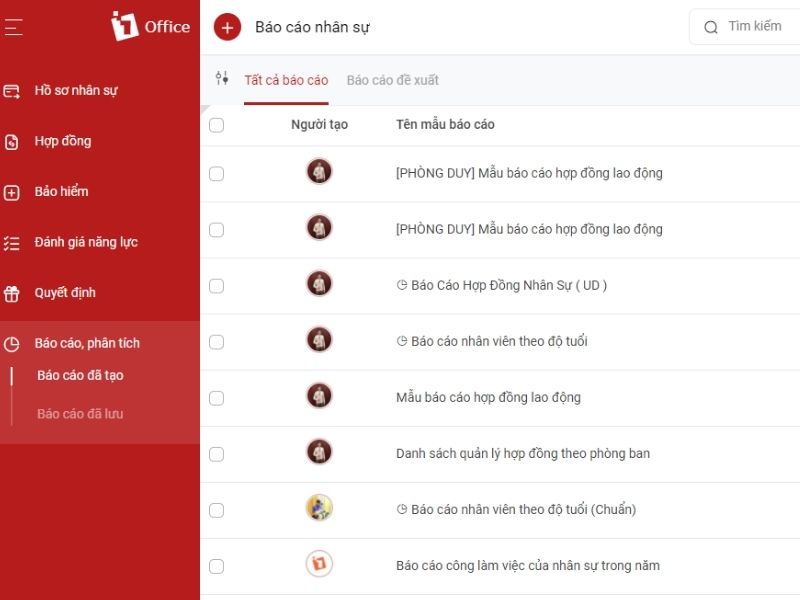
What is the company’s current personnel situation? What are the salaries and bonuses for this month? What do the labor contract report templates look like? All these metrics are calculated and collected from data stored in the software, then compiled into analytical reports.
Thus, you can grasp the company’s personnel situation at any time just by opening the software.
High security
1Office offers high security; only authorized users can access data files. Only leaders and senior HR specialists are granted permission to edit company-wide data. Other employees are only given permission to edit and view data for their own department.
All forms are created on the software
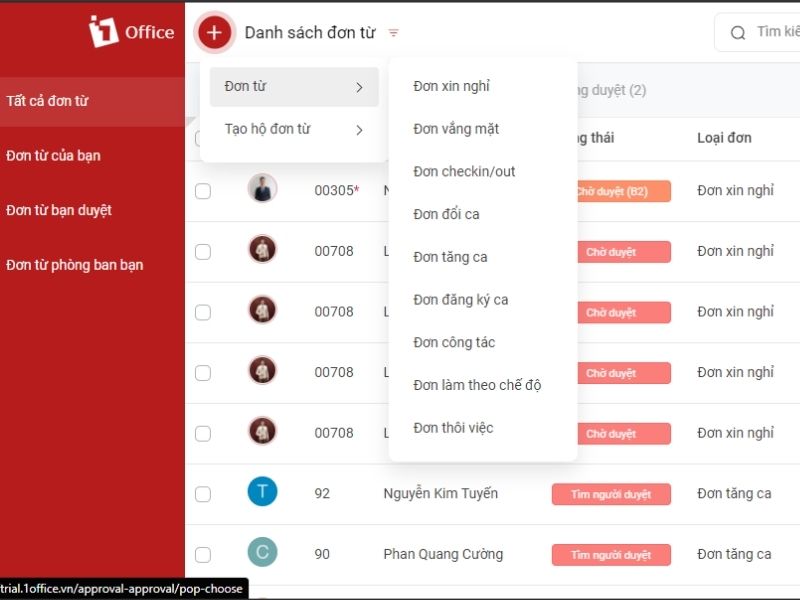
1Office allows you and your employees to create various documents such as leave requests, overtime requests, business trip requests, etc. The forms are created and automatically sent to the department head. The department head will approve them directly on the software.
1Office integrates comprehensive human resource management features
Based on research and evaluation processes, managers can create training plans for long-term resource development. Personnel are comprehensively assessed using the ASK model to identify the strengths and weaknesses of each individual. Managers can track the competency development of employees through evaluation periods. As a result, personnel are accurately assessed, helping HR managers not to overlook “talent” within the company.
Multiple features integrated into the software
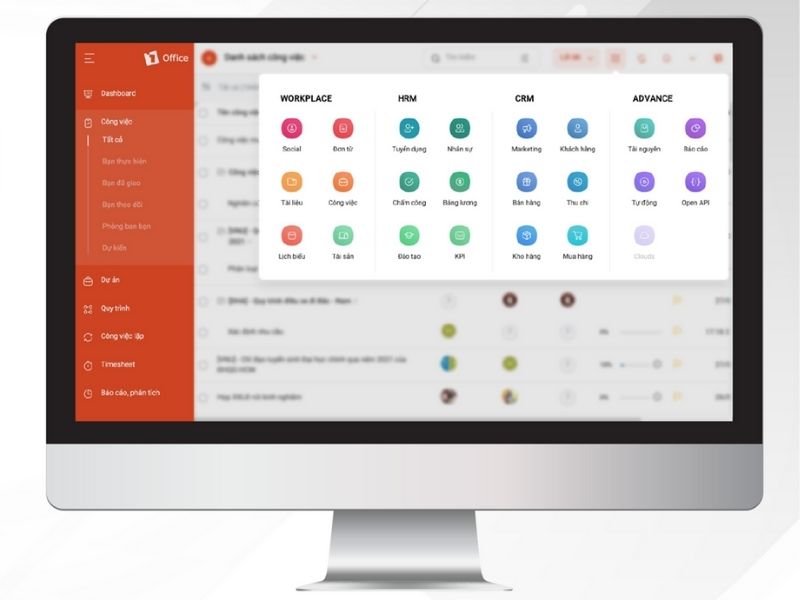
1Office digitizes and synchronizes three features on a single software platform. Workplace helps manage work and internal affairs. HRM helps manage human resources. Finally, CRM helps manage sales. By synchronizing all three modules, business management becomes more accurate and faster.
Don’t worry if your business has a large number of employees. 1Office can still help you manage it well. To learn more and experience a demo of 1Office, please leave your registration information right here.
Read more: The importance of CRM in bank management