


 12/05/2026
  845 views
Digital signature software is becoming increasingly popular in today’s era of electronic transactions due to its convenience and much higher information security compared to traditional signing methods. Instead of having to sign in person, individuals and organizations can now easily sign online on mobile devices, tablets, etc.
Mục lục
I. What are the benefits of using digital signature software?
Digital signature software is a modern technology solution that helps optimize the authentication process, delivering breakthrough benefits in transaction speed, saving financial resources, and establishing a solid security barrier for all of a business’s electronic activities.
The outstanding benefits of digital signature software in transactions include:
1. Save time
Remote digital signatures allow businesses to sign contracts and work with partners quickly and securely without the need for in-person meetings.
For other electronic transactions such as tax declarations, e-invoices, administrative procedures, etc., individuals can complete these procedures from home with an internet-connected device.
2. Save costs
Using digital signature software helps reduce costs by 70% compared to traditional signing methods. Instead of spending a large amount on printing, shipping, or storing documents, businesses can use that budget for more meaningful purposes.
3. Enhance security
In today’s open internet environment, circulating confidential information online is prone to leaks, theft, or forgery. With highly secure encryption keys, digital signature software ensures the safety of electronic transactions, giving businesses peace of mind.
4. Improve work efficiency
When using corporate digital signature software, there will no longer be piles of paperwork and backlogged documents waiting to be processed. As a result, managing and storing documents becomes much simpler, helping to improve work efficiency.
II. Top 10 best digital signature software today
Currently, there are many types of digital signatures on the market with different features and usage methods. To choose the most suitable digital signature, individuals/businesses need to carefully consider the pros and cons of each type, as well as their usage needs, before registering to purchase.
Below are reputable digital signature software trusted by many businesses.
1. 1Sign digital signature
Previously, when signing documents and vouchers manually, businesses had to follow a complex multi-step process: creating forms in one place, signing in a separate software, and then saving and managing documents in another system.
With the 1Sign digital signature feature of the 1Office software, users can perform the entire process from uploading files to signing digitally directly within a workflow without needing to print documents or use any other software. All documents and records are stored centrally on the software, which not only makes management, searching, and retrieval easier but also helps businesses eliminate concerns about scattered documents and information security.
- Sign anytime, anywhere, on any device
- Secure and legally compliant
- Centralized storage of documents and vouchers for easy retrieval and searching
- Supports signing within workflows and signing multiple documents simultaneously
- Increases trust among participating parties
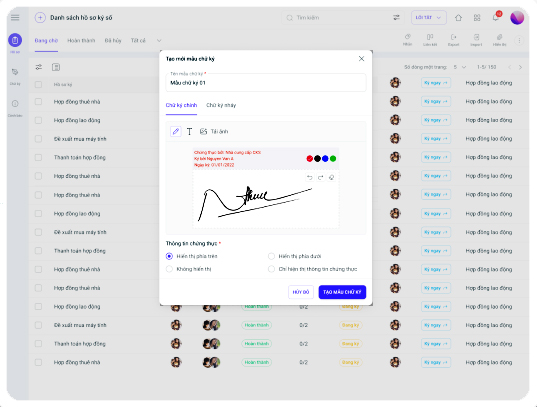
This is an effective solution that helps businesses create an efficient “digital” work environment, minimizing paper usage, saving up to 90% on printing and storage costs, and eliminating 100% of the risk of lost documents.
2. Misa digital signature
MISA eSign allows users to digitally sign e-invoices, submit tax reports, or sign documents directly on their mobile phones. The software also allows multiple people to sign one document simultaneously and supports issuing invoices from different locations.
3. FPT-CA Digital Signature
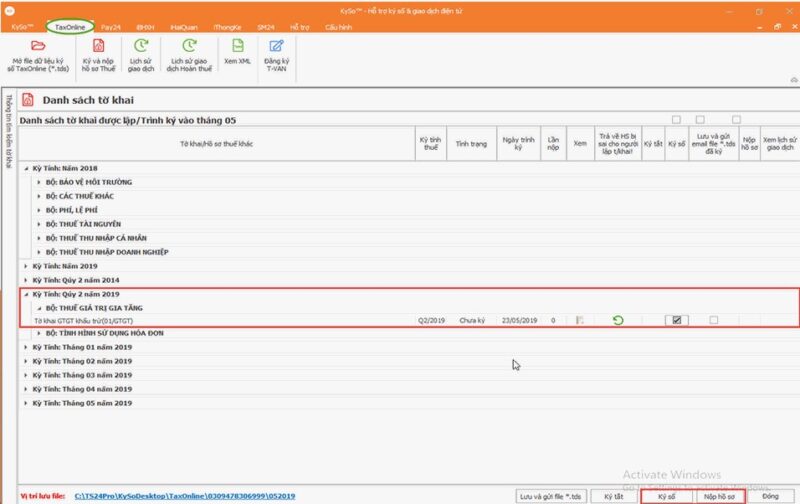
FPT-CA digital signature is developed by the digital signature certification service provider of FPT Information System Corporation. The FPT-CA digital signature software supports authentication operations in e-tax, e-customs, e-social insurance, and e-invoicing.
4. Viettel-CA Digital Signature
Viettel-CA is an electronic signature service provided by the Military Industry and Telecoms Group. Viettel signatures are used in public administrative services such as online tax declaration, e-customs, electronic transactions (e-securities, online banking, online payments), online bidding, etc.
5. BKAV-CA Digital Signature
BKAV-CA is developed by BKAV Technology Group. Besides the digital signing feature for public administrative services and regular electronic transactions, BKAV-CA is also integrated into the State Treasury’s Online Public Service system, making it easier for banking units to transact with this entity.
However, like other USB token digital signatures, BKAV-CA also has the disadvantage of only being able to sign on a computer, not supporting multiple signers on the same document, and making it difficult to control the signing activities of multiple users.
6. VNPT-CA Digital Signature
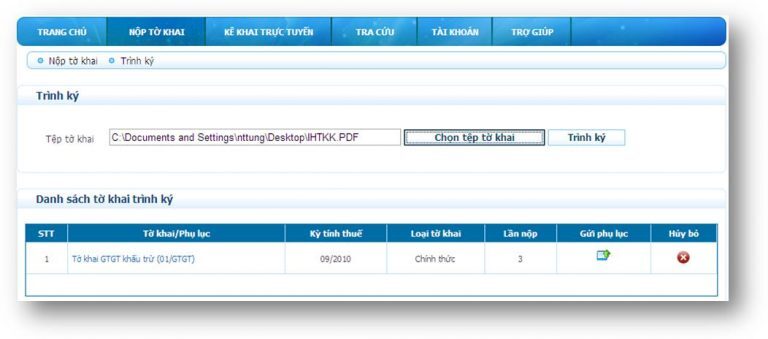
VNPT-CA is a digital signature solution from VNPT Telecommunication Services Corporation. VNPT-CA is legally recognized as equivalent to a company’s seal and signature. VNPT digital signatures can also be used in electronic transactions such as signing contracts, signing agreements, and online business.
Additionally, VNPT has a support team that helps users with installation and resolves issues quite quickly. However, the price of VNPT digital signatures is among the highest on the market, making it unsuitable for newly established businesses/organizations.
7. Vina-CA Digital Signature
Vina-CA is a digital signature brand of ViNa Digital Signature Joint Stock Company. The company is known for its simple registration process; just send a scanned copy of the representative’s ID card or the business registration license to the provider to complete the procedure.
8. New-CA Digital Signature Software
Although a relatively new name in the market, NewCA is still chosen by many customers for its reasonable prices and stable quality. Not only does NewCA provide digital signatures for individuals, organizations, and businesses, but it also offers specialized digital signature services for HSM devices, e-invoices, and employees within an organization.
9. EFY Vietnam Digital Signature
EFY-CA is a digital signature solution that allows users to digitally sign documents and conduct various electronic transactions: declaring and paying taxes online, customs declarations, social insurance, commercial transactions, e-invoicing, etc., making the process fast, safe, and highly secure.
10. Safe-CA Digital Signature
The services provided by SAFE-CA include:
- Personal digital certificate: In a computing environment, this type of certificate is used to identify individual buyers.
- Organizational/Business digital certificate: Used to identify business entities. This type of digital signature, created from this digital certificate, has the same legal validity as a seal.
See more: Digital Signatures and E-invoices
III. Criteria for Choosing Digital Signature Software
To choose a reputable and high-quality digital signature software, businesses should consider the following factors:
1. Ensuring Safety and Security During Use
Digital signatures are used to authenticate the identity of a business, organization, or individual. In the event of any dispute related to a signed document, authorities can clearly verify the entity that applied the digital signature to that document.
Additionally, digital signatures are also used in electronic transactions: Declaring and paying taxes online, registering for social insurance, issuing e-invoices, online transactions, etc. Therefore, the safety and security level of the provider are extremely important factors that businesses/individuals need to consider before choosing a digital signature software to use.
2. Support services during usage
During usage, it’s hard to avoid issues that might prevent you from signing documents and contracts in a timely manner. This is when you’ll need support from the service provider. Therefore, prioritize choosing a reputable provider with 24/7 customer support.
3. Choose a reputable provider
To choose a good digital signature software, individuals and businesses should consider the provider’s brand reputation. There are many digital signature providers on the market today, among which 1Office is the software chosen by many businesses for its ability to integrate deeply into each customer’s business process, delivering a natural and seamless experience that helps businesses save time and money.
Currently, 1Office is trusted and used by over 3,500 customers who are leading businesses in Vietnam, including names like Son Ha Group, Yody, Tocotoco, AhaMove, Adam Store, Sakuko…
To experience the superior 1CA digital signature service, click the “Sign up for a trial” button below or call 0834 838888 to connect with our Digital Signature Solution experts for the fastest support.
IV. Frequently Asked Questions about Digital Signature Software (FAQs)
Do digital signatures have the same legal validity as handwritten signatures and seals?
Yes. Digital signatures are legally recognized as having the same validity as handwritten signatures (for individuals) and seals (for organizations and businesses) in electronic transactions, ensuring the non-repudiation and integrity of the document.
Can a single digital signature be used for multiple purposes?
Absolutely. A business can use a single digital signature for various tasks such as: filing taxes, submitting social insurance, making customs declarations, signing e-invoices, and executing online business contracts.
Why should you prioritize using remote digital signatures (Remote Signing) over USB Tokens?
Remote digital signatures (like 1Sign) are superior because they don’t require hardware (like a USB), allowing you to sign anytime, anywhere on a phone or tablet. Additionally, they support multiple people signing the same document simultaneously and are easy to integrate into automated workflows.
What should I do if my digital signature expires or my signing device is lost?
When it expires, you need to contact the provider to renew the digital certificate. In case of a lost device (like a USB Token), you must immediately report it to the service provider to suspend or revoke the old certificate, preventing malicious actors from using it for fraudulent signing.
Why should businesses integrate digital signatures directly instead of using standalone signing software?
Direct integration creates a seamless workflow, eliminating the need to download and upload documents between different platforms. Instead of switching between multiple software applications (create file – sign – store), users can perform the entire process directly on the 1Office system. This helps keep data centrally stored, easy to retrieve, and enhances maximum security for the business.

















