


 09/05/2026
  13177 views
Payroll software has become an indispensable tool for HR in monthly salary management, helping to reduce pressure, save time, and improve the HR department’s efficiency. To select a suitable payroll management software that optimizes HR and payroll administration, business owners need to clearly understand the features and functions of popular software on the market to make the most informed decision. In the following article, join 1Office for a detailed review of the best employee payroll software available today.
Mục lục
- 1. Review of the Top 15 Most Popular Employee Payroll Software for Businesses
- 1.1. 1Office – Comprehensive Timekeeping and Payroll Software
- 1.2. FastWork Payroll Online Payroll Software
- 1.3. BRAVO Payroll Module
- 1.4. AiHR Payroll & Benefits Management Software
- 1.5. AMIS HR & Payroll Software
- 1.6. FTSHRM Payroll Management Software
- 1.7. Ecount Employee Payroll Software
- 1.8. Bamboo Payroll Employee Payroll Software
- 1.9. DigiiC&B Compensation & Payroll Management Software
- 1.10. Tanca Timekeeping and Payroll Software
- 1.11. CorePayroll Payroll Management Software
- 1.12. ACheckin Timekeeping and Payroll Software
- 1.13. Xero Payroll Software
- 1.14. TraxPayroll Payroll Software
- 1.15. Dsoft HRM Payroll Software
- 2. Lợi ích của phần mềm tính lương đối với doanh nghiệp
- 3. Tiêu chí lựa chọn phần mềm tính lương cho doanh nghiệp
- 4. Lộ trình triển khai phần mềm tính lương hiệu quả trong doanh nghiệp
- 5. Xu hướng phần mềm tính lương nhân viên trong kỷ nguyên AI
1. Review of the Top 15 Most Popular Employee Payroll Software for Businesses
| Software | Suitable for | Key Features | Advantages |
|---|---|---|---|
| 1Office | Medium and large enterprises | Automated payroll calculation, connects with timekeeping, KPI, and sales data | Fully automates the timekeeping – payroll – HR process |
| FastWork Payroll | Medium enterprises | Online payroll calculation, payslip management | Fast implementation, easy to use |
| BRAVO | Large enterprises | Payroll module within an ERP system | Synchronized financial and HR management |
| AiHR | SMEs | Manages salary and employee benefits | User-friendly interface, easy to use |
| AMIS (MISA) | Medium and large enterprises | Payroll calculation, manages PIT and social insurance | Comprehensive business management ecosystem |
| FTSHRM | Medium enterprises | Manages payroll and human resources | Flexible payroll calculation based on multiple policies |
| Ecount | Medium enterprises | Integrated payroll within an ERP system | Centralized management of business data |
| Bamboo Payroll | International enterprises | Manages payslips and employee data | Good reporting and salary history tracking |
| DigiiC&B | Medium and large enterprises | Manages compensation and bonus policies | Effective analysis of salary policies |
| Tanca | SMEs | Automated timekeeping and payroll calculation | Suitable for businesses with multiple work shifts |
| CorePayroll | Large enterprises | In-depth payroll calculation system | Manages complex payroll processes |
| ACheckin | Medium enterprises | GPS timekeeping, integrated with payroll calculation | Suitable for businesses with mobile employees |
| Xero Payroll | International enterprises | Payroll integrated with accounting | Suitable for businesses using the Xero ecosystem |
| TraxPayroll | Large enterprises | Manages payslips and benefits | Supports various salary policies |
| Dsoft HRM | Small and medium enterprises | Manages HR and payroll calculation | Simple interface, easy to implement |
1.1. 1Office – Comprehensive Timekeeping and Payroll Software
Employee payroll management is one of the main features of the comprehensive 1Office HRM human resource management module. The 1Office payroll management software provides a superior solution to solve all the bottlenecks in complex payroll calculations, while optimizing HR and payroll management within the business. This creates a foundation for enhancing the work experience and ensuring the quality of the workforce. With its fully developed timekeeping and payroll management features, the 1Office solution is recognized as one of the top employee payroll management software available today.
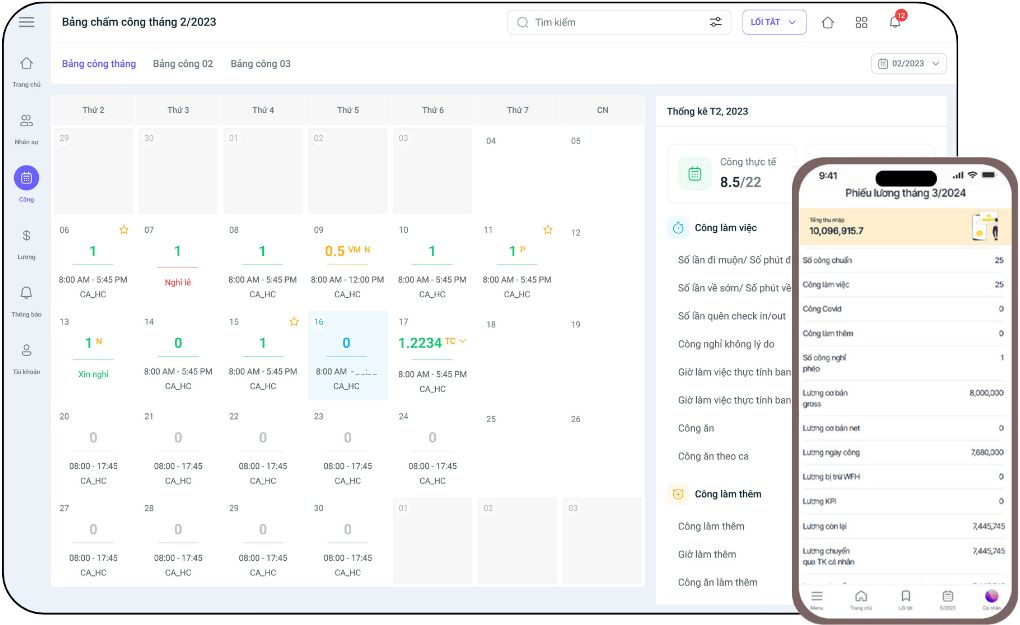
Key Features
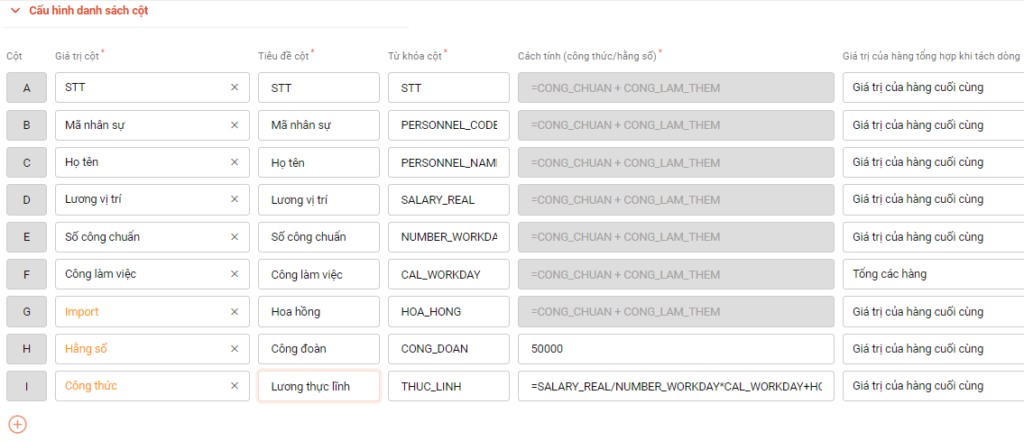
- 100% digitizes all types of manually processed payroll sheets onto the software using a system of diverse keywords and formula setups.
- Builds flexible payroll formulas tailored to the specific industry of each business: 3P salary, daily wage, product-based pay, sales-based commission, etc.
- Flexibly customizes payroll parameters (basic salary, health insurance, social insurance, personal income tax coefficients, etc.) according to the company’s policies.
- Connects with other features/operations to retrieve payroll data such as: timekeeping summaries, KPIs, sales figures, etc., helping to automate the payroll process, shortening manual calculations and reducing errors.
- Automatically syncs data to generate payslips and sends them directly to employees. HR no longer needs to calculate, summarize, or manually import/export data. Employees can proactively track their timesheets and payslips clearly and transparently at the end of the month.
- Declares and accounts for allowances, insurance, and income tax for employees.
- Quickly finalizes and approves payroll online. Can pay salaries and provide advances directly 24/7 on the software via MB Bank. Receive salary within 1 minute after the transfer order is placed.
- Automatically generates reports on the salary fund and payroll situation based on various criteria, helping managers keep track of the company’s funds and effectively manage internal cash flow.
Review
- In-depth payroll management features that meet all the timekeeping and payroll needs of a business.
- Integrates the market’s most optimal HR management toolkit, combining a full range of features to support employee payroll management along with other HR management features like KPIs, Revenue, etc.
- Direct 24/7 salary payment via MB Bank.
- Automates 70% of manual timekeeping summary and payroll calculation tasks, minimizing errors and saving 50% of time for HR.
Pricing
1Office offers a variety of service packages to suit the needs and scale of different businesses, with reasonable prices starting from just 40,000 VND/user/month. Check out the price list and get a free trial consultation for the market’s most optimal HR and payroll management software here:
Get a Quote & Free Trial Consultation
1.2. FastWork Payroll Online Payroll Software
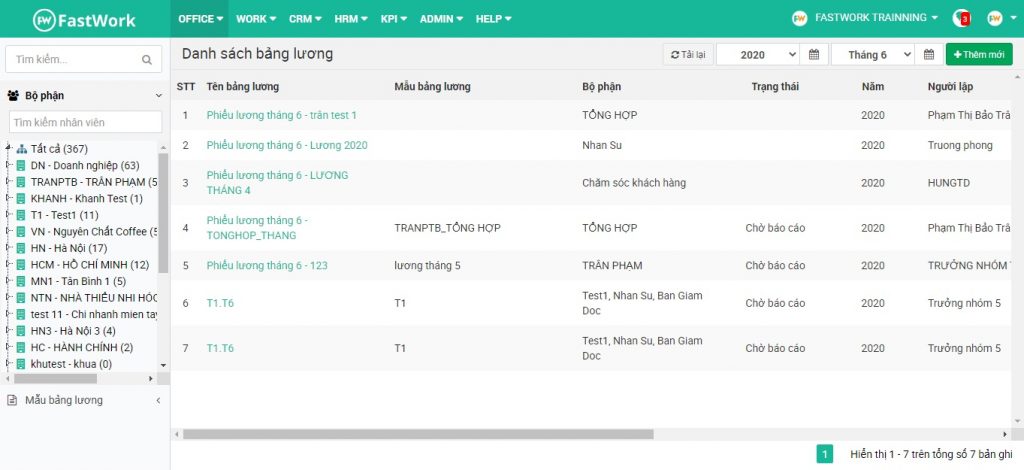
FastWork Payroll is a payroll software that is part of the FastWork HRM human resource management solution suite. The FastWork online payroll software is developed on a cloud computing platform to automate the payroll process in businesses, minimizing manual tasks and optimizing the work efficiency of the accounting and HR departments.
Key Features
- Configures payslips for each position and department based on criteria such as: payroll components, payslip information, and assignment of responsible personnel.
- Sets up payroll formulas using Excel-like functions, customizes components in the payslip (adding/removing data columns, setting fixed values, etc.).
- Automatically calculates payroll based on pre-set formulas and data aggregated and synchronized from other modules.
- Creates a payroll approval workflow and clearly assigns specific roles.
Review
| Pros | Cons |
|
|
Pricing
- Small: 700,000 VND/month/30 users
- Medium: 1,400,000 VND/month/60 users
- Big: 20,000 VND/user/month (for 60+ users)
Read more: TOP 12 Most Effective Employee KPI Evaluation Software Today
1.3. BRAVO Payroll Module
Human Resources – Payroll Management is a module within the BRAVO ERP enterprise management software suite. The module provides a relatively complete set of necessary tools to help specialized departments accurately, fully, and promptly calculate salaries, bonuses, and social insurance for employees, thereby improving the quality of human resource payroll management within the enterprise.
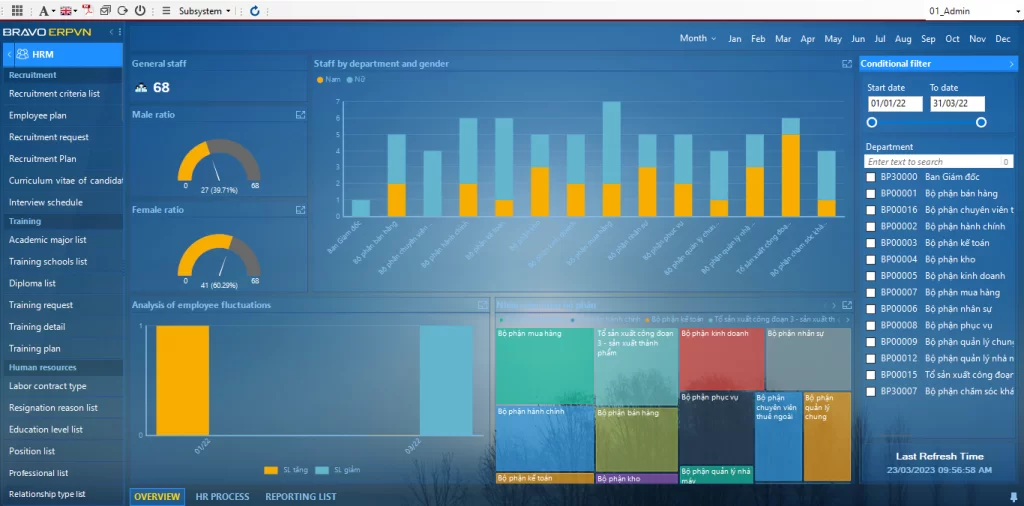
Key Features
- Set up diverse employee salary formulas based on various methods: daily wages, product-based pay, basic salary formula, commission-based salary, etc.
- Allows customization of salary parameters and enables users to update them when changes occur.
- Generate various payroll reports: payslips, salary advance statements, payment vouchers, personal income tax (PIT) declarations, taxable income reports, etc.
- Automatically calculates salaries and accounts for allowances, insurance, and income tax in the company’s expense items.
| Pros | Cons |
| Integrates with the accounting module, supporting corporate payroll accounting if using BRAVO accounting software | Higher cost and longer implementation time compared to other software because it is a customized solution for each client |
Pricing
BRAVO payroll management software does not have a fixed price for all customers. Instead, pricing is proposed based on a survey of the business’s operational status and payroll management needs.
1.4. AiHR Payroll & Benefits Management Software
Managing employee salaries and benefits is a key feature of the AiHR business human resource management software. The AiHR employee payroll and benefits management software provides basic tools for users to perform HR management, timekeeping, and payroll tasks tailored to specific industry needs.
Key Features
- Set up flexible payroll formulas suitable for various payroll structures: 3P salary, product-based salary, salary by grade/level, sales commission, etc.
- Manage and synchronize salary, bonus, and benefits information.
- Automatically generate periodic statistical reports on salary & benefits for each department.
- Integrate and synchronize data from the system and timekeeping devices into the payroll.
| Pros | Cons |
|
Payroll management features are still basic and not in-depth |
Pricing
- From 24,000 VND/user/month
- 4 solution packages: Basic – Standard – Premium – Enterprise
1.5. AMIS HR & Payroll Software
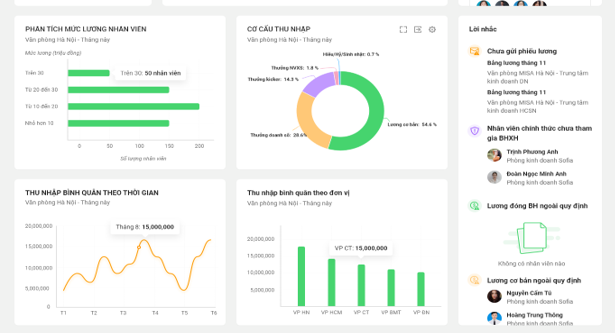
AMIS Payroll is an efficient and professional HR and payroll management software for businesses, with in-depth features that can meet most payroll processing needs within a company.
Key Features
- Quickly aggregates payroll data by synchronizing information from various modules: timekeeping (AMIS Timekeeping), sales (AMIS Sales), KPI/OKR (AMIS Performance), income – deductions (AMIS Employee Relations)
- Automatically calculates salaries and deductions using pre-suggested Excel formulas
- Manages and tracks employee salary payments, provides periodic analysis reports on salary funds and benefits
- Adjusts salary, bonus, and compensation policies periodically, creating a balance between business interests and employee benefits
| Pros | Cons |
| Allows for accounting and declaration of taxes, insurance, and payables to state agencies. |
|
Pricing
- Package for subsidiaries: 10,000,000 VND for the first year, 2,000,000 VND for subsequent years
- Package for parent companies: 20,000,000 VND for the first year, 4,000,000 VND for subsequent years
1.6. FTSHRM Payroll Management Software
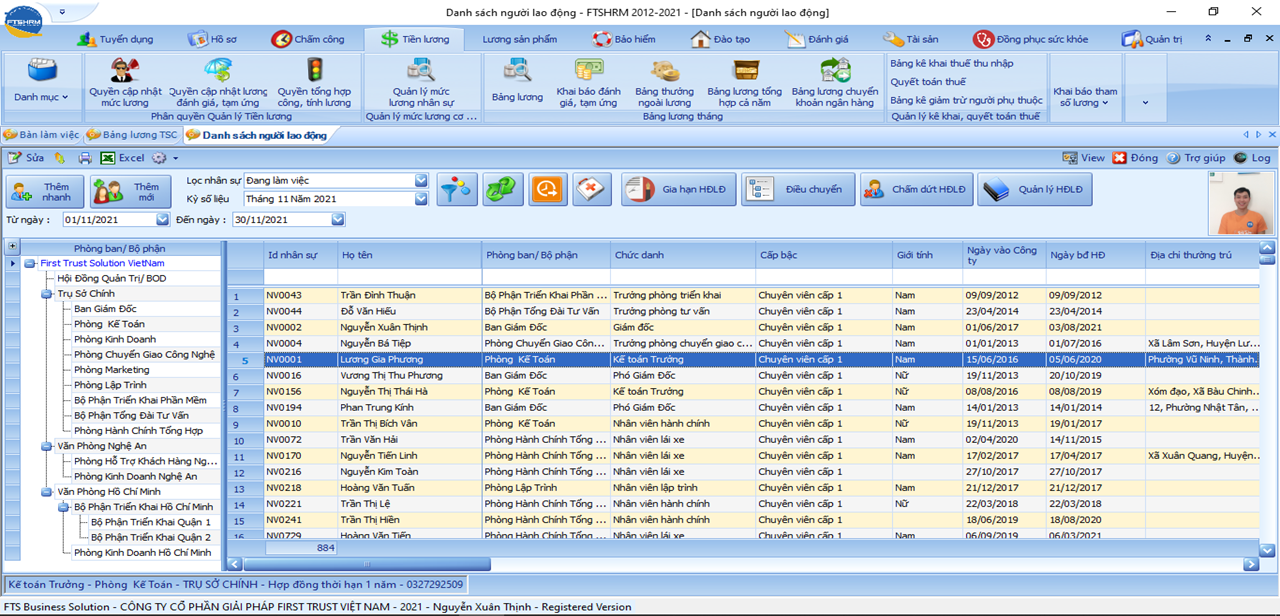
FTSHRM is a solution that helps businesses overcome challenges in HR and payroll management. The software can flexibly customize tasks to suit the specific needs of each business unit. In addition, FTSHRM offers other notable features such as task management, meal management, salary advance management, and more.
Key Features
- Allows users to proactively define payroll parameters and salary formulas that align with the company’s policies and structure
- Declare and calculate various types of allowances, deductions, insurance, and income tax
- Integrates management of various employee work time categories: working days, public holidays, and overtime hours
- Provides other utilities such as printing payslips, sending payslips via email, creating bank transfer orders, and more
| Pros | Cons |
| Provides numerous utilities for HR management | Features are not yet specialized and do not comprehensively address the challenges of employee timekeeping and payroll. |
Price: Contact for consultation
1.7. Ecount Employee Payroll Software
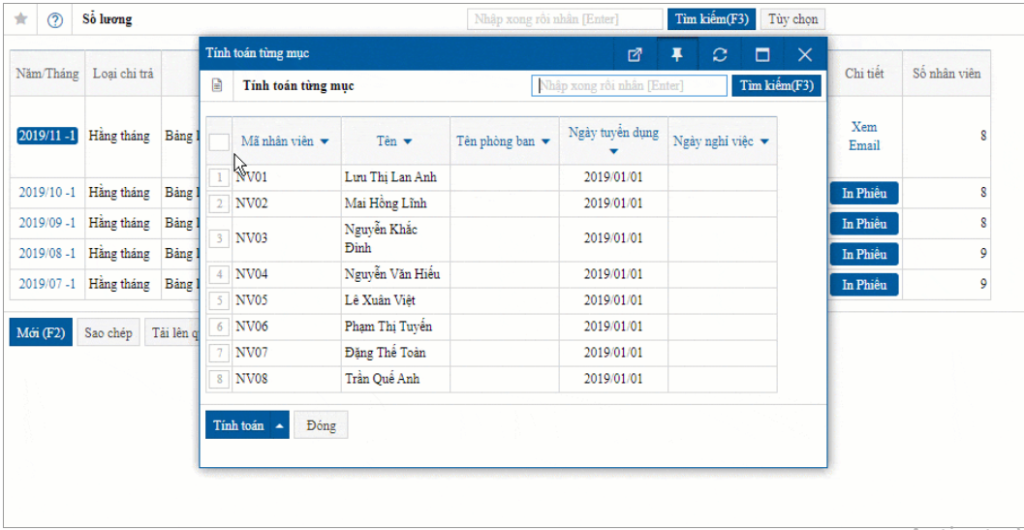
The Ecount employee payroll application is a tool within the web-based ERP management solution suite, providing an easy, fast payroll solution that optimizes the payroll process in businesses.
Key Features
- Set up payroll formulas and allowances, deductions on the system
- Link with timesheets, automatically calculate salaries and deduct insurance and tax amounts according to initial settings
- Provide a variety of reports on payroll ledgers and the salary and bonus situation of each individual and department
1.8. Bamboo Payroll Employee Payroll Software
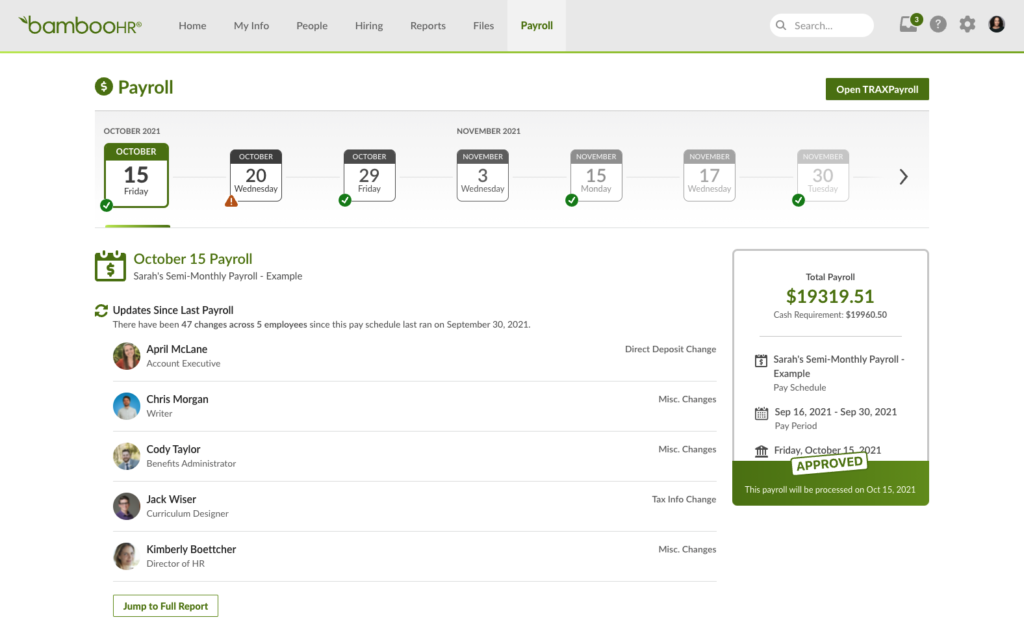
Bamboo Payroll is a foreign software developed in the United States, providing a seamless and simplified payroll and HR management solution.
Key Features
- HR information (working hours, account numbers, benefits, deductions, etc.) is automatically synchronized with the employee payroll system
- Manage tax declaration and finalization for the business
- Track employee salary payment history, compile HR – payroll reports
| Pros | Cons |
|
|
Cost: Pricing is provided based on the customer’s usage needs
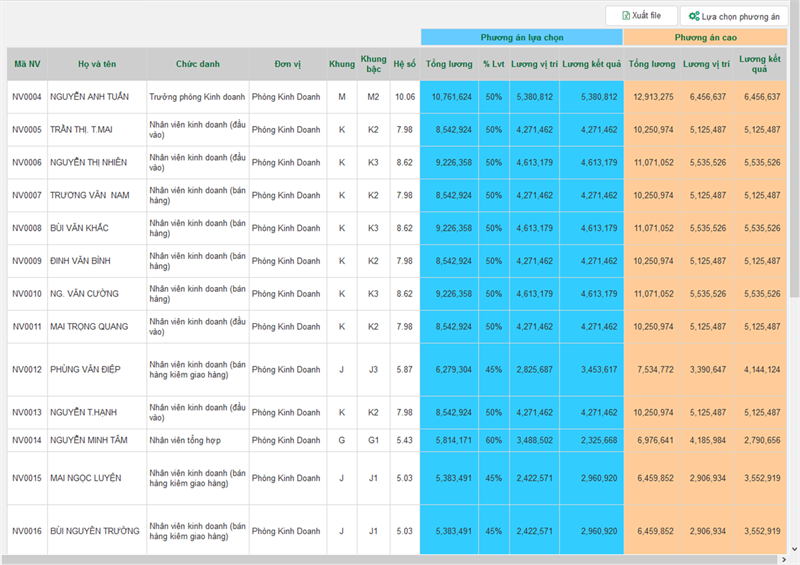
1.9. DigiiC&B Compensation & Payroll Management Software
DigiiC&B is a software that helps businesses closely manage payroll operations through a logical and clear process.
Key Features
- Implement flexible payroll calculation methods based on employee position, level, competency, and performance, with easily adjustable and customizable formulas
- Set up all necessary input information for the payroll process: personnel information, salary structure, timekeeping data, etc.
- Generate intuitive, automated salary reports to track wage fluctuations and tightly control the company’s salary fund
| Advantages | Disadvantages |
|
|
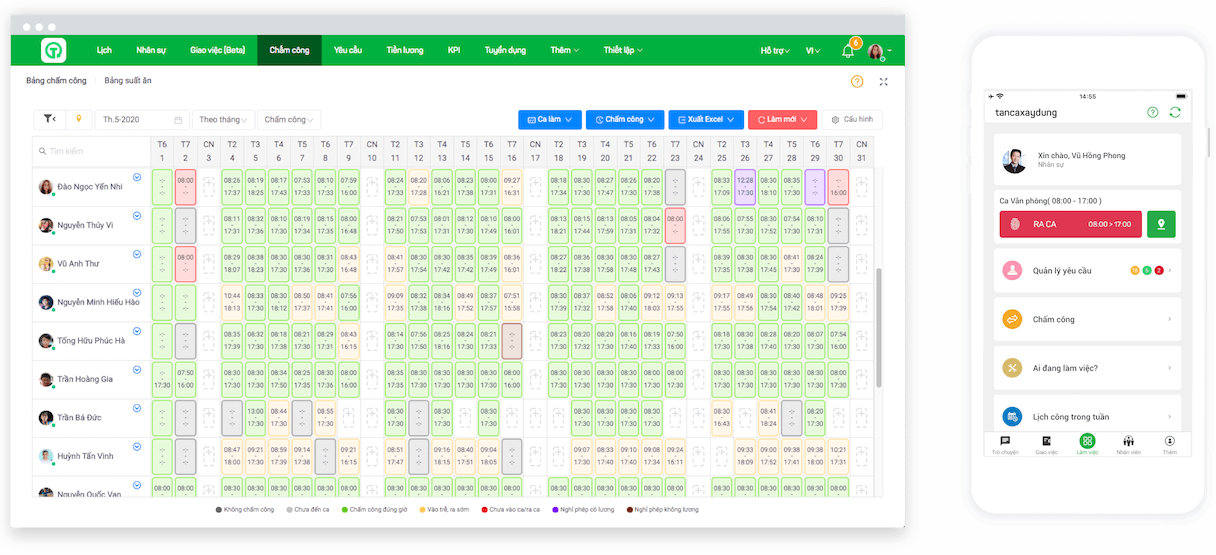
1.10. Tanca Timekeeping and Payroll Software
Tanca is a human resource management solution that primarily focuses on two key functions: timekeeping and payroll for businesses.
Key Features
- Build a basic payroll structure, customizable to the organization’s model
- Establish salary scales, grades, and set salary weights for different positions
- Online timekeeping on mobile phones and data synchronization with the payroll system
- Supports analysis and forecasting of the salary fund to align with the company’s business activities
| Pros | Cons |
|
|
Cost: Businesses pay for each feature used, calculated based on the number of monthly users.
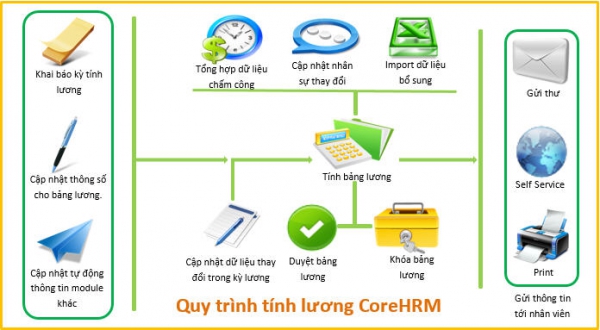
1.11. CorePayroll Payroll Management Software
CorePayroll is a module within the overall CoreHRM HR and payroll management software, featuring high customizability and logic, which significantly simplifies and streamlines the payroll process.
Key Features
- Define flexible payroll formulas based on the company’s salary policies
- Collect data from allowance tables, labor contracts, product quantities, and sales through various methods (Excel file upload, quick data entry, API reading, etc.) to use as calculation data on the system
- Allows customization and updates of formulas, salary coefficients, allowances, Social Insurance (SI), and Personal Income Tax (PIT) according to the latest regulations
- Ability to create various types of payslips:
- NET, GROSS, Productivity salary
- Shift-based pay, overtime pay, compensatory time off pay
- 13th-month salary, bonuses
| Pros | Cons |
|
|
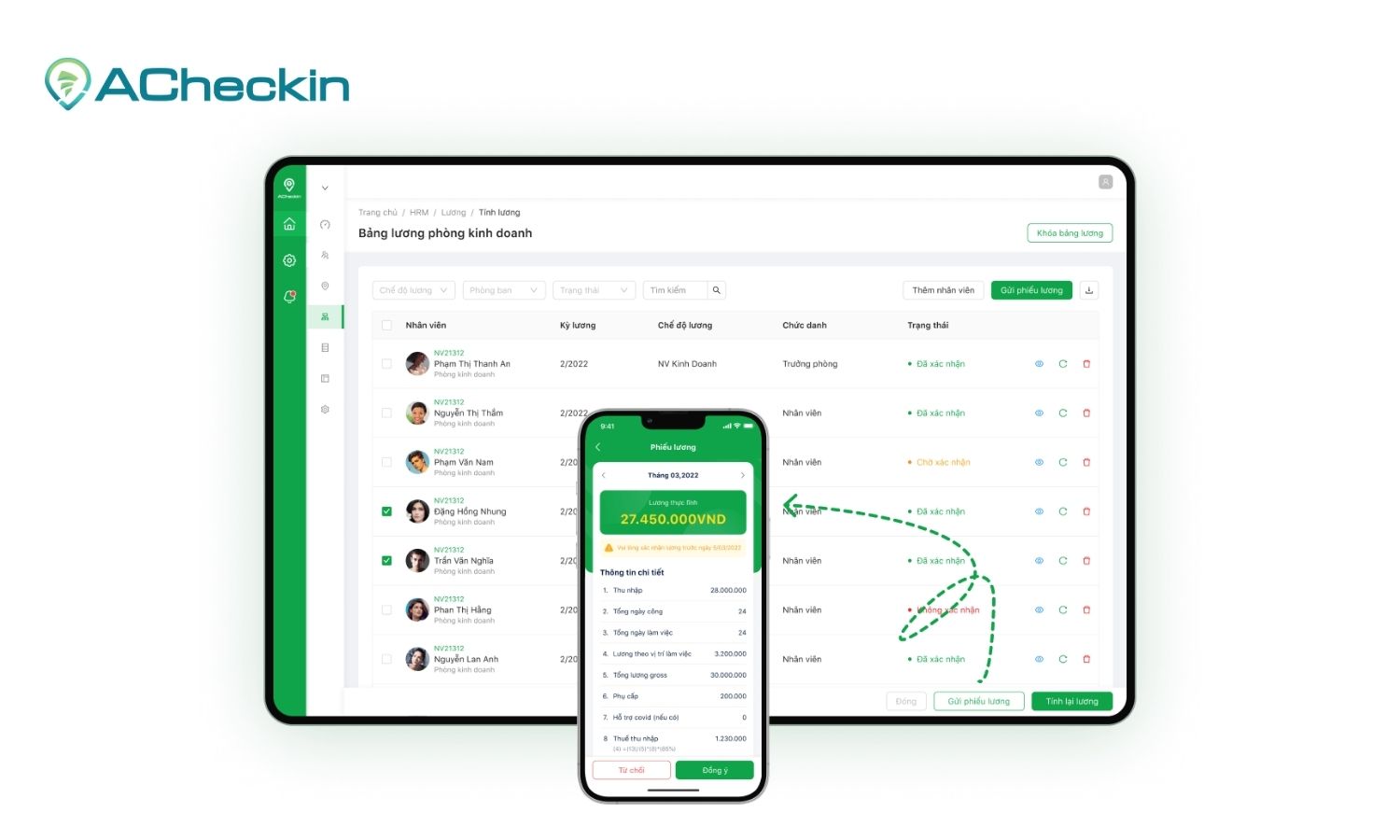
1.12. ACheckin Timekeeping and Payroll Software
ACheckin is an HR management software focused on automating timekeeping and payroll processes for businesses, thereby reducing management costs and saving time.
Key Features
- Set up various types of payrolls: hourly, by shift, 3P salary, piece-rate, etc.
- Configure payroll cycles, salary schemes, and calculation formulas
- Connects with timesheets and automatically calculates monthly payroll
- Generate reports and manage employee payment status
| Pros | Cons |
|
Does not link with KPI, sales, product data, etc., to create payroll. If applying a commission-based or product-based salary structure, data must be manually entered into the software |
Pricing: ACheckin employee payroll software offers 4 solution packages:
- Basic: 12,000 VND/user/month (<20 employees)
- Plus: 25,000 VND/user/month (21 – 150 employees)
- Office: 30,000 VND/user/month (for businesses that already have timekeeping – payroll tools)
- Advance: 35,000 VND/user/month (>151 employees)
1.13. Xero Payroll Software
Xero is an online accounting software specifically designed for small and medium-sized businesses, helping them manage finances easily and effectively. With a user-friendly interface, the software provides tools to help users automate payroll processing and payment, calculate taxes, manage deductions, track personnel costs, and ensure financial management accuracy.
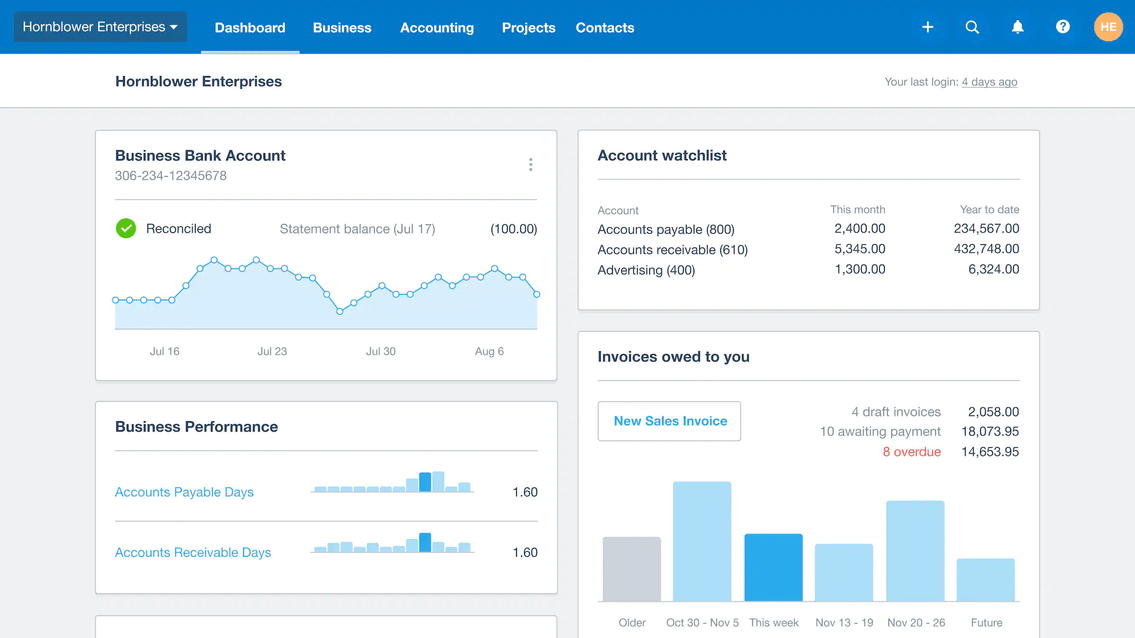
Key features:
- Automatically calculates salaries, personal income tax, insurance, and tax deductions
- Digitizes payslips, increasing transparency and saving time for the HR department
- Manages employee leave and benefits
- Automatically links and integrates with the Xero accounting system, helping to record expenses and track cash flow more accurately
- Calculates taxes and exports detailed tax reports
| Advantages | Limitations |
|
|
Cost:
- Starter: From $25/month.
- Standard: From $40/month.
- Premium: From $54/month.
1.14. TraxPayroll Payroll Software
As an online payroll software acquired by Bamboo HR, TraxPayroll provides a solution to automate the payroll process, allowing users to easily manage employee salaries, taxes, benefits, and legal compliance reports.
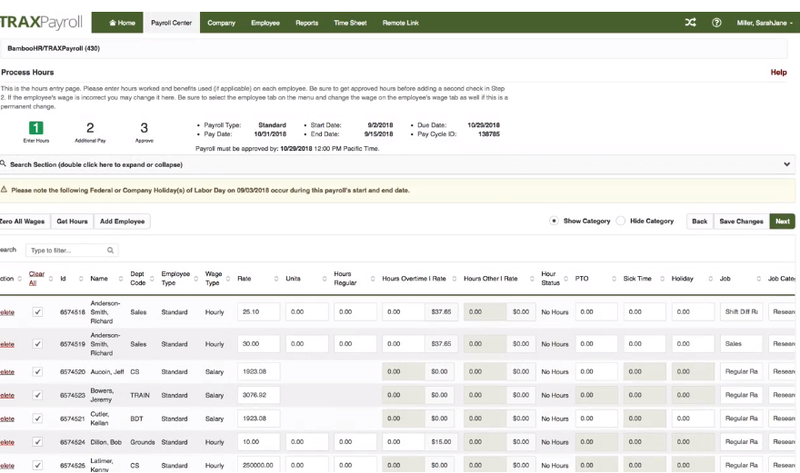
Key Features:
- Automatically links timekeeping data to the payroll system
- Can set up multiple payment groups, supporting payroll runs for specialized employee groups
- Provides payroll templates that users can customize and integrate according to their needs
- Integrates with Bamboo HR, adding many features such as benefits management, document storage, employee profile management, training management, digital signatures, etc.
| Pros | Cons |
|
|
Cost: Service packages range from $30/month for small businesses and increase based on the number of employees and advanced features.
1.15. Dsoft HRM Payroll Software
Dsoft HRM is an integrated human resource management software with automatic payroll calculation capabilities, helping businesses comprehensively manage employees, from recruitment and timekeeping to payroll and benefits. With a friendly, easy-to-use interface, the software helps businesses minimize manual tasks and ensure accuracy in salary and bonus calculations.
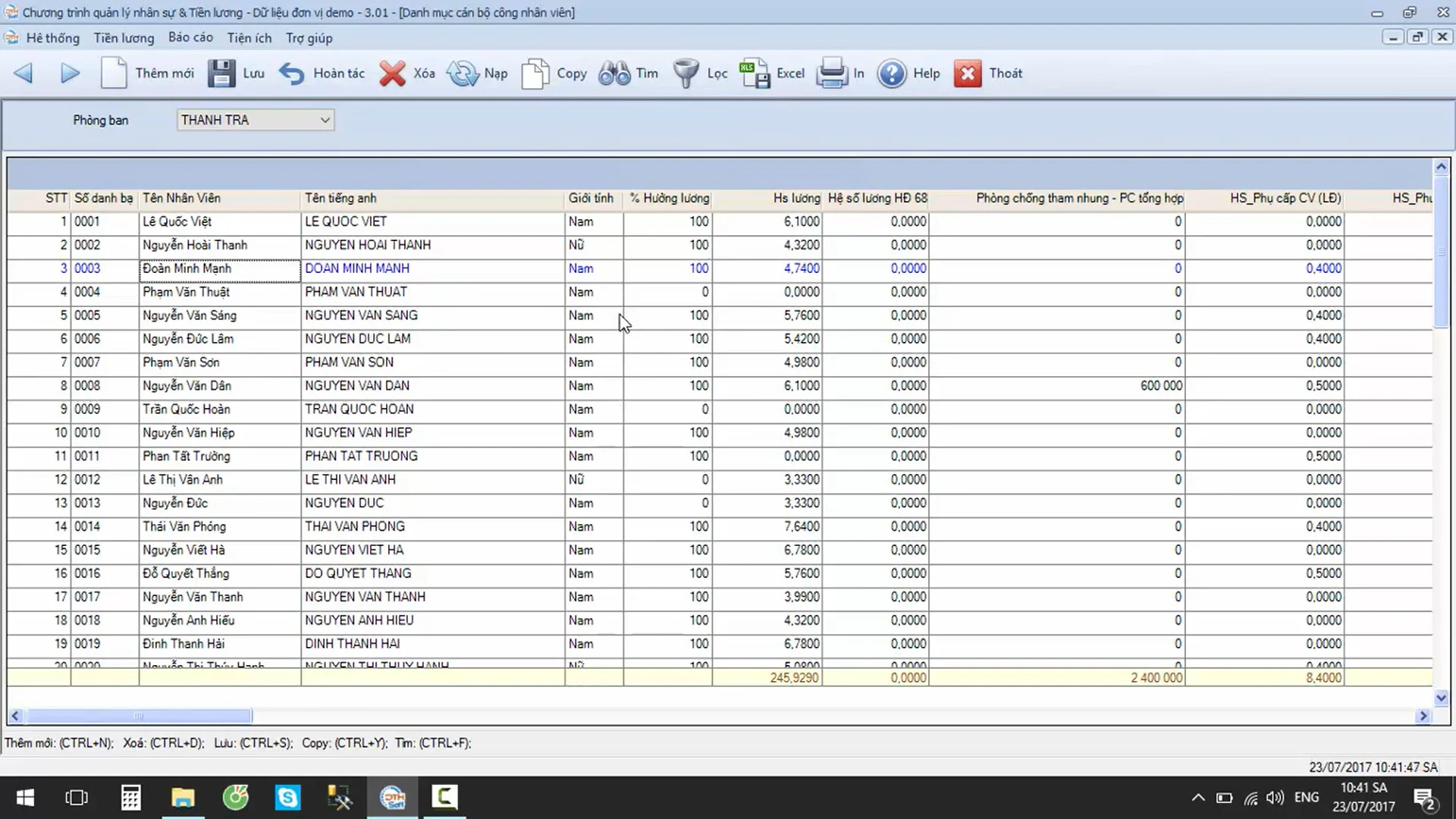
Key features:
- Detailed and accurate tracking of working hours, leave, late arrivals, and overtime
- Quickly and easily look up information, salary history, and allowances for each employee
- Supports setting up various payroll formulas: piece-rate pay, shift-based pay, salary advances, etc.
- Effectively manage employee information, data, and departments within the organization
- Provides HR management reports and government compliance reports, helping businesses easily track policies
| Pros | Cons |
|
|
Chi phí:
Chi phí khởi điểm cho một doanh nghiệp nhỏ có thể bắt đầu từ khoảng 5-10 triệu đồng/năm, và có thể tăng lên tùy theo các tính năng nâng cao và quy mô của doanh nghiệp.
2. Lợi ích của phần mềm tính lương đối với doanh nghiệp
2.1. Tự động hóa quy trình tính lương
Nếu như với phương pháp chấm công tính lương thủ công bằng Excel trước kia, HR và kế toán sẽ phải mất từ 2-3 ngày để làm bảng lương cho hơn 100 nhân sự thì với các ứng dụng tính lương, tất cả thao tác từ tổng hợp dữ liệu chấm công, lập bảng lương cho đến xuất phiếu lương chỉ gói gọn trong vòng 30 phút đến 1 tiếng bởi các tác vụ đã được tự động hóa hoàn toàn.
Các phần mềm quản lý tính lương giúp xử lý và tổng hợp dữ liệu tiền lương, cắt giảm mọi thao tác lặp không cần thiết trong quy trình tính lương, từ đó tiết kiệm một lượng lớn thời gian cho bộ phận nhân sự – kế toán.
2.2. Minh bạch hóa chính sách lương thưởng
Một trong những vướng mắc lớn nhất gây khó khăn cho việc giữ chân nhân viên và giảm tỷ lệ nhảy việc đó là do quy trình chấm công tính lương không minh bạch, rõ ràng. Công tác tính lương nhân viên thủ công khiến các dữ liệu không được chuẩn hóa, phải xử lý từng trường hợp rất mất thời gian, đi lương chậm gây ảnh hưởng đến uy tín, hình ảnh công ty.
Với phần mềm tính lương nhân viên thì những vấn đề trên sẽ không còn là mối lo ngại của doanh nghiệp bởi quy trình tính lương luôn được thực hiện minh bạch, rõ ràng. Mọi dữ liệu đưa lên phần mềm đều rất tường minh và liên kết chặt chẽ với nhau, phiếu lương cũng được cập nhật trực tiếp trên hệ thống để nhân sự chủ động theo dõi, kiểm tra trước khi chốt bảng lương chính thức.
2.3. Giảm thiểu tối đa sai sót trong khâu tính lương
Trong khâu tính lương, quy trình tổng hợp và xử lý dữ liệu được đánh giá là phức tạp và dễ xảy ra sai sót nhất. Bởi trong một công ty có những vị trí giờ làm việc không cố định, ca/kíp nhân viên chồng chéo, không đồng nhất gây khó khăn trong việc tổng hợp chấm công. Ngoài ra, mỗi bộ phận lại có một loại lương khác nhau (KPI/3P/lương khoán…) khiến cho công tác tính lương trở nên phức tạp, rối rắm, dễ nhầm lẫn giữa các công thức.
Trên thực tế, nhiều doanh nghiệp đã phản hồi rằng sau khi áp dụng triển khai phần mềm tính lương nhân viên vào công tác quản trị, chất lượng và hiệu suất công việc của bộ phận nhân sự đã có sự cải tiến vượt bậc. Không còn xảy ra tình trạng sai sót, nhầm lẫn công lương cho nhân viên bởi mọi dữ liệu đều được phần mềm kiểm soát và tự động tính toán theo đúng công thức được cài đặt sẵn, đảm bảo độ chính xác tuyệt đối 100%.
2.4. Nâng cao chất lượng quản trị nhân sự
Phần mềm quản lý lương giúp giải phóng áp lực cho bộ phận nhân sự khỏi những thao tác, thủ tục hành chính rườm rà, đồng thời giúp doanh nghiệp tối ưu nguồn lực để đầu tư nâng cao chất lượng quản trị nhân sự.
Thay vì phải đi giải quyết các khiếu nại của nhân viên và xử lý những sai sót, nhầm lẫn không đáng có thì HR có thể tập trung chuyên môn vào những mục tiêu quan trọng hơn như phát triển con người, xây dựng chế độ đãi ngộ hợp lý và nâng cao trải nghiệm làm việc cho nhân sự.
3. Tiêu chí lựa chọn phần mềm tính lương cho doanh nghiệp
Khi lựa chọn phần mềm tính lương, doanh nghiệp và nhà lãnh đạo, quản lý sẽ cần xem xét kỹ lưỡng một số tiêu chí nhằm đảm bảo phần mềm phù hợp với nhu cầu, thực trạng và vận hành hiệu quả tại tổ chức:
3.1. Tính năng tích hợp và tự động hóa
Một phần mềm tính lương hiệu quả phải có khả năng tự động hóa quy trình tính toán lương, giúp giảm thiểu sai sót khi xử lý số liệu lớn và phức tạp. Ngoài ra phần mềm cần có khả năng tích hợp và liên kết với các hệ thống khác như chấm công, quản lý dữ liệu nhân sự, hệ thống kế toán,… để dữ liệu được cập nhật đồng bộ và liên tục.
3.2. Khả năng tùy chỉnh theo nhu cầu
Mỗi doanh nghiệp có chính sách lương và phúc lợi khác nhau, vì vậy khả năng tùy chỉnh của phần mềm theo nhu cầu, mô hình và bài toán của doanh nghiệp là vô cùng quan trọng. Doanh nghiệp cần đảm bảo phần mềm có thể điều chỉnh các yếu tố như cấu trúc lương, công thức tính, các khoản phụ cấp và quy định thuế sao cho phù hợp với ngành nghề và quy mô hoạt động của mình.
3.3. Tuân thủ pháp luật và các quy định về thuế
Phần mềm cần phải đảm bảo tuân thủ các quy định pháp lý về lương, bảo hiểm xã hội, thuế thu nhập cá nhân và các khoản khấu trừ bắt buộc theo pháp luật hiện hành. Một phần mềm tính lương uy tín cần phải thường xuyên cập nhật các thay đổi về pháp luật, giúp doanh nghiệp tránh được rủi ro về pháp lý và đảm bảo tính chính xác khi xử lý lương.
3.4. Tính bảo mật và an toàn dữ liệu
Các thông tin của nhân viên là dữ liệu nhạy cảm, vì vậy tính bảo mật là một yếu tố không thể bỏ qua. Phần mềm cần có các biện pháp bảo mật như mã hóa dữ liệu, phân quyền truy cập và sao lưu dữ liệu thường xuyên để đảm bảo thông tin được bảo vệ an toàn, tránh rủi ro thất lạc, mất mát hoặc bị đánh cắp
3.5. Khả năng mở rộng và linh hoạt
Một phần mềm tính lương tốt cần phải có khả năng mở rộng nhằm đáp ứng nhu cầu khi doanh nghiệp phát triển. Với khả năng mở rộng linh hoạt, phần mềm có thể đảm bảo vẫn duy trì hoạt động trơn tru trong trường hợp thêm nhân viên, quản lý nhiều chi nhánh và hỗ trợ đa dạng các cấu trúc lương
3.6. Chi phí và ROI
Chi phí cũng là một trong những tiêu chí quan trọng khi lựa chọn phần mềm. Doanh nghiệp cần xem xét đến chi phí triển khai, bảo trì và nâng cấp phần mềm cũng như các chi phí liên quan khác. Doanh nghiệp cần cân nhắc những giá trị lợi ích (ROI) mà phần mềm có thể mang lại như: tích kiệm thời gian, giảm thiểu sai sót, tăng tính hiệu quả trong quản lý. Một phần mềm với chi phí cao đôi khi có thể mang lại giá trị lớn hơn nhiều so với các giải pháp giá rẻ nhưng thiếu tính năng.
3.7. Dịch vụ hỗ trợ và đào tạo
Khả năng hỗ trợ kỹ thuật và đào tạo từ nhà cung cấp phần mềm là tiêu chí quan trong khi doanh nghiệp lựa chọn phần mềm tính lương. Doanh nghiệp cần chọn những phần mềm có dịch vụ hỗ trợ tốt bao gồm: triển khai, đào tạo và hướng dẫn sử dụng phần mềm, hỗ trợ kỹ thuật 24/7 giúp giải quyết các vấn đề phát sinh trong quá trình vận hành.
3.8. Giao diện dễ sử dụng và thân thiện
Phần mềm cần có giao diện thân thiện với người dùng, dễ sử dụng để nhân viên có thể nhanh chóng nắm bắt và làm quen, từ đó giảm bớt thời gian đào tạo, thao tác, tăng năng suất làm việc và tận dụng tối ưu lợi ích và giá trị mà phần mềm mang lại.
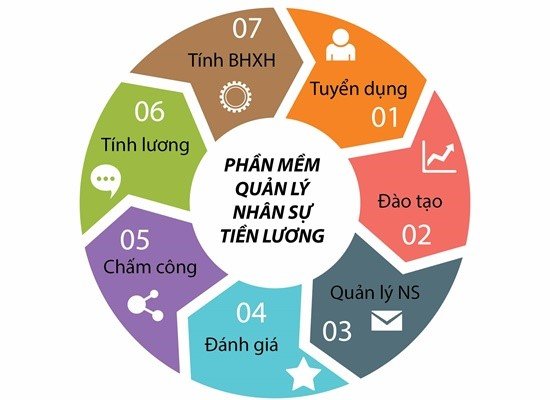
4. Lộ trình triển khai phần mềm tính lương hiệu quả trong doanh nghiệp
Nhiều doanh nghiệp mua phần mềm tính lương nhưng triển khai không hiệu quả, dẫn đến nhân viên phản đối hoặc hệ thống chỉ chạy được một thời gian rồi bỏ. Để tránh tình trạng “tiền mất, tật mang”, doanh nghiệp cần một lộ trình triển khai rõ ràng, có bước chuẩn bị – thử nghiệm – áp dụng toàn diện.
Bước 1: Khảo sát nhu cầu và quy trình hiện tại
- Doanh nghiệp cần rà soát lại quy trình tính lương thủ công/Excel đang áp dụng: số lượng nhân sự, cách chấm công, các khoản phụ cấp, thưởng – phạt, quy định bảo hiểm, thuế TNCN. Đây là cơ sở để chọn phần mềm có tính năng phù hợp.
Bước 2: Lựa chọn phần mềm phù hợp quy mô và đặc thù
- Doanh nghiệp nhỏ → ưu tiên phần mềm đơn giản, chi phí thấp.
- Doanh nghiệp lớn, đa chi nhánh → cần phần mềm có tích hợp HRM, ERP, phân quyền đa cấp.
- Doanh nghiệp sản xuất/dịch vụ → chọn phần mềm có tính năng ca kíp, tăng ca, quản lý phúc lợi.
Bước 3: Demo và triển khai thử nghiệm
- Không nên áp dụng ngay toàn bộ. Doanh nghiệp nên chọn 1 phòng ban hoặc 1 chi nhánh để chạy thử. Giai đoạn này giúp kiểm tra tính năng, khả năng tùy chỉnh và mức độ hài lòng của nhân sự.
Bước 4: Đào tạo và truyền thông nội bộ
- Nhân viên HR và quản lý trực tiếp phải được đào tạo cách nhập dữ liệu, chạy bảng lương, xử lý lỗi. Song song, doanh nghiệp cần truyền thông để nhân viên hiểu lợi ích: minh bạch, giảm sai sót, lương được chi trả nhanh hơn.
Bước 5: Triển khai chính thức trên toàn doanh nghiệp
- Sau khi thử nghiệm thành công, mở rộng áp dụng cho toàn công ty. Cần có quy trình chuẩn: ai nhập dữ liệu, ai phê duyệt, ai chịu trách nhiệm. Song song, theo dõi phản hồi nhân viên để kịp điều chỉnh.
Bước 6: Đánh giá định kỳ và tối ưu
- Định kỳ (quý/năm), doanh nghiệp cần đánh giá hiệu quả phần mềm: tiết kiệm bao nhiêu thời gian, giảm bao nhiêu % sai sót, chi phí vận hành so với trước. Nếu cần, nâng cấp hoặc mở rộng tính năng tích hợp.
Một lộ trình triển khai bài bản giúp doanh nghiệp không chỉ “mua phần mềm” mà còn biến nó thành công cụ cốt lõi trong quản trị nhân sự và tài chính. Thành công của dự án không nằm ở công nghệ, mà ở sự chuẩn bị, đào tạo và cam kết từ lãnh đạo đến nhân viên.
















