10/05/2026
  20323 views
Work assignment is always a cyclical and regular activity. In this article, let’s explore with 1Office the latest standard work assignment template for 2026
Mục lục
I. Overview of Work Assignment Templates
1. What is work assignment?
The term “work assignment” is not standardized and is therefore used differently in specific situations/cases. Since the term “work assignment” includes “work” and “assignment,” it can be inferred that this activity involves tasks or jobs that are arranged separately. Assignments can occur within projects and production line activities.

In principle, work assignments can be carried out in various ways:
- Verbally or in writing
- Situational or standardized
- Offline or online
2. Benefits of Work Assignment
- Easily track who is responsible for which task: Through work assignments, each individual’s tasks are clearly and specifically defined. This makes it easier than ever for both managers and employees on the same project to monitor work progress.
- It contains information such as which tasks need to be done by priority, the standards to be met upon completion, etc. This helps the assignee perform the work effectively.
- By assigning work to a specific team or person, they know which tasks to prioritize and can perform them efficiently to increase customer satisfaction.
- Enhance labor productivity as employees will know what they need to do, which tasks to focus on, and which to prioritize. This will help improve the organization’s overall productivity.
3. Essential Information in a Work Assignment Sheet
A work assignment primarily contains these four essential pieces of information:
- Which task is to be performed (Type of work): Clearly explain to the employee which task will be performed based on priority.
- The reason for performing the task (Purpose): When you assign a new task to an employee before their current one is finished, you need to explain the reason.
- The standards the completed task must meet (Description): Inform the employee about how the completed work will be evaluated, the time required for completion, etc.
- Guidance on all aspects: This means requiring employees to inform their manager about completed tasks and any issues they encountered, and providing instructional materials if available.
II. How to Plan Work Assignments
1. Check the Type of Work
For example, some tasks must be performed within one department. But some tasks must be divided among different departments, and those departments must establish internal work management processes.
2. Assess the Skills of Human Resources
Each employee has their own talents. Therefore, before scheduling work, it’s best to create a workflow chart. A manager’s assessment of personnel skills is a crucial activity for the organization. Assessing the skills, strengths, and weaknesses of personnel helps the organization work more effectively.
After analyzing employee skills, assign the tasks in the chart to the designated employees. Additionally, keep a backup person in case the assigned employee is unable to perform the task.
3. Calculate the Necessary Time for Assignment
Each project will have its own work schedule that needs to be completed. And the manager’s task is to determine the timelines to divide tasks reasonably, ensuring employees have enough time to successfully complete their part of the work, which is a critical issue. Therefore, calculating the necessary time for each stage of a task or project to streamline the workflow and complete the work effectively is not an easy job.
Instead of using manual tools, managers should opt for task assignment software systems and work progress management to get a comprehensive overview of performance within the business.
4. Avoid Work Duplication
When you assign employees to various basic processes, there is a potential for work overlap, as all employees may be performing tasks not specified in the diagram.
Therefore, carefully review the workflow across the entire organization and ensure there is no duplication of work.
5. Presenting the plan to the client
Communicating the plan to the client is a key step in creating a work assignment schedule. Providing the client with a clear communication plan means informing them exactly who to contact for project information and assigning a single point of contact for the entire project lifecycle.
Considering the client’s expectations is crucial for setting company standards. It also helps in understanding market standards. This can be achieved through a logical work assignment plan.
| Learn more: Top 9 best free team task management software |
III. How to Fill Out a Work Assignment Form
A work assignment form (also known as a job assignment form or work allocation form) is typically used to assign tasks to individuals or departments, ensuring everyone clearly understands the objectives, scope, and completion deadline. When filling out the form, you need to adhere to the following 6 main sections:
1. General Information of the Unit
Fill in the basic identification information:
-
Name of the agency/unit/department
-
Form number (if specified by the company)
-
Date of creation (day/month/year)
Note: This information makes it easier to store and look up the form later.
2. Information of the Assignee
Includes:
-
Full name
-
Title / Job position
-
Department in charge
-
Contact information (internal email, phone number)
Note: Fill in accurately to ensure individual accountability.
3. Details of the Assigned Work
State clearly and specifically:
-
Job/task name
-
Objectives to be achieved (desired output)
-
Professional/technical requirements
-
Scope of implementation (work independently, who to coordinate with, which department to work in, etc.)
Pro tip: Write concise but sufficiently detailed content to avoid misunderstanding the task.
4. Implementation Timeline
Includes the following milestones:
-
Start date
-
Completion deadline
-
Checkpoints (for large tasks)
Note: A clear timeline should be set to avoid prolonging the work.
5. Supporting Resources
List the necessary elements to complete the task:
-
Coordinating personnel
-
Data and documents provided
-
Budget / equipment
-
Software and work tools
Note: If no specific resources are needed, write “No additional requirements.”
6. Commitment & Signatures
The final section includes:
-
Confirmation from the assignee
-
Approval from the manager
-
Signatures of the relevant parties
Note: This serves as the basis for evaluating work performance later.
IV. Download Free Work Assignment Templates (Word, PDF)
Download the work assignment template for individuals HERE
Download the general work assignment template HERE
Download the task assignment template HERE
Other work assignment templates you can refer to:
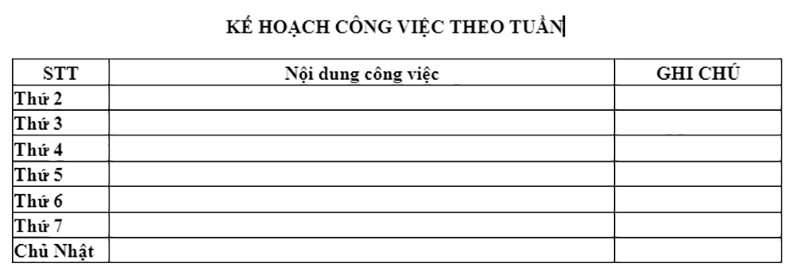
- Weekly work assignment template
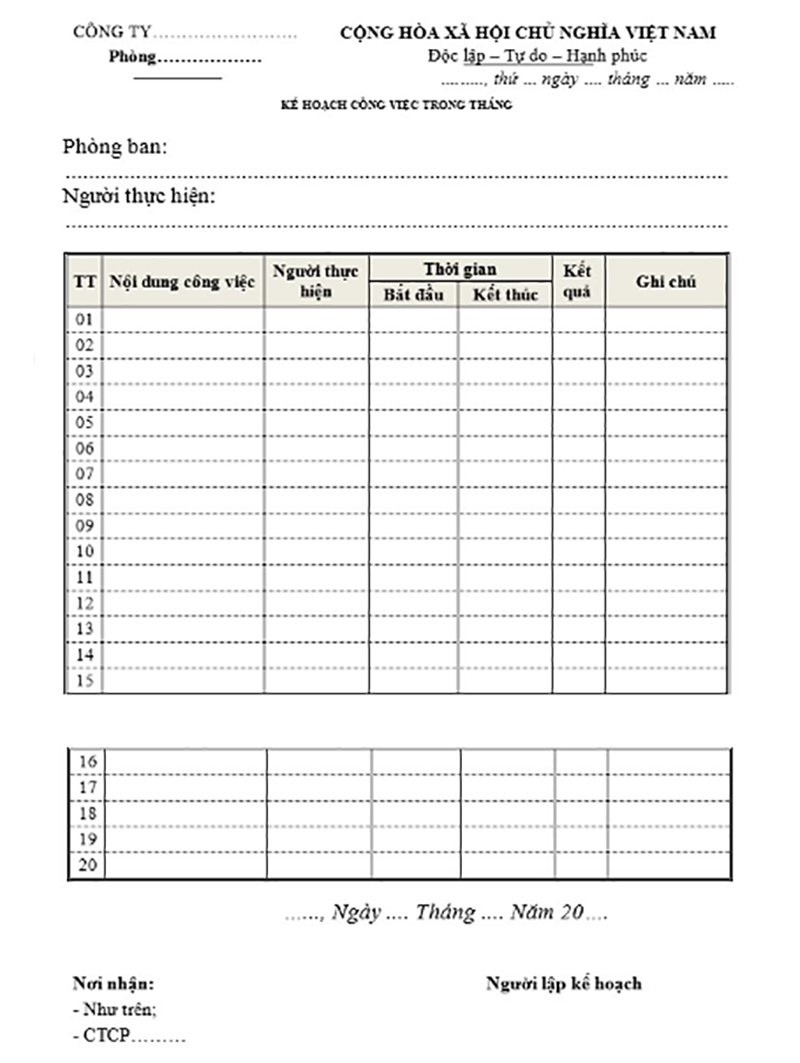
- Monthly work assignment template
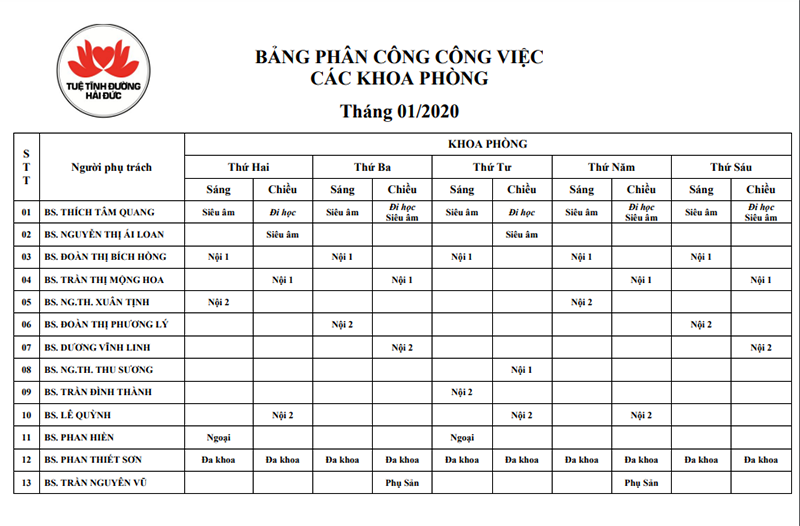
- Example of a work assignment schedule template for a general clinic
V. Assign tasks effectively, manage easily with 1Office
As an all-in-one business management software with diverse task management features, 1Office meets all the professional requirements of organizations. In addition to a diverse feature ecosystem, 1Office also has a user-friendly interface, easily applicable to any business process, helping users quickly become proficient with the software.
Additionally, when using 1Office to manage your organization, your business will receive the following benefits:
- Assign tasks directly on the system, tagging each employee to specific work items, making it easy for both managers and staff to track and monitor work progress
- Work progress is displayed in various formats: Kanban, Gantt chart,…
- Closely monitor project progress and the completion level of each individual in the project
- Control operational data, synchronize figures, and optimize data mining capabilities
- Update reports and real-time data on all aspects of the business (sales, projects, human resources, communications, etc.)
Through the article above, we hope that 1Office has provided useful information about standard work assignment templates for our readers. If you need any further information or consultation, please contact us for a free consultation.
For all inquiries, please contact:
Hotline: 083 483 8888
Fanpage: https://www.facebook.com/1officevn/
Youtube: https://www.youtube.com/channel/UCeTIRNqxaTwk0_kcTw6SxmA