12/05/2026
  489 views
Applying technology to the human resource management process is one of the top trending trends today. Besides, depending on the market situation, the demand for remote work, or working from home, has also become quite popular recently due to its convenience and flexibility. Therefore, in this article, let’s explore the Top 7 check-in software best automatic check-in software available today and the criteria for choosing an effective human resource management solution for businesses.
Choosing timekeeping management software is very important for any business. Therefore, creating a set of suitable selection criteria is extremely important. Typically, the issues that an organization needs to research carefully when selecting software are: reporting and time tracking features, available integrations, as well as usage costs,…
Mục lục
1. Based on business needs
Check-in management tools are often created to connect/be used on specific devices. Therefore, getting feedback from all employees in the business is an important issue because most check-in software today has a mobile version to diversify timekeeping methods for employees.
Depending on the business’s work model, managers or HR will have to choose timekeeping software that is as suitable for everyone as possible.
2. Essential software features
Depending on the specific needs required by the Board of Directors, the business will have different criteria for selecting Check-in software. Some basic features the software will have include:
- Track employee activity time
- Edit time entries and continue your work on them
- Create projects, break them down into tasks, and link them to the appropriate clients
- Add tags to indicate the type of work you have done
- Indicate billable time and the rate the client has to pay
3. Cost of using check-in management software
Typically, the budget allocated by the business’s leadership for software will greatly influence the choice of software, but remember that you don’t need to spend a lot of money for an effective solution.
Usually, the cost of using the software comes in two main types:
- A cost model that sets a fixed monthly or annual price,
- A pricing model that sets the price based on the number of users, and some offer custom pricing.
4. TOP 7 Best Automatic Check-in – Check-out Software Today
In this section, we will explore and evaluate 7 popular and widely used check-in check-out software in the Vietnamese market today.
-

List of the 7 best online check-in software on the market
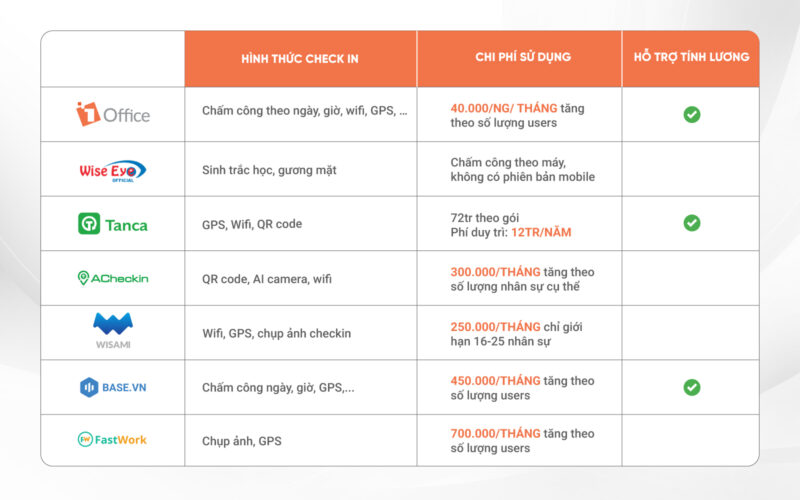
4.1. 1Office All-in-one Business Management Software – HRM Module
As an all-in-one business management software, with the strength of the 1HRM module with a customer base of over 8000+ businesses and more than 500,000 users. 1Office’s timekeeping software provides an effective timekeeping management solution thanks to features like digitizing forms, automatically connecting to time clocks, remote timekeeping, tracking and exporting reports on workdays, employee working hours, etc.
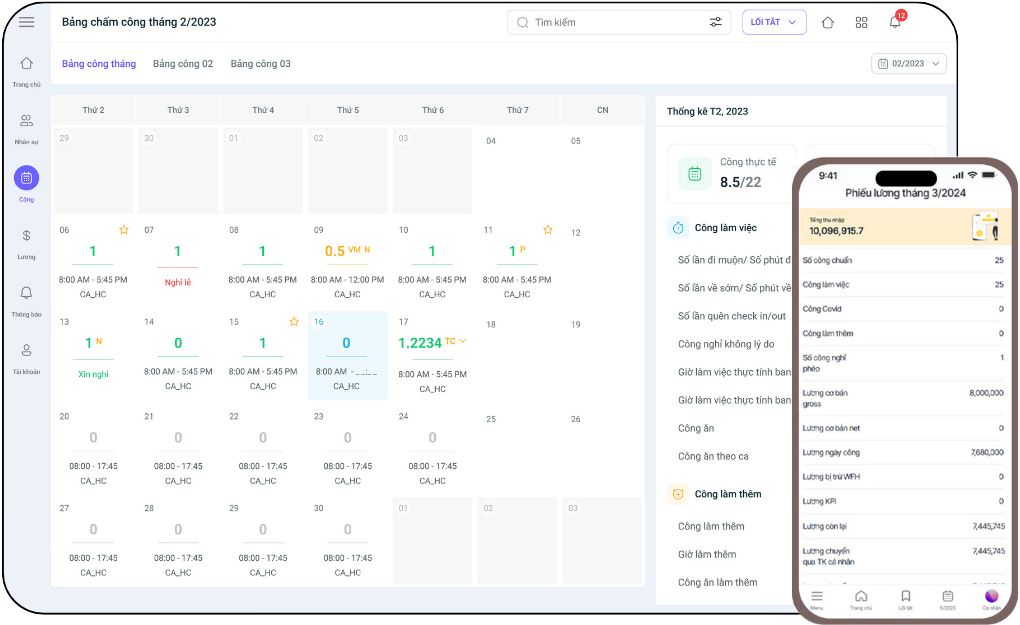
Benefits of using 1Office’s check-in management solution:
- Automatically aggregates work shifts and actual working hours of employees
- Payroll is digitized on the system, with automatic salary calculation
- Supports recruitment campaigns, with candidate profiles automatically updated on the system from various recruitment sources
- Segments and manages candidate profiles for future recruitment processes through automatic emails, etc.
- Diverse timekeeping methods: Via GPS, Wifi, etc.
- Automatically logs work shifts without manual intervention
4.2. Wise Eye – Popular Timekeeping Software
As an online timekeeping software developed since 2008, this software has become one of the quite popular check-in applications.
Limitation: Only connects with fingerprint scanners on the system, no mobile version to diversify timekeeping methods.
When using Wise Eye, you will get some main functions such as:
- Timekeeping by face, biometrics, etc.
- Aggregates and stores employee timekeeping data.
- Only supports the Windows platform, no mobile version.
4.3. Tanca.io Check-in Software
As one of the quite popular timekeeping software, your business will receive the following benefits after using this software:
- Diverse timekeeping methods: Timekeeping via Wifi, GPS, FaceID, etc.
- Supports the process of managing employee work shifts
- Supports the recruitment process for the HR department
- Make requests directly on the system, minimizing paperwork
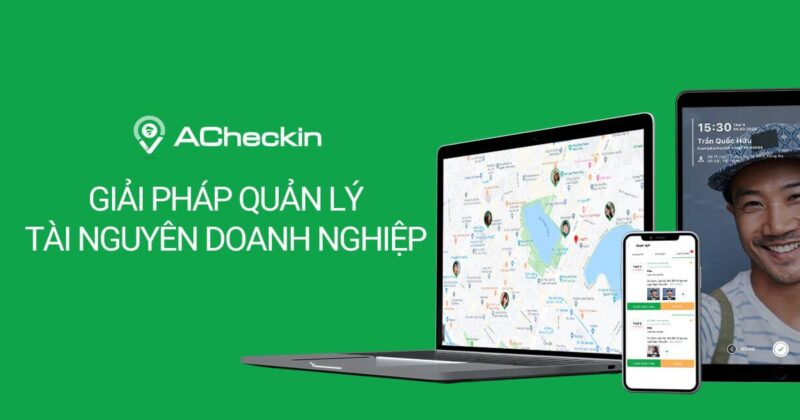
4.4. Acheckin Software
Key features of Acheckin timekeeping software
- Supports various online timekeeping and check-in methods: QR code, Wifi, GPS, etc.
- Supports HR management processes: Approving leave requests, overtime, etc.
- Manages timekeeping, automates the timekeeping process.
- Supports and implements internal company activities.
- Smart management, optimizing the company’s facilities.
-

Acheckin check-in software
4.5. Wisami Check-in Software
As a software created primarily for the purpose of check-in and timekeeping for employees, perhaps Wisami’s biggest drawback is the lack of accompanying features like automatic payroll generation. However, when using this automatic check-in software, your business will receive several benefits, such as:
- Diverse timekeeping methods: timekeeping on fingerprint scanners then logging into the system, timekeeping via mobile app, etc.
- Automatic and accurate management of employee work shifts: You can easily manage actual working hours, leave, late arrivals, OT hours, etc., for employees.
- Create and manage employee requests.
- Manage employee profiles, contract durations, etc.
4.6. Base check in
Base is a business management solution established in 2017, but its HRM feature is quite comprehensive. Some main functions of Base check in include:
- Track employees’ actual working time.
- The system automatically updates timekeeping information.
- Diverse timekeeping methods: Timekeeping by date and time, GPS, etc.
It can be seen that although it is a major software, Base check in has quite limited features for users. Compared to other products in the same segment and price range, this software does not support automatic report generation or automatic payroll generation for businesses, etc.
Learn more: Automatic HR and Payroll Management Software
4.7. Fastwork Software
As a comprehensive business management software with each module built as a separate application, when using Fastwork HRM to manage check-in requirements for employees, your business will get some of the following main functions:
- Diverse timekeeping methods: GPS timekeeping, FaceID, etc.
- Manage work locations, actual working hours of employees, etc.
- Process and create online requests, making it easier for HR and managers to exchange information.
- Easily create work schedules and assign shifts for employees.
5. Conclusion
Each Check-in management software has its own strengths and areas for improvement. However, choosing the software that fits your business model and meets all the criteria set by the organization is extremely important. We hope that the information provided by 1Office will bring useful value to your business. Thank you!
For more detailed information, please visit: