


 12/05/2026
  241 views
Project management tools are one of the most popular and widely used solutions for individuals and businesses. Applying software helps manage projects effectively, increases employee productivity, and saves maximum time in the project measurement and evaluation process. However, which project management tool is the most effective and easiest to use when choosing from thousands of software options available today? Let’s find the answer with 1Office in the article below.
Mục lục
1. What is a project management tool?
Project management tools are understood as software and applications that support individuals/teams/businesses in managing tasks, tracking progress, and evaluating work throughout the project implementation process. Currently, there are many types of project management tools, such as paid tools and free tools, categorized by function like overall/investment management tools, or by industry like construction/production project management software. But most project management tools today meet the features of the following basic process:
- Project planning
- Project execution
- Project tracking and monitoring
- Evaluating project results
>> See more: What is project management? ISO-compliant project management process for businesses
2. The most used project management tools today
As mentioned above, there are many suitable project management tools depending on the complexity and field of the project. To meet user needs, 1Office will list some popular project management tools, widely used, including both paid and free versions, so businesses have more choices that fit their budget.
2.1 Free project management tools
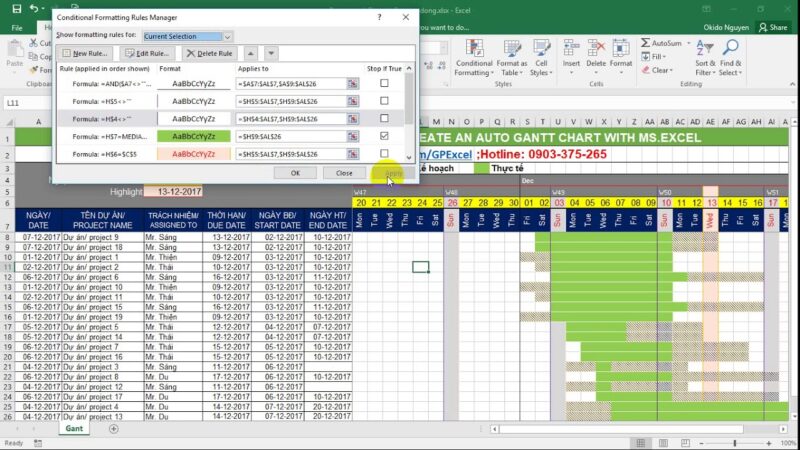
Project management with Excel
Excel is one of the most popular free project management tools today. With simple operations and ease of use, Excel helps users create and track simple, uncomplicated processes. In addition, Excel also allows multiple users to access simultaneously (with the online version) and add or remove people from the project by granting access rights to each individual user.
Disadvantages:
- Cannot attach documents or store a lot of data in a single Excel file
- No notification feature for members when data is updated
- The interface is limited, not offering many implementation formats compared to using software
- Difficult to use on mobile devices
- Only suitable for managing personal projects or small-scale teams
Trello project management tool (free version)
Trello is a project management software with both paid and free versions. With the free version, Trello allows users lifetime access without any cost. However, users are limited to certain features and storage capacity.
Some key features in Trello’s free plan:
- Allows attaching files under 10MB/file
- Allows adding tasks to the daily work board
- Manage an unlimited number of boards and created task lists
- Use 10 team boards to manage group work.
Check it out now: Task management application that helps increase productivity by 100%
3. Paid project management tools
If your business or project is complex and highly specialized, choosing paid project management tools will offer deeper specialization and more diverse utilities. Below are some effective, professional, and convenient project management tools.
3.1 Jira Software project management tool
<span style="
- Track work progress, projects: progress, assignee, work results.
- Control operational data, synchronize figures, and optimize data mining capabilities
- Customize the system, measurement methods, and reports to suit the different characteristics and purposes of the business
- Measure accurately and visually with detailed figures, charts, and statistics
- Update reports and figures instantly on all aspects of the business (sales, projects, human resources, communications, etc.)
- Proactively track project and process progress with automatic, real-time reports, and promptly handle any arising issues
- The process system is built specifically for each department and personnel position, with a clear division of responsibilities for each part, helping to minimize delays or missed assigned tasks
As you can see, applying project management tools is the optimal solution to help you track and capture project progress quickly and in a timely manner. Depending on the specifics and nature of the project, you can choose free or paid software to ensure efficiency and develop your business project. And 1Office is one of the effective, professional project management tools you should apply to optimize projects and track progress quickly and easily.
To register to use the project management tool that helps track project progress and measure project efficiency, please leave your information for 1Office experts to contact and advise you.
For more details, please see:
- Hotline: 083 483 8888
- Fanpage: https://www.facebook.com/1officevn/
- Youtube: https://www.youtube.com/channel/UCeTIRNqxaTwk0_kcTw6SxmA
















