


 10/05/2026
  161 views
Recruitment is the first step that lays the foundation for building a company’s personnel structure. Therefore, it’s crucial to closely monitor and regularly evaluate the effectiveness of the recruitment process. Join 1Office to learn about the process of creating a standard recruitment report from A to Z and download the 5+ most popular recruitment report templates for free in the article below.
Mục lục
- 1. What is a recruitment report? Key components of a recruitment report
- 2. Common types of recruitment reports
- 3. How to write a standard recruitment report
- 4. FREE DOWNLOAD: Recruitment Report Templates (Excel Files)
- 5. Create Automated and Accurate Recruitment Reports with 1Office HRM
- 6. Frequently Asked Questions When Creating Recruitment Reports
1. What is a recruitment report? Key components of a recruitment report
A recruitment report is a document that compiles statistics and analyzes the results and status of the HR department’s recruitment efforts. This report helps businesses track the progress and measure the effectiveness of their recruitment campaigns. It serves as a basis for making adjustments or optimizing the recruitment process.
Regardless of its purpose, every recruitment activity report must include the following basic components:
- General overview: Includes statistics on the number of applicants, number of successful candidates, recruitment progress, etc.
- Time to hire: The process from the start to the end of a recruitment campaign
- Recruitment channels: The platforms used to post job openings, attract candidates, and receive applications
- Candidate ratio: Fluctuations in the number of candidates through the stages: CV – Interview – Probation
- Recruitment cost: The total budget spent on the recruitment campaign, cost per candidate at each stage
2. Common types of recruitment reports
2.1. Recruitment reports by time period
- Weekly: A report compiled on a weekly basis
- Monthly: A report compiled from weekly reports
- Annually: A report summarizing the results of all recruitment campaigns conducted throughout the year
2.2. Recruitment reports by position/department
- By department: Marketing, Sales, HR, etc.
- By position: Intern, staff, manager, etc.
This report helps departments stay informed about the recruitment status for their open positions.
2.3. Recruitment activity reports by purpose
Purpose-driven reports are created to track a specific variable within a recruitment campaign in detail. Common types include:
- General recruitment overview report.
- Recruitment cost report.
- Candidate ratio report.
- Recruitment channel quality report.
Download 4 free, standard, and detailed HR report templates for HR
3. How to write a standard recruitment report
document.getElementById(“currentYear”).textContent = new Date().getFullYear();
Step 1: Provide a general overview of the recruitment situation
A general overview of the recruitment situation will give managers a broad perspective on the progress and current results of the recruitment campaign. Therefore, the overview section should be presented concisely, succinctly, and visually with specific data.
The HR’s task in this section is to list the achieved numbers, evaluate their fluctuations over time, and compare them with planned targets. Some information that needs to be clarified includes: the number of applications received, the number of new hires, the amount of budget spent, etc.
Step 2: Calculate the successful candidate rate
The successful candidate rate is the clearest indicator of recruitment effectiveness. Therefore, HR needs to pay close attention to this metric.

If this rate is high, it means the company’s recruitment activities are effective. Conversely, a low successful candidate rate indicates that the recruitment process is not yet optimized, and HR needs to re-evaluate and find the root cause.
Step 3: Evaluate the effectiveness of recruitment channels
A business can use many different platforms for recruitment. You need to analyze and specify in the report which channel is the source of the most candidates by visually representing the breakdown of applications received from each channel through a chart.
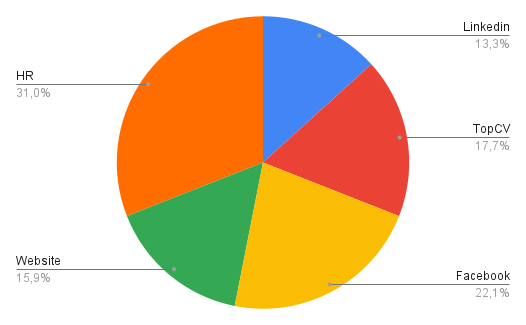
Additionally, another method you can use to evaluate the effectiveness of a recruitment channel is to calculate its efficiency index:

By calculating the cost per application for each recruitment channel, the business can identify which channels are consuming a large portion of the budget without bringing in many candidates, and then consider cutting costs or switching to other channels.
Step 4: Report recruitment costs
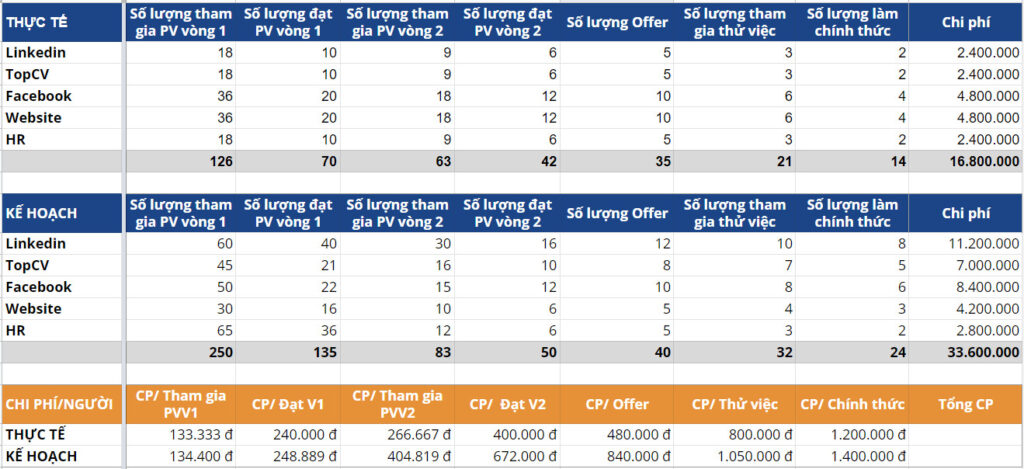
To track cost fluctuations across stages, HR needs to divide the total actual budget of the entire campaign by the number of candidates acquired in each stage. This way, you can determine the cost per candidate profile in the recruitment campaign.
Additionally, it’s necessary to determine the planned cost to control budget usage.
Step 5: Determine the time-to-hire
Time-to-hire is the average time HR needs to fill the required number of positions. This metric will be used to track recruitment progress. A longer time-to-hire indicates that the recruitment process is facing issues.
| Read more: How to Create the Most Detailed and Standard Recruitment Plan for 2022 |
4. FREE DOWNLOAD: Recruitment Report Templates (Excel Files)
4.1. Recruitment Results Report Template by Time Period
4.2. Recruitment Status Report Template by Position
4.3. Recruitment Activity Report Templates by Purpose
- Recruitment Cost Report: DOWNLOAD HERE
- Candidate Ratio Report: DOWNLOAD HERE
- Recruitment Channel Effectiveness Report: DOWNLOAD HERE
5. Create Automated and Accurate Recruitment Reports with 1Office HRM
Although Excel files are a popular format used by many HR professionals to create recruitment reports, this is not the most optimal method. For large-scale recruitment campaigns, the number of candidates can reach hundreds or even thousands, leading to difficulties in information management, such as:
- Scattered data from multiple channels makes consolidation time-consuming and prone to information loss.
- Time-consuming screening and storage of candidate information.
- Candidate data from various channels is not updated automatically; HR must manually enter it into the file daily.
- Lack of tools to evaluate the effectiveness of recruitment channels.
To help businesses solve these recruitment challenges, 1Office has developed the HRM module – a comprehensive recruitment management solution for enterprises. With its superior features, the 1Office software will handle every stage of your company’s recruitment process:
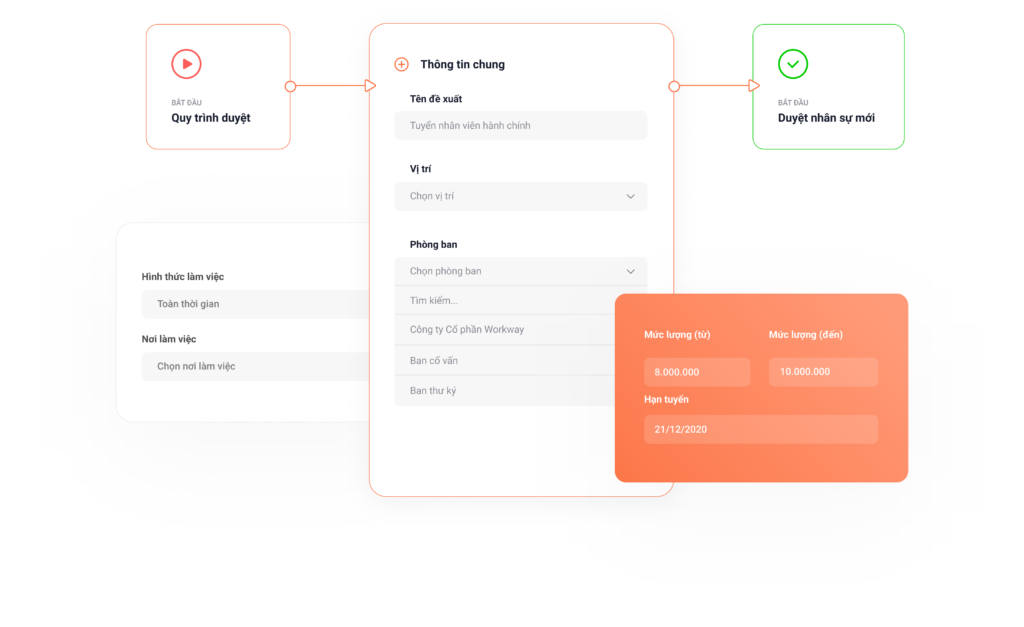
Create Recruitment Requisitions
- Simplify the process and save time with the automatic recruitment requisition approval feature.
- Closely monitor the status of recruitment campaigns.
- Automatically filter and categorize candidate profiles based on company criteria.
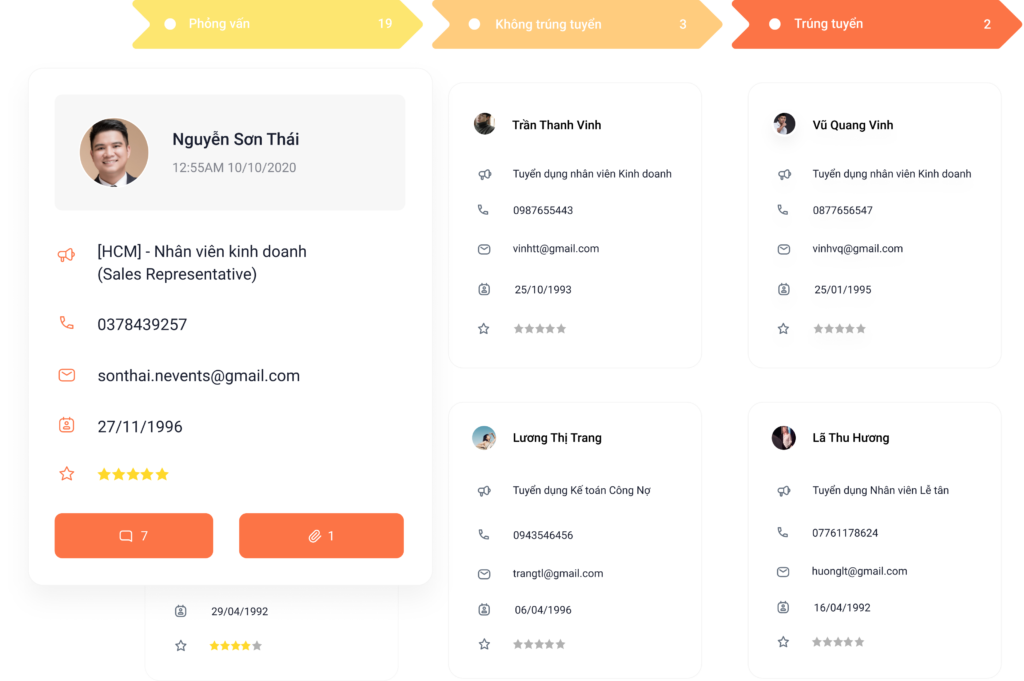
Manage CVs & Evaluate Candidates
- Easily filter and search for candidate profiles by recruitment campaign and track detailed candidate information.
- Store candidate interaction history and manage candidate status according to pre-set stages.
- Evaluate candidates directly on the system using criteria and assessment forms.
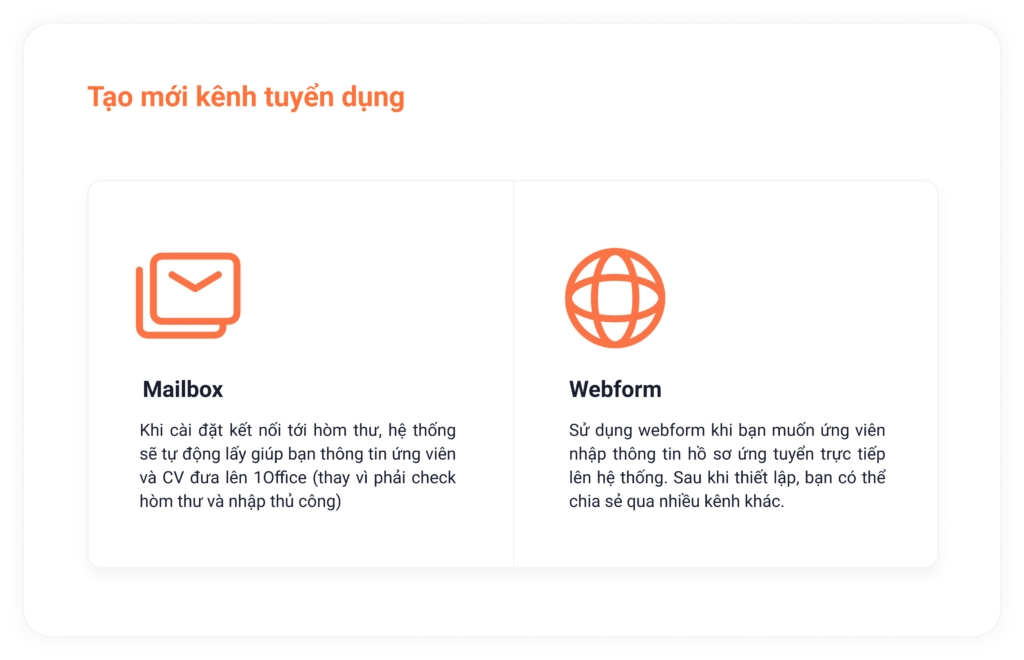
Manage by Recruitment Channel
- Automatically connect and push candidate profiles into the system.
- Flexibly choose recruitment channels based on your needs.
- Apply AI to the process to help parse data from candidate profiles.
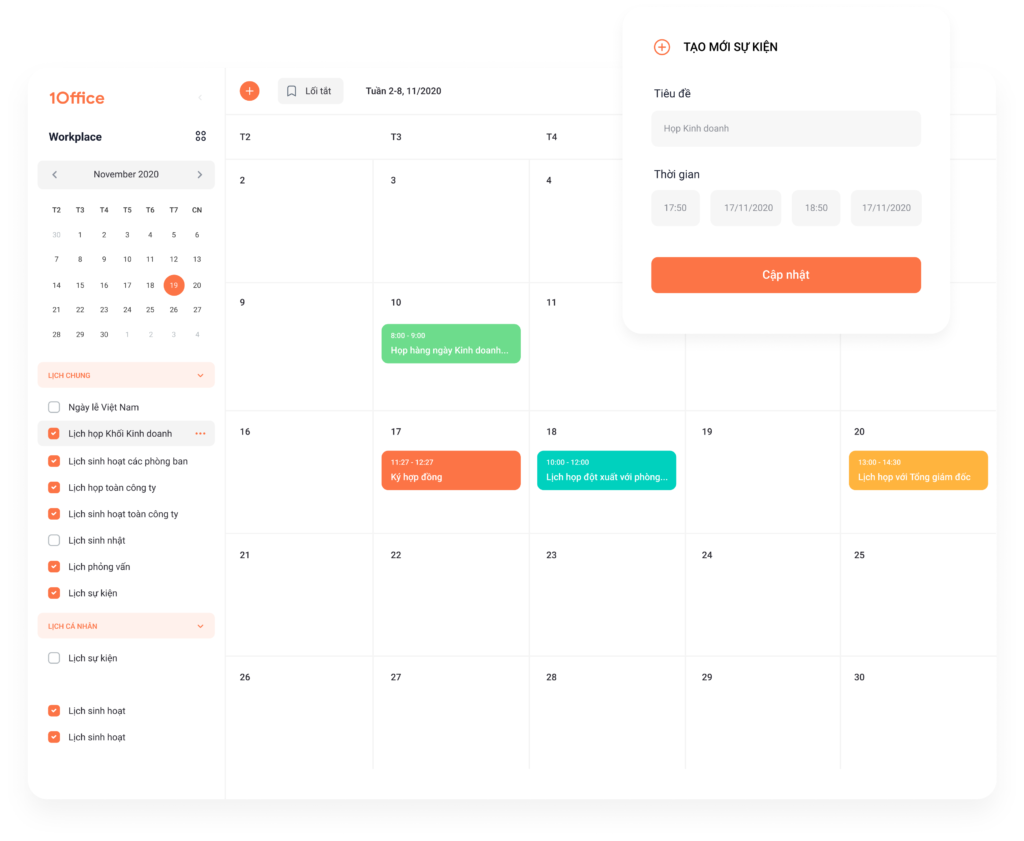
Schedule and Create Interviews
- Create and arrange interview schedules efficiently and systematically to avoid scheduling conflicts.
- Automatically send interview invitation emails to candidates according to a pre-set process.
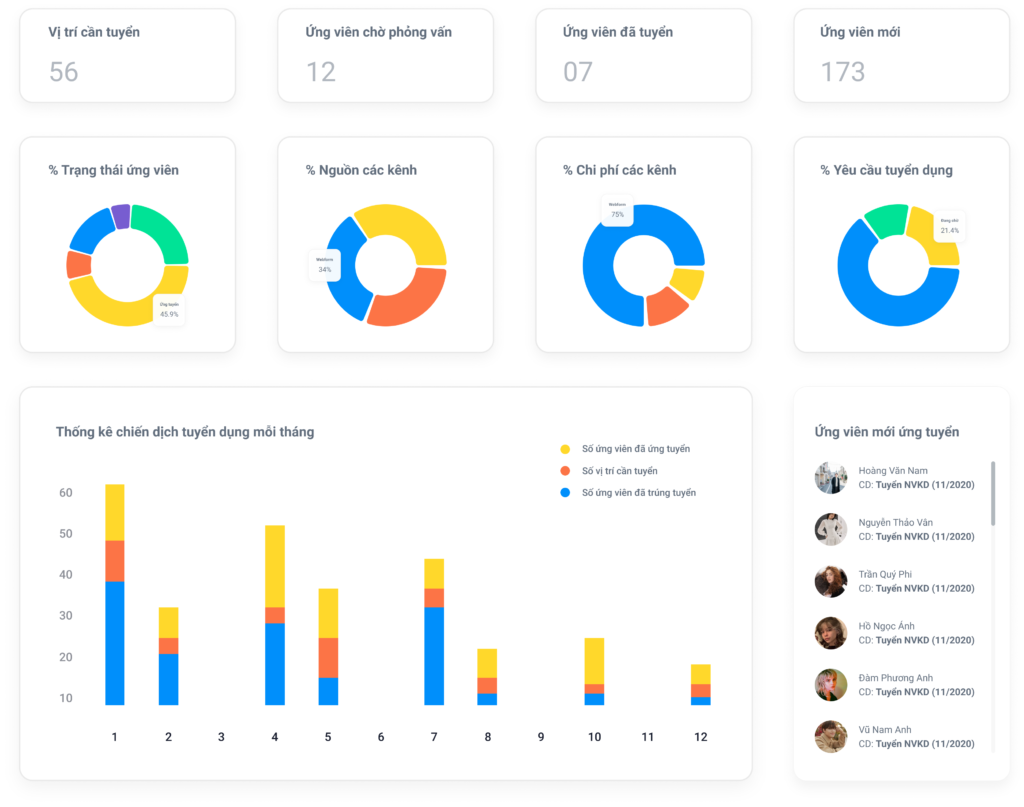
Automated Reporting System
- Automatically compiles statistics on the number of candidates and the recruitment source for each candidate.
- Provides statistics on candidate conversion rates through different stages: Application, Interview, Offer…
- Measures and calculates recruitment costs, helping businesses evaluate the effectiveness of their recruitment process.
6. Frequently Asked Questions When Creating Recruitment Reports
6.1. How often should recruitment reports be created?
The frequency of creating recruitment reports depends on the size and human resource management needs of each business:
-
Small businesses (under 50 employees): Monthly reports are recommended to track recruitment progress, costs, and the need for additional personnel in each phase.
-
Medium-sized businesses (50–200 employees): Weekly reports and monthly summaries are recommended to ensure good control over candidate quality and hiring speed.
-
Large, multi-branch corporations: Weekly, monthly, and quarterly reports are necessary for analyzing data by department, branch, or region.
In general, the more frequent the reports, the more accurate the data, helping HR proactively adjust recruitment strategies and mitigate personnel shortages.
6.2. Should you use Excel or HRM software to create recruitment reports?
Depending on the scale and level of professionalism, businesses can choose between Excel and HRM (Human Resource Management) software.
| Criteria | Excel | HRM Software |
|---|---|---|
| Advantages | Easy to use, free, suitable for small businesses. | Automation, fast data aggregation, reduces errors. |
| Disadvantages | Manual, time-consuming, difficult to aggregate for multiple positions. | Requires implementation fees, needs initial training. |
| Suitable for | Startups, businesses with infrequent hiring. | Businesses with continuous, multi-position hiring needs. |
If a business wants to increase work efficiency and standardize HR data, HRM software is a more optimal choice in the long run.
6.3. Who should recruitment reports be submitted to?
Depending on the organizational structure, the recruitment reporting process typically includes the following steps:
- Recruiter: Compiles and summarizes recruitment data weekly or monthly.
- HR Manager: Reviews, evaluates, and analyzes recruitment effectiveness.
- Board of Directors or CEO: Receives summary reports to make decisions on budgets, HR planning, and recruitment direction for the next period.
This process ensures transparency and alignment between the execution, management, and executive levels, while enhancing the ability to make decisions based on actual data.
6.4. What KPIs are commonly used to evaluate recruitment effectiveness?
Below are common recruitment KPIs that businesses should track in their reports:
-
Time to Fill: The average time to fill a position (from posting the job to the candidate accepting the offer).
-
Cost per Hire: The average cost for each successful hire, including advertising, interview, and initial training costs.
-
Offer Acceptance Rate: The percentage of candidates who accept a job offer out of the total offers extended.
-
Quality of Hire: The quality of new hires after they start (evaluated through job performance or retention rate after 3–6 months).
-
Source of Hire: The recruitment channel that yields the highest quality candidates (Facebook, LinkedIn, job boards, etc.).
Tracking these KPIs helps HR evaluate the effectiveness of each recruitment campaign, optimize costs, and improve the candidate experience in the future.
In the article above, we have shared with you how to write a standard 2022 HR recruitment report and provided 5+ of the most detailed and complete recruitment report templates for businesses. To experience our 4.0 recruitment management software, please register for a free consultation here:
For more details, please contact:
- Hotline: 083 483 8888
- Fanpage 1Office: https://www.facebook.com/1officevn
- Youtube Channel: https://www.youtube.com/c/1OfficeNềntảngquảnlýtổngthểDoanhNghiệp
















