


 10/05/2026
  21195 views
What is Asana? Is Asana software the optimal and most suitable solution for businesses? In the following article, 1Office will provide you with a detailed review of Asana software to answer these questions.
Mục lục
1. What is Asana software?
Asana is a work and project management software that helps users plan work, assign tasks, and effectively manage progress and processes.
Asana work management software was developed by Dustin Moskovitz – the technical director and co-founder of Facebook. Initially, Asana was only used as an application to help teams manage and track work progress. Later, Asana was developed into a professional project management technology software and built a solution package for businesses.
2. Key features of Asana software
Now that we know what Asana is, let’s go over the outstanding features of this software. Asana’s features are aimed at empowering the entire team rather than just focusing on the manager. The focus of the Asana app is its task and workload management features.
Management and planning features
- Scheduling and work prioritization tools: Asana offers users the option to create, schedule, and prioritize work in several different formats, including to-do lists, Gantt charts, and Kanban boards. This gives you the flexibility to track your teams and projects in the most convenient way.
- Team calendar: If you track the long-term schedule of a project, Asana provides a shared team calendar that all team members can access and update in real time.
- Resource management and time tracking: Asana software allows users to track and manage the two most important factors – workload and time spent on tasks.
- Pre-built templates: Asana provides many pre-built work checklist templates, from marketing projects to product development, creating maximum convenience for users.
- Automation: Save time by automating repetitive tasks so you can focus on important work.
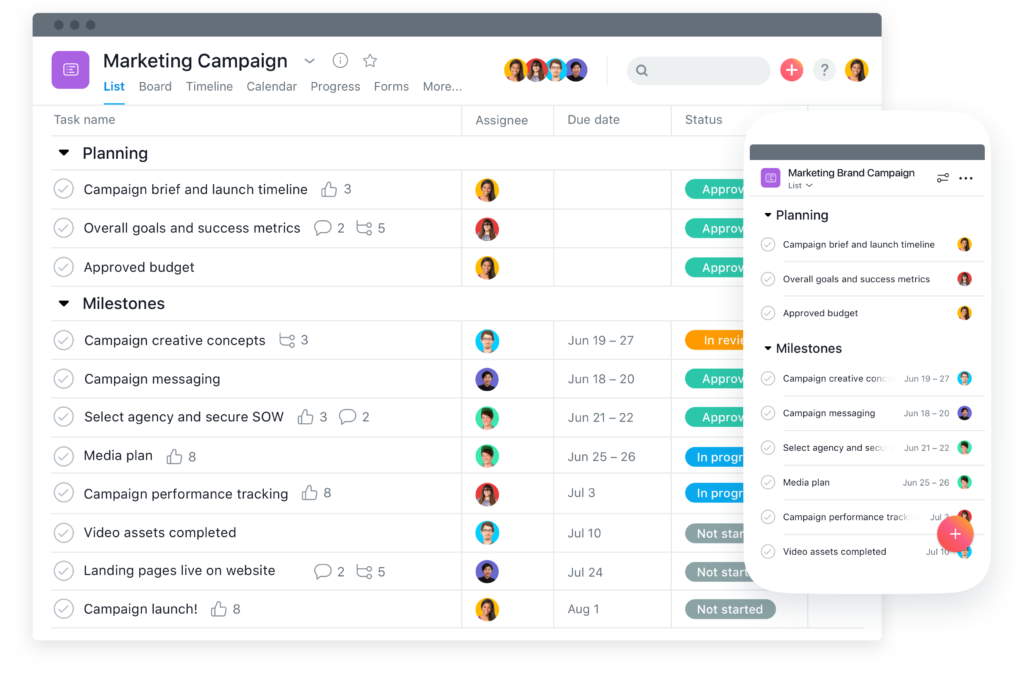
Document features
- Document storage: Store all relevant project files and documents in Asana using the task file attachment tool, so your team will have access to everything they need instantly.
Collaboration features
- Communication: Asana provides a comment mode in every task for members to discuss, collaborate, and share resources.
- File sharing: Every task in Asana supports file uploads in all formats (Word, Excel, PDF, images, etc.). You can drag and drop a file into a task or browse and upload it manually.
Reporting features
- Automated reports: Asana provides visually intuitive, fully automated reports that allow users to track project progress and other factors such as task completion levels and budget forecasts.
Security features
- Two-factor authentication: Asana creates a double security barrier for users with an additional identity verification feature through 2FA.
- Advanced account permissions: Detailed permission settings (for tasks, teams, and projects) help control and restrict access to protect user information and resources.
| Read more: What is Trello? An overall review of Trello software for SMEs |
3. How to use Asana software for work & project management
Now that you understand what Asana is, let’s explore with 1Office how Asana works for managing tasks & projects.
How to create a task
To create a task in the Asana app, start within a project, enter the task name, then press enter to continue adding more tasks.
- Name the task and add a description so the assignee knows what they need to do
- Assign the task to team members and set a due date. Clearly specify who is responsible for each work item
- Attach relevant files, documents, and images needed for the work. Also, attach completed files when the task is done to ensure team members are informed
- Add members as collaborators on the task so they can stay updated on its progress. You can mention them using @ when you comment on a task
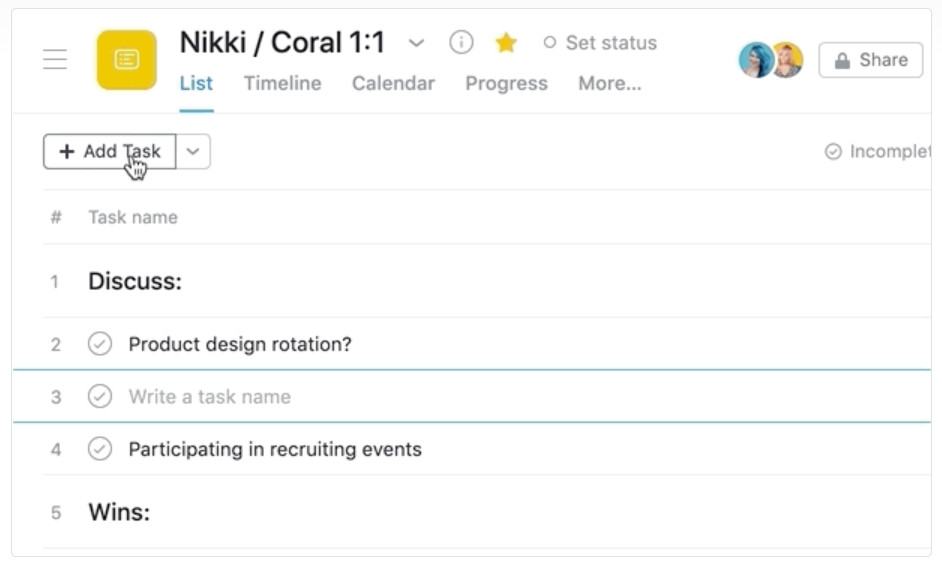
How to find and update work
- My tasks
The “My tasks” section only displays tasks assigned to you and their due dates. Keep track of the “My tasks” section to check your completed tasks, see any new upcoming work, and start your next task.
- Inbox
The Inbox is a news feed that provides status updates for the work you are following. You can also have discussions directly in the Inbox and quickly navigate to your work.
How to create a new project
Projects are how you organize and plan all the tasks related to a specific idea, goal, or a large piece of work. You can visualize projects in List, Board, Calendar, or Timeline view and switch between these views at any time.
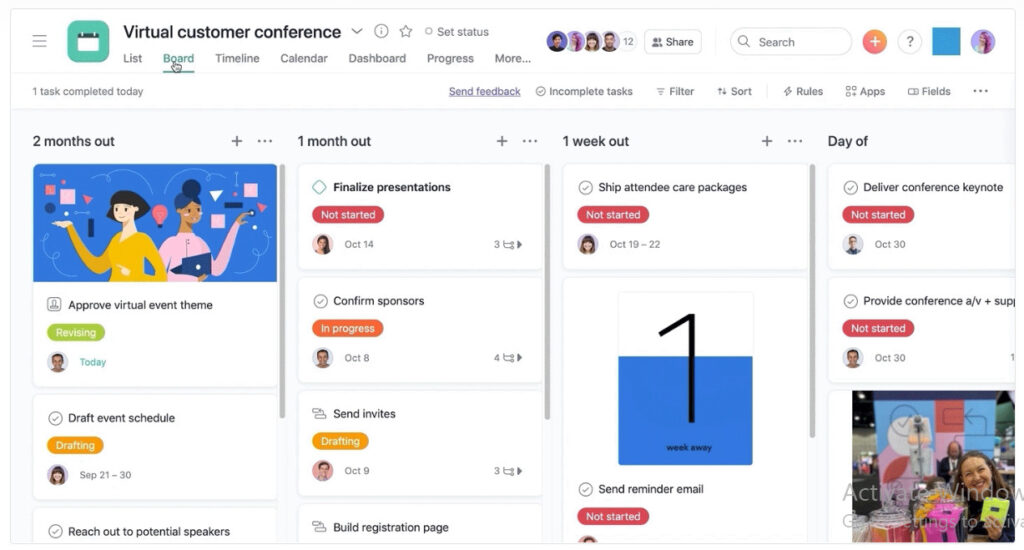
Types of projects you can manage in Asana
- Deadline-based: suitable for events, launches, campaigns
- Ongoing processes: used for sprint planning, work requests, editorial calendars
- Planning and reference: used for meeting agendas, brainstorms, roadmapping
Additionally, Asana provides pre-configured project templates in its template library to serve users.
| Read more: What are the most effective and convenient project management tools today? |
Project Management
- Group related tasks together
Grouping tasks makes project analysis easier. Users can create groups by time (quarter or month), divide them by project stages, or by Kanban boards – “to do,” “doing,” and “done.”
- Sort and filter tasks in a project with Custom Fields
Custom Fields are like spreadsheet column headers that help you filter and sort tasks by priority, status, cost, or approval. You can use this feature by clicking on any header and using the filter + sort buttons.
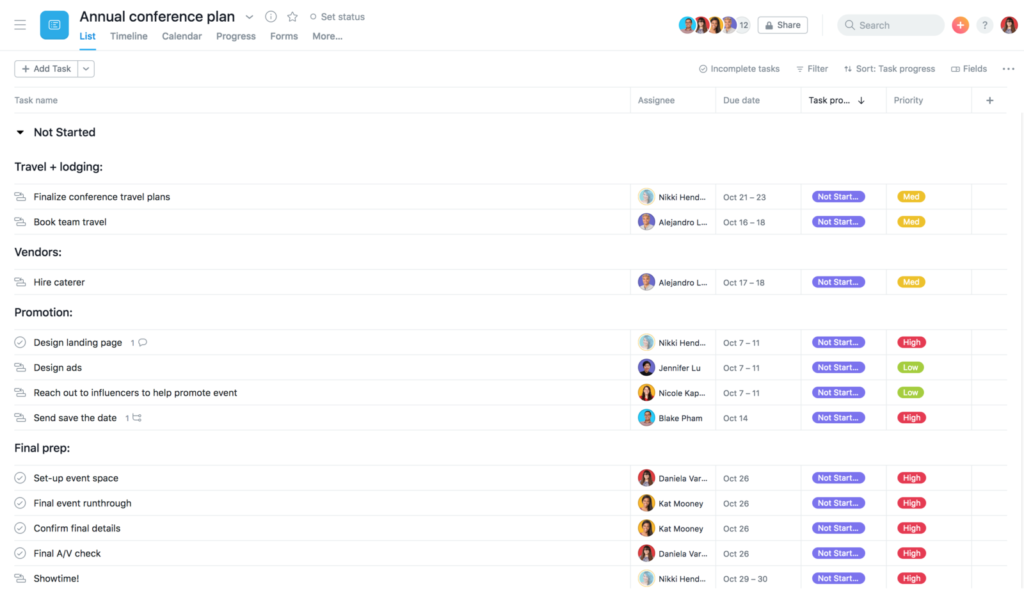
4. Review of Asana Task Management Software
We have learned what Asana software is and how to use Asana to manage work. Let’s evaluate the effectiveness of Asana in practice to help businesses get the most realistic approach to this software.
Pros
- Diverse features: Asana provides a fairly complete set of features to support users in managing tasks & projects from basic to advanced.
- User-friendly interface: The structure of the Asana app is easy to understand and user-friendly, with operations performed easily and quickly.
- High security: Asana has comprehensive security and privacy programs that meet international standards, ensuring that data is stored securely.
What are the cons of Asana?
- High cost: As an international application, the cost of using Asana is quite high. If a business wants to use the full set of features, it must make a significant investment.
- Usage limitations: The free version has limited features and number of users (maximum 15 members/team).
- Limited language support: Currently, Asana does not have a Vietnamese language version, which can be inconvenient for businesses during use.
Read now: TOP 8 Free Project Management Software for Effective Progress Tracking in 2025
5. Asana Software Pricing
Asana’s task and project management software offers 4 different service packages suitable for the various purposes and scale characteristics of users.
| Package | Basic | Premium | Business | Enterprise |
| Target Users | For individuals or teams just starting with project management | For teams that need to create professional project plans | For teams and businesses that need to manage large projects | For organizations that need to administer and control all types of projects and tasks. |
| Cost | US $0
Free forever |
US $10.99
user/month |
US $24.99
user/month |
Contact for consultation |
| Features Provided | – To-do lists, Kanban boards, calendars, app integrations.
– Up to 15 team members. |
– Basic package features
– Timelines, advanced search, project and budget dashboards, priority support, custom field creation, forms, and milestones. |
– Premium package features.
– Portfolios, Workload, forms, automated proofing, priority support, Adobe Creative Cloud integration. |
– Business package features.
– User provisioning, data export, custom branding, priority support. |
6. Which businesses are a good fit for Asana software?
Not every business is suitable for implementing Asana. Depending on the scale, type of work, and depth of management required, this software will yield different levels of effectiveness. Here are the types of businesses best suited for adopting Asana:
Asana is particularly ideal for small and medium-sized businesses, startups, or agile teams looking for a simple yet effective work management tool. Thanks to its intuitive interface, ease of use, and ability to organize tasks in Kanban boards, timelines, or calendars, Asana helps teams quickly grasp overall progress and minimize missed tasks.
-
Startups / Small businesses: Asana is a cost-effective and user-friendly choice. Creating projects, assigning tasks, or setting deadlines takes just a few clicks, helping teams stay organized even without a clearly defined process.
-
Marketing, creative, and communications teams: With its strong collaboration features, comments, file sharing, and real-time updates, Asana is well-suited for teams creating content, running advertising campaigns, or managing posting schedules.
-
Businesses working on short-term projects: Companies in fields like design, consulting, technology, and made-to-order manufacturing can leverage Asana to track the progress of each stage, from brief to execution to acceptance.
-
Non-profit organizations or educational groups: Asana offers a free version and discounted plans for these organizations, providing excellent support for managing plans, volunteers, or courses.
Conversely, for large-scale enterprises with multiple management layers or multi-level approval requirements, Asana may have limitations due to the lack of advanced features like complex workflow automation, KPI management, HR reporting, or ERP system integration. In such cases, businesses should consider using more comprehensive platforms like 1Office, Jira, or ClickUp, which allow for connecting processes across multiple departments.
In summary, Asana is best suited for small to medium-sized, highly flexible teams that need an intuitive project management tool for quick collaboration and don’t have overly complex approval processes.
7. How to optimize efficiency when using Asana software in your business
For Asana to reach its full potential, businesses need not just to “use” it, but to “operate it strategically.” Here are ways to optimize efficiency when implementing Asana for work and project management:
First, businesses should standardize their internal workflows before creating projects on Asana. When the steps, roles, and completion criteria are clearly defined, the system can operate smoothly and prevent conflicts of responsibility among team members.
-
Set up a scientific project structure: Use “Sections” or “Boards” to group tasks by stage: Planning – Execution – Review – Completion. This makes it easier to track the workflow and avoid missing tasks.
-
Set specific deadlines and assignees: Every task in Asana should have a primary person responsible (Assignee) and a clear due date. This helps increase commitment and avoid task-shifting or delays.
-
Leverage automation features (Automation Rules): Asana allows you to set up “rules” such as automatically moving a task upon completion, adding a tag when the status changes, or sending automatic notifications. This helps reduce manual operations and saves significant time.
-
Sync Asana with other tools: Connect Asana with Google Drive, Slack, Zoom, Gmail, or Microsoft Teams to unify data and help everyone easily stay updated on work progress.
-
Track & report periodically: Use charts or dashboards to monitor work progress, completion times, and the performance of each team member. This helps managers quickly identify bottlenecks in the process and make timely improvements.
Finally, businesses should train employees to use Asana consistently. A system is only effective when all members understand how to use it correctly and adhere to the common process.
8. 1Office – Comprehensive Work & Project Management Software
Key features of 1Office
It’s clear that Asana’s work and project management software is an effective tool with powerful support features for businesses. However, considering its limitations, it may not be the most optimal choice for the needs and characteristics of businesses in Vietnam. So, what is a viable alternative to Asana?
1Office is one of the market’s #1 business management platforms, with 10 years of pioneering experience in digital transformation. With its Workplace module, 1Office offers a superior and diverse set of features that help businesses manage projects and tasks easily and effectively, on par with Asana, but at a reasonable and cost-effective price.
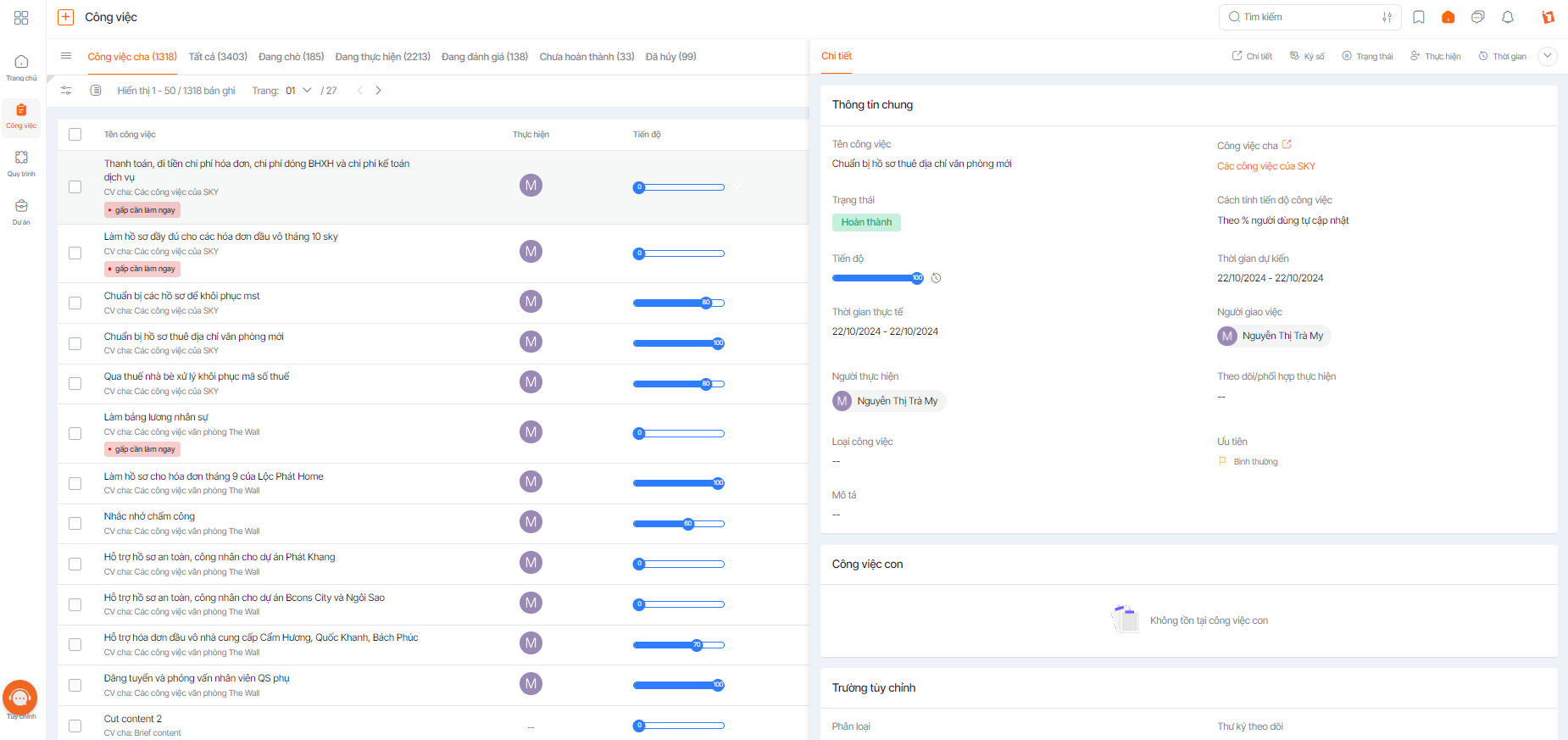
Task Management
- Supports easy planning and task assignment. Project members can view project content, documents, progress, and priority levels.
- Monitor progress anytime, anywhere. With just one click, you can view all accurate data without needing to ask employees.
- Automatically updates progress reports in highly intuitive, scientific, and easy-to-understand Gantt Chart & Kanban formats.
- Project members can view all tasks anytime, anywhere via any device with an Internet connection.
- Flexible communication with 1Chat, allowing task assignment and progress tracking directly within conversations.
- Manage workflows, automate trivial tasks, and configure automated processes for one-click deployment.
- Digitize and manage records and documents, allowing for direct digital signing within the process.
Project Management
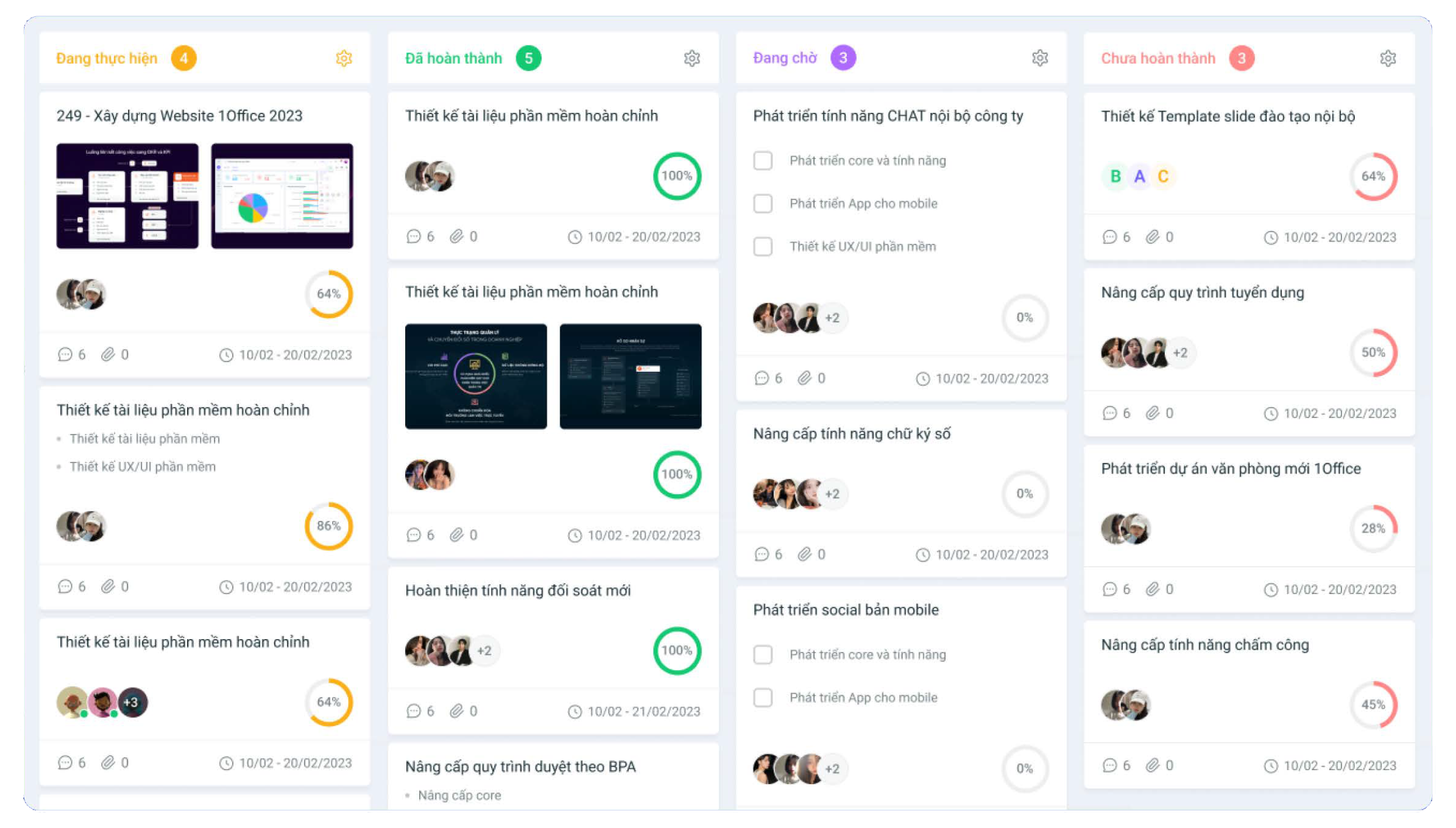
- Easily create plans and assign tasks to the right people and departments directly on the software.
- Closely monitor progress and track the detailed status of tasks to ensure timely handling.
- All task participants can discuss and exchange ideas directly in the discussion section.
- Automatically updates work result reports, allowing managers to evaluate work efficiency.
What is the difference between 1Office and Asana software?
| Features | Asana | 1Office |
| Diverse task management features | x | x |
| User-friendly interface | x | x |
| Affordable price | x | |
| Vietnamese language | x |
This article has helped you understand what Asana software is and provided a detailed review of its features for work & project management. If you have any further questions or are interested in the 1Office software solution, please contact 1Office at:
- Hotline: 083 483 8888
- Fanpage: https://www.facebook.com/1officevn/
- Youtube: https://www.youtube.com/channel/UCeTIRNqxaTwk0_kcTw6SxmA
















