


 12/05/2026
  296 views
CRM Mobile – a customer relationship management solution integrated on smartphones, is a breakthrough in the software technology field, helping businesses implement flexible business strategies and achieve breakthrough growth. Thanks to its mobility and ability to work with real-time data anytime, anywhere, CRM Mobile is estimated to deliver 25% higher performance than desktop software. So, what is CRM Mobile? What criteria should be considered when choosing a CRM Mobile to optimize business operational efficiency? Let’s find out with 1Office in the following article.
Mục lục
1. What is CRM Mobile?
CRM Mobile is a customer relationship management solution that operates on mobile phone applications. A CRM Mobile system provides all the basic functions to manage and optimize business operations and customer care, thereby enhancing the customer experience and boosting sales.
What sets Customer Relationship Management Mobile apart from conventional customer relationship management software solutions is its flexibility and convenience. By installing a CRM app on internet-connected mobile devices such as smartphones, tablets, etc., sales, marketing, and customer care teams can access and manage customer-related information in real-time from anywhere.
2. Why Businesses Should Use CRM Mobile
Considered the “new generation” of customer relationship management solutions, CRM Mobile offers outstanding benefits compared to traditional server-based software, helping businesses optimize their business management processes and flexibly meet operational requirements in various situations. Specifically:
- Enhance customer service quality by thoroughly mining customer information and understanding buyer needs to develop appropriate consulting and care strategies, thereby improving the customer experience.
- Respond to and meet customer needs and desires promptly, helping to increase satisfaction and build customer brand loyalty.
- The CRM app helps save 100 employee work hours and improves business performance by up to 25% by reducing manual tasks to focus on customer conversion.
- Mobile CRM facilitates flexible work for employees anytime, anywhere; this feature is particularly suitable for the mobile nature of a sales team’s work.
- Allows staff to communicate and collaborate remotely, enhancing teamwork efficiency and ensuring smooth coordination between departments.
Read more: CRM System – 6 Key Functions and the Process of Building a Professional CRM System
3. Core Functions of CRM Mobile
Provides Real-Time Customer Data
With a mobile customer relationship management system, customer data is stored, centrally managed, and synchronized across all devices. This allows sales staff to instantly update necessary customer information while in the field or meeting with partners directly on their mobile phones, helping them effectively understand customer psychology and make important decisions in various situations.
Additionally, continuously updated customer data helps businesses promptly meet customer needs and quickly detect and resolve issues arising in the sales process, thereby increasing satisfaction and improving service quality.
Instant Business Situation Reporting
Beyond storing a vast data repository, the mobile sales management application provides a highly accurate automated reporting system. This helps managers stay updated on the business situation and closely monitor employee performance through data on revenue, orders, contracts, customer status, and more.
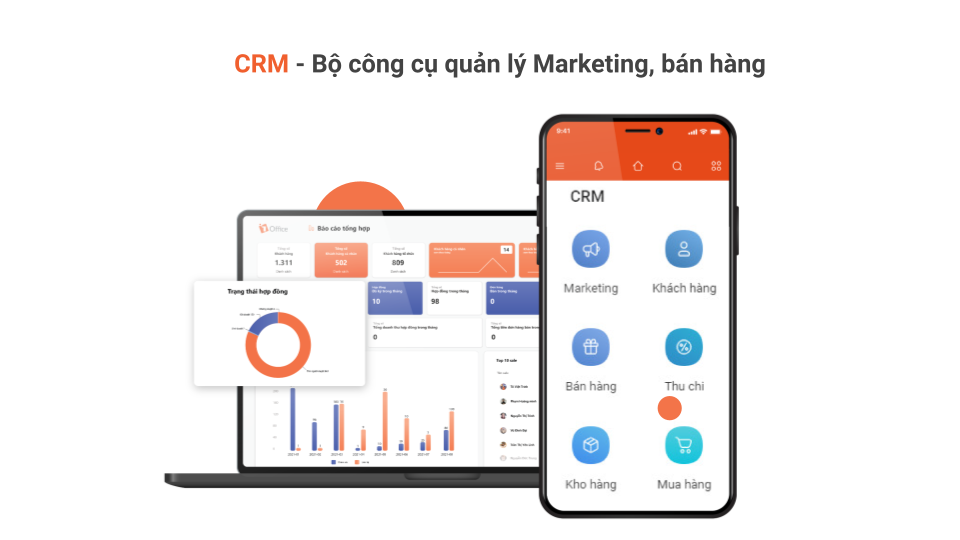
Furthermore, CRM Mobile allows employees to report on their field activities and the results of partner discussions to their superiors while on the move, without needing to spend time compiling data and creating reports. This also helps to minimize cumbersome procedures and save significant time for the sales department, allowing employees to fully focus on their professional duties to deliver the best customer experience.
Records Customer Interactions
The Mobile CRM app records all interactions between care staff and customers on the software in full detail, from call history and SMS to the number of care actions performed. This allows managers to monitor the entire customer care process and evaluate the quality and performance of each staff member remotely via mobile devices.
Closely monitoring the business process and customer interaction status also helps managers promptly identify gaps in the process and pinpoint issues needing improvement in the consulting and customer care stages. This enables them to take corrective measures, thereby optimizing the customer conversion rate.
Manage the sales process anytime, anywhere
CRM Mobile allows users to digitize and track all steps of the sales process. The system strongly supports quote management and contract/sales order implementation status, which are the most critical links determining business success.
By setting up automated approval workflows for proposals, quotes, contracts, etc., the CRM app offers flexibility for both the sales team and management levels, helping the business process run smoothly and minimizing bottlenecks. This is also a standout advantage of the mobile customer relationship management solution, thanks to its remote approval and digital signature features.
4. Criteria for Choosing a Suitable Mobile CRM Application
A CRM Mobile solution will help businesses optimize their sales process and significantly increase business efficiency. However, a mobile customer relationship management application is only truly effective when implemented appropriately, closely aligning with the business’s operational needs. Therefore, when choosing a CRM Mobile app to integrate into their operations, managers should consider the following points:
CRM Mobile with Unrestricted Functionality
Some mobile CRM solutions often have limited features compared to the server-based software version; managers should pay close attention to this when choosing a CRM Mobile. A comprehensive Mobile CRM solution must provide a full suite of necessary tools to ensure the business process runs smoothly and seamlessly, including core features like data storage and management, transaction tracking, customer interaction history, and automated reporting.
Mobile CRM with Connectivity and Scalability
Similar to CRM customer care management software installed on computers, mobile CRM must be able to connect with other modules and software to optimize business efficiency, such as call centers, marketing automation, SMS, etc.
Additionally, the customer relationship management system should be ready to expand and develop new features to keep pace with future usage demands and the company’s growth rate.
Offline Mode
A common issue with mobile applications is disconnection when there is no internet, which interrupts the user experience and, in some cases, can lead to data omissions or inaccuracies. Therefore, a CRM app needs an offline mode feature that updates data as soon as a network connection is available to ensure business processes run seamlessly.
5. 1Office – The Market-Leading CRM Application Helping Businesses Boost Sales
1Office CRM is an online customer relationship management solution within the comprehensive 1Office business management platform. The 1Office CRM module provides a comprehensive toolset to support marketing, sales, and customer care management activities within the business.
- Centralized customer data management on a single platform, making it easy to look up and retrieve information from any device
- Standardize and comprehensively manage the sales process. At each stage, you can easily compile statistics, forecast revenue, and detail work progress to promptly motivate and support employees
- Flexible quote and contract approval management process, allowing you to track contract status, quote status, and easily approve proposals right on your mobile phone
- Tightly control employee work quality, closely monitor KPI performance, and track the percentage of work completed
This article from 1Office has provided readers with useful information about CRM Mobile, while also sharing experience in choosing and implementing a suitable mobile customer relationship management application to enhance business efficiency and boost revenue. For a free consultation and a demo of the 1Office sales management software, please contact us using the information below.
Get a consultation & free software trial
For more details, please see:
- Hotline: 083 483 8888
- Fanpage: https://www.facebook.com/1officevn/
- Youtube: https://www.youtube.com/channel/UCeTIRNqxaTwk0_kcTw6SxmA
















