


 11/05/2026
  4620 views
Work performance report templates are tools that help managers track progress and evaluate employee performance. At the same time, employees can also review their completed work to improve their performance. In this article, 1Office will compile 8 standard work report templates that are easy to use and available for free download.
Mục lục
- 1. What is a work performance report template?
- 2. What makes a standard work report template?
- 3. Steps to Write a Work Report
- 4. Criteria for a Work Performance Report Template
- 5. Some Common Work Report Templates
- 6. Notes on Creating a Work Performance Report Template
- 7. Create work reports easily and accurately with 1Office
- 8. Frequently Asked Questions about Work Result Report Templates
- 9. Conclusion
1. What is a work performance report template?
A work performance report template is a report created for periodic work reporting on a weekly, monthly, quarterly, or annual basis, accompanied by specific, detailed report templates for each department. Work reports help managers get the most comprehensive overview of employee performance. This forms the basis for evaluation, rewarding good results, and correcting any mistakes employees have made.

Management reporting is an extremely important task for every employee. Creating a work performance report template is a crucial foundation for each individual, department, and organization to achieve the following objectives:
– Demonstrate the work capacity of each individual.
– Show the employee’s attitude and responsibility towards the work.
– Draw lessons and experience from shortcomings and difficulties during and after completing the work.
– Help managers and leaders in the company accurately assess employee capabilities.
– Serve as a basis for managers to plan and allocate work reasonably, in line with each employee’s abilities.
See also: Top 8 Best Free Task Assignment Software for Employees Today
2. What makes a standard work report template?
A standard work report template is a summary with a clear layout, professional presentation, and concise language. Instead of just listing tasks, a standard report must focus on quantitative results (data, KPIs), clearly identify actual challenges, and propose specific solutions, helping managers easily track progress and make accurate decisions.
2.1 Format
– Clear, coherent layout: Content sections are arranged logically and reasonably, with clear subheadings.
– Professional presentation:
- Easy-to-read font (e.g., Times New Roman, Arial).
- Font size 12-14 for the main content, larger for headings.
- Appropriate line spacing, usually from 1.15-1.5 to ensure readability.
- Choose font colors that are appropriate for each section and highlight important parts.
– Attach charts, data tables (if necessary): Used to illustrate progress or results, making the report more visual.
– Minimize spelling and grammar errors: A report with errors will affect its professionalism.
– Use numbering or bullet points: Helps to easily follow the items in the report.
– Reports can be presented on Google Docs or Google Sheets for convenience in sending and viewing by the recipient.
2.2 Content
Similar to other text-based report templates, a work performance report template needs to convey information to the reader concisely and understandably. Therefore, you need to know how to present a standard work report. Below is some information that should be included in a work report to make it detailed and standard.

– Title: Simple, concise, and clearly states the topic and general content of the report.
– Brief summary: Provides a general overview of the report’s main content, results, or work progress.
– Main content:
- Objective: Describe the objective or task to be performed and achieved.
- Work progress: Update on completed tasks, current progress, and comparison with the original plan.
- Achievements and results: List the results achieved, with specific data (if any).
- Difficulties, challenges: Analyze obstacles, difficulties, or issues that arose during the work process.
- Solutions: Propose ways to handle difficulties, outstanding issues, or methods to improve work in the future.
- Next steps: Outline the plan for remaining tasks or the next steps to be taken.
– Feedback and suggestions: In this section, employees can offer their opinions and contributions to adjust plans and work direction for better results. You can add goals and tasks that you will perform if you are reporting work progress daily, weekly, monthly, annually, etc.
– Conclusion: In this section, you summarize the results mentioned above and reiterate the most important points to highlight the key issues.
Among the contents listed above, you need to ensure that the report includes the following essential information:
- The latest updates on information, progress, and work results achieved
- A list of difficulties, obstacles, and outstanding issues encountered during the work process.
- Proposing solutions and specific action plans for the identified issues and challenges
- Presenting other work-related information, as well as the work plan for the upcoming period.
>>>>> See more:
- Scientific and effective work planning template to double work efficiency
- 5+ Latest free personal achievement report templates for 2024
2.3 By Method
– Direct reporting: Usually done in periodic meetings (daily/monthly/yearly), this involves a verbal report combined with a slide presentation (Powerpoint, Google Slides) or Google Sheets, depending on the nature, importance, and purpose of the meeting.
– Written reports: Sent via email or work management and communication systems, usually in PDF or Sheet format to ensure format consistency.
– Reporting via work management software: Software like 1Work, Trello, and Asana can automatically aggregate data and generate work reports based on progress and the person/department responsible.
– Ad-hoc reports: For events or emerging issues that require quick information.
3. Steps to Write a Work Report
As mentioned above, a work performance report needs to be presented in a detailed, clear, and logical sequence so that managers can easily understand and process it. To write a complete report, you can refer to the steps below:
3.1 Identify Your Audience
The first step is to identify who will be reading your report (department head, director, etc.). This is a crucial step that helps you include appropriate and accurate content in the report, as well as choose the right language.
3.2 Decide What Information to Include
Once you have identified your audience, you should focus on determining the purpose of the report and what content to include. You should list the tasks within the required reporting period, including assigned tasks and their completion levels. Then, select the most important information to provide the clearest picture of what you are conveying.
3.3 Structure the Work Report
A work result report template needs to be easy to read and understand. Different positions and jobs will have different report templates, but you can use some of the result report templates that 1Office will share in the content below to create a complete and professional report.

3.4 Use Concise and Professional Language
The language and writing style in the report are also important factors to consider. Try to present your points as clearly and quickly as possible. You should avoid wordy and confusing sentences. For example, instead of saying “you may find it helpful to frequently refresh your inbox to stay updated on emails,” you can say “refresh your inbox frequently.”
3.5 Proofread and Edit Your Report.
Finally, once you have completed the work report, proofread and check it one more time before submitting. This gives you the opportunity to ensure your writing is as professional as possible and to catch any errors before you send it. Additionally, proofreading helps you remove unnecessary information and ensure your report is as effective as possible.
| Read more: How to Create a Business Performance Report for Enterprises |
4. Criteria for a Work Performance Report Template
A work performance report is only truly effective when it conveys all important information clearly and systematically. It should not merely list completed tasks but also show the level of completion against the plan, the quality of work, any difficulties or obstacles, and directions for future improvement. Therefore, for a report to become a tool that supports management and decision-making, businesses or individuals must understand the basic criteria required in a report template.
4.1 Common KPIs for Evaluating Work Reports
For a work performance report to be valuable, it needs specific metrics rather than just a list of completed tasks. Some common KPIs that businesses often use include:
-
% work completion: A comparison between the plan and the actual results. For example: completing 90% of the tasks planned for the month.
-
Progress against the plan: Measures delays or early completion. For example: the project was completed 2 days ahead of the deadline.
-
Number of errors: Especially important in manufacturing, testing, or customer service industries.
-
Customer/internal satisfaction level: Often measured through surveys or rating scales.
-
Cost-effectiveness: A comparison between the projected budget and actual costs.
These KPIs not only reflect individual performance but also show the level of coordination within the team/department.
4.2 How Work Reports Support Management’s Decision-Making Process
A report is not just a “recap” of work done; it is also a basis for management to make decisions:
-
Identify bottlenecks: If progress consistently lags behind the plan, managers will know they need to reallocate resources or adjust processes.
-
Prioritize resources: Reports show which tasks yield high efficiency, allowing managers to focus resources on those areas.
-
Make faster decisions: When reports include data, charts, and dashboards, managers can grasp the situation in minutes without lengthy meetings.
-
Propose improvement solutions: A good report not only states the results but also suggests the next steps (e.g., need more marketing budget, need 2 additional personnel for the project…).
4.3 The Link Between Work Performance Reports and Departmental/Company KPIs
Individual and team work reports must be closely linked to the company’s larger goals. Specifically:
-
Individual → Team → Company: Each employee’s report is compiled into team results, which then contribute to departmental KPIs and overall goals.
-
Transparency: When reports clearly show metrics (completion rate, work quality), the board of directors can easily assess the contribution of each department.
-
Strategic direction: For example, if sales reports consistently show targets being exceeded, the company can confidently expand its market. Conversely, if product quality KPIs are frequently below standard, the company needs to review its production process.
-
Long-term connection: Short-term reports (weekly/monthly) provide the baseline data for measuring long-term results (quarterly/annually) and comparing them against the strategic plan.
5. Some Common Work Report Templates
In the course of work, every business or individual often has to use various types of reports depending on the purpose and management requirements. There are reports for daily progress updates, weekly reports to summarize the situation, monthly reports to evaluate performance, or project reports to track the entire implementation process. Each report template will have its own structure, content, and presentation style, but all share the common goal of providing clear, timely information to help management easily grasp the situation and make decisions. Choosing the right report template not only saves time but also enhances professionalism and efficiency at work.
5.1 Daily Work Performance Report Template
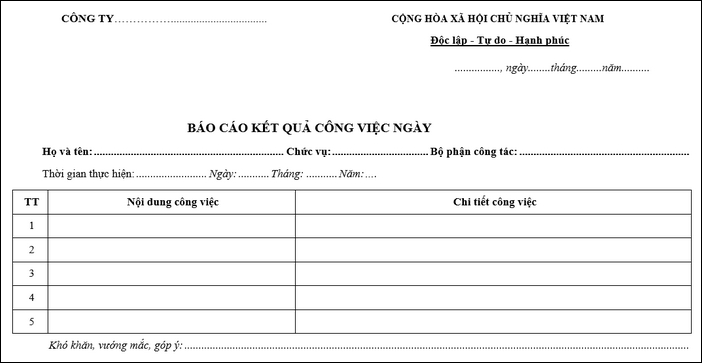
A daily work report is a work performance report template detailing what an individual has done in a day. A daily work report needs to show detailed content, work progress, and have a clear, standard format. Below is the latest daily work report template in Excel that you can refer to.
5.3 Weekly Work Report Template
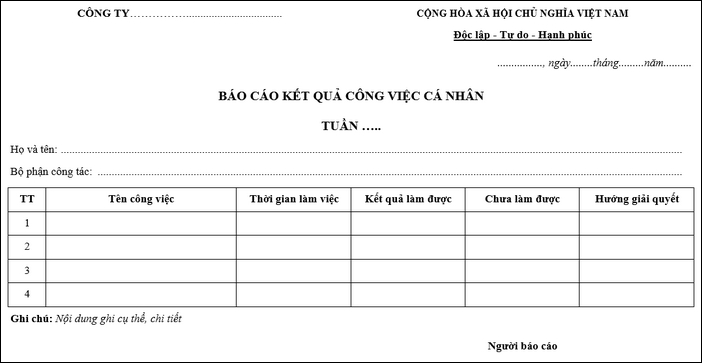
A weekly work performance report summarizes all the tasks and duties an employee has completed during the week. With this report, managers can track their employees’ weekly progress and identify any issues or challenges they are facing. This allows leaders to make necessary adjustments and arrangements to improve workflow.
| >> Read more: 8+ common work checklist templates for departments in a business |
5.4 Monthly Work Report Template
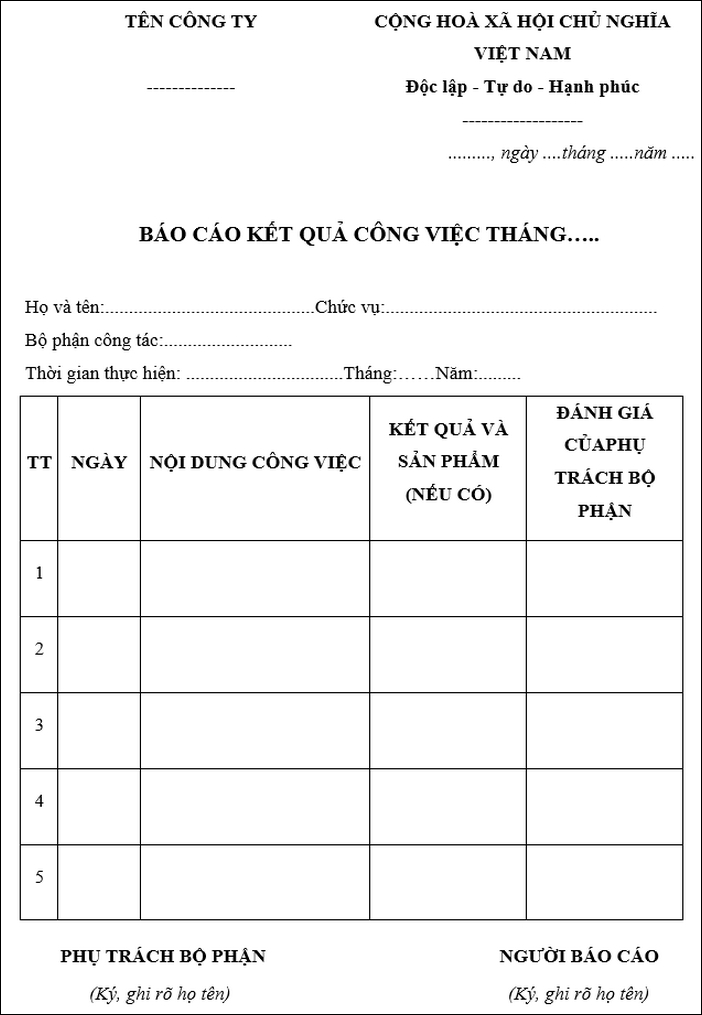
Unlike the two types of work reports above, the monthly work report adds columns for the number of tasks, and the volume of completed and uncompleted work. If you are looking for a standard monthly work report template, you can refer to the sample below.
5.5 Annual Work Performance Report Template
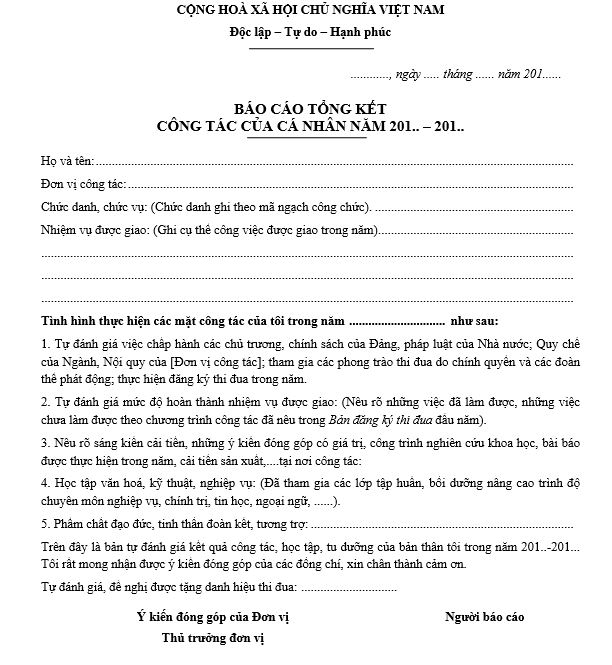
Currently, most employees have to create an annual work report to summarize their work and state what has been achieved and what has not. You can refer to the annual work report template in the form below.
Along with the work report template, you can also refer to the standard form for a salary increase proposal template, which helps employees easily propose a salary increase.
See more: 11 Common Methods for Evaluating Employee Performance
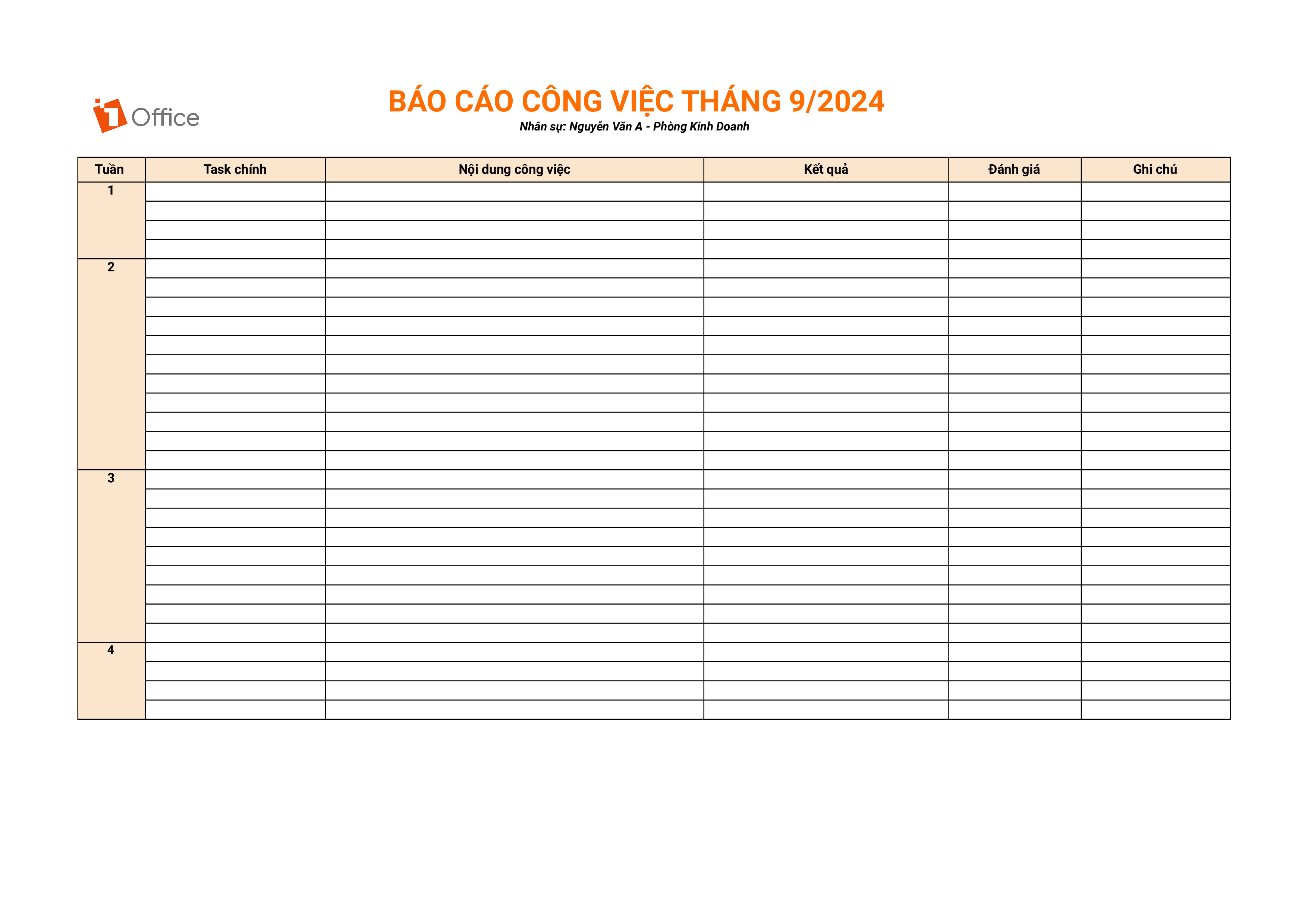
5.6 Work Report Template for Employees
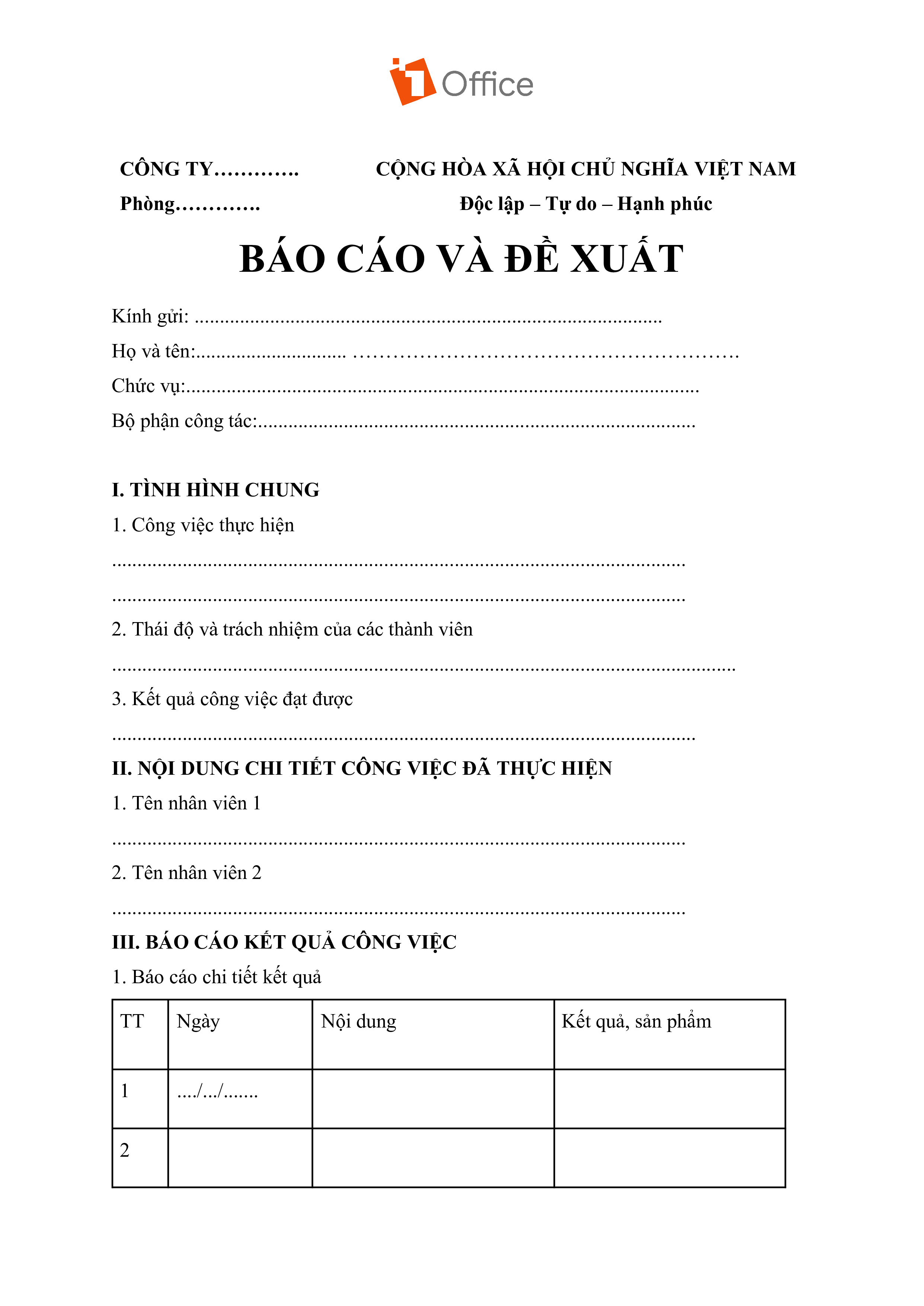
5.7 Work Report Template for Managers
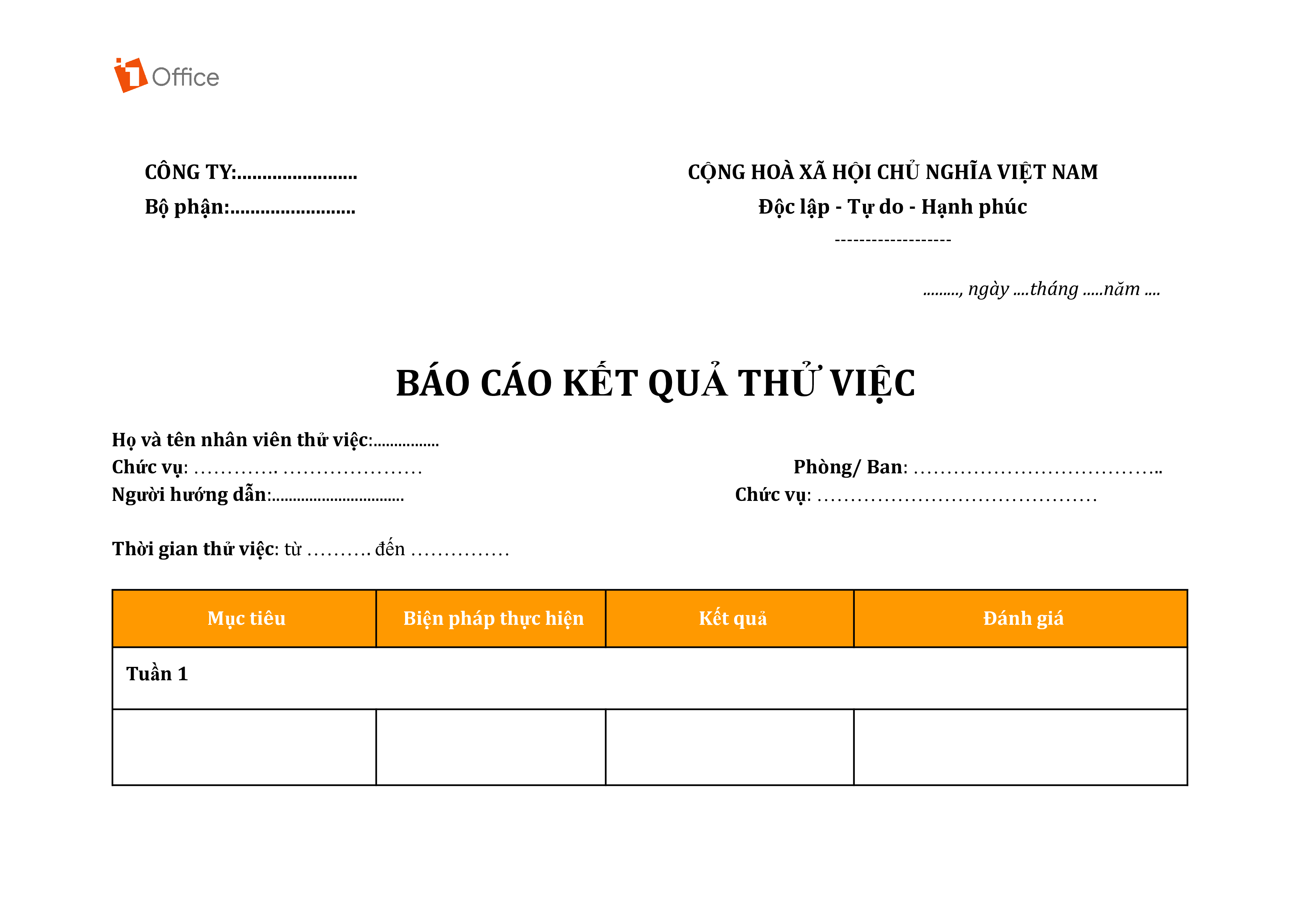
5.8 Probation Report Template
6. Notes on Creating a Work Performance Report Template
When creating a work report, you need to ensure it is easy to read and understand. To have a professional report, you should avoid some common mistakes listed below.
6.1 Not Structuring the Report’s Content
Any type of report needs a clear, focused structure. Therefore, before starting the report, you should brainstorm the layout, outline, and key content points to help the reader visualize and grasp the issue effectively.
6.2 Not Proofreading the Report
This is a basic mistake many people make when creating reports. Having many spelling errors will make your report look unprofessional. Therefore, you need to check the report carefully before sending it.
6.3 Writing a Report That Is Too Short
A report that is too short and incomplete shows a lack of professionalism and attention to detail from the person who created it. This will prevent managers from grasping the necessary information to monitor and manage work. Therefore, try to provide a report of a reasonable length, containing important information and necessary content.
6.4 Confusing and Unprofessional Presentation
One of the common mistakes when creating a work performance report is presenting information in a confusing, unclear manner, with a disjointed layout, or using overly complex language that makes it difficult for the reader to understand. In addition, inconsistent line breaks, fonts, and colors are also reasons why many reports lose their persuasiveness and professionalism.
To fix this, the report creator needs to build a clear, logical structure from the beginning, while ensuring that the language and presentation are easy to understand, professional, and visually consistent.
6.4 Redundant or Missing Data, Inaccurate Data
A work report might contain too many unnecessary details or omit important information due to careless data collection or a lack of experience in identifying core metrics. This makes it difficult for the reader to focus on the key points or renders the report incomplete.
Additionally, when data errors occur during entry or calculation, it can lead to flawed decisions. Therefore, the person creating the report needs to carefully review and verify the accuracy of the data before including it. At the same time, you also need to identify key data and eliminate unnecessary information to avoid redundancy.
6.5 Not consolidating data into a comprehensive report
Failing to consolidate reports or connect different data sets into a comprehensive report is also a common mistake, often caused by a lack of time, analytical skills, or a clear reporting process.
Without a holistic view, managers may struggle to make strategic assessments or provide accurate direction. To build a cohesive consolidation process and a scientific, interconnected reporting system, businesses can adopt work management and automated reporting software to unify and present information visually, accurately, and clearly.
7. Create work reports easily and accurately with 1Office
In the modern business environment, tracking and reporting work results is a crucial factor for evaluating performance and ensuring work progress. However, not all businesses have an effective reporting process: manual reporting is time-consuming, and using multiple disparate software tools makes it difficult to consolidate and track data.
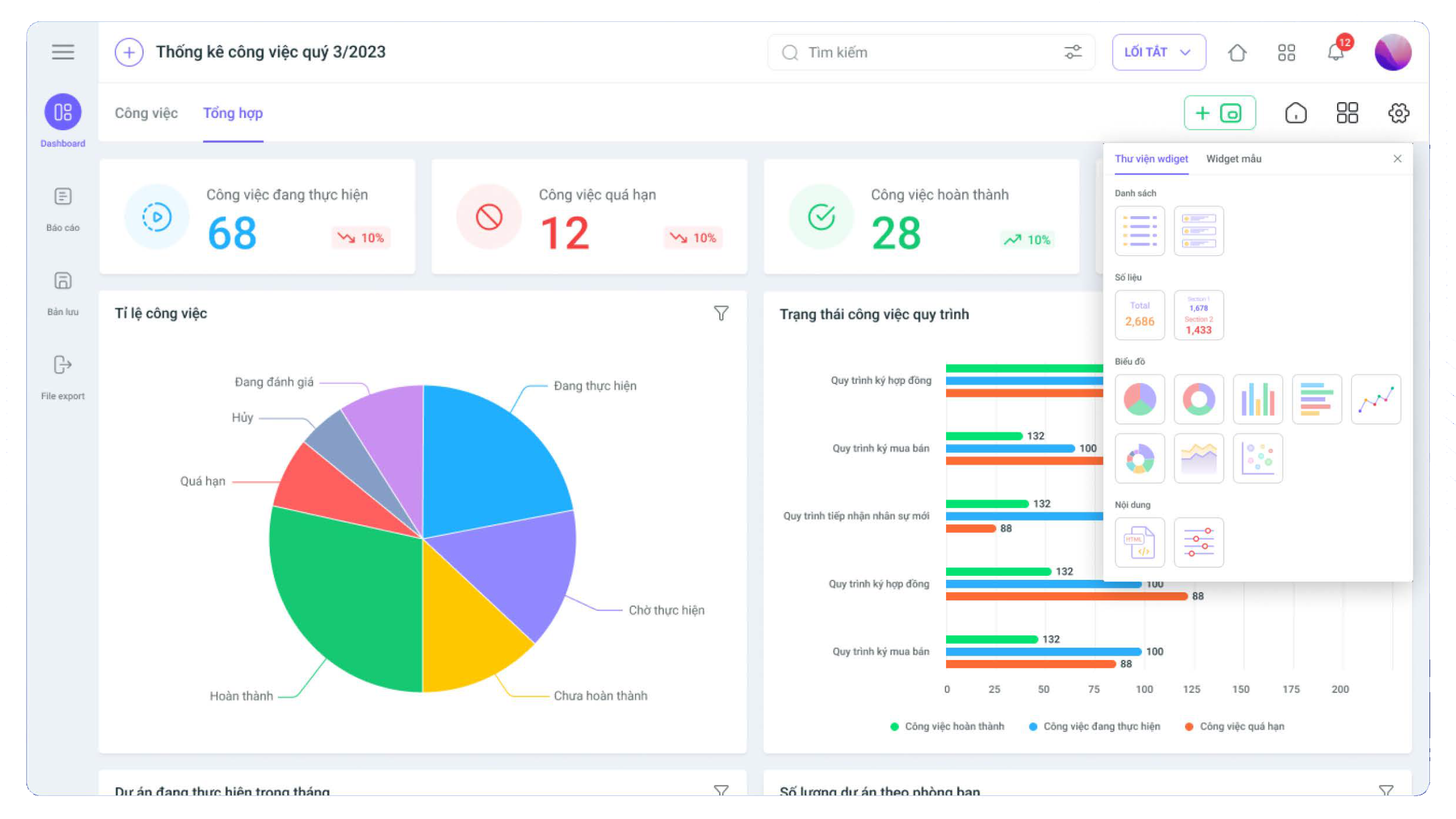
To solve this problem, 1Work – the leading work and project management software from 1Office – provides a professional, visual, and automated system for reporting progress and work results, helping to optimize the tracking and evaluation of work efficiency quickly and accurately.
- Automated Data Consolidation: No need to spend time on manual reporting. 1Work automatically consolidates and analyzes information from the tasks and projects of each team member, giving you a comprehensive overview of the performance and progress of each individual and department in the company.
- Visual and Flexible Reporting: You can customize report templates to fit your needs, from work progress reports to project overviews. With a user-friendly and easy-to-use interface, 1Work allows you to create reports quickly and professionally.
- Real-time Data: All work-related information and data are updated in real-time, helping leaders and managers make timely and accurate decisions based on report figures.
- Enhanced Performance: By using the work report templates in 1Work, the management process becomes more transparent and smoother, minimizing errors and improving coordination between departments
Register for a free feature demo!
8. Frequently Asked Questions about Work Result Report Templates
What sections should a professional work report include?
A standard report template should have 4 core sections: General Information (name, department); Execution Details (tasks, metric results); Difficulty Assessment (outstanding issues); and Next Steps (key upcoming tasks).
How can I make my work report more persuasive to my superiors?
Focus on quantitative results. Instead of general lists, use specific numbers, completion percentages (%), and directly compare the results achieved with the initial targets (KPIs).
What is the most suitable report template for new employees?
For employees who are getting accustomed to their job or are on probation, it’s best to use a daily or weekly report template. This helps you detail your learning process, any difficulties requiring support, and allows management to closely assess your integration speed.
Is it mandatory to include KPI data in the report?
It is highly recommended. Data is the most objective proof of competence. If the work is difficult to quantify, report based on: completion time (early/on time), number of processes handled, or satisfaction levels from related departments.
Is there a way to create reports quickly while still ensuring accuracy?
The most effective way is to use work management software like 1Office. Instead of manually compiling data at the end of the week, the software automatically extracts data from the tasks you perform daily to create visual charts, saving up to 80% of your reporting time.
9. Conclusion
Creating and using professional work performance report templates not only helps employees demonstrate their capabilities but also assists managers in optimizing operational processes. We hope the templates and experiences shared by 1Office have helped you find a suitable reporting solution, thereby enhancing efficiency and transparency in your work.
If you want to save time and automate complex reports, experience the smart management tools from 1Office to create a breakthrough for your business!
















