


 13/05/2026
  218 views
Business reporting is a crucial task for summarizing and reflecting a company’s business situation. Without business reports, business owners cannot grasp the profit status or the work performance of each employee. The article below will provide you with a broader overview of the tasks and functions of each type of report, as well as how to compile reports more effectively and accurately.
Mục lục
I. What is a business report?
A business report (known in English as a Profit and Loss Statement, abbreviated as P&L) is a comprehensive financial report that provides a general overview of a company’s business situation.
This type of report is of great interest to stakeholders related to the business, as it provides figures on the business performance that the company has achieved over a period. It indicates whether those activities resulted in a profit or a loss, and also reflects the utilization of potential in capital, resources, technology, and management and business experience of the company.
II. Common types of business reports
Before creating a business report, you need to consider its purpose and the requirements of management to choose the appropriate type of report. In the article below, we introduce you to the 4 most common types of business reports.
1. Analytical report
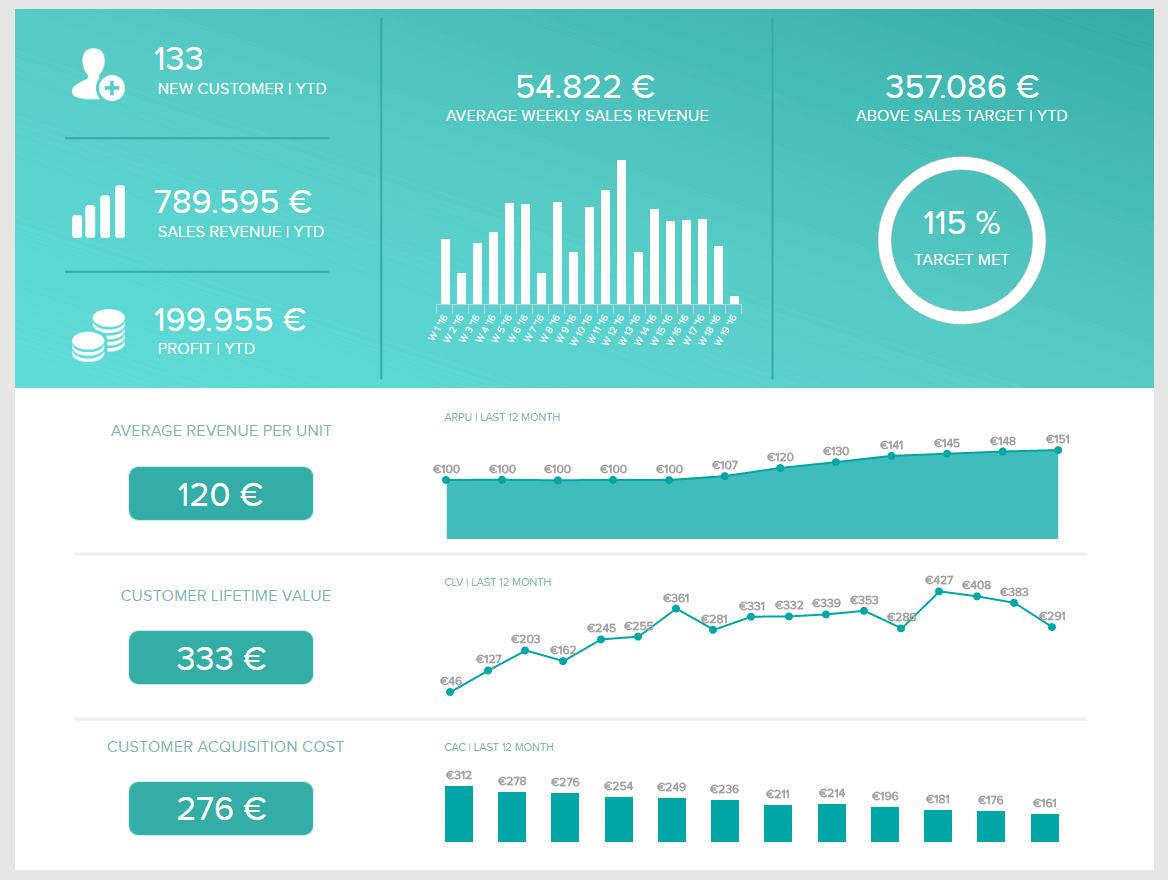
An analytical report is a business reporting tool that uses qualitative and quantitative data to analyze the performance of a business strategy or to support the company when important decisions need to be made. This report will include real-time statistics as well as forecasts for the business situation in the next period.
Source: datapine
A business analysis report provides comprehensive sales data to measure metrics such as average revenue per unit, customer lifetime value, acquisition costs, as well as sales targets to be achieved. The value of this analytical report lies in its ability to provide a multi-dimensional view of data in a single report. This data can be filtered and aggregated by daily, weekly, monthly, or quarterly time frames, depending on the requirements and purpose.
2. Research report
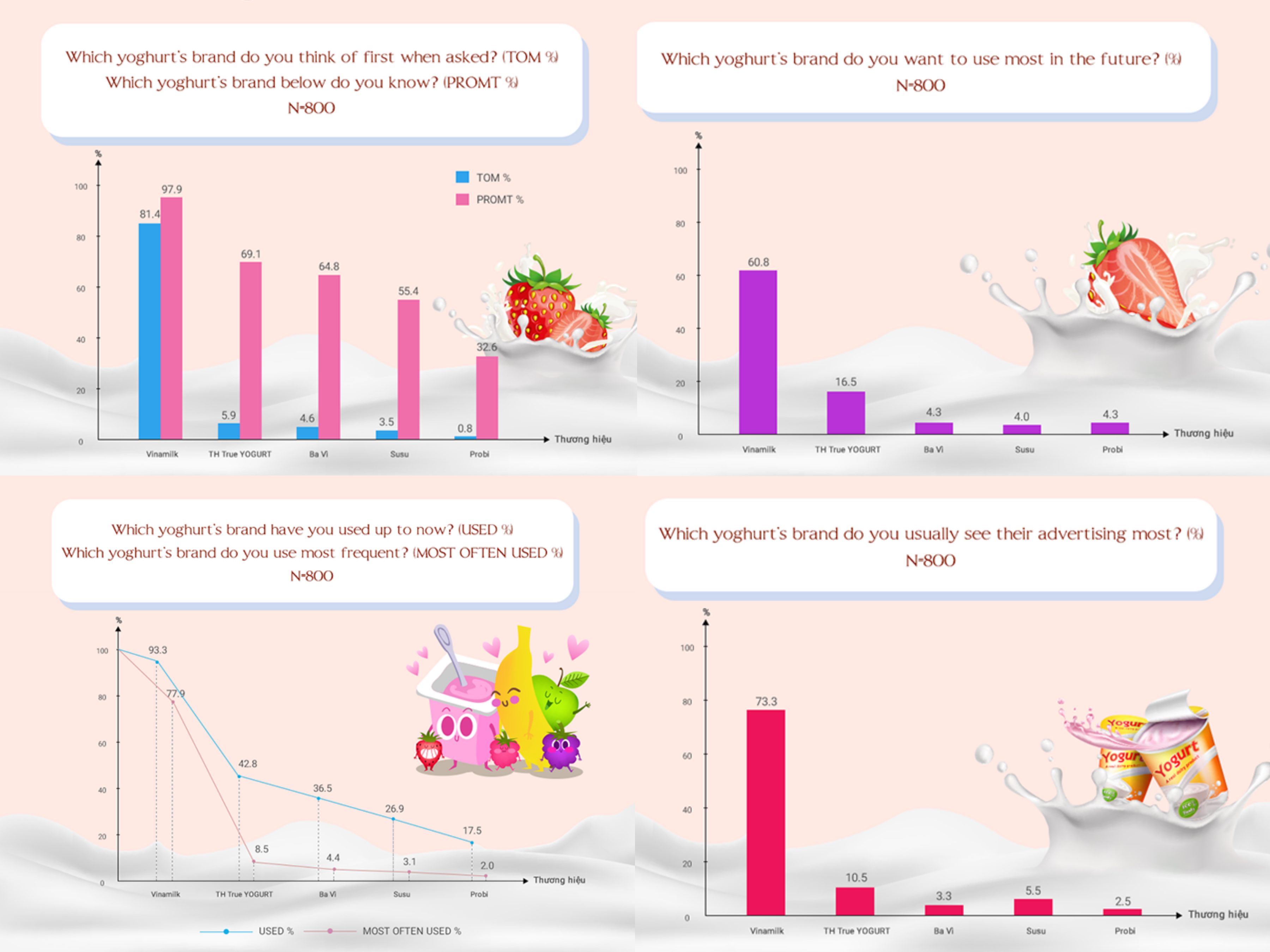
Another very common type of report is the research report. Businesses often use these types of reports to predict the viability of a new product, research new sales locations, or gauge customer awareness of the brand image. To create this type of business report, managers will contact market research agencies to collect all relevant information on the topic being studied.
Source: Vinaresearch
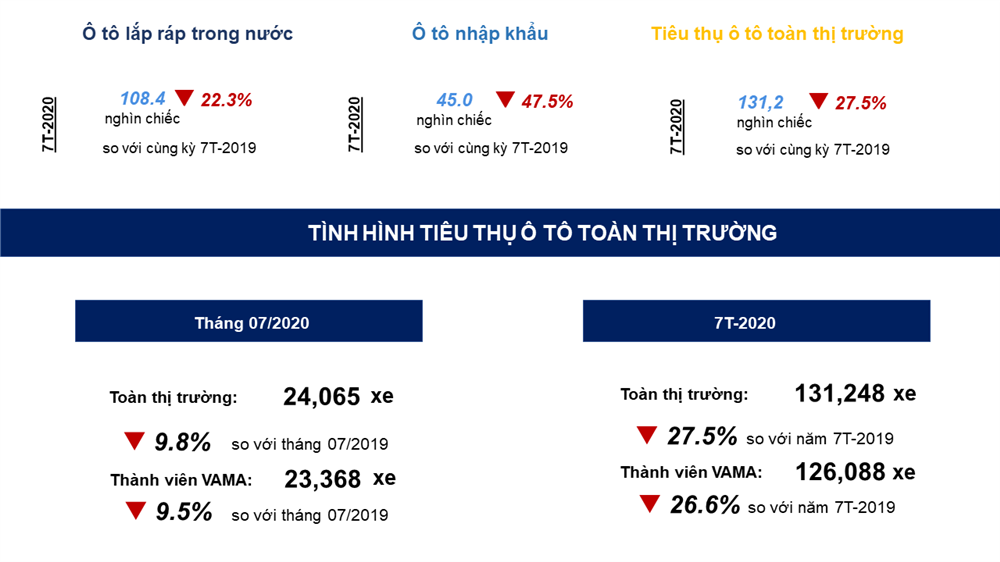
3. Industry report
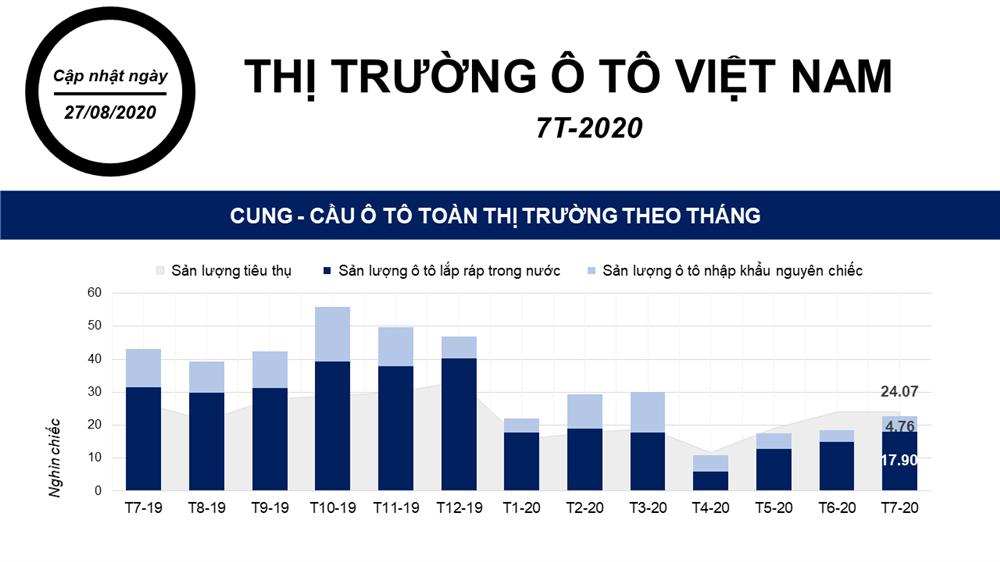
The next type of business report is the industry report. This report is used to measure the performance and success potential of a business. However, these goals must be based on realistic values, especially the level of competition in today’s market. By conducting industry reports, businesses will get a comprehensive picture of the industry market, including the general context, industry size, economic indicators, and business trends. Leaders will use this data to plan future strategies and set performance goals for employees.
Source: Vietdata
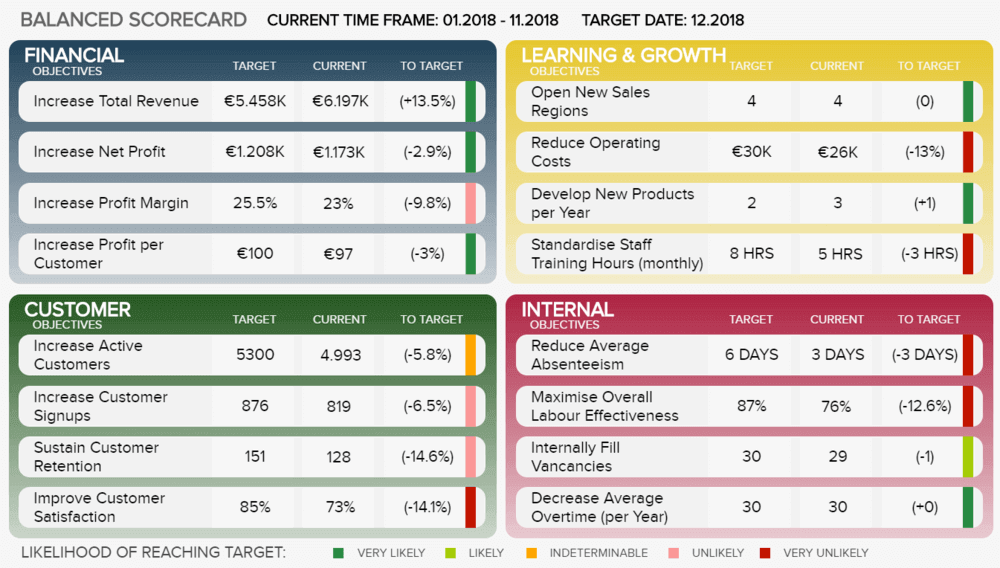
4. Progress report
The final type of business report is the progress report. This type of report does not necessarily rely on in-depth research or advanced analysis but focuses on providing a clear picture of the performance of a specific business area or objective. The nature of these business reports is to support business meetings or discussions. A common example of a progress report is a company’s KPI dashboard.
Source: datapine
III. The importance of business reports for enterprises
For any function and in any industry, business reports are not only useful but also crucial for all company activities.
Analyzing the financial situation
Business performance reports help managers get a general overview of the company’s operational status. They reflect the company’s assets, liabilities, expenses, and revenues over a specific period.
With a full range of reports in hand, business owners can get a comprehensive assessment of the company’s performance over the past period. Based on this, they can identify potential opportunities and make important decisions regarding management, business operations, or investments for the owners, investors, and the future of the enterprise.
Business reports also clearly reflect the company’s capital situation and how capital is being utilized. From there, the business can foresee its financial situation to balance when to borrow and how much to borrow.
Solving the company’s existing problems
Based on business reports, business owners can assess the company’s performance over the past period to promptly implement measures to address outstanding issues in production. At the same time, managers can also easily monitor work quality and the performance of their staff to evaluate whether the current operational process is truly effective. If not, the business can use the reports to identify emerging problems, pinpoint bottlenecks, and propose improvement plans.
Supporting sales and marketing
Compiling business reports is also one of the important activities in sales management. Reports in the form of detailed tables and charts are easy to track and compare, allowing managers to promptly grasp the sales staff’s process. In addition, all sales revenue information can be viewed at any time. Through this, managers can identify consumer trends, especially important customer groups and loyal customers, to devise suitable sales plans.
IV. CRM – The solution to optimize sales activities
CRM customer care software – 1Office is a module within the 1Office business management software system. With a synchronized data system on a single platform that updates automatically in real-time, the software provides reports on customer data, sales, and revenue/expenses to support pre-sales, during-sales, and post-sales activities.
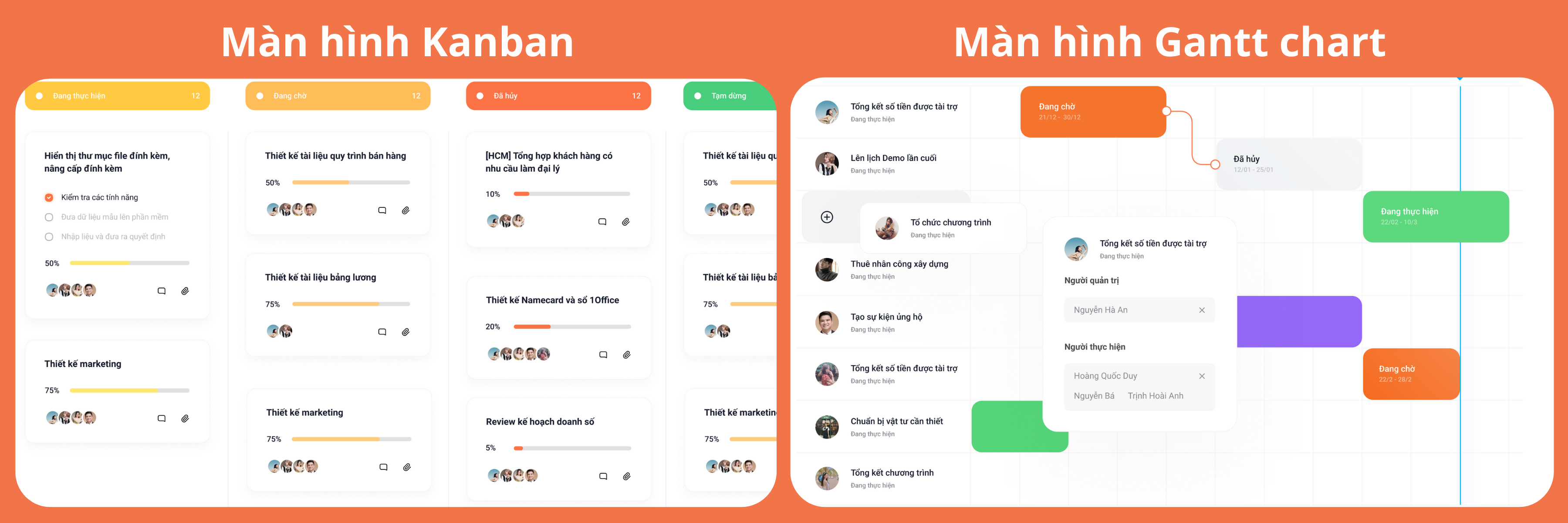
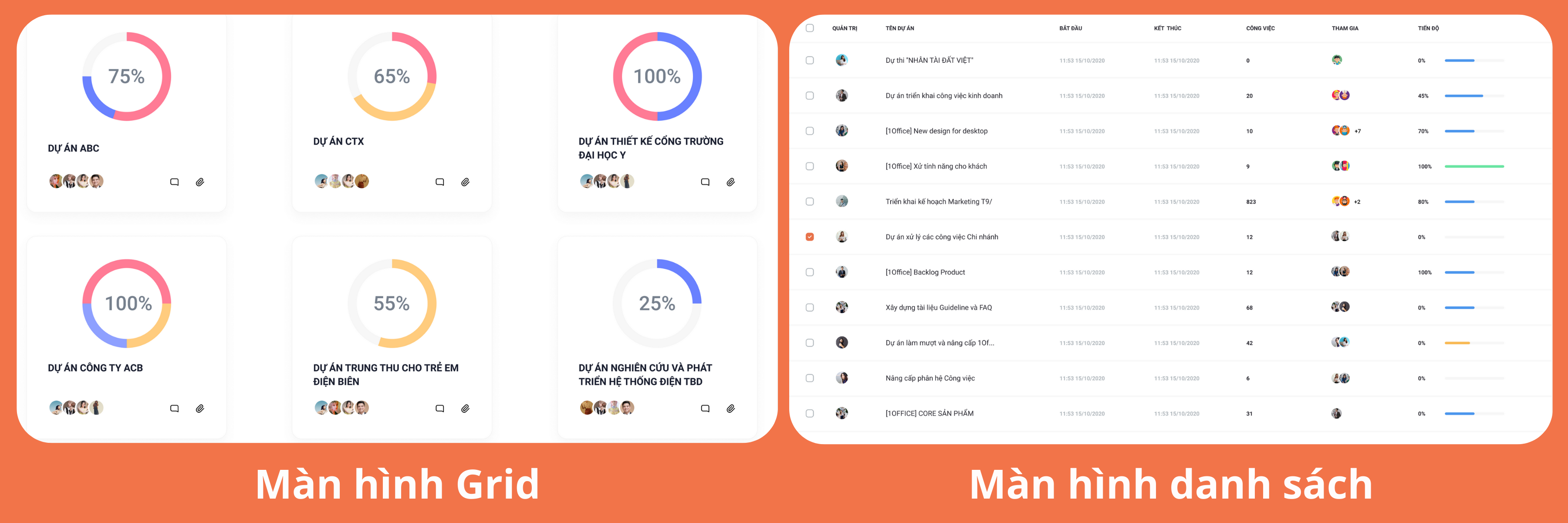
Notably, 1Office reports are displayed in 4 formats: Kanban, Gantt chart, Grid, and List, helping businesses grasp information in the most intuitive, multi-dimensional, and detailed way.
PRE-SALES
In the approach stage, the reporting system will provide data on the status of sales opportunities by percentage to create suitable care scenarios for each customer, closely monitoring until the sale is successful.
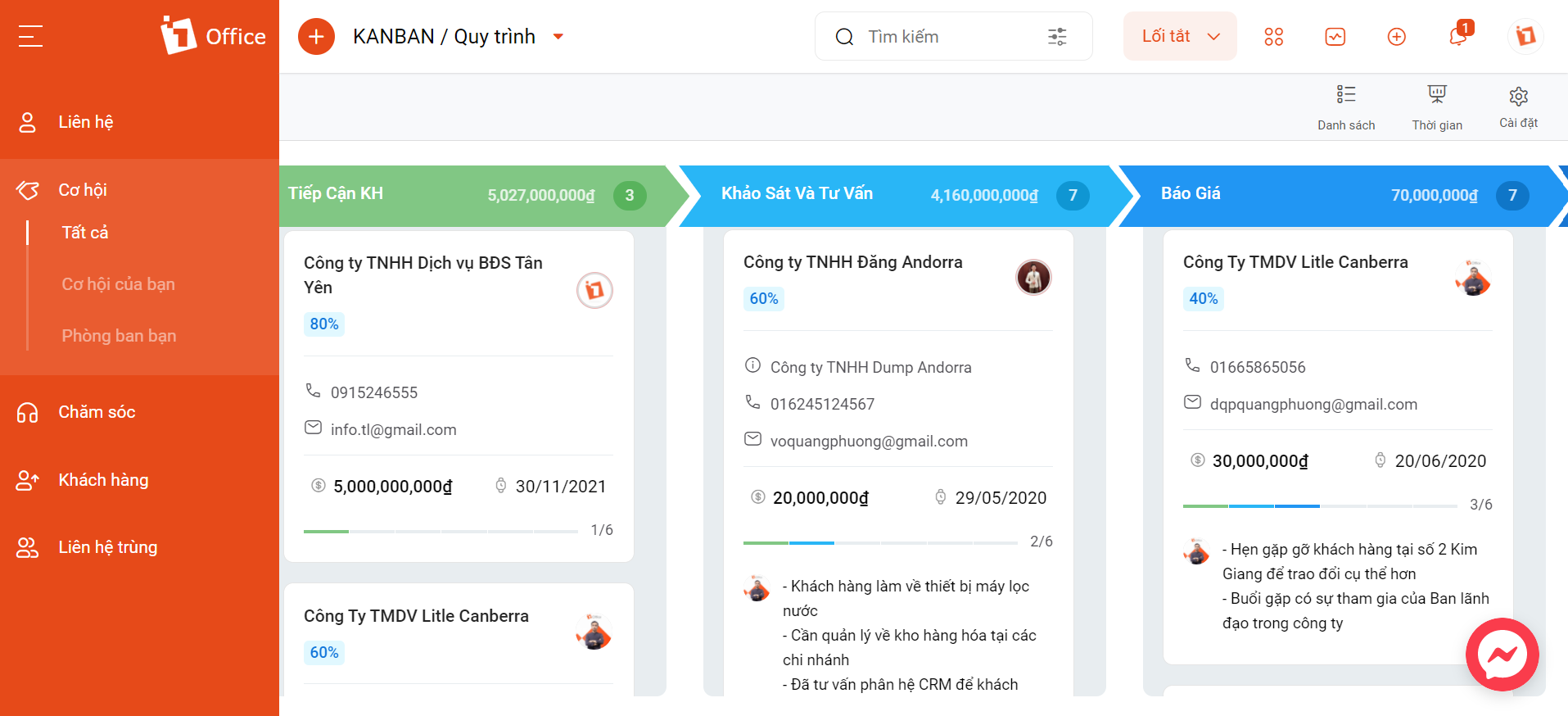
In addition, all information about employees’ customer care activities, such as communication history, calls with customers, internal discussions, etc., is also updated automatically, helping to preserve resources in case of personnel changes.
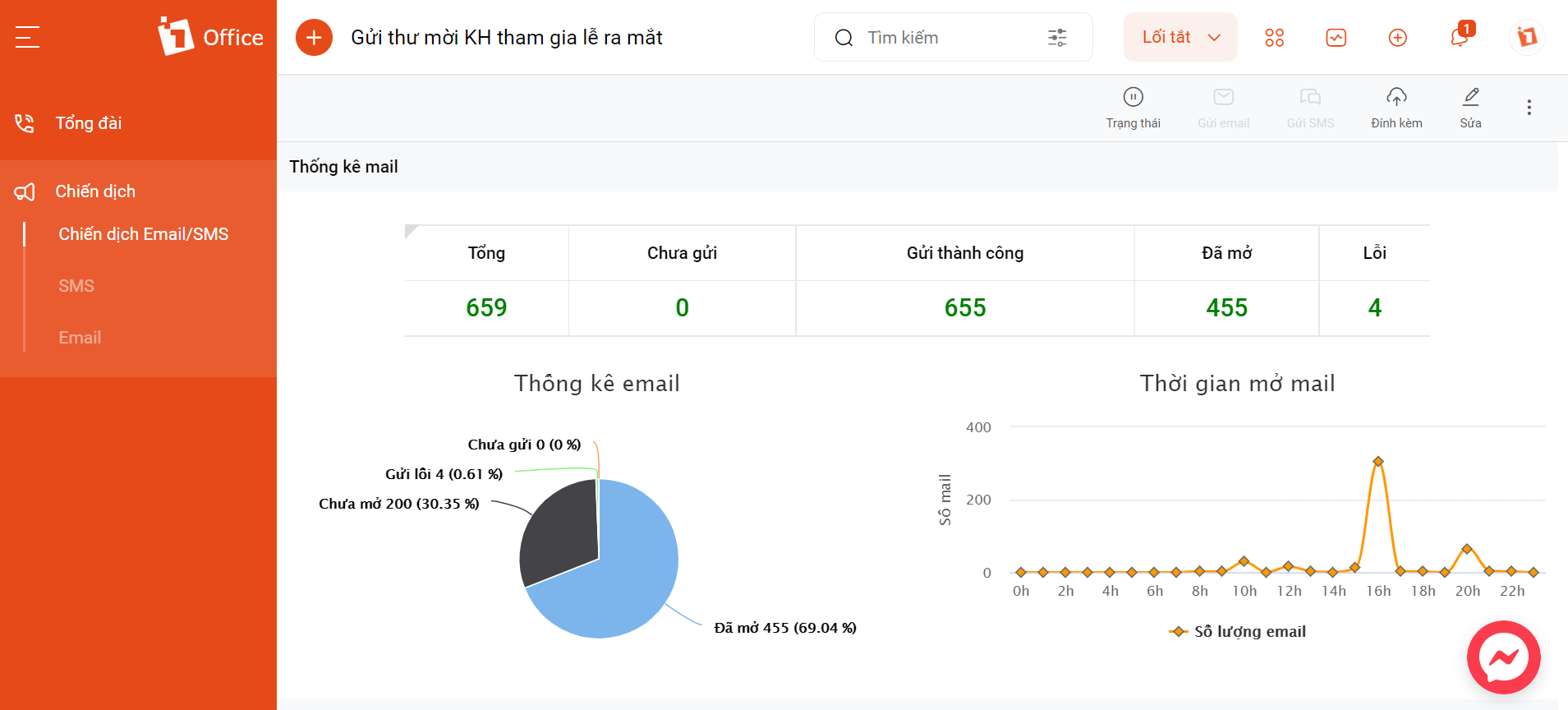
Another type of report used in the pre-sales stage is the evaluation of the effectiveness of each marketing campaign, the number and quality of leads, revenue-generating channels, etc., so that managers can propose changes/additions to the upcoming business plan.
DURING SALES
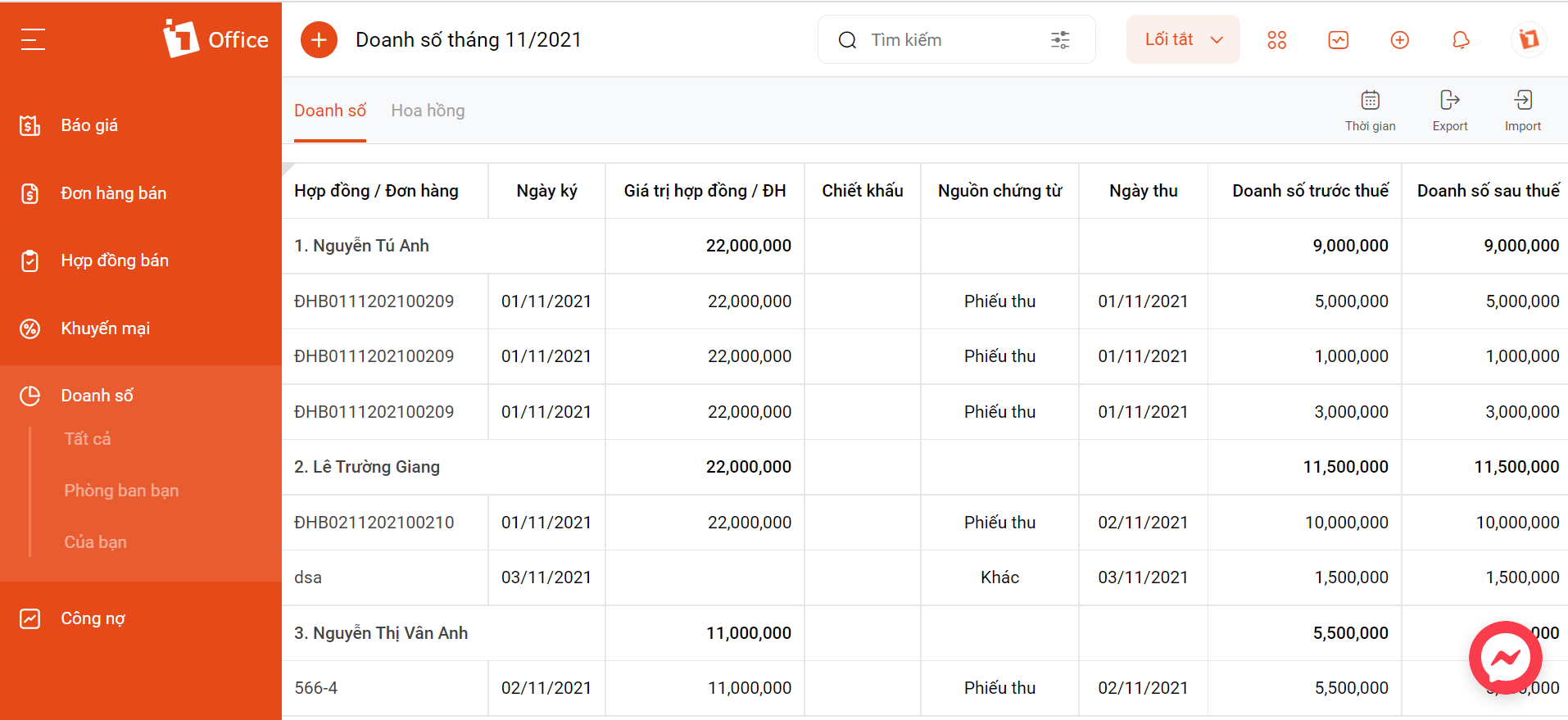
Sales reports will provide all the necessary data to help managers grasp the business situation in real-time, measure and compare sales across different periods to understand growth trends, and devise appropriate strategies to boost sales. Managers can also use this data to evaluate the performance of individuals and departments and plan customer allocation accordingly.
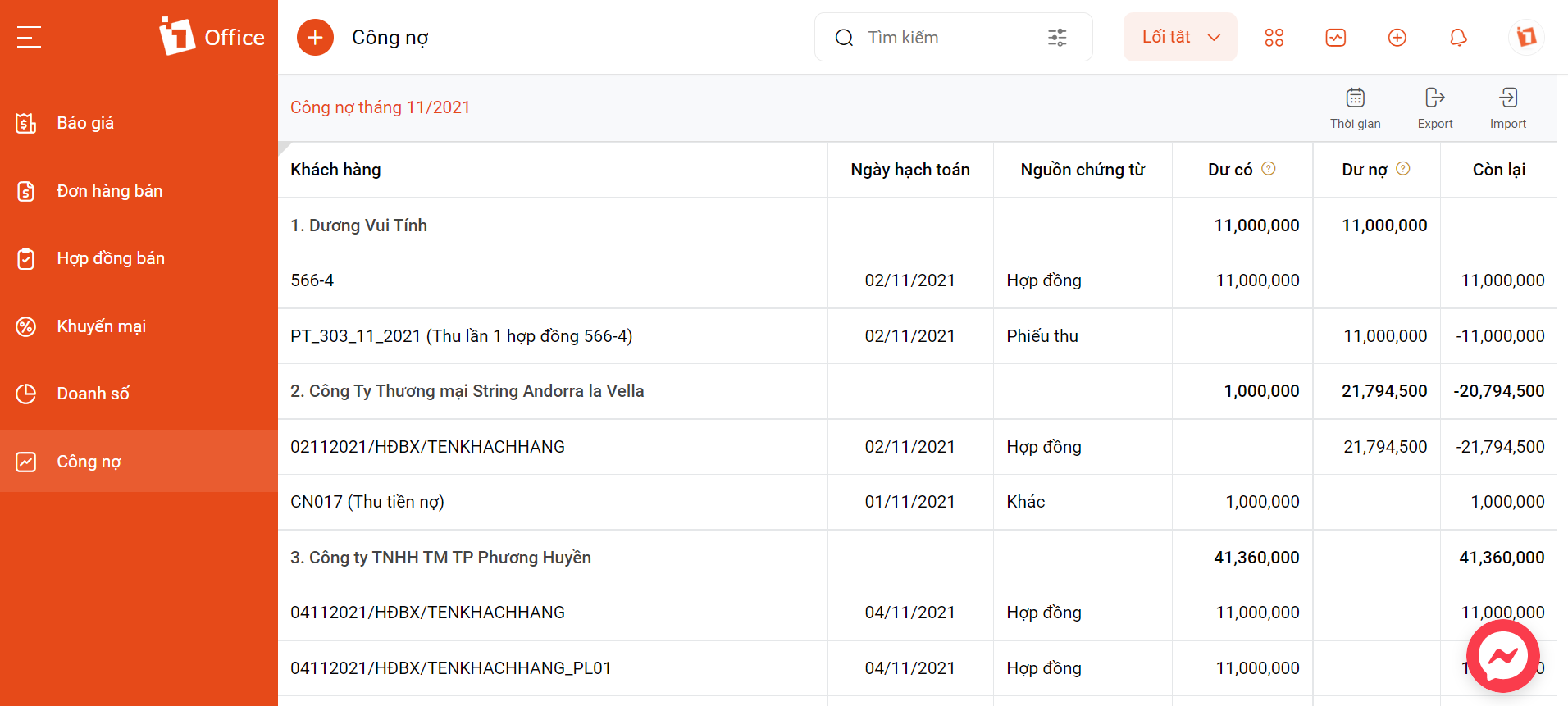
Based on customer data, the software will automatically alert you about debt status, upcoming contract expirations, etc., to implement appropriate collection policies.
POST-SALE
In the post-sale stage, customer care is one of the crucial steps that determines whether a customer will return for future purchases.
The intelligent 1Office CRM software will automatically compile all data from the moment a customer starts using the product to optimize post-sale customer care activities, such as sending congratulatory messages or emails, and providing detailed answers to customer inquiries…
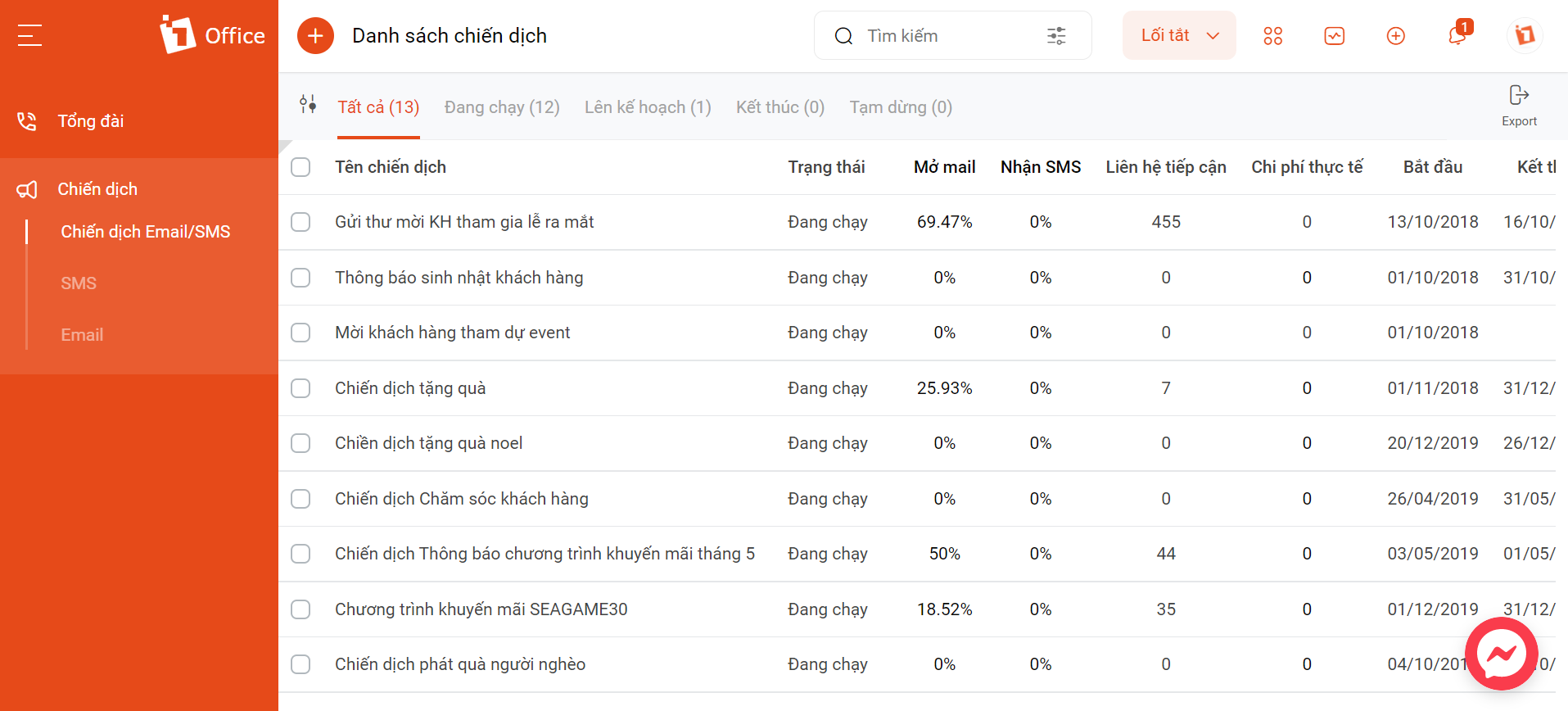
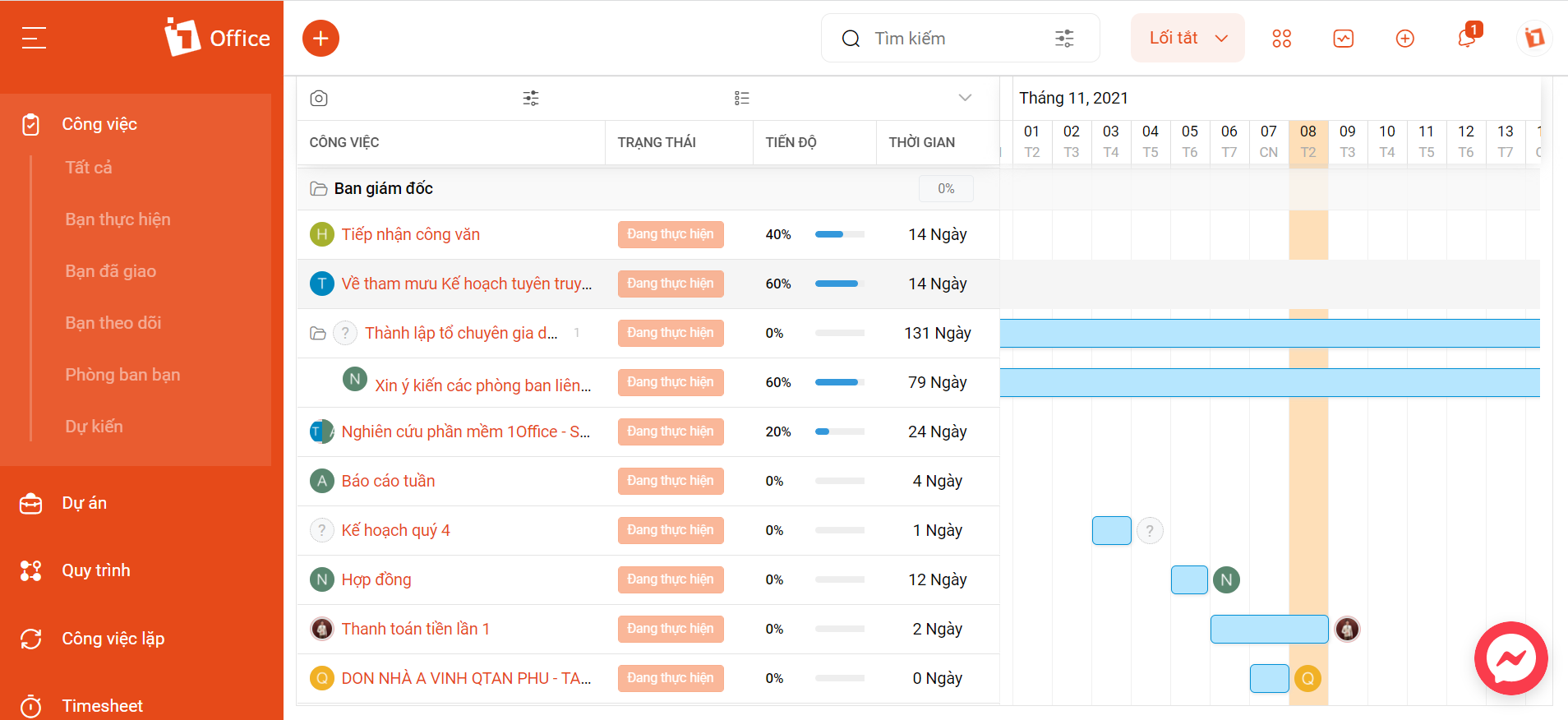
Work Progress & Quality Reports
Not only does 1Office CRM help businesses manage customer care professionally, but it also improves employee and internal management. Managers can rely on the reporting system for employee work progress and quality to implement solutions that maintain the team’s performance at the highest level.
In addition, the 1Office customer relationship management software has many other outstanding features to help businesses optimize sales efficiency:
Customer Data Management
- Manage and classify customer information on a single platform; retrieve data quickly.
- Store the history of all transactions related to customers and projects
- Secure customer information through data access permission features
- Seamless and consistent information flow between different departments in the business
Sales Management
- Build and edit sales processes for each business stage
- Manage all elements involved in the sales process: Quotes, orders, contracts, goods, debts, sales…
- Automatically calculate sales commissions based on revenue to link with payroll
Customer Care Management
- Build automated multi-channel care scenarios, segmenting customers for each scenario
- Send reminders for scheduled customer care activities.
- Automatically save contact care history to save time for each employee.
See more: CRM in banking management
With the support of digital technology, the reporting process becomes almost perfectly efficient and accurate, saving maximum time and effort for the business.
In line with the digital transformation of the Industry 4.0 era, 1Office CRM has been accompanying 3,500 businesses with over 300,000 Vietnamese users, especially in the B2B sector. We are proud to be one of the most trusted and chosen CRM management software solutions for the digital transformation of Vietnamese enterprises.
To register for a trial of the CRM customer relationship management software that helps manage information, data, and optimize the sales process, please leave your phone number. The 1Office team of experts will contact you for a consultation today.
For more details, please visit:
Fanpage: https://www.facebook.com/1officevn/
Youtube: https://www.youtube.com/channel/UCeTIRNqxaTwk0_kcTw6SxmA
















