


FREE DOWNLOAD: 6+ Detailed OKR Excel Templates for Various Departments (Latest 2026)


OKRs have long been a powerful management tool to help businesses achieve their goals. However, not every business successfully implements OKRs due to the lack of a standardized, methodical framework. To help managers overcome this challenge, 1Office will provide you with 6+ OKR Excel templates for all departments, complete with the most detailed information, and a comprehensive digital goal management solution for 4.0 businesses.
Mục lục
- 1. What is an OKR Excel template? Key components of an OKR template sheet
- 2. How do OKR Excel templates help with a company’s goal management activities?
- 3. 6+ detailed OKR Excel templates for every department in a business
- 4. Effective Techniques for Applying OKR Templates
- 5. 1Office – The Breakthrough Digital Objective Management Solution
1. What is an OKR Excel template? Key components of an OKR template sheet
An OKR Excel template is a sample performance management framework designed and presented as an Excel spreadsheet to support the setting and management of Objectives and Key Results (OKRs). An OKR template provides tools that help users easily establish objectives, track progress, and measure results within a specific period.
A complete OKR Excel template typically includes the following main components:
- Objective: A brief, comprehensive statement describing the main goal an organization or individual wants to achieve, including both long-term and short-term goals.
- Key Results: Metrics that measure the outcomes needed to achieve the objective, including both expected and actual results. Key results are often defined based on measurable data, such as sales figures, traffic volume, customer satisfaction levels, or any other metric relevant to the objective.
- Progress: This section allows users to input and track the progress of achieving results, including the completion percentage and expected timeline.
- Status: Helps track and mark the implementation status of the objective, including completed, in progress, or not started.
- Owner: Provides information about the person responsible for implementing the objective.
>> Learn more:
2. How do OKR Excel templates help with a company’s goal management activities?
Promote seamless collaboration
Using an OKR Excel template helps make the process of communicating information from top-down and bottom-up transparent, ensuring that the flow of work information within the company is always clear, seamless, consistent, and uninterrupted. As a result, individuals and departments have a basis for coordinating smoothly and working towards common goals. Additionally, using an OKR Excel template also enhances collaboration through easy access, interaction, and discussion on the spreadsheet.
Easily track and monitor goal implementation progress
With an OKR template, managers can closely monitor the entire work process and receive instant, quick updates on the goal implementation status of team members by tracking the goal completion percentage in the spreadsheet. This helps managers grasp work progress and identify which tasks are delayed, allowing them to flexibly adjust objectives and key results to fit the company’s actual situation.

Implement OKRs scientifically and methodically
OKR is a complex system that requires careful research and a thorough understanding of the OKR methodology to be applied successfully. Instead of having to figure things out and build a goal management system from scratch, OKR Excel templates can save managers a lot of time and effort. In addition, an OKR template provides a standardized framework where components and metrics are tightly linked, helping businesses implement OKRs in a scientific, methodical, and systematic way.
>> See also: Top 12+ OKR software for the most effective goal tracking and management
3. 6+ detailed OKR Excel templates for every department in a business
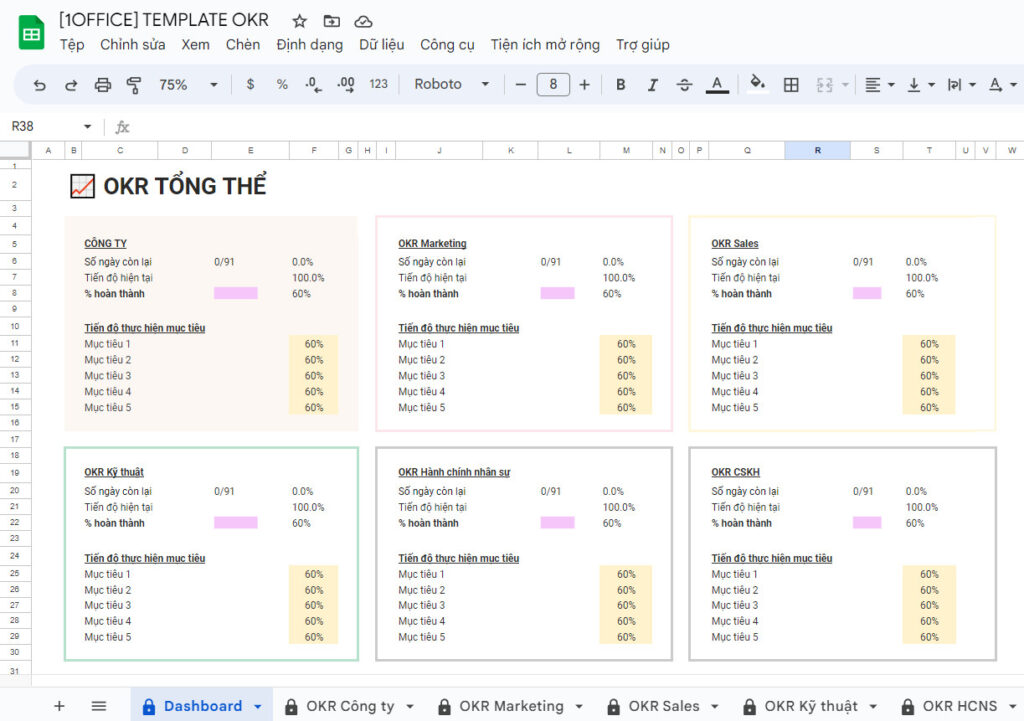
To help optimize OKR goal management within your business, 1Office would like to present CEOs/Managers with a set of detailed OKR EXCEL TEMPLATES for each department. These OKR Google Sheets templates will provide your business with:
- Detailed, clear OKRs designed for each department: Sales, Marketing, HR, etc.
- A well-structured design that is easy to track and evaluate
- Easily update goal progress thanks to pre-set formulas
Key contents in the Google Sheets OKR template
| Overall OKR | Provides an overview of the company’s goal achievement status, focusing on the main objectives of each department and division. |
| Company OKR | Objectives and action plans that ensure the entire company is working towards a common goal and achieving the best results. |
| Sales Department OKR Template | Helps the sales department achieve higher revenue and profit, increase competitiveness, and expand the market. |
| Customer Service OKR Template | Enhances customer service quality, increases satisfaction, and effectively retains customers. |
| HR & Admin OKR Template | Boosts the operational efficiency of the HR department and helps employees achieve personal goals, improve work quality, and enhance productivity. |
| Technical Department OKR Template | Enhances the operational efficiency of technical or production departments, improves the quality of the company’s products and services, increases productivity, and reduces production costs. |
4. Effective Techniques for Applying OKR Templates
To effectively implement and apply OKR Google Sheets templates, managers should follow these steps:
- Define common objectives
Start by setting common objectives for the company for the planning period, then assign tasks to specific departments. The established objectives must adhere to the SMART model: Specific, Measurable, Achievable, Relevant, and Time-bound.
- Break down main objectives into key results
After defining the main objectives (Objectives), managers need to break them down into key results (Key Results) and determine what needs to be done to achieve them. Key results should be quantifiable and have specific units of measurement.
- Develop an action plan
Identify the activities required to achieve the objectives and the established key results. The OKR implementation plan should be detailed on a daily basis and tasks should be assigned to specific personnel.
- Track and evaluate progress
To achieve the set objectives, the most crucial task is to track progress towards the objectives and evaluate the effectiveness of the activities. By monitoring these results, managers can adjust activities as needed to achieve the objectives.
- Review and discuss results
After the period ends, managers should review and discuss the results of objective implementation with the team. By doing this, you can acknowledge the achievements and shortcomings in the plan to serve as a basis for improvement in the next phase.
- Adjust the OKR plan for the next period
Based on the results and evaluation of the implemented OKRs, managers can adjust and improve the OKR implementation plan for the next period. This helps ensure that the company’s objectives and activities are continuously updated and optimized to achieve the best results.
- Promote employee development
The OKR Excel template can also be used as a tool to help employees develop their skills. By helping them set objectives and tracking their performance, managers can create a positive learning environment, encourage personal development, and enhance team effectiveness.
5. 1Office – The Breakthrough Digital Objective Management Solution
1Office Workplace is an objective management solution within the comprehensive business management software of 1Office. Featuring many smart functionalities, the software helps businesses digitize their entire workflow and manage everything centrally on one platform. This allows managers to easily assign, track, and evaluate objectives.
Key Features
- Intuitive dashboard system: Provides a comprehensive overview of the entire workflow, helping managers easily track and monitor progress towards objectives.
- Task completion percentage report: Each task’s completion level is updated with a percentage from 10% to 100%.
- Task results are assigned to each responsible employee, making it easy for managers to evaluate employee performance and implement a transparent reward and penalty system.
This article has provided you with 6+ detailed OKR Excel templates for various departments and a solution for digitizing objective management with the 1Office Workplace module. Sign up to experience 1Office today!
Get a free consultation & software demo
For more details, please contact:
- Hotline: 083 483 8888
- 1Office Fanpage: https://www.facebook.com/1officevn
- Youtube Channel: https://www.youtube.com/c/1OfficeNềntảngquảnlýtổngthểDoanhNghiệp




