


 10/05/2026
  10461 views
Inventory management software helps businesses track goods, control inbound, outbound, and on-hand stock, and reduce data discrepancies during operations. Instead of manual management with ledgers or separate Excel files, inventory management tools provide clearer support for inventory updates, stocktakes, reporting, and branch-based permissions. The article below compiles the top easy-to-use inventory management software suitable for stores and businesses.
Mục lục
- I. Top 7+ Best Inventory Management Software to Use Today
- II. Criteria for Choosing a Suitable Inventory Management Software
- III. Essential Features of Warehouse Management Software
- 1. Automated Inbound, Outbound, and Inventory Management
- 2. Detailed Product Code Management
- 3. Expiry Date Tracking and Automated Alerts
- 4. Storage Location Management (Bin Location / Slotting)
- 5. Reporting, Statistics, and Visual Dashboards
- 6. User Permissions and Control
- 7. Multi-platform Integration and Data Synchronization
- IV. Benefits of Using Inventory Management Software
- 1. Save Time, Effort, and Personnel Costs
- 2. Reduce Losses and Data Discrepancies
- 3. Optimize Stocktaking and Goods Receipt/Dispatch Processes
- 4. Support Decision-Making Based on Real-Time Data
- 5. Enhance Management Efficiency and Scalability
- 6. Improve Customer Experience & Competitive Edge
- 7. Pave the Way for Comprehensive Digital Transformation
- V. Conclusion
I. Top 7+ Best Inventory Management Software to Use Today
|
Inventory Management Software |
Pros/Features |
Cons |
| 1Office CRM | Build a detailed and specific product catalog
Unlimited warehouse management
Update inventory figures accurately
Support quick inventory counting
|
|
| Sapo POS |
|
|
| KiotViet |
|
|
| ECount |
|
|
| Suno.vn |
|
|
| SalesBinder |
|
|
| BS Silver |
|
|
1. 1Office CRM – A comprehensive integrated warehouse management solution
1CRM is the best comprehensive sales management software, suitable for all business sizes, from small to large. This software integrates warehouse management features with a set of inventory tracking tools for products and has no user limit. 1Office CRM is the most suitable choice for retail businesses that need to manage large inventories and for chain stores and branches that require centralized management and frequent transfer of goods between sales points,…
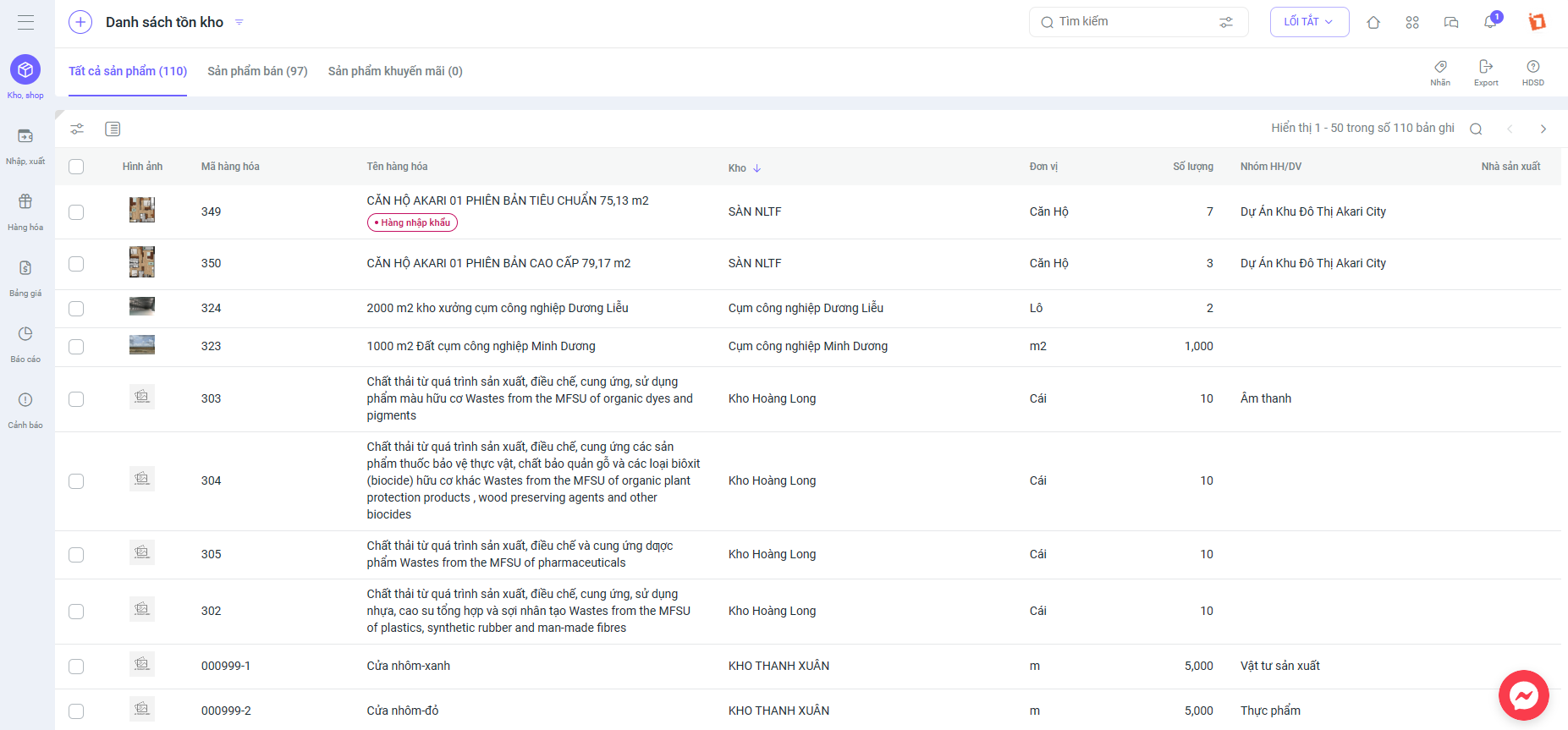
Register for a Demo account to experience 1Office CRM’s warehouse management features
1Office warehouse management software has all the basic features and allows for the development of advanced features, ensuring it meets all business needs from receiving, inventory management, dispatching, goods management, and a detailed reporting system to help you easily control your warehouse situation. Businesses will no longer need to spend a lot of time on manual bookkeeping, manual calculations with Excel functions, and dealing with a lack of synchronization between warehouses or stores.
See more: Detailed methods for calculating the cost of goods sold according to Circular 200
2. Sapo POS Software
Sapo POS is a leading product of Sapo Technology Joint Stock Company, a unit specializing in multi-channel sales and management platforms. It is built to provide maximum support for management activities such as inventory, goods management, order processing, employee management, and detailed sales reports at the store and on Facebook.
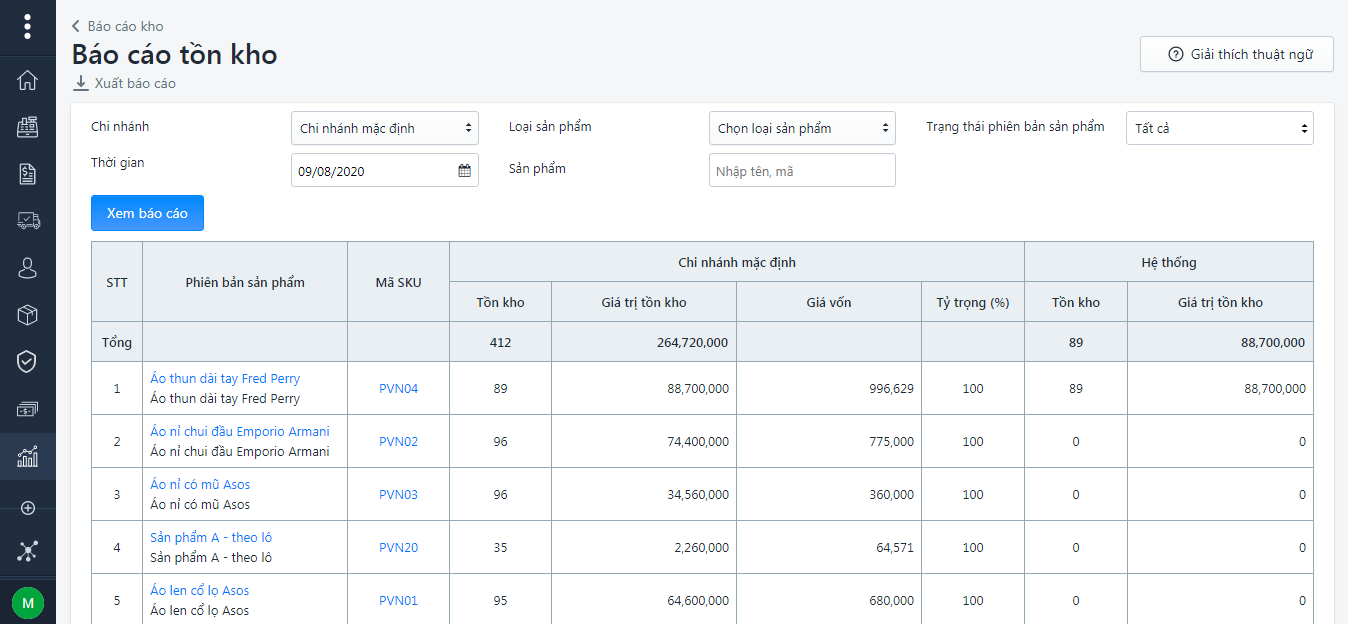
Sapo POS is developed as an optimal warehouse management application, primarily for retail store owners and chain stores. This software supports management from the receiving process to dispatching, with the ability to generate reports that help save up to 80% of time and personnel costs. This simplifies the warehouse management process and creates favorable conditions for businesses.
3. KiotViet Software
KiotViet is a warehouse management software developed specifically for businesses in Vietnam. With a focus on the customer, KiotViet claims that their software is “Simple on the outside, powerful on the inside, and convenient to use”.
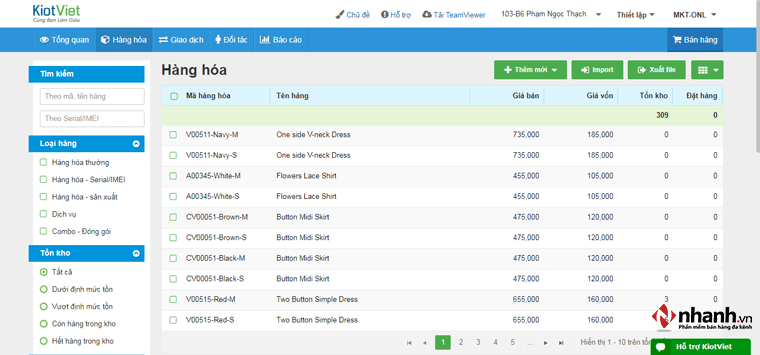
KiotViet always puts the customer at the center with cost-effective pricing and risk mitigation. It is a software trusted by many Vietnamese businesses due to its reasonable service costs.
4. ECount Warehouse Management Software
Ecount is a warehouse management software capable of providing various types of reports, helping entrepreneurs easily monitor the situation and make decisions. At the same time, Ecount is also one of the most popular and widely used warehouse management software today.
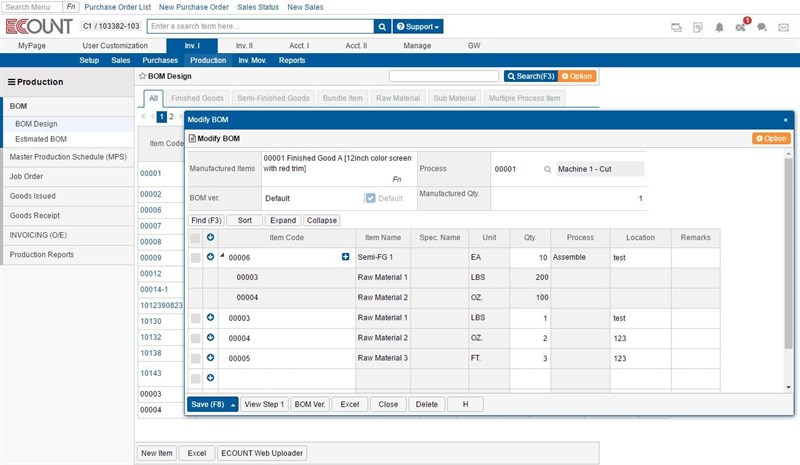
Some outstanding features of Ecount include:
- Inventory fluctuation reports: Records goods receipts and issues.
- Goods status reports: Includes placed, unplaced, and pending approval orders.
- Tracks the status of defective goods, warehouse transfers, and other statuses.
- Allows importing and exporting goods information, supporting barcode printing and order printing for the business.
5. Suno.vn Website
SUNO software is a comprehensive support tool for store managers, including sales calculations, inventory management, revenue and expenditure tracking, customer care, and easy business performance analysis. Especially with its user-friendly interface, SUNO is an ideal choice even for those with no computer experience.
Some outstanding features of SUNO include:
- Manage warehouse operations on a single user interface.
- Allows users to manage goods in detail by item code, import information from Excel files, websites, or old management software, as well as perform tasks such as printing barcodes, printing labels, categorizing goods, and managing warehouse receipts and issues.
- Supports multiple platforms, can be used on computers, phones, and other devices such as barcode printers and label printers.
6. English Inventory Management Software – SalesBinder
SalesBinder is a web-based online inventory management application that is customizable and easy to use. You can organize items in real-time from customer accounts, leads, purchase orders, invoices, and more.
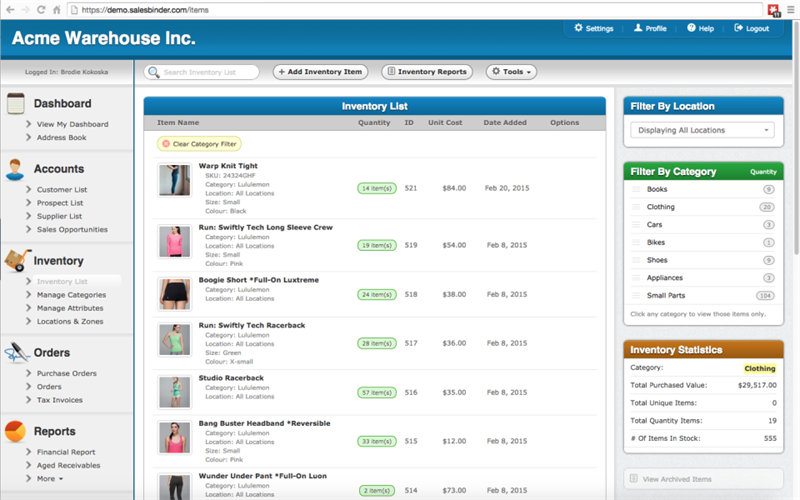
Some outstanding features of SalesBinder:
- Track the location of items.
- Barcode scanning.
- Manage accounts for customers, leads, and suppliers.
- Note additional costs for profit analysis.
- Create invoices, estimates, and purchase orders.
- Reports on inventory and sales revenue
7. Vietnamese Inventory Management Software – BS Silver
BS Silver is an inventory management software that supports multiple platforms; you can use it on Windows, Android, and iOS. Notably, this is a completely free inventory management application that allows for managing diverse product sources and multiple warehouses, as well as applying popular costing and inventory methods like LIFO, FIFO, and JIT.
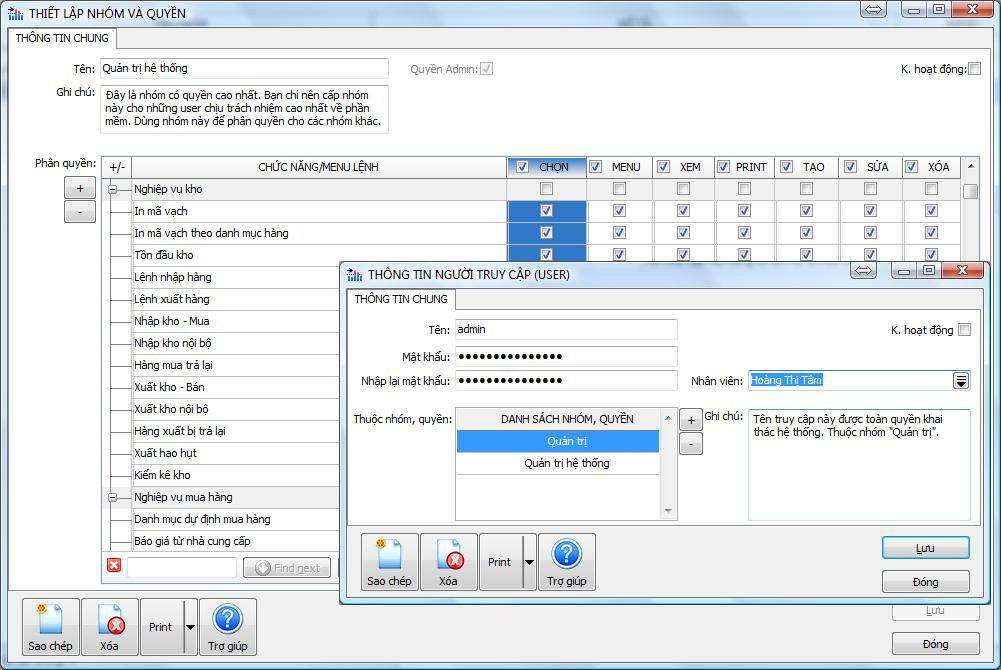
BS Silver not only supports multiple users accessing the database simultaneously but also provides permission delegation and control over the activities of administrative members.
II. Criteria for Choosing a Suitable Inventory Management Software
Choosing inventory management software should not be based on the number of features or the product’s popularity, but rather on the actual needs, operational specifics, and development direction of the business. A suitable software not only solves current problems but also needs to be flexible enough to accompany the business in the medium and long term.

1. Scale and Industry Specifics
The scale of the business and the industry are the first factors to consider when choosing inventory management software. Each business model has different product characteristics, import-export frequencies, and control requirements.
For example:
-
Retail businesses need to manage inventory by store, by SKU, and in real-time
-
Manufacturing businesses need to track raw materials, semi-finished products, and finished products
-
The food and pharmaceutical industries need to control expiration dates and batch numbers
Suitable software must meet the core operational needs of the industry, rather than just providing general, superficial functions.
2. Complexity of Warehouse Operations
Not every business needs a complex inventory management system. Assessing the complexity of current warehouse operations helps avoid choosing software that is too simple or has too many redundant features.
Businesses need to consider:
-
The number of warehouses and branches to manage
-
The number of SKUs, variants, and units of measurement
-
Operations for managing by batch, serial number, and storage location
-
Processes for stocktaking, transfers, and internal goods receipts/issues
A good software should allow for flexible customization according to operations, rather than forcing the business to change its processes to “fit the software.”
3. Scalability as the Business Grows
Inventory management software should not only serve current needs but also be ready for future growth scenarios. Businesses often face difficulties when their current software cannot meet expansion needs, forcing them to change systems and causing operational disruptions.
When evaluating scalability, businesses should consider:
-
Whether it’s easy to add warehouses, branches, or users
-
Whether the software has data or performance limitations
-
Whether it supports feature upgrades according to development stages
Choosing scalable software helps businesses save on transition costs and ensures continuity in warehouse management.
4. Implementation and Operating Costs
Cost is an important factor, but you shouldn’t just look at the initial purchase price. Businesses need to evaluate the total cost of ownership of the software throughout its usage.
The costs to consider include:
-
Initial implementation and user training costs
-
Licensing fees, recurring subscriptions
-
Upgrade, maintenance, and technical support costs
-
Costs incurred when expanding or integrating additional systems
A reasonably priced software is one that provides value commensurate with the cost, not simply the cheapest one.
5. Integration Capability with Other Systems
In a modern business environment, warehouse management software does not operate in isolation but needs to be closely connected with other systems such as sales, accounting, CRM, or ERP.
Good integration capability helps:
-
Data is synchronized seamlessly, reducing manual data entry
-
Reduce errors and information duplication
-
Support centralized management and accurate decision-making
Businesses should prioritize software that:
-
Has built-in integration capabilities with popular systems
-
Supports open APIs for flexible connectivity
-
Ensures stability and security during data synchronization
III. Essential Features of Warehouse Management Software
Professional warehouse management software does more than just store product information; it acts as a “digital assistant” to help businesses manage the entire warehouse cycle – from goods receipt, goods issue, and stocktaking to statistical reporting and automated alerts. Below are the key features that any business should consider when choosing software:
1. Automated Inbound, Outbound, and Inventory Management
This is the most core feature.
The software helps you record all inbound, outbound, return, and warehouse transfer transactions in just a few steps. Data is updated in real-time, allowing businesses to always know the actual inventory levels without manual checks.
Additionally, some systems also have an automated stocktaking function: comparing actual data with system data to detect discrepancies immediately.
2. Detailed Product Code Management
Modern software allows businesses to create and manage barcodes or QR codes for each product, batch, and even individual serial number.
This is especially useful for manufacturing or distribution businesses with thousands of product codes, making traceability fast and accurate.
3. Expiry Date Tracking and Automated Alerts
For businesses in the food, pharmaceutical, or fast-moving consumer goods industries, this feature is a “lifesaver.”
The software will automatically send alerts when products are nearing their expiration date or when inventory levels are exceeded, helping businesses take timely action, rotate stock, or run promotions to avoid losses.
4. Storage Location Management (Bin Location / Slotting)
Advanced software allows for precise locating of goods within the warehouse: shelf, aisle, level, bin, etc. This enables warehouse staff to quickly find or arrange goods, optimize storage space, optimize performance management, and reduce handling time.
5. Reporting, Statistics, and Visual Dashboards
One of the greatest values of warehouse management software is its ability to aggregate data and present it visually.
Managers can view inventory charts, stock turnover reports, fast-moving and slow-moving products, or inventory levels over time.
Dashboards are often designed to be user-friendly, displaying real-time data to help managers make accurate and quick decisions.
6. User Permissions and Control
Not everyone is allowed to edit or access all data.
The software allows for creating different permission levels (warehouse keeper, accountant, director, data entry staff…) to ensure information security and prevent errors.
The system also saves an action history (log) for tracing when necessary.
7. Multi-platform Integration and Data Synchronization
Modern software cannot stand alone. It needs to be able to integrate with other software such as ERP, accounting, CRM, POS, or online sales software.
This allows all data on orders, payments, and inventory to be synchronized automatically, helping businesses save data entry time and reduce the risk of errors.
Read now: What is 1Office business management software?
IV. Benefits of Using Inventory Management Software
By implementing inventory management software, businesses not only digitize data but also transform their operational methods – from manual to automated, from intuitive to data-driven management. Here are the most specific and practical benefits:
1. Save Time, Effort, and Personnel Costs
Instead of keeping paper records, entering data into Excel, or performing manual stocktakes, the software allows all operations to be done in just a few clicks.
This helps businesses reduce data entry time by 50–70% and minimize calculation errors.
2. Reduce Losses and Data Discrepancies
All transactions are recorded automatically – no more worries about overages, shortages, or incorrect items.
The software also allows for quick reconciliation between actual data and system data, helping businesses detect fraud or discrepancies immediately.
3. Optimize Stocktaking and Goods Receipt/Dispatch Processes
Thanks to barcodes and QR codes, employees can update item status with a simple scan.
The stocktaking process becomes many times faster and can be performed even while goods are in transit between warehouses.
4. Support Decision-Making Based on Real-Time Data
Reports on inventory levels, stock turnover, obsolete items, etc., help managers understand the warehouse situation and make accurate decisions about purchasing, liquidating, or reallocating stock.
This is the foundation for data-driven management – an inevitable trend in the digital age.
5. Enhance Management Efficiency and Scalability
When the business opens new branches or warehouses, the system can still manage multiple locations centrally at the same time.
Managers need only a single interface to monitor inventory, transfer goods between branches, and synchronize overall revenue.
6. Improve Customer Experience & Competitive Edge
When the inventory management process runs smoothly, the business can deliver goods faster and more accurately, eliminating out-of-stock situations or incorrect shipments.
This helps enhance brand reputation, increase satisfaction, and retain customers for the long term.
7. Pave the Way for Comprehensive Digital Transformation
Inventory management software is a crucial step in the digital transformation journey.
When data is digitized, businesses can easily connect with other management systems (CRM, ERP, HRM), moving towards a more unified, transparent, and flexible management model.
V. Conclusion
Above are the top 7 inventory management software trusted by many businesses today. We hope this article has provided enough information about the pros, cons, and features of the software, helping you choose the right tool for your business’s needs, budget, and scale. If you would like a consultation on the best and most suitable inventory management solution, please contact the experienced implementation consultants at 1Office immediately!
Register for a Demo Account of the 1Office CRM Inventory Management Feature
















