


 13/05/2026
  336 views
In countries around the world, many businesses have long adopted business management systems to manage more effectively, aiming for sustainable and long-term development. In recent years, Vietnamese businesses have also gradually recognized the importance of digital solutions, considering them an essential part of their development and integration process. So, what is a business management system, and how do you choose the right management system for your business? Let’s find out in the content below.
Mục lục
1. General information about business management systems
1.1 What is a business management system?
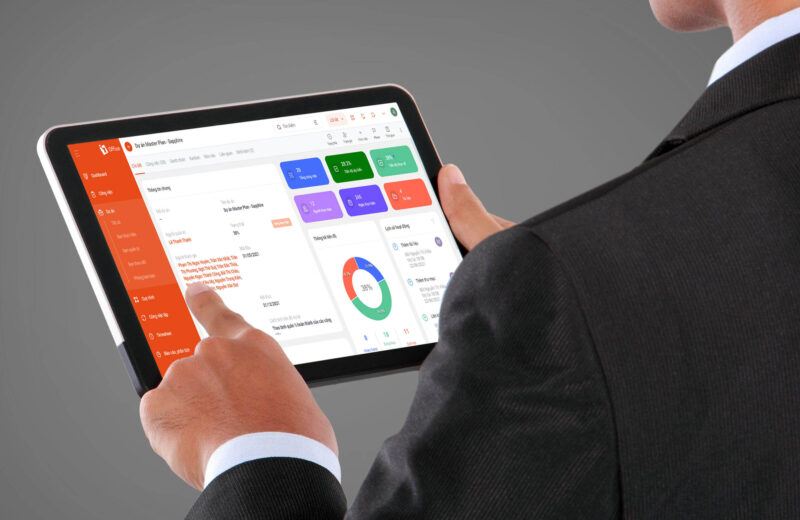
A business management system is a set of means and tools that provide comprehensive support to a business in managing, evaluating, and operating projects, personnel, and resources. Instead of performing manual and subjective management and evaluation activities as before, a business management tool digitizes processes to improve efficiency and minimize errors in management and operations.
1.2 Benefits of a comprehensive business management platform
Applying a business management software system to the operational apparatus can help businesses gain the following benefits:
Improve operational efficiency & work performance
A business management system eliminates repetitive processes and significantly reduces manual data entry, which not only improves employee productivity but also minimizes the potential for errors in business.
Additionally, applying management software helps improve daily business activities by streamlining processes, making it easier and more efficient for the company to collect data. Thanks to these advantages, users can see improved work performance across departments.
Enhance collaboration between departments
With data centralized and consistent on a digital platform, departments can share information and collaborate anytime, anywhere. The advantage of a business management software is its real-time update capability, so information sharing and data usage are always available and accurate.
Improve management analysis capabilities
A business management system allows for overall control and monitoring of the work of each department specifically and the company as a whole. The data collected and stored on the platform helps generate in-depth, multi-dimensional reports, analyses, and evaluations.
This feature provides maximum support for managers, helping them accurately assess the company’s actual situation, predict development trends, and build appropriate future plans.
See more: What is a Human Resource Management System? Criteria for choosing an effective HRMS
2. What constitutes an effective business management system?
For each management model, the mindset and design of a business management software system will differ. However, you can approach building an effective business management system with the following criteria:
2.1 Quick implementation, easy to use
To quickly apply online business management software within the operational apparatus, businesses should choose a management system with a simple, user-friendly, and intelligent interface; features should be arranged in a logical, intuitive, and easy-to-understand sequence for the user.
Additionally, leadership needs to consider the support and implementation capabilities of the software provider. A professional ERP software solution provider will have a plan to guide practice and train employees to use the new system in the shortest possible time, quickly delivering results.
2.2 Stability
Every business wants to develop stably and grow over time. To control and manage the business tightly, the software must be stable and of high quality. During the application of business management software, even minor errors can cause major disruptions to the entire business operation and take time to fix. The stability of construction business management software is particularly important as it limits operational risks and ensures a smooth workflow.
Therefore, the chosen software must have high stability. This is often verified by businesses through the practical implementation experiences of other companies.
2.3 Flexibility for every need
Each business has a different scale and specific operational characteristics. Businesses should prioritize choosing a flexible business management system that meets all emerging requirements. Users can flexibly configure features to suit their usage needs.
2.4 Permission delegation capability
This is one of the important criteria that businesses need to consider before choosing software. When using a business management software with many different departments and divisions, the software must have permission delegation capabilities. In particular, it is necessary to define the access rights and responsibilities of each person so that managers can manage the work of each individual.
2.5 Development and scalability potential
Businesses always have the need to expand their production and business operations, and once they use software, they want to use it for the long term. Therefore, an effective business management system must have a development plan and continuous scalability. It needs to regularly improve existing features and update with new ones to help the business develop towards professionalization in the future.
2.6 Brand and reputation of the provider
A comprehensive business management system is often implemented over a long period and is used throughout the company’s development. Therefore, when choosing software, managers need to carefully consider and research reputable providers with a strong brand in the market to ensure the product is used stably.
Read now: 5 “golden criteria” for choosing business management software
3. Process of Building a Business Management System
Business management includes the following activities: developing management mechanisms, establishing an organizational and departmental structure, managing finances and resources, developing administrative mechanisms, and managing business operations.
1. Developing Management Mechanisms
To effectively manage operations and direct the business, it is essential to have documents that define the company’s mechanisms and policies. Additionally, there must be regulations for financial management within the organization.
2. Establishing an Organizational Structure
Outlining the organizational structure, including its divisions, departments, and their responsibilities, is the next step after you have developed the management mechanisms.
3. Financial Management
Financial management is a crucial activity and a decisive step in a company’s development. It includes policies for managing capital, cash, assets, etc. Additionally, there should be policies regulating the use of capital or cash advances.
4. Managing Production and Business Activities
These are the activities that generate revenue for the business. Production and business activities include: manufacturing, inventory import, sales, customer care, etc.
5. Managing Administrative Activities
This is the stage responsible for ensuring that employees within the company collaborate effectively. Furthermore, administrative activities are also directly related to the development of internal culture.
| Read now: A Systematic, Cost-Optimizing ERP Implementation Process for Businesses |
4. The best enterprise resource planning software today
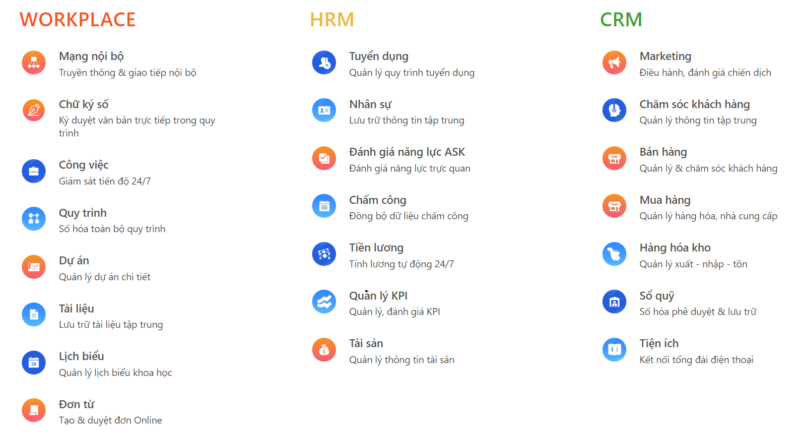
Currently, 1Office is the most comprehensive business management solution, helping businesses solve management challenges anytime, anywhere. The all-in-one business management software integrates 3 main modules: Workplace – CRM – HRM on a single platform.
4.1 Workplace – Work and Communication Management Feature Set
The internal communication network system is operated and designed like a miniature social network, helping leaders convey messages to company members. This allows employees to quickly update and follow company-related news as soon as it’s announced.
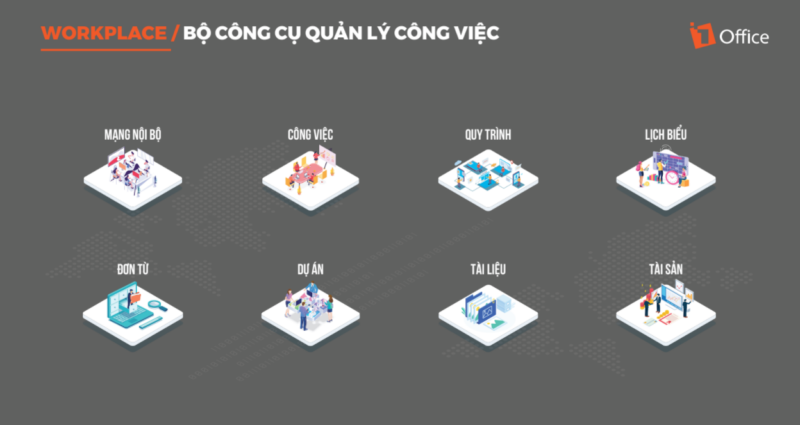
All-in-one business management system for work and communication management
- Internal network: The internal newsfeed updates statuses and company information, helping employees stay informed anytime, anywhere without missing posts.
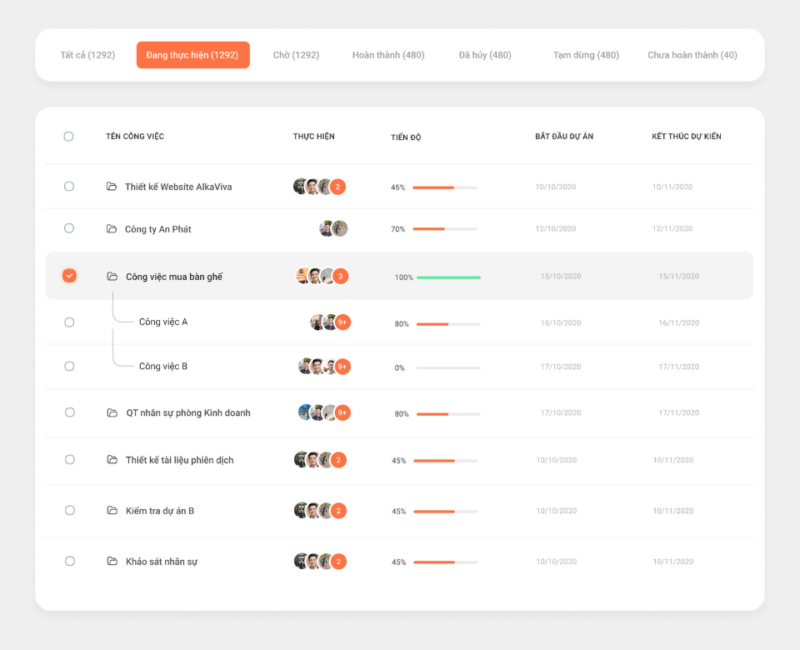
- Work management: Quickly create work plans and assign tasks to employees. This allows managers to easily supervise and track employee work progress.
- Process management: Digitize repetitive work processes, such as asset purchase requests, invoice issuance requests, employee onboarding processes, etc.
- Project management: Manage the quantity, monitor the progress, and evaluate the quality of all projects. Administrators can update project progress statuses: Paused, Completed, Canceled.
- Schedule: Employees can manage all personal and departmental events and calendars on the system. Notably, the schedule module also links with all other modules on the system to automatically sync calendars.
- Requests: The fully digitized request system makes creating, approving, and summarizing data simple and instantaneous.
- Documents: The document module helps businesses systematize and centrally manage all these resources in an organized manner.
- Asset management: Assists the HR and administration department in managing asset information, allocation, retrieval, and reports of damage or loss.
4.2 HRM – Comprehensive Human Resource Management Toolkit
HRM – Human Resource Management is an automated employee management software within the 1Office all-in-one business management software. It enables businesses to identify personnel with the right qualifications and skills that the company is looking for, ensuring the best human resources to serve the work.
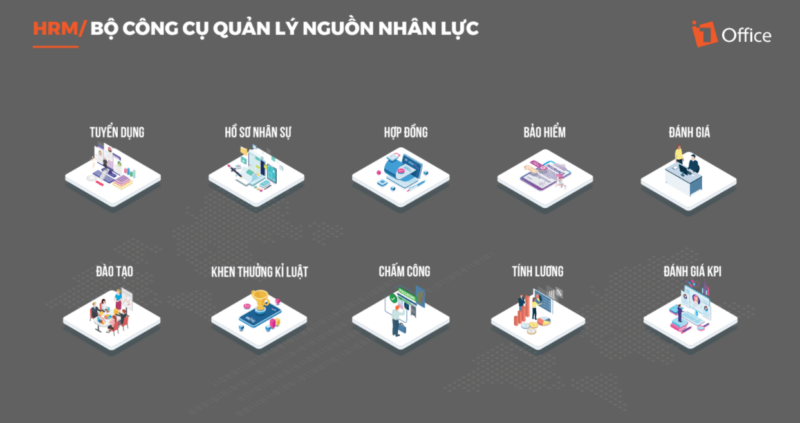
All-in-one business management system for comprehensive HR management
- Recruitment process management: Create recruitment proposals on the software. Relevant parties will immediately receive notifications for approval.
- Syncs with recruitment emails, automatically retrieves candidate profiles to sync with the system. The smart application will parse data & streamline information clearly.
- Personnel records management: Centrally store all employee information directly on the personnel records management software, making it easy to look up and retrieve information.
- Handles complex shift scheduling, shift registration, and frequent shift changes; Saves printing costs, and time spent reviewing and processing timesheets and payroll for staff.
- Employee competency assessment: Easily evaluate employee competency through the ASK framework: Attitude, Skills, and Knowledge.
- Timekeeping tracking: Allows timekeeping via GPS location. Simply set up a smart GPS check-in point, and users can clock in from their smartphones anywhere.
- Payroll management: Digitizes all administrative requests within the month, automatically updating the timesheet to generate a payroll based on the configured settings.
- KPI management: Through KPIs, leaders can build effective KPIs and accurately assess employee performance to devise methods for quality improvement.
4.3 CRM – Business Operations Management Toolkit
The 1Office CRM management software is a module within the 1Office business management system. With many outstanding features, customer management software is considered a comprehensive Marketing – Sales – Customer Care solution that helps businesses achieve their automated sales goals. This helps increase revenue, accelerate the sales process, and easily acquire target customer groups.
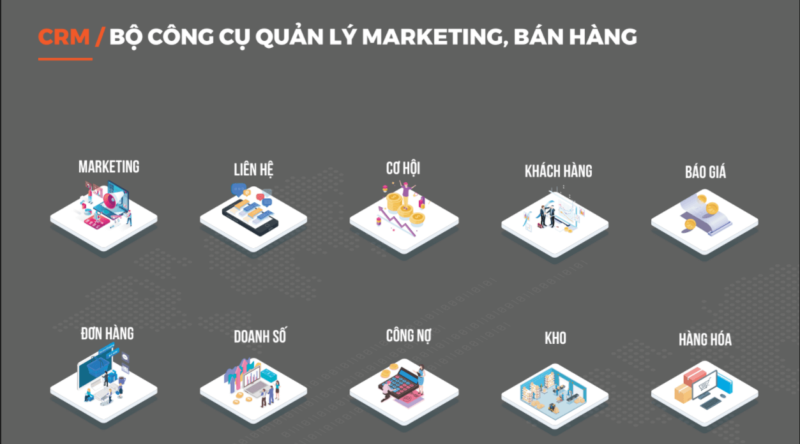
Comprehensive business management system for managing business operations
- Marketing Campaign Management: Easily use and access the marketing resource system (email, email templates, auto call, etc.) to meet business needs
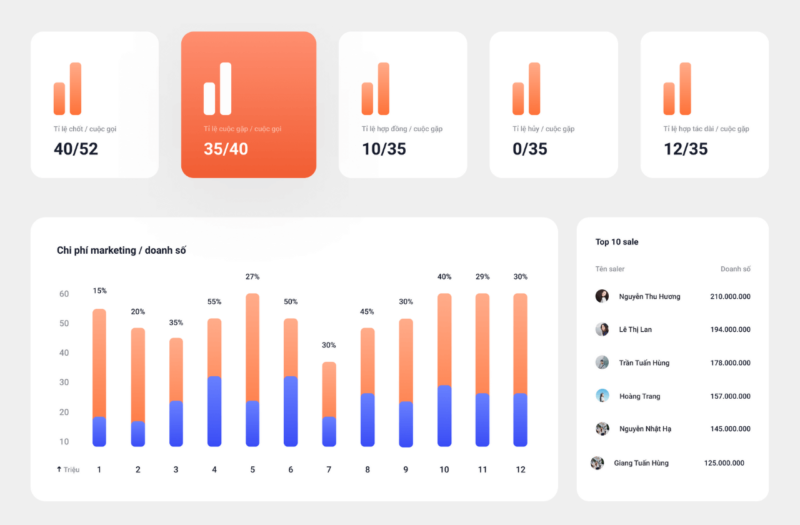
- Accurately measure the effectiveness of each marketing campaign and understand the detailed performance of each project
- Track and control profits. Measure marketing campaigns and evaluate detailed KPIs for each campaign’s results
- Customer Care: Save all care history; automatically save customer care calls and emails sent to customers
- Purchasing Management: Digitize and centralize all supplier information on the software, minimizing information loss from manual storage
- Create New Contracts/Orders: This feature allows creating Contracts/Orders directly from customer records
- Add Documents: Users can attach customer-related documents to the software
- Inventory Management: All inventory receipts and issues are managed by an automated approval process. Receive alerts when stock is low.
- Debt Management: Automatically update sales and receivables. Classify sales by source and criteria to generate accurate business reports.
Get a consultation & free software trial
5. Why choose the 1Office comprehensive business management solution
5.1 A full-featured solution
Today, businesses are using multiple software applications, which complicates management, data aggregation for reports, and the daily tasks of employees.
The business management system aims to be a fully integrated solution that helps run a business without needing multiple software applications. This helps businesses save money while ensuring flexibility and customization. 1Office customers have the option to enable or disable any specific feature.
5.2 Work anytime, anywhere
1Office is not just a comprehensive business management software; it is also an online work environment. Each user is provided with an account full of tools and resources, allowing them to access and work anytime, anywhere. All that’s needed is a device with an internet connection to handle tasks easily.
5.3 Standardize and synchronize processes
Every business has processes, forms, etc., but they often exist in a non-standardized, inconsistent format that lacks enforcement and monitoring. Now, the comprehensive business management software helps businesses automatically standardize all work processes. When a task follows a pre-set process, the software will automatically notify and remind the assigned individuals quickly.
5.4 Unify and synchronize data
All 1Office modules are developed on a single core technology platform. Therefore, 1Office offers seamless synchronization across its business management software features, user interface, and user data. Additionally, 1Office provides a ready-made library for automatic data synchronization.
5.5 Save on management costs
Deployment as a subscription-based service on a cloud computing platform offers a different approach to software for businesses. This approach helps businesses minimize unnecessary costs such as building server infrastructure, operational personnel costs, initial software investment costs, and warranty costs.
5.6 Enhance work productivity
Instead of tracking work with manual paperwork or using Excel, which can easily lead to lost documents and errors, applying a comprehensive business management software is a complete solution that helps users save maximum time and effort. This helps employees increase their work productivity, cutting down time on unnecessary tasks to focus on their new projects.
5.7 Diverse and intuitive reports
Company management software helps CEOs and business managers grasp the overall health of their business. This allows each customer to customize report templates to suit their needs, similar to working on Excel. In addition, 1Office has also designed a template library of standard reports for each module, which customers can easily download and use.
5.8 Promote internal communication
Today, a company is not just a workplace; it’s also about culture and relationships between colleagues, superiors, and subordinates. A simple software tool can help you work better individually, but if the business aims to build a friendly corporate culture, a comprehensive management system is a must-have. With 1Office, employees can increase their enthusiasm and energy for work by sharing joys and difficulties, thereby promoting internal communication and contributing to building a sustainable corporate culture.
A business management system has become an indispensable tool for managers to operate their businesses effectively. Currently, the 1Office comprehensive business management platform is trusted by 5,000 businesses with over 450,000 Vietnamese users, including YODY, AhaMove, Hoa Phat, ViettelPost, and more. We are proud to be one of the leading providers of comprehensive business management system consulting, meeting all the needs of businesses in their digital transformation journey for sustainable development.
To register for a trial of the comprehensive business management software that helps leaders manage and operate their businesses holistically, please leave your phone number. We will contact you for a consultation today.
Register for a consultation: 083 483 8888
For more details, please visit:
Fanpage: https://www.facebook.com/1officevn/
Youtube: https://www.youtube.com/channel/UCeTIRNqxaTwk0_kcTw6SxmA
















