


 11/05/2026
  61492 views
The daily timesheet template is an important form in any business. It serves as the basis for evaluating the diligence and work performance of each employee in the company, and for calculating salaries. Check out 15 daily timesheet templates updated for 2026, in Excel and Word formats from 1Office, in the article below. You can download automated Excel timesheet templates in both English and Vietnamese from this article.
Mục lục
- 1. Latest Daily Timesheet Templates for 2026
- 2. Timesheet Template according to Circular 200
- 3. Timesheet Template according to Circular 133
- 4. Daily Timesheet Template according to Circular 177
- 5. Selection of the Latest Excel Timesheet Templates for 2026
- 6. Daily Timesheet Template in Word
- 7. Excel Timesheet Template for Manufacturing
- 8. Excel Timesheet Template for Overtime
- 9. Weekly Excel Timesheet Template
- 10. Shift-Based Timesheet Template
- 11. Hourly Timesheet Template
- 12. Daily Timesheet Template for Teachers Based on Teaching Hours
- 14. Teacher Timesheet Template by Clock-in/Clock-out Time
- 15. Daily Timesheet Template in English
- 16. What are the benefits of timesheets for businesses?
- 17. Who creates the timesheet?
- 18. How to create a simple timesheet that is easy for businesses to apply
- 19. Common timekeeping methods
- 20. Why does timekeeping cause so many problems for businesses?
- 21. Important KPIs to Track in Timekeeping
- 22. How to Optimize Timesheets to Improve Management Efficiency
- 23. Automate Timekeeping with 1HRM
1. Latest Daily Timesheet Templates for 2026
The daily timesheet is a common form of attendance tracking for employees today. This method is usually performed twice a day to record the start and end times of an employee’s workday, helping to accurately update the number of hours worked.
Additionally, the daily timesheet template helps managers track work conveniently and motivates employees in the workplace. Below is an illustrative image of a daily timesheet for the HR department.
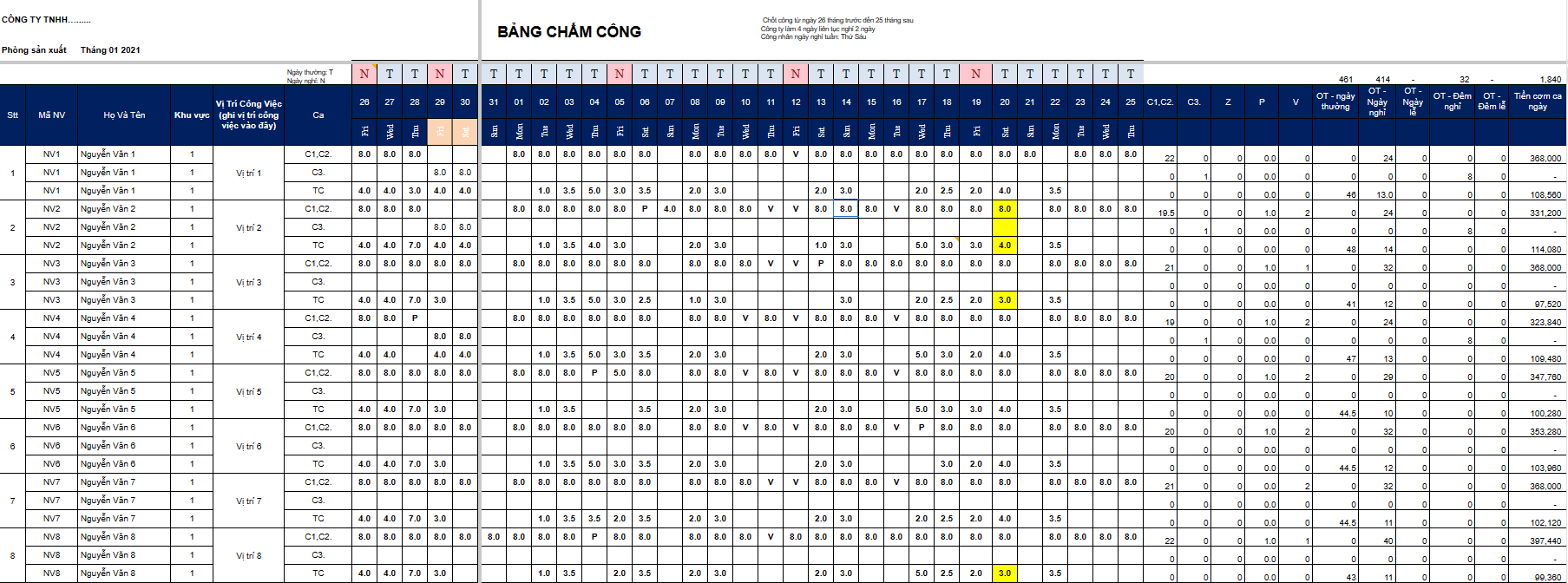
Download daily timesheet template 1 (Excel file)
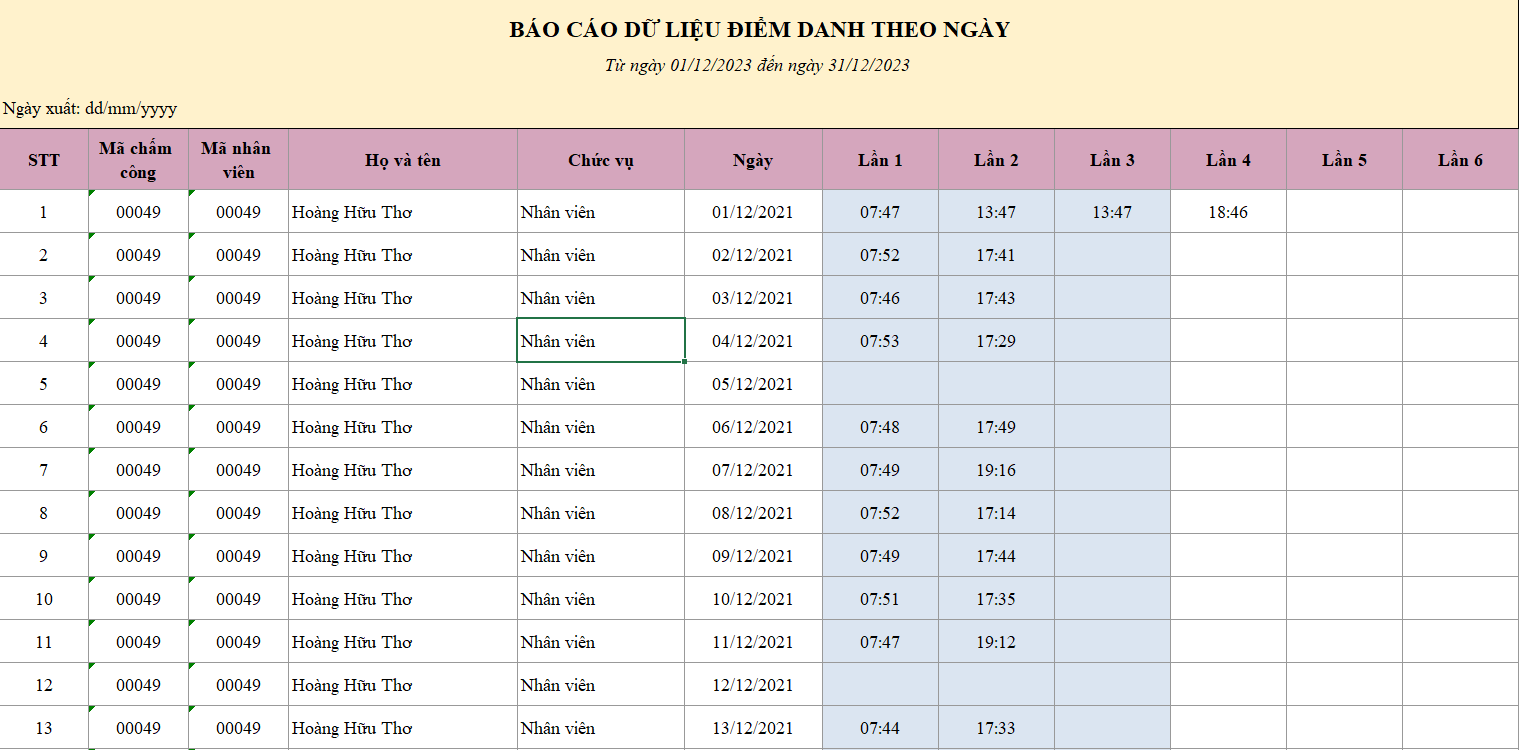
Download daily timesheet template 2 (Excel timesheet file)
2. Timesheet Template according to Circular 200
This timesheet template is based on the regulations of Circular 200, including information on salary grades or ranks and positions. This template is applicable to businesses in all sectors and economic components.
This document details the tracking of working hours by categories such as time-based work, product-based work, and work eligible for social insurance benefits. This helps ensure that the business maintains accuracy and transparency regarding salaries and allowances, while complying with legal regulations.
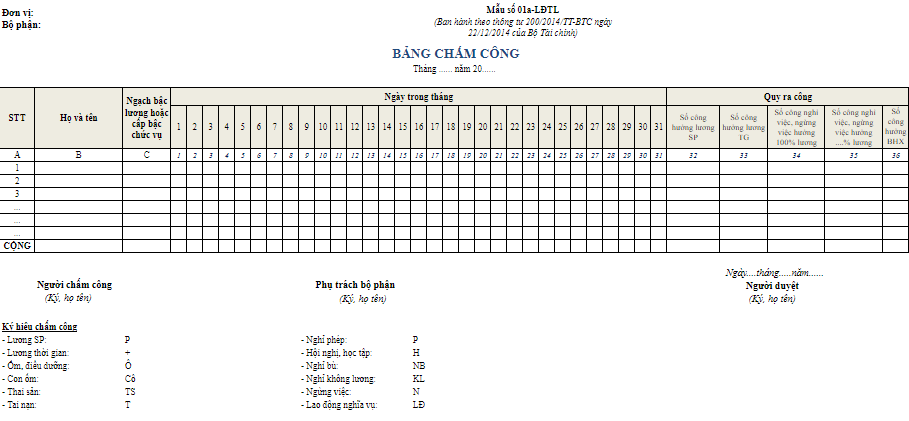
Download daily timesheet template according to Circular 200 (Excel file)
3. Timesheet Template according to Circular 133
The timesheet according to form 01a-LĐTL, Circular 133/2016/TT-BTC is designed to track work by employee levels. This is a simple template that still ensures transparency in managing working hours, leave time, and overtime.
This template differs from the one based on Circular 200 in that it applies to small and medium-sized enterprises, including micro-enterprises.
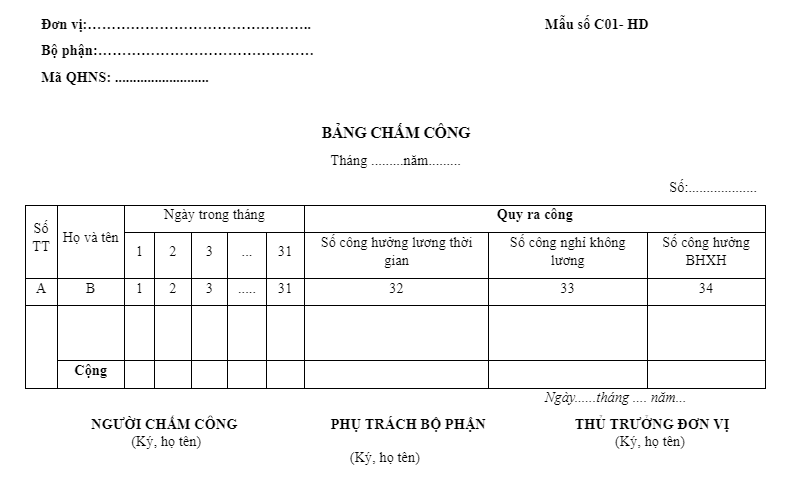
Download daily timesheet template according to Circular 133 (Doc file)
4. Daily Timesheet Template according to Circular 177
The timesheet according to Circular 177 is very similar to the templates for Circulars 200 and 133, however, the work conversion section is designed more concisely. This template divides work into 3 types: days worked for time-based salary, days of unpaid leave, and days eligible for social insurance benefits.
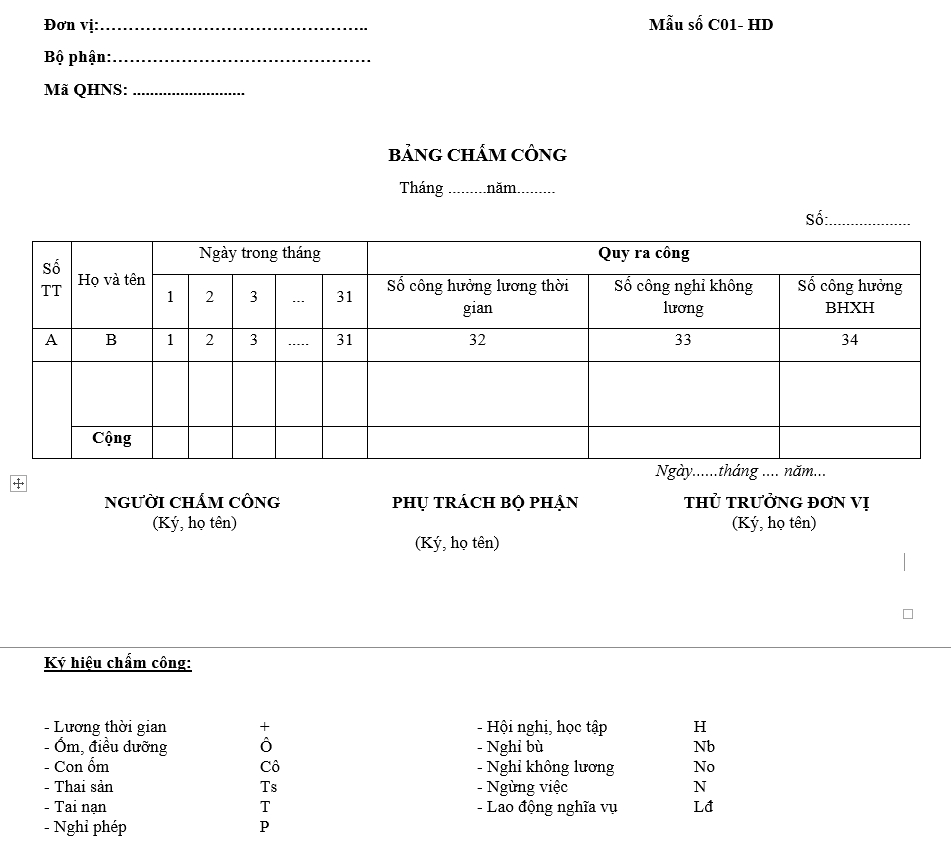
Download daily timesheet template according to Circular 177 (Doc file)
5. Selection of the Latest Excel Timesheet Templates for 2026
To manage employee attendance, each company will create different Excel timesheets tailored to their specific personnel characteristics or industry. When creating a timesheet, it is important to ensure compliance with certain standards. This helps avoid errors and issues during the timekeeping process. A basic automated Excel timesheet file typically includes information like the template shown below.
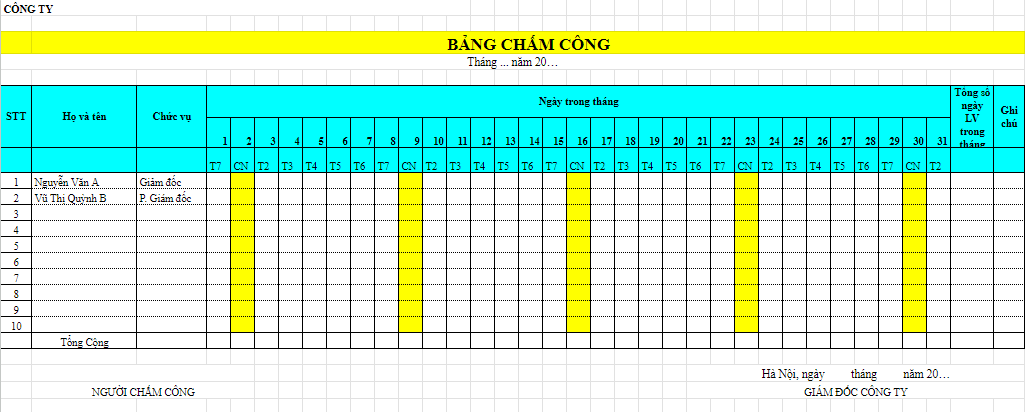
Download daily timesheet template in Excel
6. Daily Timesheet Template in Word
Timesheets can also be created in Word and used by all departments and divisions within a company. However, Word timesheets only support manual data entry or printing for handwritten entries; they cannot automatically calculate based on formulas when needed. This template is suitable for organizations with a small number of employees and a simple timekeeping process.
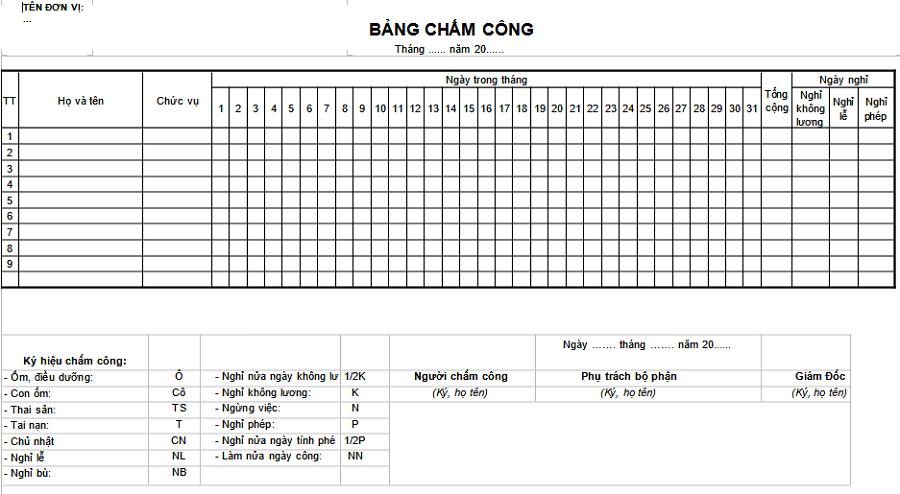
Download the daily timesheet template in Word
7. Excel Timesheet Template for Manufacturing
This timesheet template is designed to track the working hours of employees in manufacturing workshops. It is simple, easy to use, and includes information on shifts, overtime hours, official workdays, and extra work. At the end of the month, managers and team leaders can easily summarize working hours and calculate salaries and corresponding benefits.
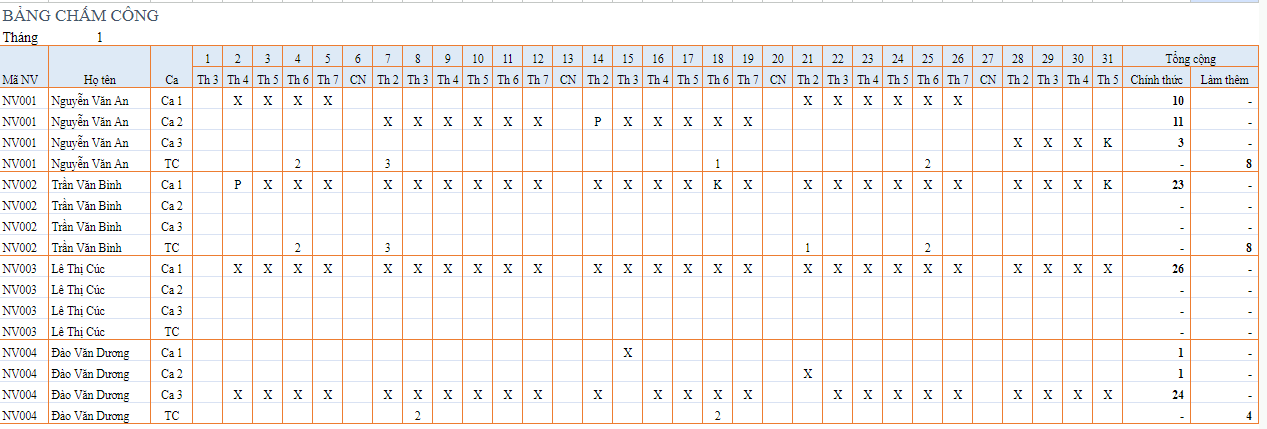
Download the manufacturing timesheet template (Excel file)
8. Excel Timesheet Template for Overtime
Overtime timesheets play a crucial role in calculating salaries and ensuring employee rights, especially for businesses in the manufacturing sector or companies that frequently require overtime. Tracking overtime outside of regular business hours provides a basis for calculating compensatory time off for employees or converting it into wages.
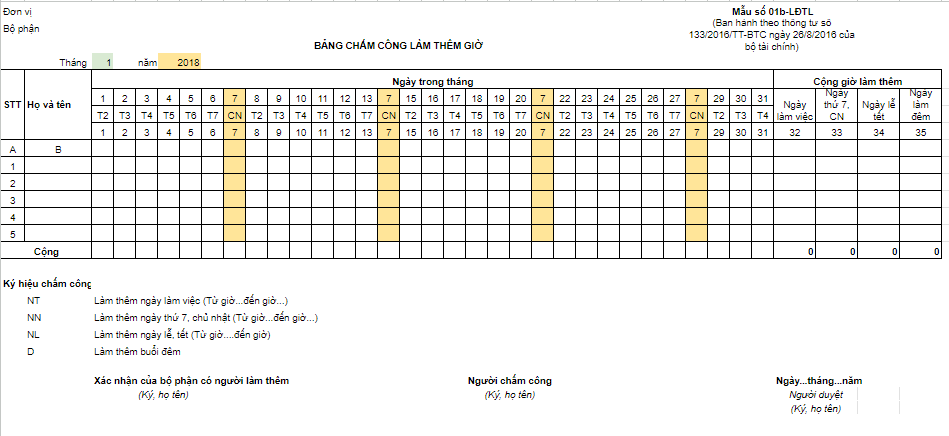
Download the overtime timesheet template (Excel file)
9. Weekly Excel Timesheet Template
To monitor working hours more closely and accurately, as well as to minimize potential conflicts, HR can use a weekly timesheet template. Although this template is not common, it is highly suitable for businesses that calculate salaries weekly or need to report progress on a weekly basis. When using this template, it is important to pay attention to the start and end dates of the week.
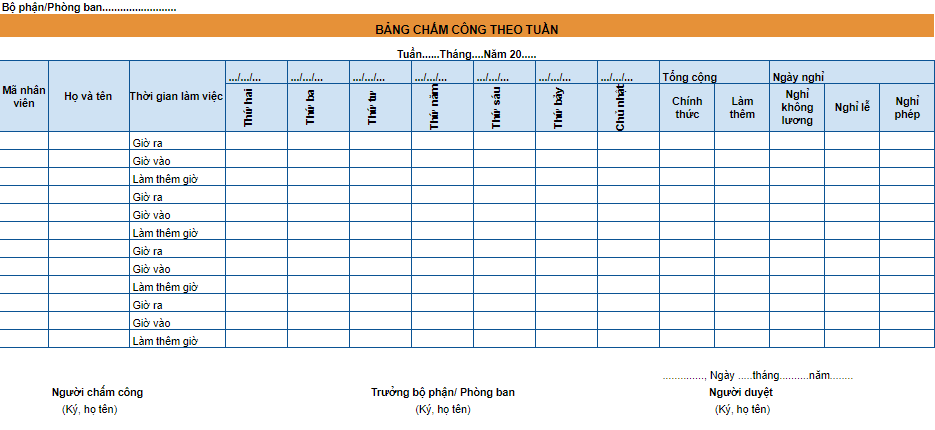
Download the weekly timesheet template (Excel file)
10. Shift-Based Timesheet Template
The purpose of this timesheet is to track the workdays of employees on a shift basis. This template helps managers simultaneously monitor the shifts of individual employees and the number of employees per shift. With this information, managers can reallocate shifts more effectively, avoiding staff shortages or surpluses and ensuring work efficiency.
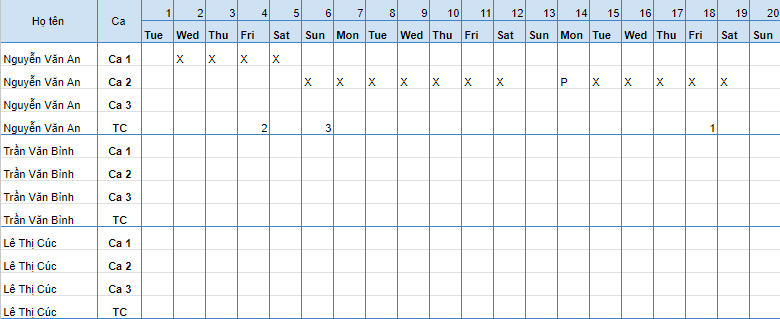
Download the shift-based timesheet template (Individual shift-based timesheet Excel file)
Refer to more individual timesheet templates in Excel to optimize individual time tracking!
11. Hourly Timesheet Template
Hourly timekeeping is a meticulous method of managing work time favored by many businesses. On an hourly timesheet, employees’ clock-in and clock-out times are clearly recorded for each day or shift. This allows managers to accurately assess employee attendance and implement measures to enhance compliance with company regulations.
In addition to basic information, hourly timesheets can also include details such as minutes late, early departures, overtime hours, and leave time. Based on this data, the HR and accounting departments can carry out processes related to employee benefits, such as calculating overtime pay according to regulations and managing compensatory time off.
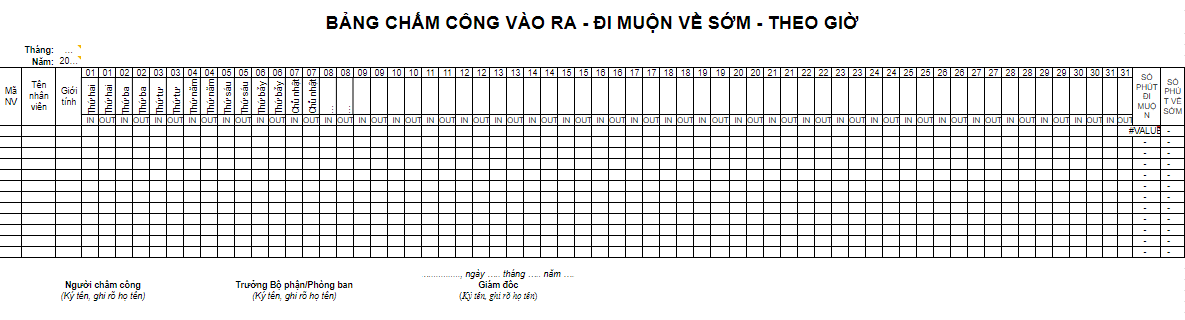
Download the hourly timesheet template (Excel file)
12. Daily Timesheet Template for Teachers Based on Teaching Hours
Many schools and educational institutions often calculate teachers’ work based on teaching hours, and this timesheet will help you track the details with the utmost accuracy. This template is particularly suitable for language centers, private educational institutions, and educational businesses operating both domestically and internationally.
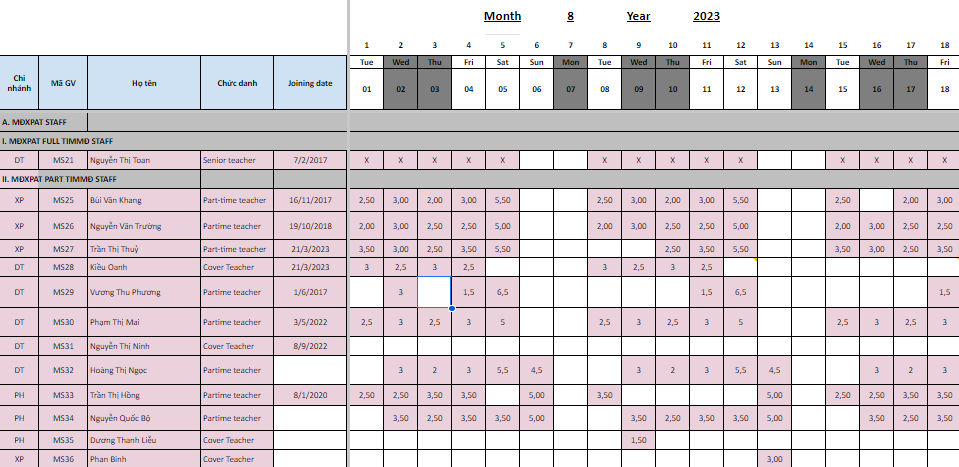
Download the teacher timesheet template based on teaching hours (Excel file)
14. Teacher Timesheet Template by Clock-in/Clock-out Time
This automated timekeeping report includes multiple sheets. When clock-in/clock-out times are updated on the DATA sheet, the end-of-month work status is also automatically updated in chart form on the DASHBOARD sheet.
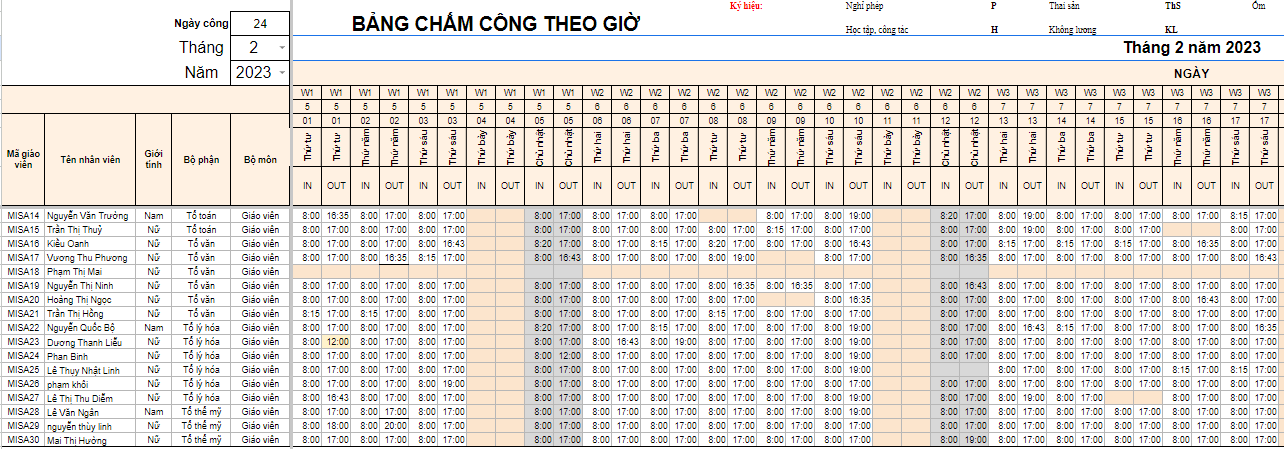
Download the teacher timesheet template by clock-in/clock-out time (Excel file)
15. Daily Timesheet Template in English
This English timesheet template is designed for foreign businesses and international organizations operating in Vietnam. Companies that wish to use English in their operations can also use this template. Note that to ensure data accuracy, HR and employees need to be instructed on how to use the sheet and read the information in English.
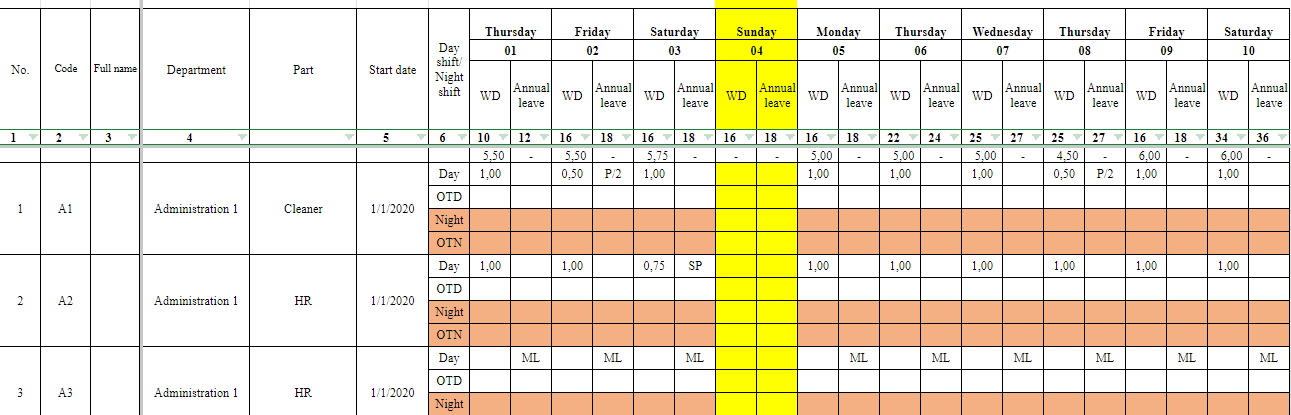
Download the daily timesheet template in English (Excel file)
Download the daily timesheet template in English (Doc file)
16. What are the benefits of timesheets for businesses?
Timesheets are often seen simply as a payroll tool, but in reality, they offer much deeper management value when utilized correctly. When analyzed and combined with other management data, timesheets become a strategic tool that helps businesses: track work performance, ensure legal compliance, and many other benefits. These benefits help managers not only “record time” but also understand the true value created by personnel, thereby making fairer, more transparent, and more effective HR decisions.
Managing performance and productivity with timesheets:
- Daily timesheets help businesses know if employees are present and how many hours they work, but working long hours doesn’t necessarily mean high performance. According to a 2022 Gallup report, only 21% of employees globally feel truly engaged in their work, even though they all work full hours. This figure proves that timekeeping only reflects “time” and not the full “value” that employees create.
- For example, an employee might work up to 10 hours a day, but their KPIs remain low. The cause could be an improper workload distribution, insufficient skills to handle tasks, or inefficient team coordination processes. Conversely, some employees complete their KPIs early without much overtime because they know how to prioritize tasks and use their time effectively.
- Therefore, managers need to combine timesheet data with task management and KPI tools to get a comprehensive view. This comparison helps distinguish between “employees who work long hours” and “employees who create real value,” allowing for adjustments in workload, task reallocation, or additional training to optimize productivity.
>>> See more: A simple and easy-to-understand guide on how to create a timesheet in Excel
Supporting labor law compliance:
- Daily timesheets not only serve payroll purposes but are also crucial legal documents for businesses to prove compliance with legal regulations. According to Vietnam’s Labor Code, an employee’s normal working hours cannot exceed 48 hours per week. Additionally, total overtime hours are also limited: not to exceed 50% of normal working hours in a day, not more than 40 hours per month, and a maximum of 200-300 hours per year depending on the industry.
- In this context, timesheets become the basis for proving that the business has paid correct wages, calculated work hours accurately, and has not violated working hour limits. During labor inspections or audits, presenting transparent timesheets will help the business avoid penalties and strengthen its credibility with employees.
- In reality, there have been cases where businesses were fined for not keeping timekeeping records or for falsifying working hours to avoid paying overtime. This is a serious mistake that not only exposes the company to administrative sanctions but also erodes employee trust and damages the employer brand image.
Linking data with KPIs/OKRs:
- If businesses only use timesheets for payroll, they are only tapping into a small fraction of their value. When timekeeping data is linked to a KPI/OKR system, managers get a more complete picture of work efficiency: which employees have full attendance and even work constant overtime but still fall short of expectations, and conversely, who optimizes their time to achieve high performance.
- For example, a sales employee may have full attendance and even work overtime frequently, but their sales figures remain low. This is a sign that the problem isn’t a lack of diligence, but could stem from a lack of sales skills, a flawed customer approach strategy, or an unsuitable market allocation. From there, managers have a basis to adjust targets, reallocate markets, or provide necessary skills training.
- The key message here is: timesheets are not just for payroll but are also a source of strategic data that helps businesses make more accurate HR decisions. When combined with KPIs/OKRs, timekeeping becomes a true performance management tool, helping businesses balance the “time spent” with the “value created”.
17. Who creates the timesheet?
In most businesses, timesheets are typically created by the Human Resources (HR) or administrative department to track workdays, working hours, and employee labor status. For small businesses or production teams, this task may be handled by a team leader or direct manager, who then hands it over to the general accountant. Creating a timesheet is not just a simple administrative responsibility; it is directly related to personnel management, payroll calculation, and legal compliance. Depending on the company model, several positions may be involved in this process:
Human Resources (HR) Department or Administrative Department:
- Group tracked: All employees in the company.
- Purpose: The HR department receives and consolidates timekeeping data from all departments, standardizing it into an official timesheet for calculating salaries and benefits.
- Benefits: Ensures transparency, minimizes disputes between employees and the company, and creates a clear basis for timely and compliant salary payments. This document can also be used by HR for labor reports to government agencies.
Direct Manager / Head of Department:
- Group tracked: Employees within their respective departments.
- Purpose: To monitor attendance, time discipline, and project participation levels. The direct manager is usually the one who signs off on the timesheet before forwarding it to HR.
- Benefits: Helps the department operate efficiently, preventing issues like employees arriving late, leaving early, or “buddy punching.” Additionally, this data is used for comparison against the department’s KPIs/OKRs.
Team Leader / Workshop Supervisor (for manufacturing companies):
- Group tracked: Workers in the production team/shift.
- Purpose: To record details of each shift, overtime hours, paid leave, unexpected leave, etc. The team leader is usually the person most familiar with the labor situation.
- Benefits: Provides real-time, factual data to prevent time theft, serves as a basis for calculating piece-rate wages, and helps the company measure production line productivity.
Accounting Department:
- Group tracked: Based on data provided by HR/Management.
- Purpose: To calculate salaries, bonuses, allowances, and deductions for insurance and personal income tax.
- Benefits: Ensures transparent, fair, and legally compliant payments; helps the company minimize financial errors and build employee trust.
>> See also other hourly timesheet templates: How to Create an Hourly Timesheet in Excel【+5 File Templates】
18. How to create a simple timesheet that is easy for businesses to apply
To build a standard-compliant timesheet and minimize errors in personnel management, businesses can follow these steps:
Step 1: Create an employee list
First, you need to create a list of employees with at least basic information such as full name and employee ID. Using an employee ID helps avoid confusion in cases of identical names. Additionally, businesses can add information like department, job title, date of birth, or contact information for easier management.
Step 2: Set up timekeeping columns
Create columns corresponding to each day of the month to track the number of working days for each employee. You can also add a notes column to record special information such as late arrivals, early departures, or leave.
Step 3: Define timekeeping symbols
The business needs to standardize timekeeping symbols for easy tracking and summarization, for example: X for a workday, P for paid leave, UL for unpaid leave. Using symbols simplifies the data entry and consolidation process.
Step 4: Review and finalize
After creating the timesheet in Excel or Word, you need to review all the information to ensure accuracy. The completed template can be saved for use in subsequent months, which helps save time and reduce errors.
19. Common timekeeping methods
Depending on the specific nature of the work, businesses can choose suitable timekeeping methods:
Daily timekeeping
Employees clock in and out for each workday (check-in, check-out). This is suitable for an 8-hour administrative work environment. At the end of the month, the data is compiled to calculate salaries.
Hourly or shift-based timekeeping
This is applied to employees who work in shifts or by the hour. Working time is recorded in detail to ensure accurate work calculation and payment.
>> See also shift-based timesheet templates: Standard Shift-Based Timesheet Template Form 2026【Download Now]
Current forms of timekeeping
To ensure accuracy and transparency, businesses can adopt modern timekeeping methods such as:
- Fingerprint time clock: Uses a machine to recognize employee fingerprints.
- Facial recognition: Authentication using facial recognition technology.
- Card swipe: Swiping a card to record entry and exit times.
- Online timekeeping: Through software, using GPS or Wi-Fi.
Why do businesses need to create a timesheet?
A timesheet is an important tool that helps businesses accurately track employee workdays, ensuring transparency and fairness in management. It also serves as the basis for calculating salaries, bonuses, and related benefits.
Especially for large-scale enterprises, using a timesheet or timekeeping software will help optimize management processes and save significant time.
20. Why does timekeeping cause so many problems for businesses?
In day-to-day operations, timekeeping may seem like a simple administrative task, but it often leads to numerous complications. Businesses frequently encounter situations like employees forgetting to clock in, buddy punching, error-prone manual timesheets, complex shift changes, or unrecorded overtime. These issues not only consume a lot of time for HR and accounting but can also lead to disputes and erode employee trust in the company.
However, these difficulties can be overcome. Businesses can establish a clear timekeeping process, enhance supervision by line managers, and adopt technology like HRM software to automate time tracking. This makes data transparent, minimizes fraud, and helps make the salary and bonus calculation process faster and more accurate.
If you want to learn more, you can read the article: Employee Timekeeping Issues and How to Handle Them for Businesses. This article will analyze each specific problem and provide suitable solutions for businesses to optimize their human resource management.
21. Important KPIs to Track in Timekeeping
Timekeeping is not just an administrative tool for calculating salaries; it is also a crucial data source that helps businesses monitor employee discipline, productivity, and engagement. Below are the KPIs that businesses should regularly monitor:
Lateness Rate & Average Lateness Time
- Meaning: Shows the level of punctuality and disciplinary culture within the organization.
- How to measure:
- Lateness Rate = (Number of late arrivals / Total number of work shifts) × 100%
- Average Lateness Time = Total minutes late / Total number of late arrivals
- Example: If an employee is late 5 times a month, totaling 60 minutes → the average lateness is 12 minutes per instance.
- Meaning: Reflects the level of commitment and responsibility of employees.
- How to measure:
- Unauthorized Absence Rate = (Number of unauthorized absence days / Total workdays) × 100%
- Early Leave Rate = (Number of times leaving early / Total workdays) × 100%
- Application: HR can use this metric as an early warning for low engagement or poor discipline.
Valid / Accurate Clock-in Rate
- Meaning: Assesses the reliability of timekeeping data, especially when using an electronic system.
- How to measure:
- Validity Rate = (Number of valid clock-ins / Total number of clock-ins) × 100%
- Example: If there are 1,000 total clock-ins and 950 are valid → the validity rate is 95%.
Total Overtime Hours vs. Target
- Meaning: Helps control workload and comply with labor laws (overtime limits).
- How to measure:
- Total Overtime Hours = Actual hours worked – Standard working hours.
- Application:
- Managers can prevent the abuse of overtime.
- Ensures a balance between work efficiency and employee well-being.
Reliability & Transparency of Timekeeping Data
- Meaning: Determines whether the timekeeping data accurately reflects reality.
- How to measure:
- Compare system timekeeping data with actual reports (paper, GPS, direct manager).
- Track the number of errors, data corrections, or unusual reports.
- Application: Creates a transparent basis for resolving disputes over salary, discipline, or inspections from labor authorities.

22. How to Optimize Timesheets to Improve Management Efficiency
An effective timesheet not only serves the purpose of accurate payroll calculation but is also a crucial tool in comprehensive human resource management. Accurate timekeeping data helps businesses monitor labor discipline, analyze productivity, and make more precise HR management decisions. To achieve this, businesses need to optimize their timesheets in the following aspects:
Standardize Data & Timekeeping Update Processes
Businesses need to establish a clear and unified timekeeping process to avoid discrepancies and reduce disputes between employees, managers, and HR.
- Establish a standard process: clearly define clock-in/out times (start of shift, end of shift), the person responsible for recording, and the approver.
- Ensure consistent compliance: all employees, managers, and the HR department must apply the same regulations.
- Develop an SOP (Standard Operating Procedure): document the steps to reduce errors and increase transparency.
Incorporate Modern Technology
Applying technology helps automate processes, reduce fraud, and save time on manual data processing.
- Time clocks: fingerprint, card-based, facial recognition for offices and factories.
- Mobile app with GPS: supports employees working off-site, on business trips, or remotely.
- QR code check-in: suitable for the retail and service industries.
Benefits: prevents “buddy punching,” synchronizes data in real-time, and saves data entry time for HR.
See more: Top 8 Popular Mobile Timekeeping Apps in 2026
Integrate Timesheets with Payroll, KPI, and HR Reporting Systems
A modern timesheet needs to be integrated with other systems to optimize management efficiency.
- Payroll system: timekeeping data automatically flows into the payroll, reducing errors and shortening processing time.
- KPI/OKR: link attendance data with work performance evaluations.
- HR reports: help management make quick decisions based on transparent data.
Periodically Review & Evaluate Data
Even with technology, businesses still need to regularly monitor data to detect anomalies.
- Review data periodically: weekly and monthly to detect discrepancies.
- Analyze trends: monitor rates of lateness, unapproved leave, and excessive overtime.
- Apply data: use it as a basis for early warnings and adjusting HR policies (e.g., arranging reasonable shifts, adding benefits, or tightening discipline).
Thus, optimizing timesheets is not just about managing work hours but also contributes to building a transparent, efficient, and sustainable HR system.

23. Automate Timekeeping with 1HRM
If timekeeping with Excel is difficult and time-consuming, businesses can consider using technology software. Among the many solutions, 1HRM Timekeeping is considered a modern product with many superior features, making HR timekeeping management extremely simple and convenient.
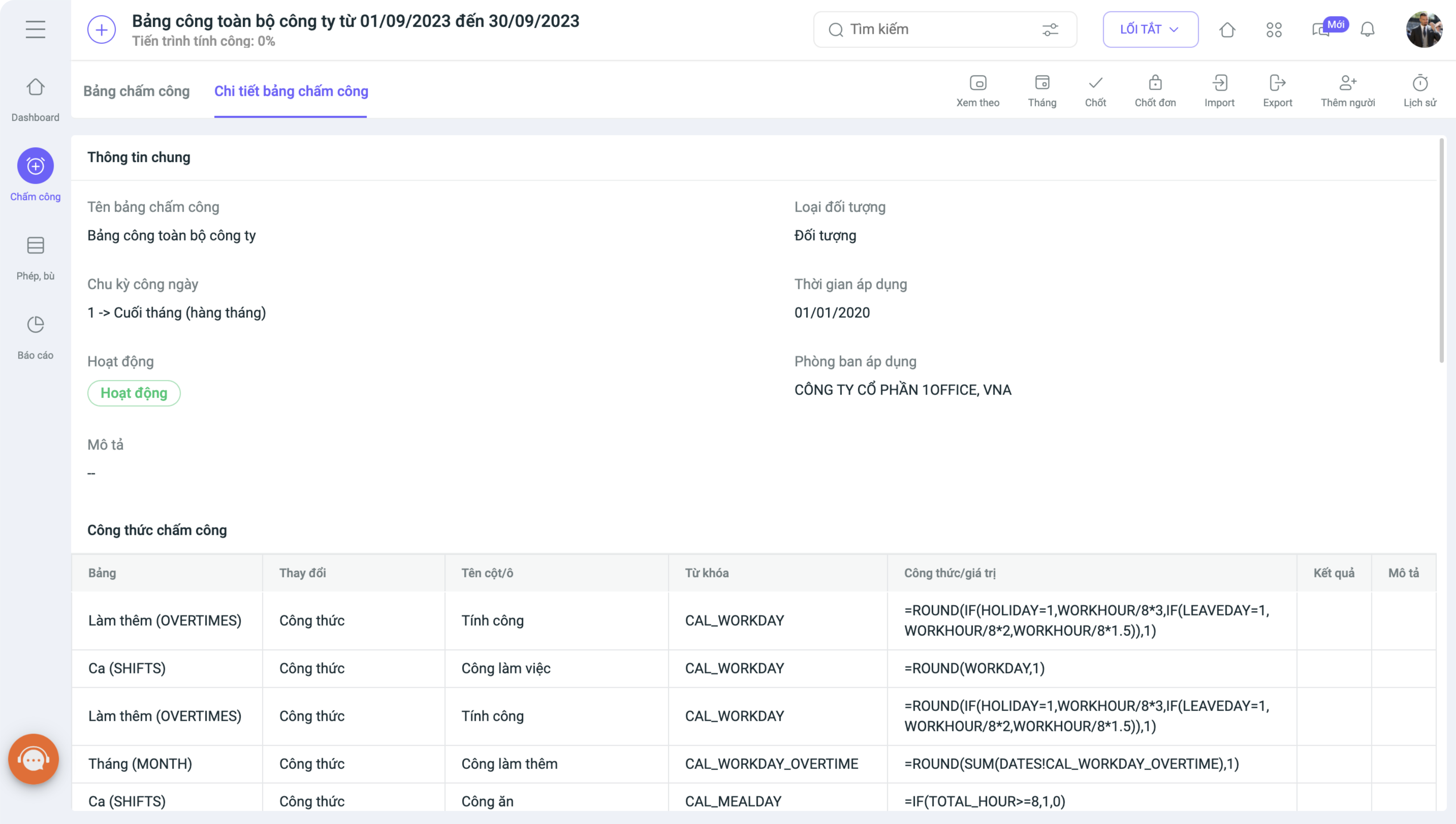
Register to experience the automated timekeeping feature of 1Office HRM
The centralized timekeeping management feature quickly pushes timekeeping data into the daily timesheet template, helping managers save time on monthly time summaries. Employees can track their detailed work hours and report lateness or early departures, helping managers grasp the detailed work performance of their staff.
- This 1HRM timekeeping software allows for various clock-in methods such as fingerprint, facial recognition, card-based, GPS, etc., directly on the application, making it very suitable for companies with employees who frequently travel or work remotely.
- The timekeeping process for shift workers or employees at multiple branches becomes simpler, with data consolidated on a single software platform, making it easy to export data and calculate payroll. Employees can create requests for leave, early departure, or late arrival directly on the software, completely eliminating manual procedures.
- The timekeeping report is generated in a visual and easy-to-read format, helping leadership track the working hours of each individual and implement appropriate policies.
Read more: A comparison of 33 timekeeping software for different types of businesses
The software also supports synchronizing timekeeping and payroll data across company branches and automatically generates monthly payrolls. Payroll templates and salary calculation formulas can be easily created and managed directly on the software, helping to reduce payroll processing time and ensure efficiency.
Frequently Asked Questions (FAQs) for Choosing a File-Based Daily Timesheet
Should I use Excel or Word for daily timekeeping?
Excel is more suitable as it supports automatic calculations, while Word is primarily used for manual data entry and printing.
Is a daily timesheet mandatory?
Yes, it is a crucial document for calculating salaries, managing work hours, and ensuring compliance with labor laws.
Do small businesses need timekeeping software?
It’s not mandatory, but as your staff grows, software can help reduce errors and save management time.
How can I minimize errors when using Excel for timekeeping?
You should use automatic formulas, check data periodically, and set editing permissions to prevent incorrect entries.
Are there any alternatives to Excel for more effective timekeeping?
Software like 1HRM helps automate timekeeping, synchronize data, and calculate salaries accurately, completely eliminating manual tasks. See also the top timekeeping software on the market in 2026
















