


 12/05/2026
  72 views
There are many task management software solutions on the market today that help businesses resolve bottlenecks in work management, contributing to optimizing operational efficiency and improving productivity. However, not all software provides the right solution to the problems business owners are looking to solve. So what is the best choice for your business? Let’s explore and evaluate the detailed advantages and disadvantages of the 10 best task management software on the market today with 1Office to find the answer.
>> See more:
Mục lục
- 1. What Problems Does Task Management Software Solve for Businesses?
- 2. Detailed Review of the 10 Best Task Management Software on the Market
- Comprehensive Task Management Software 1Office
- Jira Project Task Management Software
- Wrike Task Tracking and Management Software
- Basecamp Online Task Management Software
- Redmine Task Progress Management Software
- Pintask Task Organization and Management Software
- Taskworld Task Management Software
- Taskque Task Management Software
- ASANA Task Management Software
- MeisterTask Task Management App
1. What Problems Does Task Management Software Solve for Businesses?
As business operators, managers have surely encountered situations of work congestion, schedule delays, and inefficient employees due to the lack of tools to support scientific monitoring, tracking, planning, and work allocation. In daily task management, there are always constantly arising issues that make the business’s operational processes complicated, such as:
- Information errors during manual data entry
- Wasting time processing tasks of a similar nature
- Difficulty in tracking the progress of ongoing work
- Inability to accurately assess the work performance of individuals and departments
This is why task management software is developed and offered on the market to solve the problems above. Task management software is an important tool that helps users manage, track, and complete tasks, jobs, and projects effectively. The benefits that most task management software can bring to businesses today include:
- Helps managers easily track and closely control the work progress of both the performer and the work results.
- Saves maximum time because work is processed on the software without needing to go directly to each department for approval.
- Automates repetitive tasks, thereby improving employee productivity, and businesses can also optimize unnecessary costs.
- Reduces workload thanks to a system that automates all management and operational tasks.
2. Detailed Review of the 10 Best Task Management Software on the Market
Comprehensive Task Management Software 1Office
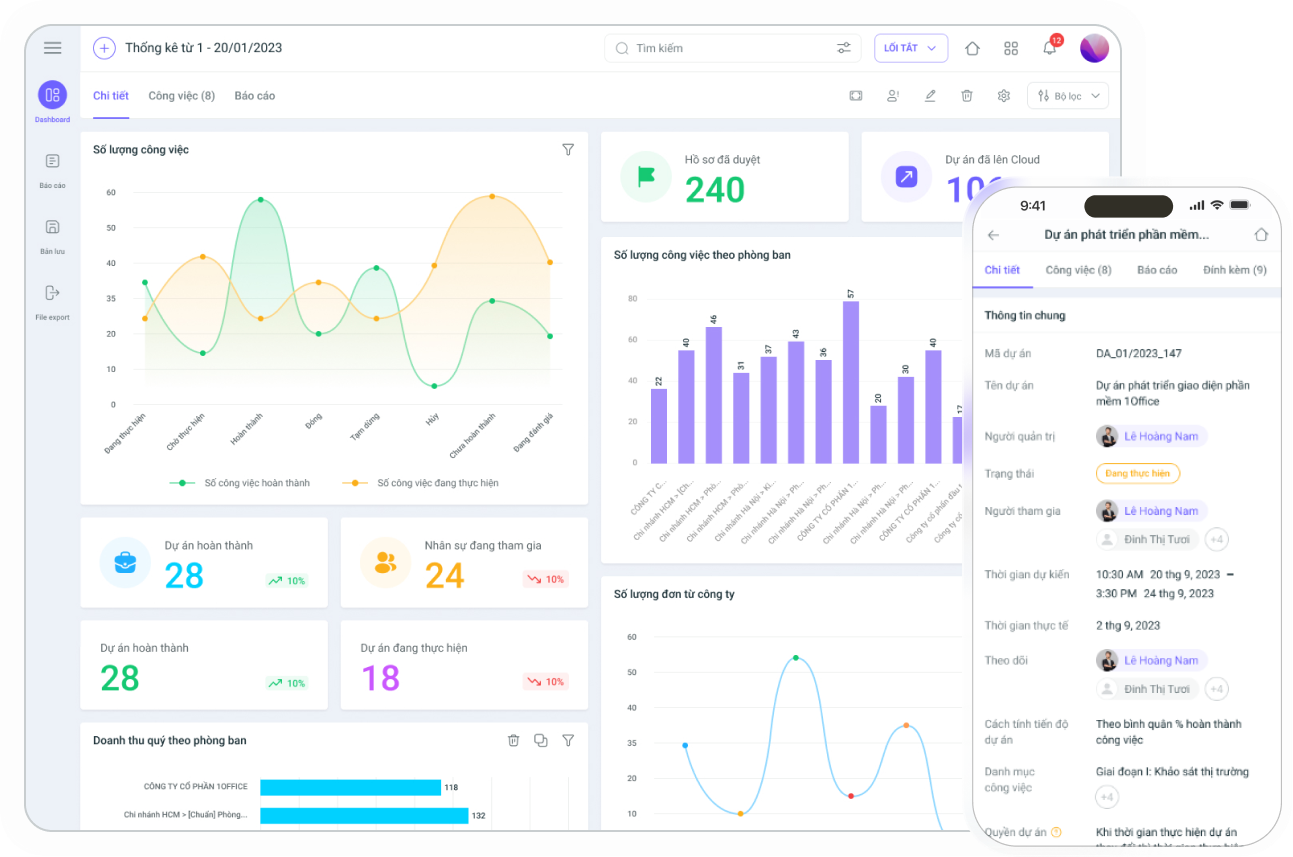
As one of the market-leading software in supporting the optimization of effective work management processes, 1Office solves the problem of overlapping tasks in an extremely scientific and effective way, reducing up to 60% of the work management pressure for managers and team leaders.
Key Features
- Effective Task Assignment Management: Allows managers to plan for each specific task and assign it in detail to individual staff and departments, along with requirements for KPIs, deadlines, and necessary documents. Employees can grasp the specific work content and clearly understand their roles when receiving tasks, minimizing forgotten or missed tasks.
- Convenient discussion and interaction on tasks: The 1Office software allows users to discuss and interact directly on the task screen, and send reminder chats from the task without having to switch between different chat applications.
- Close Task Monitoring and Supervision: Managers can track the task progress of each employee, knowing clearly: Who is doing what? What are the results? Are there any issues arising that need timely resolution?
- Task Performance Measurement: Understand the work performance status of employees, know who is performing well and who has not met their KPIs, thereby providing a basis for evaluating task quality and employee capabilities.
- Smart Task Reminders: The software automatically sends alerts as deadlines approach so employees can proactively complete their tasks.
- Integration Capability: Notably, 1Office can link with other modules within the same software to synchronize data on work, KPIs, sales, salary, bonuses, etc., ensuring consistency and integration between business operations.
>> See more: Latest Work Management Software Price List 2024 – Best Work Software Pricing
Get a free consultation & software demo
Jira Project Task Management Software
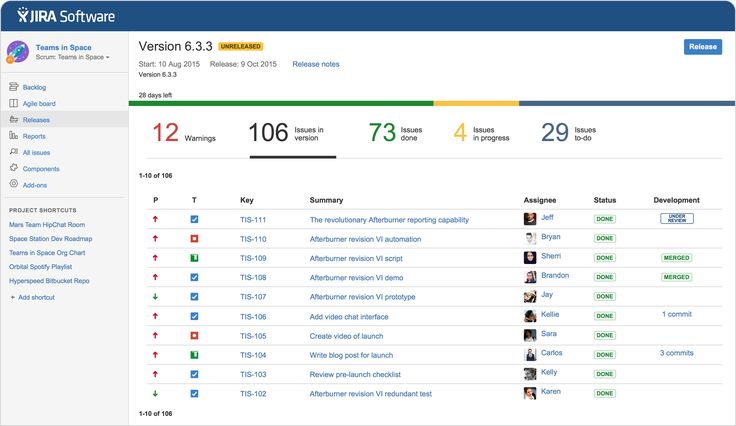
Jira is an effective task and project management software developed by Atlassian. Jira is built and developed based on Agile principles, so the software offers high flexibility in managing everything from basic tasks to complex projects.
Key Features
- Task Management: Jira allows users to create, manage, and track specific tasks and jobs for each project.
- Flexible Project Management: Jira provides features to create and manage projects, from planning and assigning tasks to tracking progress and reporting results.
- Reporting and Analytics: Jira provides tools to create reports and visually analyze data on project progress and team performance.
Review
| Pros | Cons |
|
|
Wrike Task Tracking and Management Software
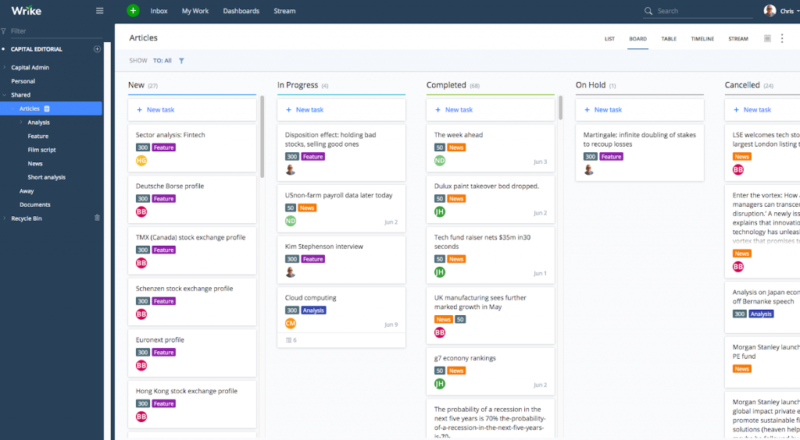
Wrike is a popular project management software and task management tool in the US with many outstanding features. Wrike is a suitable choice for project teams and small startups.
Key Features
- Flexible Task Management: Wrike provides many task management tools that allow users to create and assign tasks, track progress, and schedule work.
- Multi-platform Integration: Wrike supports integration with various platforms such as Slack, Dropbox, Gmail, and Google Drive, making data management and sharing easier.
- Task Progress Reporting and Analysis: Wrike provides tools for reporting and analyzing work progress, helping users easily track progress and make informed decisions.
- Support for Large Project Management: Wrike supports the management of large and complex projects, with the ability to break down work into smaller tasks for easier management.
Review
| Pros | Cons |
|
|
Basecamp Online Task Management Software
Basecamp is an online work management software launched in 2004. It is a popular tool used by teams to manage projects, tasks, and daily work.
Key Features
- Task Management: Basecamp allows users to create and manage tasks with flexible tools such as creating to-do lists, planning, setting deadlines, assigning work, and tracking progress.
- Schedule Management: Supports users in creating and sharing work schedules with colleagues. Schedules can also be linked to tasks and projects to ensure everyone is aware of the time and deadline for each task.
- Interaction and Communication: Communicate and exchange information with colleagues and partners directly within tasks. Users can share documents, files, and images, and discuss work-related issues.
Review
| Pros | Cons |
|
|
>> See more: Review of 8+ Effective Work Schedule Management Apps for Mobile and Online Scheduling
Redmine Task Progress Management Software
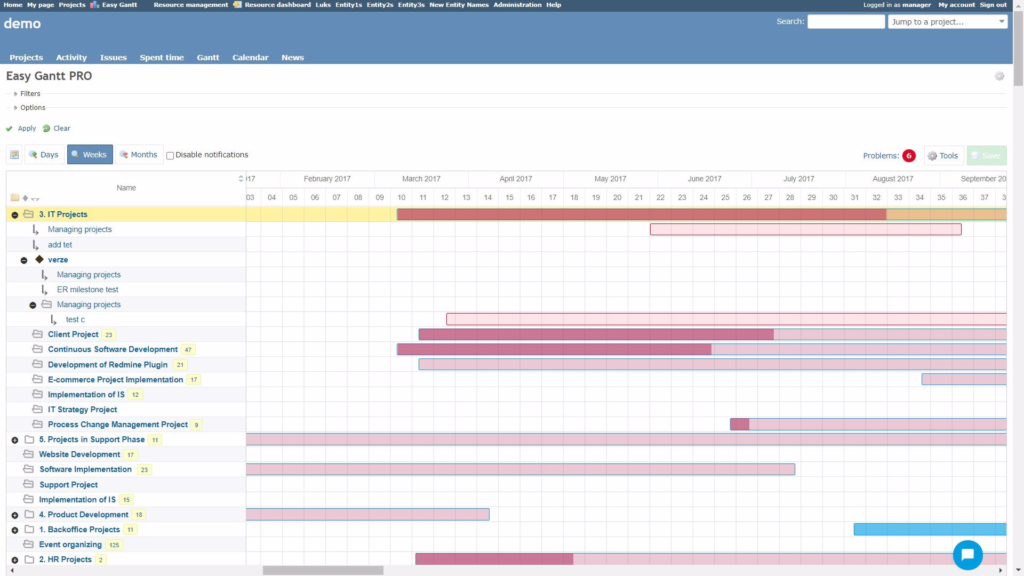
Redmine is a useful task management software that helps users plan and track work progress effectively and optimally.
Key features
- The Gantt chart screen displays the detailed progress and deadline of each task, helping managers easily grasp and manage work execution time effectively
- The filter search tool allows users to filter out important and urgent tasks in a large project to prioritize their execution
- Ability to calculate and report the time required to complete a task or an entire project
Review
| Pros | Cons |
|
|
Pintask Task Organization and Management Software
Pintask is considered a perfect replica of the famous task management software, Trello. This software provides a comprehensive set of features necessary for effective task organization and tracking.
Key Features
- Multi-project task management: Pintask allows users to manage tasks across multiple projects simultaneously, ensuring a cohesive and efficient workflow.
- Task progress tracking: Managers can easily monitor the progress of tasks on Pintask, always knowing which tasks are in progress and which need to be completed.
- Task classification and prioritization: Categorize tasks into different groups, assess priorities, and schedule work, helping employees focus on important and urgent tasks first.
Review
| Advantages | Limitations |
|
|
Taskworld Task Management Software
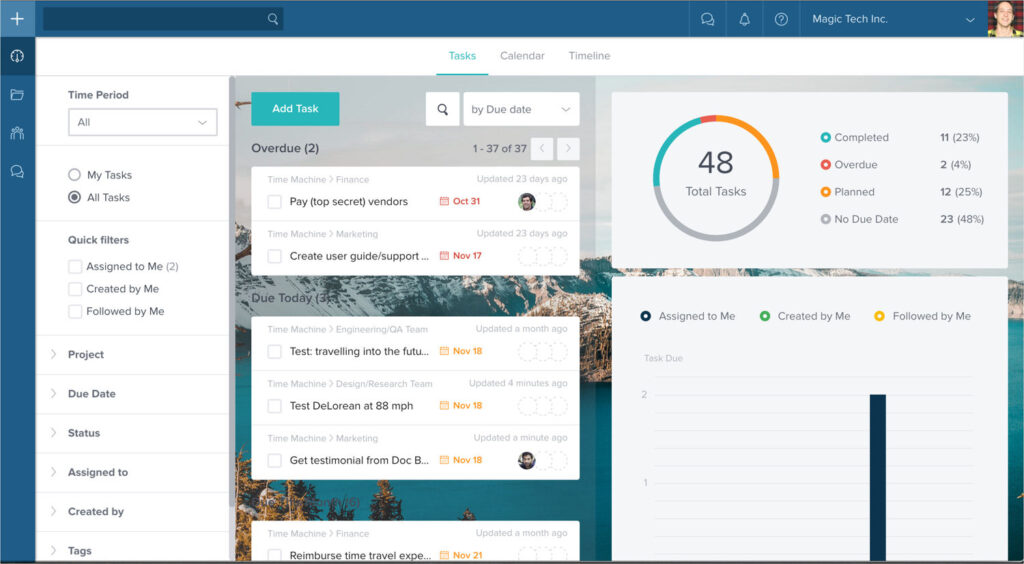
Taskworld is a task management software designed to help organizations and teams simplify their work management process by providing a diverse set of tools.
Key Features
- Task Management: Users can create and manage task lists, set goals, and evaluate their progress. Tasks can be categorized by priority level, due date, and completion status.
- Direct Discussion: Taskworld provides a discussion feature for users to exchange information and opinions within a project or task. This makes coordination and teamwork easier.
- Reporting: Visual reports help managers track and analyze the performance of each employee, monitor progress, and see the percentage of work completed.
Review
| Pros | Cons |
|
|
Taskque Task Management Software
Taskque is an outstanding task management software that helps users organize and manage tasks scientifically and effectively according to priority level.
Key Features
- Task Assignment: Taskque allows you to create and manage tasks using boards and columns. Users can assign tasks to team members and set specific deadlines for each task.
- Task Notifications: Taskque automatically sends notifications about tasks and projects to each team member, helping to prevent forgotten or missed work.
- Customizable Task Boards: Taskque allows users to customize task boards and columns to suit their needs.
Review
| Pros | Cons |
|
|
ASANA Task Management Software
Asana is an effective task management application that helps users easily track and understand the status of their work through visual task boards and timelines. A key strength of Asana is its flexible integration with over 100 other tools like Slack, Dropbox, etc., facilitating seamless work organization and management.
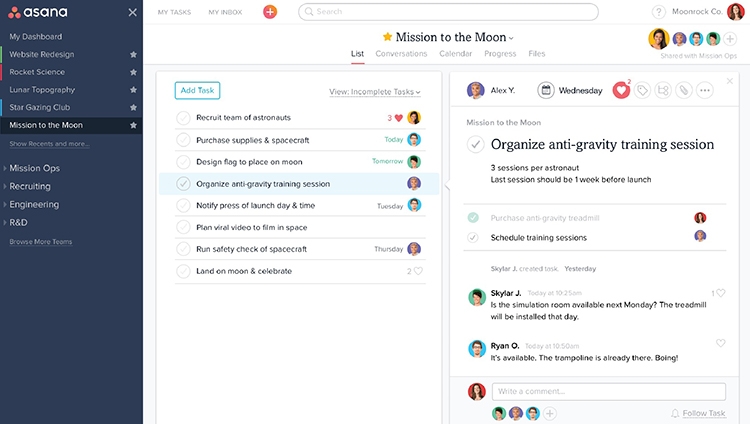
In Asana, users can view tasks in a list or board format, depending on their personal habits and preferences. Additionally, you can attach files or add comments to each task to highlight important notes that require attention.
MeisterTask Task Management App
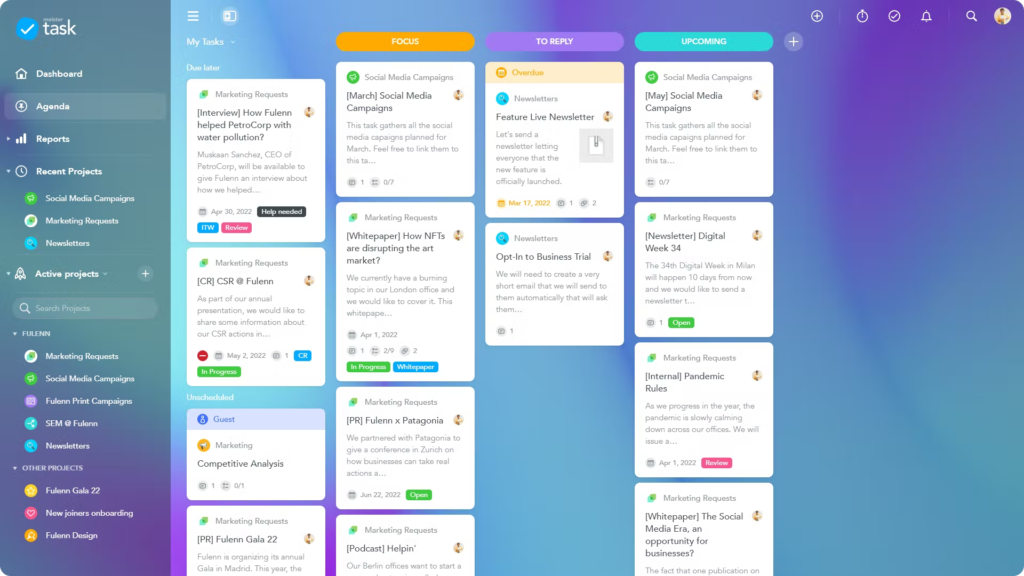
MeisterTask is an online work management application with many useful features that is highly rated by users.
Key Features
- Work Management: MeisterTask allows users to create, manage, and assign tasks for their projects. Users can create task lists, set titles and descriptions for tasks, establish deadlines, and assign tasks to other team members.
- Task Adjustment: MeisterTask allows users to adjust their tasks, including updating progress, time, priority, and adding comments.
- Notifications: MeisterTask provides email notifications to help users stay updated on the latest changes related to their tasks and projects.
| Pros | Cons |
|
|
In this article, 1Office has introduced the TOP 10 best task management software of 2024 with detailed reviews. For a more detailed consultation on the 1Office work management software, you can contact us via:
- Hotline: 083 483 8888
- Fanpage 1Office: https://www.facebook.com/1officevn
- Youtube Channel: https://www.youtube.com/c/1OfficeNềntảngquảnlýtổngthểDoanhNghiệp
















