


 11/05/2026
  6611 views
Training management software is an essential tool for every business today, allowing managers to easily track, monitor, and guide all employees simultaneously. This enhances work productivity and optimizes the personnel training process for the entire organization. But which software is the most suitable for your business’s scale? In the following article, 1Office will compile and introduce the TOP 10 reputable and high-quality internal training management software. Let’s dive in!
Mục lục
- 1. TOP 10 Best and Most Effective Personnel Training Management Software for Businesses
- 1.1 1Office Training Management Software
- 1.2 fTrain Internal Training Management Software
- 1.3 Misa Amis HRM Training Software
- 1.4 ClearCompany Employee Training Software
- 1.5 Saba Training Management Software
- 1.6 Deputy Internal Training Software
- 1.7 OWS Internal Training Platform
- 1.8 Tanca Employee Training Management Software
- 1.9 Base Internal Training Management Software
- 1.10 WorkBright Training Software
- 2. Criteria for choosing a suitable employee training management software
- 3. Benefits of using training management software for businesses
- 4. Frequently Asked Questions (FAQ)
1. TOP 10 Best and Most Effective Personnel Training Management Software for Businesses
Training management software not only helps businesses organize effective training programs, but also ensures the tracking of progress, evaluation of results, and storage of the entire employee learning process on a centralized system. Depending on the scale and training objectives, each business will need a suitable solution. Below are outstanding software solutions that help optimize internal training activities, which you can reference and apply.
| Software Name | Key Features | Business Size | Usage Cost |
| 1Office HRM | – Build and manage recruitment processes, employee records, and labor contracts – Manage timekeeping, calculate salaries and bonuses, and declare social insurance – Manage and digitize documents, asset information, employee training, and set up approval workflows – System for periodic employee evaluations, and KPI & OKR goal management |
Suitable for all business sizes as the features and versions of 1Office software can be customized to fit each specific business. | Multiple feature packages with different price lists are available. Get a free trial here |
| fTrain | – Design and manage training courses
– Create tests and assessments – Manage certificates and recognition systems. |
fTrain software can be used by both large and small businesses, organizations, schools, and units in the fields of education, training, and human resource development. | 6-MONTH PACKAGE: 35,000 VND User/Month
12-MONTH PACKAGE: 29,750 VND User/Month |
| Misa Amis HRM | – Create training schedules, manage registrations, timekeeping, payroll…
– Manage training programs, tests, assessments, and report on training results. |
Suitable for both small and large businesses. | Contact for pricing |
| ClearCompany | – Manage training, evaluate training effectiveness, and analyze data.
– Features for organizing and managing online courses, creating tests and exams to assess employee proficiency – Manage course registration and participation. |
Suitable for small and medium-sized businesses. | Contact for pricing |
| Saba | – Design, implement, manage, and evaluate training courses
– Manage employees’ personal information and track their training progress. |
Used for large and complex organizations with many departments and employees. | Contact for pricing |
| Deputy | – Manage training, design training courses for employees, and track each employee’s training progress.
– Arrange work schedules and manage payroll, making the business’s human resource management more convenient. |
Suitable for small and medium-sized businesses | Price: 2.50 USD /User/Month.
Also provides a trial version. |
| OWS | – Create, manage, and update courses, create tests
– Evaluate course effectiveness, reports on course completion. |
Suitable for small businesses to large corporations. | Contact for pricing |
| Tanca | – Manage trainee information
– Plan training, track learning progress, create and manage courses, organize tests and assessments. – Features for notes, reminders, and statistics to help manage training more effectively |
Suitable for small and medium-sized businesses, from 50 to 500 employees | Contact to receive a quote |
| Base | – Organize, create, and manage online courses, lessons, tests, and assessments.
– Outstanding software features include the ability to create flexible learning paths and support for multiple languages |
Base software is suitable for small and medium-sized organizations | Contact for pricing |
| WorkBright | – Create flexible training paths, track employee training progress.
– Automatically send email reminders – Provide tests, learning materials – Evaluate training results and analyze data. |
Suitable for small and medium-sized businesses with a scale of several tens to several hundreds of employees | Contact to receive a quote |
Comparison Table of 10 Employee Training Management Software
1.1 1Office Training Management Software
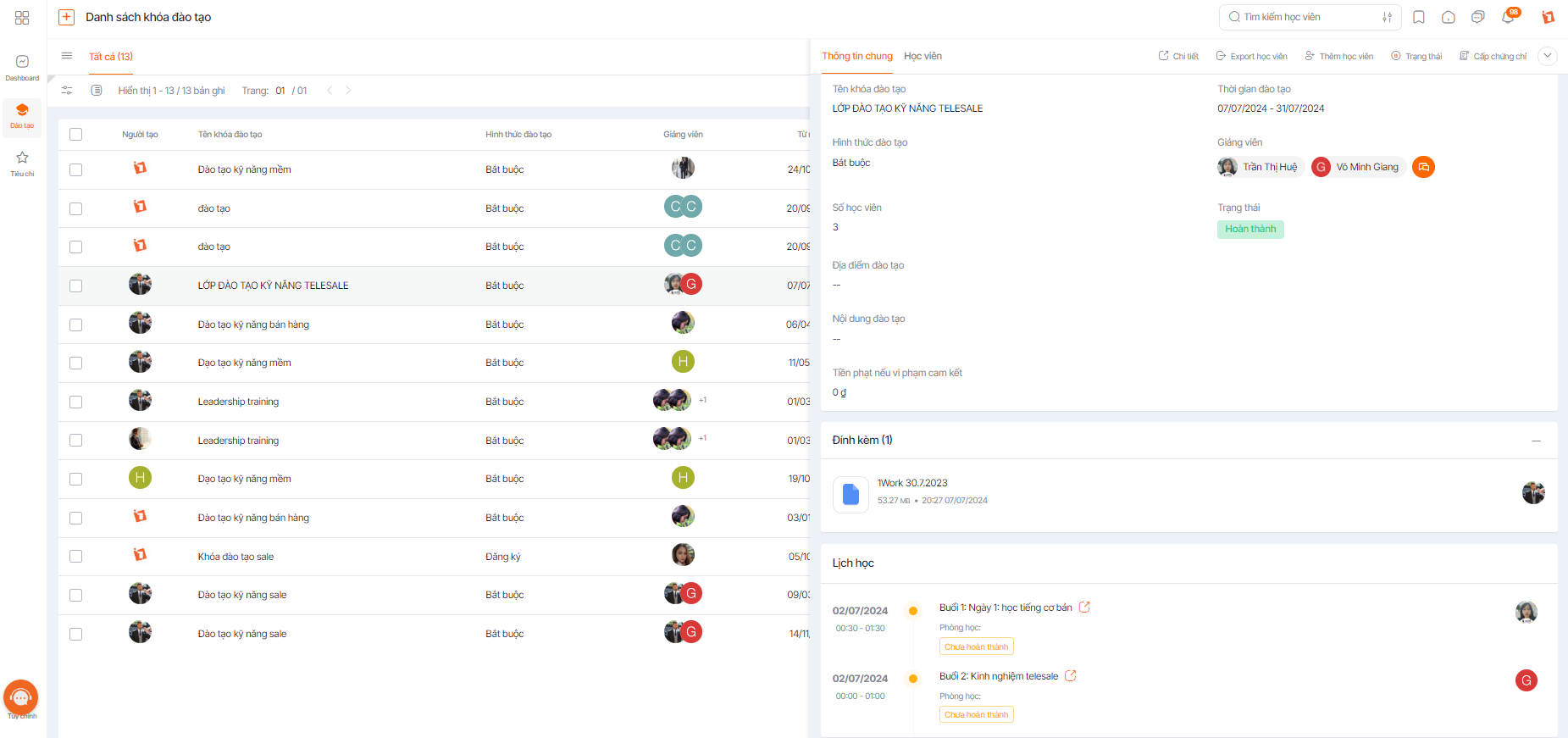
The 1Office HR training management software solution is a specialized module within the comprehensive 1Office Business Management suite. The main features of this software include:
- Manage employee information, including personal profiles, labor contracts, work history, contact information, salary, benefits, etc.
- Manage timekeeping, calculate salaries, and process payroll for employees.
- Recruit and manage candidates, including posting jobs, screening resumes, interviewing, etc.
- Manage employee training and development, including planning training, tracking progress, and evaluating effectiveness.
- Manage work performance, including evaluations, proposing rewards or disciplinary actions, and providing direct feedback to employees.
In manufacturing and processing enterprises, such as the textile or food industries, HR management software plays a core role in tracking shifts, timekeeping by production line, and calculating piece-rate wages. With the unique nature of personnel operating on production lines, where leave requires shift replacements and timesheets involve processing thousands of entries each period, manual methods are prone to errors and consume hours each month. 1Office helps automate the entire process from timekeeping to payroll and alerts for shift violations, ensuring accuracy, transparency, and standardized operations for frontline personnel.
Advantages:
- Intuitive, flexible, and user-friendly interface that integrates multiple HR management features into a single platform.
- Provides a full range of HR management features, from personal information management, timekeeping, payroll, and training to analytics and reporting.
- Features automation and optimization of the human resource training and development process, reducing the workload for HR staff.
- Supports integration with other accounting, ERP, and CRM software.
- Provides fast, 24/7 customer support.
Disadvantages:
- It may take time to adapt to the system, especially for users with no prior experience using HR management software.
Get a free demo of 1Office’s training management feature
1.2 fTrain Internal Training Management Software
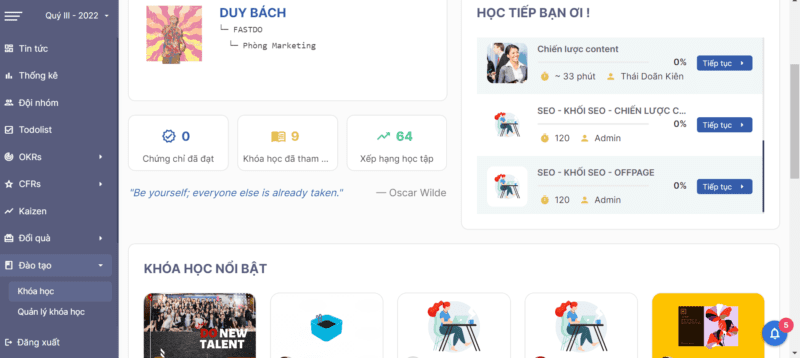
Fastdo’s fTrain HR training management software has many outstanding advantages. The tool helps store and manage trainee information, assign administrative rights, provide certificates to personnel, and control training content. Similar to 1Office, each employee is provided with a separate account for access, ensuring the security of training materials and personal information.
Advantages:
- Simple, easy-to-use, and user-friendly software.
- Provides a variety of learning materials suitable for many different training topics.
- Supports training effectiveness evaluation features.
- Allows for the creation of custom training courses based on business needs.
Disadvantages:
- Simple interface, lacks interactivity and aesthetic appeal, has not been updated recently.
- Does not offer online learning and data analysis features.
>> See more: Top 9 Accurate and Effective Employee Evaluation Software
1.3 Misa Amis HRM Training Software
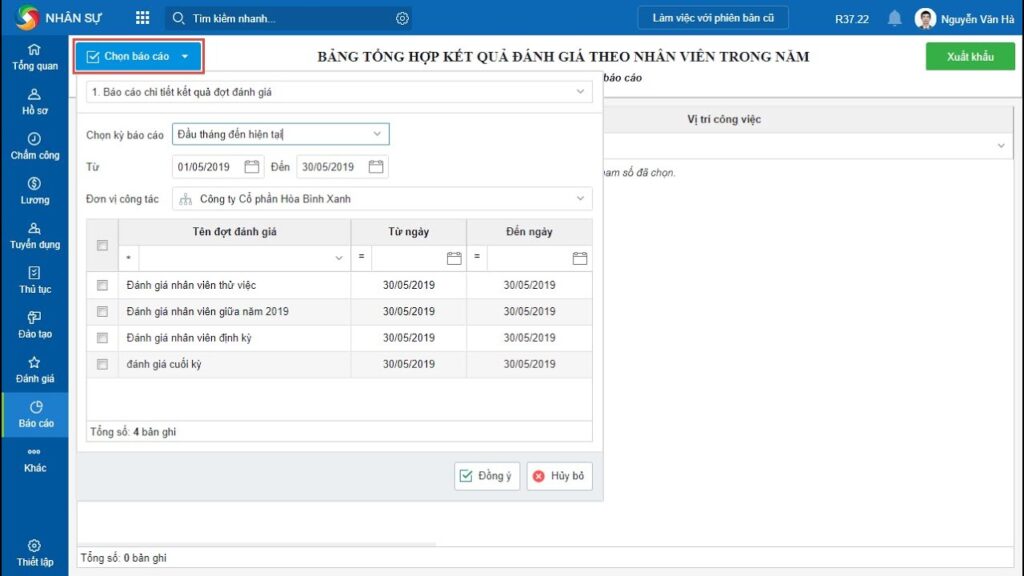
Misa Amis HRM training software is a human resource management software that integrates training management features. The main features of the software include: building training plans, managing training records, evaluating training effectiveness, and analyzing reports.
Pros:
- Misa Amis HRM provides many human resource management features, including personal information management, position management, payroll management, timekeeping management, and training.
- The software has a simple, easy-to-use, and user-friendly interface.
- Integrated reporting and statistics features help users monitor, analyze, and evaluate the effectiveness of human resource management.
- Supports online training features to help reduce training costs and increase flexibility for employees.
Cons:
- Requires a relatively high computer configuration, limited in interface and function customization.
- Does not support features for managing training effectiveness evaluation and user feedback assessment.
- The cost of using the software is quite high compared to some other training software on the market.
| >> Read more: Regulations on Employee Training Costs in a Business |
1.4 ClearCompany Employee Training Software
ClearCompany is a powerful training management software with key features including training planning, creating and managing training content, providing online courses and tests, evaluating learning outcomes, and generating comprehensive reports.
Pros:
- One of ClearCompany’s advantages is its easy-to-use and customizable interface, which helps users create and manage training content easily.
- It provides data synchronization with other systems such as Human Capital Management (HCM) and Learning Management Systems (LMS), helping to automate and simplify training management processes.
Cons:
- The cost is quite high and not suitable for small businesses.
- This software has some stability and compatibility issues with certain other systems.
1.5 Saba Training Management Software
Saba training management software is one of the leading training software on the market today. Its main features include: automating training processes, supporting online training, coordinating and managing employees, and analyzing and reporting on training effectiveness.
Pros:
- Highly flexible, it can be customized to suit different businesses.
- It supports multi-language features and online training, helping to reduce costs and increase the effectiveness of the training process.
- It integrates features for learner management, training program management, and training effectiveness evaluation.
Cons:
- The interface is complex, making it difficult for users.
- It does not support interaction features between learners or the ability to create training content quickly and easily.
1.6 Deputy Internal Training Software
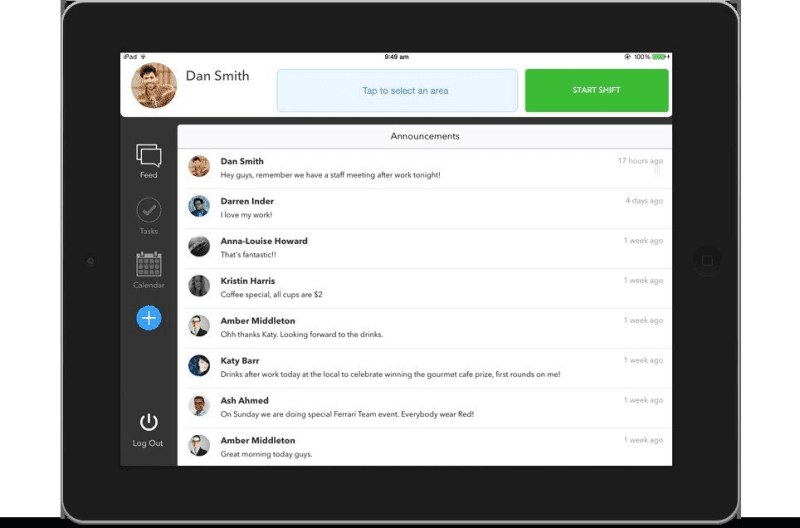
Deputy is an internal training software for businesses. It is a tool that helps manage training, develop human resources, and save time on HR management processes.
Pros:
- It provides many tools to support training management, from designing training programs, registering learners, and managing content and training progress to evaluating training results.
- It has communication and information-sharing features between employees and managers, helping to improve work efficiency and reduce confusion.
- It integrates with many other applications and software, helping to increase flexibility and efficiency at work.
Cons:
- Deputy software is not yet widely popular in Vietnam, leading to difficulties in adoption and use for businesses.
- The cost of using the software is not cheap, especially for small and medium-sized enterprises.
1.7 OWS Internal Training Platform
OWS is an internal training platform focused on developing the talent and skills of employees within a business. This platform has diverse features, including functions for learner management, course registration, knowledge testing, and learning outcome evaluation. OWS also provides document management functionality to make training easier. Furthermore, with its user-friendly design, OWS can be easily customized to fit the training needs of each business.
Pros:
- User-friendly interface, with a simple and easy-to-use design.
- Supports diverse and effective training features, providing advanced training management tools that help businesses save time and money.
- In addition, the platform supports multiple languages to meet the needs of global businesses.
Disadvantages:
- Implementing and configuring the software requires a high level of expertise, so deployment can be time-consuming and costly.
- Some features like data analysis and user feedback are not perfectly optimized.
1.8 Tanca Employee Training Management Software
With Tanca, businesses can easily manage, organize, and track employees’ learning progress. The software provides many features to support training, such as managing training roadmaps, analyzing employee training needs, building online courses, and updating and tracking employee learning progress. However, some customers have reported that the software’s interface is not user-friendly and is difficult to use.
Advantages:
- Allows businesses to customize training programs and build content based on the actual needs of each department or employee.
- Multi-language support helps employees understand and absorb training content easily and accurately.
- User-friendly interface, easy to access and use the software.
Disadvantages:
- Customization capabilities are limited compared to some other software on the market.
- Lacks an online classroom management feature, which can make organizing online courses difficult.
- Tanca’s customer support is not highly rated for its speed and effectiveness in resolving issues.
1.9 Base Internal Training Management Software
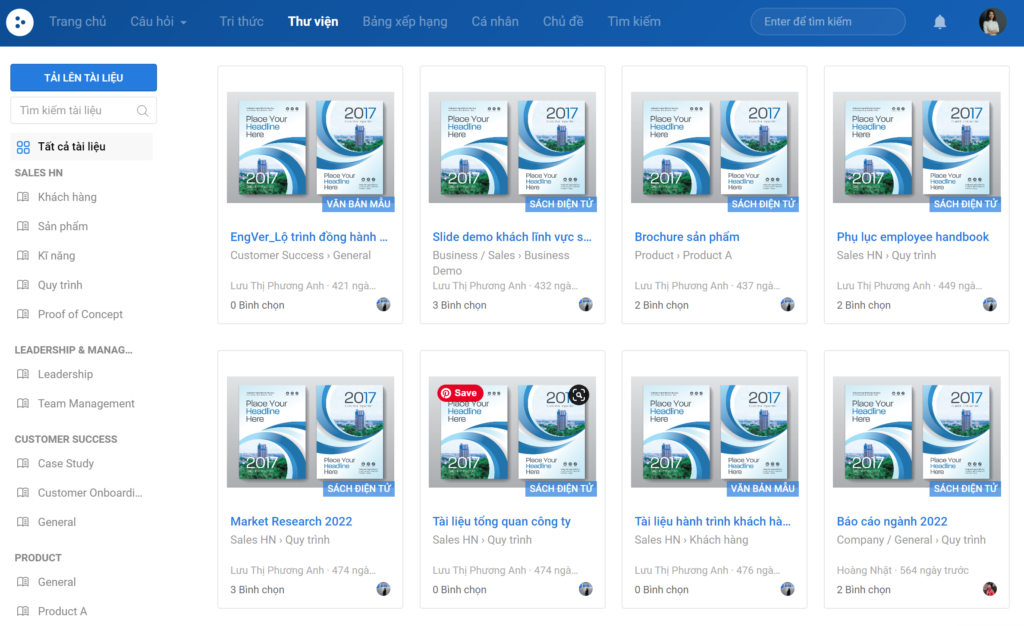
Base employee training management software is an online training platform that helps businesses organize and manage training courses for employees. The software’s main features include creating and managing courses, online testing, tracking employee learning progress, and generating reports on learning outcomes.
Advantages:
- Intuitive, easy-to-use interface with flexible and diverse test creation features.
- Supports automatic assessment of learning results and effective report generation.
- Integrates with other tools such as Google Drive, Slack, and Salesforce to optimize training and HR management processes.
Disadvantages:
- Limited interface and feature customization compared to some other training software on the market
- Limited flexibility in some features. Additionally, this software is quite expensive compared to some competitors on the market.
1.10 WorkBright Training Software
WorkBright internal employee training management software allows for managing employees on their mobile devices with convenient and fast features. Employees simply fill in their personal information, and the HR department is updated instantly. Additionally, the software helps schedule and manage tasks for employee groups, enabling businesses to establish detailed training roadmaps tailored to each group of employees. Everything is done efficiently and saves time.
Advantages:
- Ability to customize training programs, manage courses, track learning progress, and evaluate employee learning outcomes.
- Automated registration and online testing processes.
- Integrated functionality for updating personal profiles and managing employees.
Disadvantages:
- The software’s cost is also quite high for small businesses.
- Limited flexibility in customizing course content; lacks a direct communication feature between instructors and learners.
- Limited ability to integrate with other business software.
2. Criteria for choosing a suitable employee training management software
- Secure company information and data:
This factor is crucial when choosing training management software, especially for businesses with high-security needs. The software must ensure that company information and data are not stolen or leaked, and it should have security features to restrict user access.
- Suitable for the operations of the unit or organization:
Each unit or organization has its own purposes and operations, so the training management software must meet the specific requirements and needs of each entity. For example, a large enterprise operating in multiple countries will need training management software that can integrate multiple languages and support multiple regions.
- Centralized data and information management:
Training management software should have a centralized data and information management feature, making data retrieval and tracking easier. This also ensures that information and data are fully and accurately updated.
- Ability to track and evaluate training results:
Training management software needs a feature to track and evaluate employee training results, helping the business assess the effectiveness of the training program and adjust it to meet the needs of each employee group.
- Integration with other tools:
Other management tools such as HR systems, CRM, or other office tools are also very important and need to be integrated with training management software to make data management and usage more convenient.
3. Benefits of using training management software for businesses
Applying training management software for employees helps businesses build a systematic training system, managing the entire training process on a unified platform. Below are the outstanding benefits that businesses can achieve when implementing training management software.
3.1 Standardize the internal training process
Training management software helps businesses standardize the entire internal training process, from building training programs and assigning courses to each employee group to tracking learning progress. All documents, videos, lectures, and tests are stored centrally on the system, ensuring employees always have access to a unified and updated knowledge source.
Additionally, businesses can easily set up training roadmaps based on job positions, such as new employee training, professional skills training, management training, or leadership capacity development. This helps the training process become more systematic, clear, and aligned with the company’s personnel development goals.
3.2 Improve employee training effectiveness
Traditional training methods often rely heavily on in-person classes and fixed schedules, making it difficult for employees to be flexible in acquiring knowledge. In contrast, training management software allows businesses to implement online training (e-learning) with various learning formats such as videos, interactive lectures, digital documents, or online tests.
As a result, employees can learn at a pace and time that fits their work schedules. Learning becomes more flexible, which helps improve knowledge retention and application to practical work.
3.3 Track competency and learning progress
Evaluating training effectiveness is often a challenge for businesses without a suitable management system. When training is conducted manually, it is difficult for managers to accurately track whether employees have completed courses, their level of knowledge retention, and which skills need improvement.
Training management software provides detailed tracking and reporting tools on the learning progress of each employee. Managers can easily check:
-
Which courses employees have participated in
-
Training program completion rate
-
Test results and competency assessments
-
Skills that require additional training
Thanks to the data compiled on the system, businesses can build competency profiles for each employee, thereby creating suitable training plans for individuals or employee groups. This not only helps improve the quality of training but also effectively supports talent development and management.
3.4 Save on Corporate Training Costs
With training management software, businesses can significantly optimize training costs by digitizing all training content. Courses can be created once and reused multiple times for different employee groups, helping to minimize the costs of traditional classroom training.
Additionally, employees can learn online at the workplace or remotely, saving time and travel expenses. This is particularly useful for businesses with multiple branches or a workforce distributed across different regions.
4. Frequently Asked Questions (FAQ)
What is training management software?
Training management software is a technology system that helps businesses build, manage, and track all employee training activities on a centralized platform. Through the software, businesses can easily organize courses, assign training programs to specific employee groups, and automatically monitor learning outcomes.
Instead of managing training manually with spreadsheets, emails, or scattered documents, training management software allows businesses to digitize the entire training process, from creating course content and storing training materials to organizing tests and evaluating employee learning results.
Should businesses choose internal training software or an LMS?
Internal training software is typically designed specifically for businesses to manage employee training programs within the organization. This system focuses on building training roadmaps for each job position, managing employee competencies, and tracking the learning progress of the workforce.
Meanwhile, an LMS (Learning Management System) is widely used in various fields such as education, online training, or corporate training. An LMS often provides powerful features for managing online courses, digital lectures, and learning activities on an e-learning platform.
For businesses, choosing the right solution depends on their actual training needs:
-
If a business needs to manage internal training linked to human resource management, it should choose training software that integrates with an HRM system.
-
If a business focuses on deploying large-scale online courses, an LMS would be a more suitable choice.
Today, many software platforms have integrated both of these functions, helping businesses effectively manage employee training and deploy online training simultaneously.
What is the cost of employee training management software?
The cost of implementing employee training management software can vary depending on several factors, such as the size of the business, the number of users, system features, and the software deployment model.
Typically, current employee training software is offered under a SaaS (Software as a Service) model with a monthly or annual subscription. Common cost ranges can be categorized as follows:
-
Small businesses: Costs can range from a few hundred thousand to a few million dong per month, depending on the number of users.
-
Medium-sized businesses: Costs are typically higher due to the need for more management and reporting features.
-
Large enterprises: Large-scale training systems may require custom implementation and tailoring to the business’s needs.
In addition to the software subscription cost, businesses may also need to consider other expenses such as initial implementation fees, system usage training costs, or integration costs with other management software.
Does employee training software integrate with HRM?
Currently, many training management software solutions are designed to integrate with Human Resource Management (HRM) systems to create a comprehensive personnel management platform for businesses.
When integrated with an HRM, personnel data such as employee information, job positions, departments, or career development paths are synchronized directly with the training system. This helps businesses easily build training programs tailored to each position and employee level.
With the superior features of the 1Office HRM training management software, 1Office has become one of the platforms chosen by many businesses to solve issues related to employee training management, human resource administration, and business operations optimization. For any inquiries, please contact us via:
- Hotline: 083 483 8888
- Facebook: https://www.facebook.com/1officevn/
- Youtube: https://www.youtube.com/@1office-chuyendoisodn
















