12/05/2026
  382 views
Excel Payslip Template is the optimal solution to help businesses manage income more accurately, transparently, and professionally. Join 1Office to explore a set of 8 beautifully designed payslip templates (Excel & Word), complete with a guide to quickly create payslips. This helps employees easily check their salaries and allowances, and saves businesses up to 90% of processing time each pay period.
Mục lục
- What is a Payslip?
- Why do businesses need to send payslips to employees?
- Top 8 Simplest and Best-Looking Excel and Word Payslip Templates
- Template 1: Simple payslip template for all businesses
- Template 2: Comprehensive payslip with Social Insurance + Personal Income Tax
- Template 3: Payslip template for office staff
- Template 4: Payslip template for production workers
- Template 5: Payslip Template for Chinese Companies
- Template 6: Payslip Template for European Companies
- Template 7: Payslip Template for Japanese Companies
- Template 8: Bilingual Payslip Template (Vietnamese – English)
- Latest Regulations on Payslips
- Guide to Creating Automated Payslips from an Excel Payroll Sheet
- Elevate Payroll Management with the 1HRM Solution
- Frequently Asked Questions about Payslips (FAQ)
- Conclusion
What is a Payslip?
A payslip (or Salary Slip) is a detailed statement of income information that an employer (the business) sends to an employee during each monthly pay period.

Simply put, a payslip acts as a “document” that explains specifically how an employee’s net pay is calculated. Through the payslip, employees can clearly understand parameters such as:
- Basic salary and wages based on actual working days.
- Allowances (lunch, travel, phone…).
- Bonuses (performance bonus, attendance bonus).
- Deductions (Social Insurance, Personal Income Tax, advances…).
Using a standard Excel payslip template not only helps accountants easily manage data but also builds a bond of trust and transparency between the business and its employees.
Why do businesses need to send payslips to employees?
Sending payslips is not merely an administrative procedure but a crucial process for maintaining a sustainable relationship between the employer and the employee.
For the business
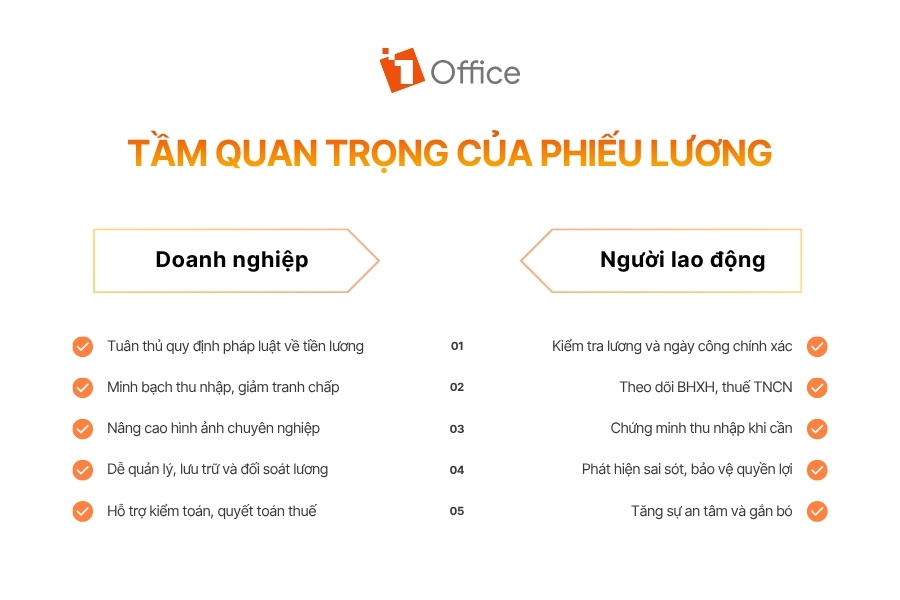
For management and business owners, sending monthly payslips offers the following key benefits:
- Strictly comply with the 2019 Labor Code regulations on providing detailed salary notifications.
- Ensure transparency in income details and minimize complaints or disputes regarding wages.
- Enhance the professional image and reputation of the employer brand in the eyes of employees.
- Optimize the process of storing, managing, and reconciling monthly payroll data.
- Facilitate inspections, audits, and year-end tax finalization.
For the employee
For employees, the payslip is the “key” that helps them fully understand their information and protect their legitimate rights:
- Protect personal rights by verifying the accuracy of salary and workdays.
- Clearly understand the details of social insurance contributions and personal income tax deductions.
- Provide a legal basis for proving income when undergoing financial procedures such as applying for loans, credit cards, or visas.
- Create a sense of security, trust, and motivation to stay with the organization long-term.
- <span style="font-weight:The header of the payslip will provide basic information about the business and the employee for the payroll period, including:
- Company name, address, and logo.
- Payslip title (e.g., Monthly Payslip…).
- Employee’s full name and Employee ID.
- Department/Division and Job position.
- Actual working days in the month.
Content Section
This section details the employee’s actual income and deductions, specifically:
- Income: Basic salary, salary based on working days, overtime (OT) pay, night shift pay.
- Allowances: Lunch, travel, phone, and responsibility allowances.
- Bonuses: KPI bonus, sales bonus, attendance bonus.
- Deductions: Social insurance, health insurance, unemployment insurance contributions (deducted from the employee’s salary).
- Personal Income Tax (PIT): The amount of tax deducted after applying family circumstance deductions.
- Advances: Amounts the employee has taken as an advance during the month.
- Net pay: The final total amount the company transfers to the employee.
See more:
- The Most Accurate Way to Calculate Salary Fund Based on Revenue in 2026 (Download Sample Excel File)
- What Salary Level is Subject to Personal Income Tax? [New 2026 – Detailed Guide]
Closing Section
The final part of the payslip will be reconciliation information for the employee, including:
- Date of payslip creation.
- Signature of the preparer (Payroll Accountant) and approver (Director).
- Employee’s confirmation signature (if receiving the slip in person).
- Notes or contact instructions for salary inquiries.
Top 8 Simplest and Best-Looking Excel and Word Payslip Templates
Template 1: Simple payslip template for all businesses
A simple payslip template is a suitable choice for startups or businesses with uncomplicated salary structures. This template focuses on key information such as basic salary, working days, and total net pay, helping the accounting department save data entry time and reduce unnecessary paperwork.
Download the free basic payslip template for all businesses
For businesses, the Excel payslip template needs to fully display Social Insurance and Personal Income Tax amounts as required by regulations. This format helps employees easily track their monthly contributions according to legal rates, thereby building strong trust in the organization’s transparency and professionalism.
Download the free payslip template with Social Insurance and Personal Income Tax
Template 3: Payslip template for office staff
The design of the payslip template for office staff often emphasizes sophistication, modernity, and a clean layout. This template mainly focuses on fixed salary, KPI bonuses, and administrative deductions, making it very convenient to convert to PDF format and send securely and quickly to employees via email.
Download the standard payslip template for office staff
Template 4: Payslip template for production workers
The unique feature of a worker’s payslip is the detailed inclusion of overtime hours, night shift pay, and various allowances such as hazardous work or attendance bonuses. This payslip template is optimized to handle large volumes of data, helping workers in factories and production workshops easily reconcile their actual working hours with the amount received at the end of the month.
Download the free payslip template for production workers
See also: Restaurant Employee Payroll Template 2026 [Free Download]
Template 5: Payslip Template for Chinese Companies
Payslip templates for Chinese FDI enterprises are often customized according to the management practices and specific bonus/penalty categories of Chinese leadership. Using familiar professional terminology in this template helps streamline the reporting and data reconciliation process between departments, avoiding unnecessary misunderstandings.
Get the free payslip template for Chinese companies
Template 6: Payslip Template for European Companies
European businesses typically require absolute logic and transparency in presenting Gross and Net income. This payslip template is designed to international standards, clearly delineating employee tax and insurance obligations, reflecting the professional work style and respect for privacy of multinational corporations.
Download the free payslip template for European companies
Template 7: Payslip Template for Japanese Companies
Japanese-style payslips are known for their meticulous detail, down to each family allowance and strict attendance rules. This template design not only provides income figures but also serves as an evaluation of discipline, helping personnel maintain a responsible work ethic in line with Japanese corporate culture.
Download the payslip template for Japanese companies now
Template 8: Bilingual Payslip Template (Vietnamese – English)
A bilingual payslip template is the optimal solution for multinational work environments with both local and foreign personnel. Accurately translating all titles and content from Vietnamese to English ensures that all employees clearly understand their benefits, while also affirming the company’s professional standing and scale in the market.
Get the free bilingual Vietnamese – English payslip template
See also:
- [Free Download] 13+ Standard, Easy-to-Use Employee Payroll Excel Templates 2026
- Top 15 Best Payroll Software Today [Latest 2026]
Latest Regulations on Payslips
Current regulations on payslips are based on the 2019 Labor Code, which requires businesses to provide employees with a detailed statement of income and deductions each pay period.
Principles of Salary Payment
According to current legal regulations, when paying salaries to employees, businesses must strictly adhere to the following basic principles:
- Pay salaries directly, in full, and on time to the employee.
- If paying via a bank account, the business must cover all fees related to opening the account and transferring the salary.
- Do not interfere with or force employees to spend their salary on purchasing goods or using services from the employer or other entities.
- Ensure the principle of equality, with no gender-based discrimination for employees performing work of equal value.
Note: In special cases where salary cannot be paid on time, the delay must not exceed 30 days, and compensation must be paid at a rate at least equal to the deposit interest rate.
Forms of Salary Payment
Based on the nature of the work and the agreement in the labor contract, the employer can choose from the following forms of salary calculation to apply to employees:

3 common forms of salary payment that businesses often apply today - Time-based pay (hourly, daily, weekly, monthly) based on timesheets and the actual number of days worked.
- Piece-rate pay based on the level of target completion, unit price, and the actual quantity of products produced by the employee.
- Lump-sum pay based on the volume, quality of work, and completion deadline as specified in the contract.
In addition to the above salary calculation methods, businesses can pay salaries in cash or via bank transfer; the costs of opening accounts and transferring salaries will be covered by the business.
Guide to Creating Automated Payslips from an Excel Payroll Sheet
5 steps to create automated payslips from an Excel payroll sheet using functions and Data Validation Step 1: Consolidate Employee Data and Payroll Sheet
For the system to automatically retrieve information, you need to prepare a clean and accurate “database” in a separate sheet (often named ‘Data Sheet’ or ‘Payroll Sheet’).
- Arrange the data in a table format, where each row contains the information of one employee.
- The Employee ID column must be the first one, as this is the unique value required for the lookup function (VLOOKUP) to work correctly.
- Ensure that the columns for income, allowances, insurance, and net pay have been fully calculated before linking.
Step 2: Create a Payslip Template in Excel
Once you have the source data, you need to design the payslip interface in a new sheet to ensure it is aesthetically pleasing and convenient for printing or exporting.
- Lay out the payslip in 3 parts (Header, Body, Footer) as guided in section 3.
- Use formatting tools (Border, Fill Color) to highlight important items like Total Income and Net Pay.
- Adjust the Print Area so the payslip fits neatly on an A5 or half-A4 page, saving paper when printing.
Step 3: Set Up an Employee Selection List with Data Validation
- Select the cell where you want the Employee ID to appear on the payslip.
- Go to the Data tab on the ribbon → Select Data Validation.
- In the Allow field, select List; in the Source field, select the range containing the list of Employee IDs from the Payroll Sheet.
- Click OK to finish. Now, you can simply click the arrow to select the ID of the employee whose payslip you want to generate.
Step 4: Use Excel Functions to Automatically Fetch Payroll Data
This is the most crucial step to link data from the master sheet to individual payslips using the most common lookup function, VLOOKUP.
- In the empty cells where data needs to be populated (like Full Name, Department, Net Pay…), enter the formula: =VLOOKUP(Cell_with_Emp_ID, Master_payroll_range, Column_index_number, 0).
- For example: If the Employee ID is in cell C5, the master payroll sheet is in Sheet1 range A2:Z100, and the employee’s name is in the 2nd column, the formula would be: =VLOOKUP($C$5, Sheet1!$A$2:$Z$100, 2, 0).
- Repeat the formula for all other income and deduction items by changing the corresponding column index number.
Step 5: Optimize Operations and Generate Payslips Faster
To make the process more seamless and professional, you can apply a few tips to handle bulk payslips and secure information.
- Use the IFERROR function wrapped around the VLOOKUP function (e.g., =IFERROR(VLOOKUP(…), “”)) to avoid displaying the #N/A error when no employee ID is selected.
- Use the Mail Merge feature in Word to link with this Excel file if you want to generate hundreds of payslips as separate printouts or PDF files simultaneously.
- Set a password for the file or export it to PDF format before sending via Email/Zalo to ensure the confidentiality of employee income information.
Elevate Payroll Management with the 1HRM Solution
The manual payroll process in Excel costs businesses a lot of time consolidating data from timekeeping, bonuses, penalties, taxes, and insurance. Additionally, complex salary formulas based on KPIs, sales, or allowances are prone to errors when editing or updating data. Furthermore, employees often have to wait for HR or accounting to send their payslips instead of being able to look them up directly online.
Instead of spending hours manually creating payslips, 1Office offers businesses the 1HRM module – Optimizing HR processes with a single platform:
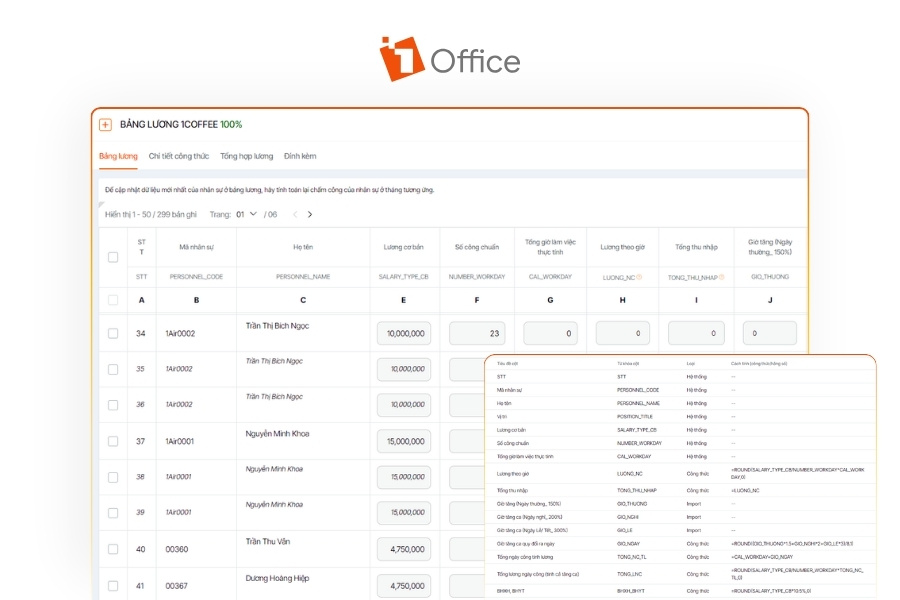
1Office payroll interface supports automatic employee payroll management and calculation - The system automatically extracts timekeeping data, calculates personal income tax and insurance, and generates payslips with high accuracy.
- Supports all payment models, from daily wages and project-based (lump-sum) pay to production-based (piece-rate) and sales-based (commission, KPI, revenue) salaries.
- Set up hierarchical salary approval workflows to standardize processes, ensuring transparency and information security.
- Employees can proactively track their detailed income and payroll history directly on the system, eliminating the manual process of sending payslips.
- The entire salary change history is stored systematically, supporting the extraction of intuitive management reports anytime, anywhere.
Notably, 1Office pioneers the application of No-code technology, allowing the HR department to flexibly design payslip templates with drag-and-drop. Additionally, the 1AI Salary virtual assistant helps detect unusual data and warns of potential errors before finalizing payroll.
“Since implementing this software for all employees in the company, our staff can work from anywhere, at any time, and still access it to receive work assignments, report on their work, and handle timekeeping for payroll. As for myself, it has also reduced many operational tasks such as managing personnel records, recruitment processes, and employee training…” – HR Director of Yody shared.
Frequently Asked Questions about Payslips (FAQ)
Is it mandatory for businesses to provide payslips to employees?
According to Clause 3, Article 95 of the 2019 Labor Code, providing a payslip is a mandatory obligation for employers. Specifically: “For each salary payment, the employer must provide the employee with a detailed breakdown of their wages, which must clearly state the salary, overtime pay, night work pay, and the content and amount of any deductions (if any).”
Do payslips created in Excel need to be stamped with the company’s red seal?
It is not mandatory for internal notification purposes. However, if an employee uses the payslip to apply for a bank loan, prove their income, or apply for a Visa, the payslip must have the signature of an authorized person and the company’s red seal to ensure its legal validity.
How can I secure information when sending Excel payslips via Email?
The best way is to export the payslip to PDF format and set a password for each file (often using the Employee ID, National ID number, or Date of Birth as the password). However, to ensure high security, businesses should use the 1Office solution, which allows employees to look up their payslips online through a securely encrypted personal account.
Is it better to use a payslip template in Excel or Word?
- Use Excel: Best when you need automatic calculations, manage large datasets, and want figures to auto-populate from a master payroll sheet.
- Use Word: Best when you prioritize aesthetics, a clean print layout, or want to use the Mail Merge feature to generate payslips in bulk from an existing data file.
Instead of using Excel or Word separately, 1Office supports accurate, automatic payroll calculation while also making it easy to design professional payslip templates with drag-and-drop.
If an employee finds an error on their payslip, what is the resolution process?
The employee should report directly to the Accounting or HR department within the specified timeframe (usually 3-5 days after receiving the payslip). After cross-checking and confirming the error, the accountant will make an upward/downward adjustment (back pay or clawback) in the next month’s payroll period or issue an immediate supplementary payment if the error is significant.
Conclusion
Using a standardized Excel payslip template not only helps businesses comply with the Labor Code regulations but also builds trust and transparency with their staff. We hope the set of 11 Excel and Word payslip templates that 1Office has shared will help you optimize your monthly calculation and printing process.
But if you are looking for a more groundbreaking solution, one that completely eliminates complex Excel functions and offers comprehensive automation with AI.