


 10/05/2026
  12807 views
Human resource management software is becoming an almost mandatory tool for businesses looking to reduce manual operations, standardize data, and enhance employee experience. If you are looking for a suitable HRM software, this article will help you quickly compare the outstanding HR software of 2026, selection criteria, detailed costs, and the features businesses should prioritize.
Mục lục
- What is Human Resource Management (HRM) Software?
- Top 15+ HR Management Software for Vietnamese Businesses (Latest 2026)
- 1Office HRM Software
- MISA AMIS HRM Human Resource Management Software
- Base HRM+ HR Software
- Lạc Việt SureHCS HRM Human Resource Management Software
- SV-HRIS Human Resource Management Software
- VnResource HRM Pro HR Management Software
- Perfect HRM Software
- FPT.iHRP HR Software
- AiHR Human Resource Management Software
- Lotus Pro HRM Software
- HR-Manager Software
- iHCM Employee Management Software
- Tanca HR Management System
- Professional Human Resource Management Software DigiiHR
- Bravo HRM Software
- Top 13+ HR management software for international businesses
- Cloud HR management software (hrcloud.com)
- Viindoo Human Resource Management Software
- Fast HRM Online Human Resource Management Software
- Workday HRM Software
- SAP SuccessFactors Employee Management Software
- Sage HR Management Software
- Bitrix24 HR Software
- Paycor HRM Software
- Odoo Human Resource Management Software
- UltiPro HR Management Software System
- Sage Business Cloud People HR Software
- BambooHR HRM Software
- Zoho People HR Management System
- What Criteria Are Needed to Choose HRM Software?
- Suitable for Company Size and Industry Specifics
- Features That Meet Current and Future Needs
- Integration Capability with Other Systems
- User Interface and User Experience
- Customization Capability
- Implementation and Operating Costs
- Data Security and Legal Compliance
- Customization and Scalability
- Intuitive and Easy to Use
- Cost-Effective and Within Budget
- 24/7 Support
- Types of HRM Software
- Why do businesses need to use HRM software applications?
- What features does a standard Human Resource Management (HRM) software need?
- Common Mistakes Businesses Make When Choosing HRM Software
- HRM Software Implementation Process for Businesses
- Features of HRM software
- Future Trends in Human Resource Management (HRM) Software
- Discover 1Office’s AI-integrated HRM software
- Frequently Asked Questions about HR Management Software
- Conclusion
What is Human Resource Management (HRM) Software?
HRM software, an abbreviation for Human Resource Management, is a type of software for managing human resources within a business. Specifically, it applies technology to comprehensive HR management—from profile management, recruitment, timekeeping, payroll calculation, salary payment, training, KPI calculation, health insurance, social insurance, etc.—quickly, conveniently, and accurately. It helps HR save time. Through this, the company’s leadership can also clearly understand the business situation and devise appropriate implementation plans.
Top 15+ HR Management Software for Vietnamese Businesses (Latest 2026)
1Office HRM Software
-

1IVAN – Electronic Insurance Management Platform
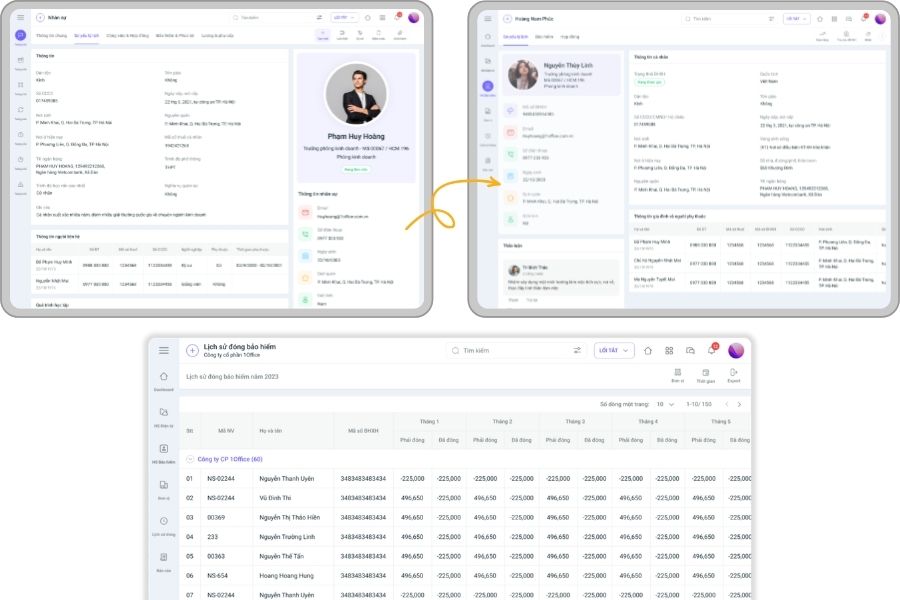
Suitable for: Medium and large enterprises (from 50 – 1000+ employees) that need to fully digitize HR processes, automate operations, and apply AI in resource management.
Estimated cost: From 5,000,000 VND
In a context where businesses are increasingly focused on optimizing operations and resource management, 1Office is not just a simple HRM software, but also a comprehensive technology platform integrating Low Code and AI, helping businesses move closer to an intelligent and fully automated management model.
See more:
- 5 HR Management Models Every HR Professional Should Know
- The Interesting Art of Human Resource Management for Leaders
Detailed Feature Table of 1HRM:
| Feature Group | Detailed Description | Benefits |
|---|---|---|
| Electronic Employee Profile Management |
|
|
| Flexible – Multi-method Timekeeping |
|
|
| Automatic – Flexible Payroll |
|
|
| Leave & Benefit Management |
|
|
| Performance Management – KPI & Evaluation |
|
|
| Smart Recruitment (AI) |
|
|
| HR Process Automation (HR Automation) |
|
|
| HR Analytics & Reporting (AI) |
|
|
| Overall System | Connects all HR operations: profiles – timekeeping – payroll – KPI – recruitment – reporting on a single platform |
|
Read more: 7 Steps to Standardize Your HR Management Process to ISO Standards
General pricing for 1Office HRM software:
| Company Size | Price | Implementation Time | 1Work Implementation | 1HRM Implementation | 1CRM Implementation | Online Training | Offline Training |
|---|---|---|---|---|---|---|---|
| Under 50 employees | 5.000.000 đ | 01 week | Default | Default | 2 sessions | – | |
| 50 – 99 employees | 10.000.000 đ | 02 weeks | Default | Default | 2 sessions | 1 session | |
| 100 – 299 employees | 15.000.000 đ | 03 weeks | Default | Default | 3 sessions | 2 sessions | |
| 300 – 499 employees | 20.000.000 đ | 04 weeks | Default | Default | 5 sessions | 2 sessions | |
| 500 – 999 employees | 30.000.000 đ | 06 weeks | Default | Default | 10 sessions | 3 sessions | |
| 1000+ employees | Negotiable | – | – | – | – | – | – |
Learn more: Detailed Pricing for the 1Office HRM Software
Or register for a free consultation now to get the latest detailed quote for 2026!
MISA AMIS HRM Human Resource Management Software
Suitable for: medium and large businesses that need user-friendly software compliant with local labor laws and business practices, and want to integrate with other management ecosystems.
Estimated cost: From 5,100,000 VND/year
Among the HRM software solutions currently popular with Vietnamese businesses, MISA AMIS HRM is a standout solution developed based on the needs and operational specifics of the domestic market. The software not only covers core HR functions like profile management, timekeeping, and payroll, but also extends to other important modules such as recruitment, performance evaluation, and employee training.
Summary of MISA AMIS HRM’s key features:
| Feature | Description |
|---|---|
| Comprehensive employee lifecycle management | Supports businesses in managing the entire process from recruitment, onboarding new employees, performance evaluation, and training, to employee offboarding. |
| Automated salary, bonus, and insurance processing | Helps calculate quickly, accurately, and in compliance with current regulations in Vietnam. |
| Flexible timekeeping | Supports various methods such as fingerprint, GPS, facial recognition, QR code, and can connect with existing timekeeping systems. |
| KPI and work performance evaluation | Allows setting goals, tracking progress, and measuring employee work results in real-time. |
| Connects with the AMIS ecosystem | Easily integrates with other solutions like AMIS Accounting, AMIS Work, AMIS CRM to support more synchronized business management. |
Pros and cons of MISA AMIS HRM:
| Pros | Cons |
|
|
MISA AMIS HRM software pricing:
| Category | Details |
|---|---|
| Basic Package | From approximately 5,100,000 VND/year for about 30 users. |
| Expansion Costs | Varies depending on the number of employees and the business modules chosen for implementation. |
| Trial | Businesses can sign up for a free 15-30 day trial before making a purchase decision. |
See more: 10 HR Scenarios and Reasonable Solutions
Base HRM+ HR Software
Suitable for businesses: medium and large-sized businesses that need a flexible, module-based HRM system that is easy to expand and can integrate with internal management tools.
Estimated cost: From 450,000 VND/month
Base HRM+ is one of the outstanding human resource management solutions developed by Base.vn, aimed at digitizing and standardizing HR tasks within businesses. This platform is built on a model of multiple separate modules that are tightly integrated, making it easy for businesses to select, expand, and implement in stages. Base HRM+ is often suitable for medium and large-sized businesses that need a human resource management system with high flexibility and integration capabilities.
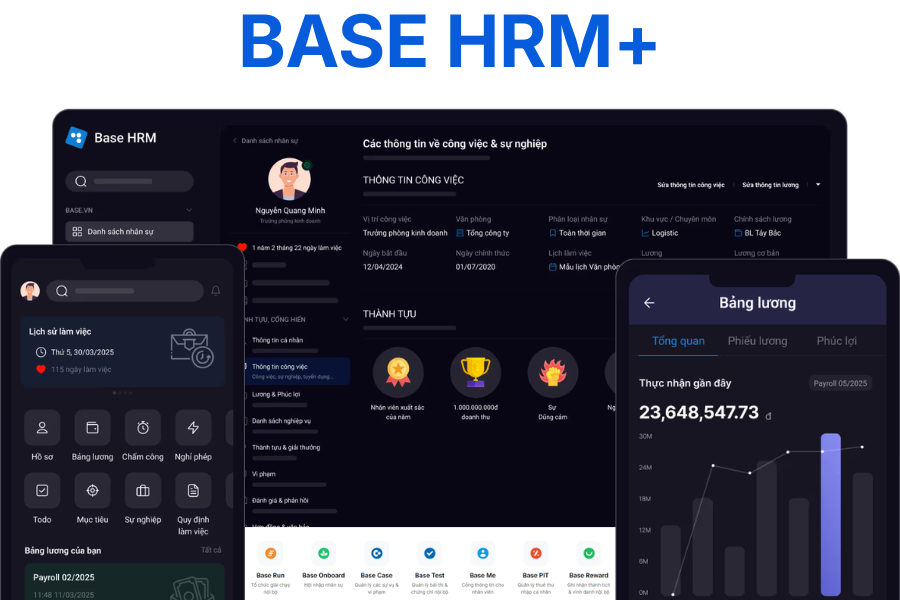
Key features of Base HRM+:
| Feature | Description |
|---|---|
| Centralized personnel information management | Supports storing and tracking complete employee records, departmental structures, job titles, contracts, and the entire work process on a single, unified system. |
| Recruitment & onboarding | Helps businesses track candidates through each recruitment stage while establishing a clearer, more systematic onboarding process for new personnel. |
| Timekeeping & payroll | Combines timekeeping data from GPS and Wifi, and syncs it to the system to calculate work hours and payroll accurately and automatically. |
| Work performance management | Supports setting up KPIs, OKRs, and tracking implementation progress for each individual, department, or project. |
| Real-time HR reports | Provides aggregated data in real-time, helping managers grasp the situation and make quick, accurate decisions. |
Pros and cons of Base HRM+:
| Pros | Cons |
|
|
Base HRM+ software price:
| Package | Details |
|---|---|
| Starter Package | Approximately 450,000 VND/month for about 30 accounts. |
| Expansion Package | The cost varies depending on the number of employees and additional business modules used. |
| Free Trial | Businesses can experience the full features for 14 days before official deployment. |
Lạc Việt SureHCS HRM Human Resource Management Software
Suitable for businesses: Focusing on timekeeping, work time management, and accurate payroll calculation, especially for units with complex timekeeping processes.
Estimated cost: Not publicly disclosed/Unclear
Lạc Việt SureHCS HRM is one of the human resource management systems that many businesses in Vietnam are interested in, especially for challenges related to timekeeping and work time management. Within this system, the SureHCS Timekeeping module is developed to help businesses track working hours, workdays, and fluctuations related to employee work time more systematically. With many years of experience in the enterprise software field, Lạc Việt has built SureHCS with a focus on synchronization and easy connectivity with other HR functions such as payroll, profile management, or the internal management systems currently in use within the business.
See more: What is Human Resource Management?
Key features of Lạc Việt SureHCS HRM:
| Feature | Description |
|---|---|
| Supports multiple timekeeping methods | Businesses can use methods such as fingerprint, magnetic card, facial recognition, or timekeeping via GPS-enabled mobile devices. |
| Connects with the HRM system and payroll calculation | Timekeeping data is synchronized to calculate work hours, salaries, allowances, and overtime, reducing manual tasks and increasing accuracy. |
| Online leave management | Employees can submit leave requests on the system and track their remaining leave days for better planning. |
| Diverse and detailed reports | Provides various reports on working hours, overtime, leave, and timekeeping status, helping managers monitor and evaluate. |
| Ensures data security | The system has clear security and permission mechanisms, helping to effectively control important HR data. |
*Note: SureHCS does not publish a detailed price list on its website. The actual cost will be quoted based on the implementation needs of each business, as follows:
| Category | Details |
|---|---|
| Subscription (Cloud/SaaS) | Charged based on the number of users and modules used, flexible according to business size. |
| On-premise (one-time license) | The business pays a one-time fee to deploy the system in-house. |
SV-HRIS Human Resource Management Software
Suitable for: small to medium-sized businesses needing a comprehensive yet budget-flexible HRIS solution, including small businesses with under 30 employees looking to begin digitalization.
Estimated cost: Not publicly listed
SV-HRIS human resource management software (developed by Sao Viet – saovietsoft.vn) is well-known for offering a free version with basic features like profile management, timekeeping, and payroll, making it suitable for small businesses. Currently, the pricing for advanced features is not publicly disclosed; businesses need to contact the provider directly for a consultation and a detailed quote.
Key features:
| Feature | Description |
|---|---|
| Employee Profile & Organizational Structure Management | Centralized management of employee profiles, organizational structure, contracts, job transfers, and all personnel information. |
| Timekeeping – Payroll – Insurance Management | Fully supports timekeeping, payroll, bonus, insurance, and tax processes on a single system. |
| Extended Online Features | Provides features such as eLeave (leave management), eAppraisal (performance reviews), and a personal information page for employees. |
| Trial & Free Version | Supports a trial download and offers a free version for small businesses with under 30 employees (subject to the provider’s terms and conditions). |
Learn more: What is a Human Resource Information System (HRIS)?
VnResource HRM Pro HR Management Software
Suitable for: medium and large businesses seeking comprehensive HR management, from employee records, timekeeping, and payroll to performance evaluation and succession planning.
Estimated cost: Not publicly listed/Contact for pricing
VnResource HRM Pro is a professional HR management software developed by VnResource, aimed at comprehensively digitizing HR operations within a business. According to the company’s public information, this platform supports the management of multiple HR functions on a unified system and has been introduced by VnResource as a comprehensive employee management solution for Vietnamese businesses.
Key features:
| Features | Description |
|---|---|
| Comprehensive HR Management | Supports operations such as organizational structure, employee profiles, contracts, and centralized personnel information management. |
| Timekeeping & Work Time Management | Supports timekeeping via time clocks, GPS, and WiFi; simultaneously manages timesheets, leave, overtime, and business trips. |
| Payroll & Compensation | Processes payroll, taxes, insurance, and related items, helping to reduce manual operations. |
| Performance Evaluation & Goal Management | Establishes flexible performance evaluation standards, supporting forecasting and succession planning. |
| Mobile App | Employees and managers can view profiles, check in via GPS, track timesheets, request leave and overtime, and approve requests. |
This software’s pricing has not been updated since 2023. Therefore, if your business is looking for more information on the pricing of VnResource’s HR management solution by account packages, please contact them via their website, Vnresource.vn, for a direct consultation and demo.
Perfect HRM Software
Suitable for businesses: That need a traditional, stable human resource management software focused on core operations like employee records, timekeeping, payroll, insurance, and taxes.
Estimated cost: 1,690,000 VND and up
Perfect HRM is an HR software by Perfect Software, targeting basic HR operations such as employee records, contracts, payroll, insurance, and taxes. Publicly available sources indicate that this is a solution that leans towards traditional management software, suitable for businesses that want to digitize HR tasks using a stable and easily controllable model.
Feature highlights:
| Feature | Description |
|---|---|
| Automated payroll data synchronization | Automatically syncs timekeeping, shift, leave, and KPI data to the payroll, minimizing manual entry and errors. |
| Flexible salary formula customization | Supports various pay models such as time-based, shift-based, product-based, KPI, revenue, 3P, etc. |
| Calculates salary according to Vietnamese regulations | Supports accurate deductions for Personal Income Tax (PIT), Social Insurance (SI), and Unemployment Insurance (UI) in compliance with current regulations. |
| Centralized payroll management | All payroll data is managed on a single platform, eliminating the need for multiple disparate software. |
| Electronic payslip lookup | Employees can view their own payslips, increasing transparency and reducing complaints. |
| Salary fund & HR cost reporting | Provides real-time reports, helping leaders make quick decisions. |
| Easy to use, fast implementation | User-friendly interface, no complex technical knowledge required. |
| Affordable cost | Suitable for small, medium, and expanding businesses. |
Detailed pricing:
| Business Size | Details |
|---|---|
| Small Business (≤ 50 employees) | Basic plan from 1,690,000 VND/year (~15,000 VND/user/month). Includes: recruitment, employee records, electronic contracts, timekeeping, payroll, booking, social insurance. |
| Medium Business (50 – 500 employees) | Option for the advanced plan (contact for a quote). Adds features such as task management, performance reviews, and expanded operational capabilities. |
| Large Enterprise (> 500 employees) | Contact https://easyhrm.vn/ directly to receive a quote and custom policies based on your size, implementation needs, and system customization requirements. |
FPT.iHRP HR Software
Suitable for businesses: Large corporations, conglomerates, or organizations with multiple management levels that require an in-depth HRM system with numerous modules and high customizability.
Estimated cost: The software price is based on a consultation and survey from FPT IS (FPT Information System). To receive an accurate quote, businesses need to contact them for a demo.
FPT.iHRP is an HRM software developed by FPT IS, positioned for businesses needing to digitize end-to-end HR operations, from recruitment, timekeeping, and payroll to training, evaluation, and insurance. According to FPT, the system currently has 13 modules, supports web/mobile operation, and can be deployed on various infrastructure models to suit the needs of each organization.

Key features of FPT.iHRP:
| Feature | Description |
|---|---|
| Comprehensive HR Management | Integrates resource management from recruitment, management, and training to personnel development on a unified system. |
| Mobility (Flexible Work) | Supports system access and management on multiple devices, catering to flexible work needs. |
| ESOP Compensation | Supports the management of compensation policies and ESOP programs for employees. |
| System Administration | Manages configuration, permissions, and operation of the HRM system. |
| Tax Finalization | Supports the processing and finalization of personal income tax in accordance with regulations. |
| Online CV | Manages candidate profiles and online recruitment data. |
| Insurance | Manages social insurance and health insurance regimes for employees. |
| Recruitment | Supports the recruitment process from job posting to candidate management. |
| Training & eLearning | Manages internal training programs and online learning for employees. |
| Personnel (HR Core) | Manages personnel records, organizational structure, and centralized employee information. |
| Evaluation | Sets up and tracks performance, and evaluates employee competency. |
| Timekeeping | Manages working hours, shifts, leave, and overtime. |
| Employee Self-Service | Employees can look up information, register for leave, and submit requests online themselves. |
Pros and cons of FPT.iHRP:
| Pros | Cons |
|
|
AiHR Human Resource Management Software
Suitable for businesses: With multiple branches, multiple work shifts, or large fluctuations in personnel, that need real-time human resource management and AI application to optimize operations.
Estimated cost: From 35,000 VND/month
AiHR is an all-in-one human resource management platform developed by a Vietnamese company, introduced as a solution for managing the entire employee lifecycle on a single system. According to publicly available information from the company, AiHR covers many areas from recruitment, timekeeping, and payroll to performance, training, administration, and succession.
Key Features:
| Features | Description |
|---|---|
| Comprehensive employee lifecycle management | Supports areas such as organizational management, recruitment, timekeeping, payroll & benefits, employee portal, performance & competency, training, administration, project/task management, and succession planning. |
| AI application in human resource management | Integrates AI to analyze data, detect anomalies, and help optimize resources. |
| Suitable for distributed enterprise models | Supports real-time operations, shift management, and effective personnel coordination for businesses with multiple branches or large workforce fluctuations. |
Preliminary pricing:
| Plan | Price | Key Features | Suitable for |
|---|---|---|---|
| Standard | 35,000 VND/month | Timekeeping, E-portal, organizational structure, payroll & benefits | Small businesses (≤100 users) |
| Professional | 65,000 VND/month | All Standard features + KPI, performance | Medium-sized businesses (≤150 users) |
| Premium | 100,000 VND/month | All Professional features + recruitment, training, projects, administration | Medium to large businesses (≤200 users) |
| Enterprise | Contact us | Full features + customization, 24/7 support | Large enterprises / corporations |
Lotus Pro HRM Software
Suitable for: Vietnamese businesses looking for a domestic HRM solution that can be flexibly deployed according to actual needs, especially when needing to cover multiple HR operations on a single system.
Estimated cost: Contact us
Lotus Pro is one of the domestic human resource management systems developed to meet the HR management needs of Vietnamese businesses. This solution aims to help businesses digitize HR operations, while increasing data control and standardizing the team management process. Businesses can get a free trial for a limited time and need to contact the provider for a quote.
See more: Standard 7-step HR management process diagram
Key features:
| Feature | Description |
|---|---|
| Centralized employee information management | Store and manage all employee data on a single, unified system. |
| Supports common HR operations | Supports operations such as payroll, recruitment, training, and employee evaluation. |
| Flexible deployment based on needs | Suitable for businesses that need a domestic HRM solution with the ability to customize based on actual operations. |
Pros and cons of HRM Lotus Pro software:
| Pros | Cons |
|
Its market presence is not as strong as some major brands |
HR-Manager Software
Suitable for: Small businesses or units just starting with HR digitalization, needing to meet basic and accessible HR management needs.
Estimated cost: Contact us
HR-Manager is an HRM software that helps businesses store, track, and utilize centralized HR data. This software is suitable for businesses seeking a solution for basic and accessible human resource management.
Key features:
| Feature | Description |
|---|---|
| Personnel profile management | Store and manage employee profiles and HR data centrally on a single system. |
| Lookup & reporting | Supports information lookup and report compilation for management purposes. |
| Suitable for basic needs | Meets foundational HR operational needs, suitable for small businesses or those newly implementing HRM. |
iHCM Employee Management Software
Suitable for businesses: Of all sizes that focus on performance management, goals, and employee competency development, rather than just traditional profile, timekeeping, and payroll management.
Estimated cost: From 31,600,000 VND/year
iHCM is a modern human resource and performance management platform developed to help businesses manage their team’s goals, tasks, competencies, and work efficiency. Unlike many traditional HRM software that only focus on profiles, timekeeping, and payroll, iHCM stands out in performance management and personnel competency development.
Key features:
| Feature | Description |
|---|---|
| Profile Management | Centralized employee data storage |
| Lookup & Reporting | Quick information lookup, data aggregation |
| Core HR | Fulfills foundational HR functions |
Pricing summary:
| Plan | Price | Size | Highlights |
|---|---|---|---|
| Workspace One | 1,800,000 VND/month | ≤ 30 users | Full basic task management |
| Workspace | 1,800,000 VND/month | ≤ 30 users | Includes internal network, chat/video |
| Workspace Pro | 1,950,000 VND/month | ≤ 30 users | Full features + advanced approval |
- Storage: 200MB/user
- Setup fee: 10,000,000 VND
- Minimum payment: 12 months
*Special pricing is also available for other company sizes: 31 – 60 employees, 61 – 90 employees, 91 – 180 employees, over 180 employees
Tanca HR Management System
Suitable for businesses: With multiple branches, multiple work locations, or a shift-based workforce that require strong timekeeping, shift scheduling, and distributed workforce management.
Estimated cost: Free for businesses with <25 employees
Tanca HR is a cloud-based human resource management platform, well-known among Vietnamese businesses for its strengths in timekeeping, shift scheduling, and managing a distributed workforce. Not limited to timekeeping, Tanca also extends to other operations such as leave, payroll, recruitment, training, and performance management.
Key features:
| Features | Description |
|---|---|
| Multi-method Timekeeping | Supports timekeeping via phone, time clock, and AI camera. |
| Shift & Work Schedule Management | Manage shifts, shift swaps, overtime, and online approvals. |
| Expand HR Operations | Can be expanded to include recruitment, training, evaluation, and internal request management. |
| Suitable for Distributed Businesses | Optimized for businesses with multiple branches, various work locations, or shift-based personnel. |
Pricing summary:
| Plan | Price | Scale | Highlights |
|---|---|---|---|
| Free | $0 | ≤ 25 employees | Timekeeping, shift scheduling, basic HR |
| Basic | $49/month + $0.99/user | ≤ 50 employees | Adds request management, leave, reports |
| Standard | $99/month + $1.99/user | ≤ 50 employees | Adds e-contracts, insurance, payroll |
| Professional | $199/month + $3.99/user | ≤ 50 employees | Adds performance, task assignment, workflows |
| Enterprise | $299/month + $5.99/user | ≤ 50 employees | Manpower planning, talent management |
Professional Human Resource Management Software DigiiHR
Suitable for businesses: Looking to upgrade their HR management to a systematic, modern approach, focusing not just on HR operations but also on competency, KPI/OKR, talent management, and HR analytics.
Estimated cost: Not publicly disclosed
DigiiHR is a human resource management solution developed by OOC, aimed at synchronously digitizing HR tasks and upgrading human resource management to a more systematic approach. DigiiHR is not limited to operational tasks such as employee records, timekeeping, and payroll, but also extends to competency management, KPI/OKR, talent management, and HR analytics.
Key features:
| Feature | Description |
|---|---|
| Timekeeping & Working Hours | Manage shifts, track attendance automatically |
| Track Working Hours | Late arrival and early departure reports |
| HR Reports | Export reports by day/month/year |
| Profile Management | Centralized employee information storage |
| Management & Supervision | Performance tracking, personnel management |
| Payroll | Automate the payroll process |
| System Integration | Employee card integration |
Bravo HRM Software
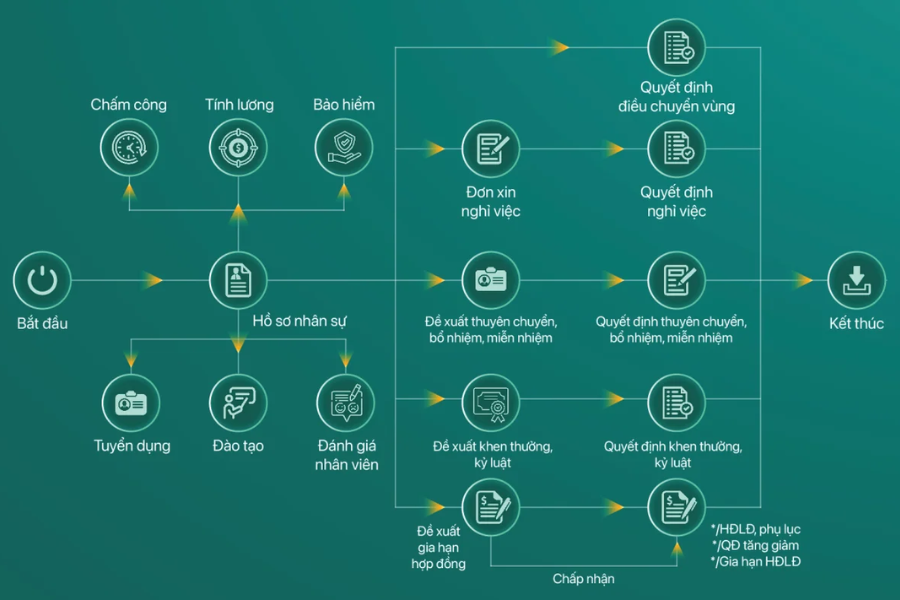
Suitable for businesses: operating on an ERP model or needing to synchronize HR with overall management operations, especially units that require in-depth management of labor, payroll, and HR administration.
Estimated cost: Contact (+84) 243 776 2472 – Hanoi
Bravo HRM is the Administration – Human Resources – Payroll module within BRAVO’s ERP ecosystem. BRAVO is positioned as a solution that helps businesses manage recruitment, training, employee records, and performance appraisals, while also tracking details of salary, bonuses, income tax, and labor-related changes.
Key Features:
| Module | Key Features |
|---|---|
| Recruitment | Headcount tracking, AI CV scanning, recruitment management |
| Training | Plan management, course tracking, evaluation |
| Employee Records | Manage profiles, contracts, and decisions |
| Time & Attendance | Connect to time clocks, shift management, mobile access |
| KPI Evaluation | Set up KPIs, tracking & reporting |
| Payroll | Automated flexible payroll, view on mobile |
| Insurance | Social insurance management, benefits, reporting |
| Administration | Manage meeting rooms, vehicles, and uniforms |
Top 13+ HR management software for international businesses
Cloud HR management software (hrcloud.com)
Suitable for businesses: Global, small to medium-sized, prioritizing fast implementation, saving on infrastructure costs, and remote HR management on a cloud platform (hospitality, retail, food, beverage)
Estimated cost: Contact us
Cloud HR is an online HR management software on a cloud platform, introduced as a solution that helps businesses manage HR remotely on the web, phones, and tablets. The provider emphasizes the advantages of not needing a large initial infrastructure investment, easy implementation, and suitability for businesses wanting to use software based on an online model.
Feature summary:
| Feature Group | Feature | Description |
|---|---|---|
| Core HR | Onboarding | Automate the new employee onboarding process |
| HRIS | Centralized storage and management of HR data | |
| Leave & Attendance | Track leave and attendance | |
| Self-service | Employees can access their own information | |
| Offboarding | Simplify the offboarding process | |
| Talent Management | Recruitment ATS | Recruit faster, optimize the process |
| Performance Review | Track and develop employees | |
| Shift Scheduling | Flexible shift management | |
| Real-time Timekeeping | Accurately record working hours | |
| Asset Management | Track company assets | |
| Employee Experience | Engagement | Increase internal connection and interaction |
| Recognition & Rewards | Boost work motivation | |
| Surveys | Quickly collect feedback | |
| Analytics | Analyze HR data |
Pricing:
| Package | Price | Key Features | Best for |
|---|---|---|---|
| Onboard Suite | Contact Us | Onboarding, offboarding, HRIS, automated workflows | Businesses needing to digitize onboarding |
| HR Suite | Contact Us | All Onboard features + recruitment (ATS), performance, time off (PTO) | Businesses needing comprehensive HRM |
| Add-ons | Custom | Engagement, asset management, timekeeping, surveys, reporting… | Businesses with custom needs |
Viindoo Human Resource Management Software
Suitable for: Vietnamese and foreign businesses, ranging from Startups, SMEs, Enterprises, to Education (special offers)
Estimated cost: Free – $27.80/user/month
Viindoo HRM is a human resource management solution suite within Viindoo’s comprehensive enterprise management platform. Viindoo HRM has a flexible modular structure, allowing businesses to implement it in parts and easily integrate with other applications such as accounting, sales, projects, and manufacturing to form a synchronized management ecosystem.
Preliminary pricing:
| Plan | Price | Key features | Best for |
|---|---|---|---|
| One App (Free) | Free | 1 application, unlimited users | Startups / basic use |
| Standard | $21.38 /user/month | Unlimited apps, marketplace, training | SMEs |
| Luxury | $27.80 /user/month | Full features, customization, multi-company | Large enterprises |
| Education discount | -75% | All features at a discounted price | Schools / educational organizations |
Fast HRM Online Human Resource Management Software
Suitable for businesses: Medium or large-scale enterprises, those with foreign elements or bilingual needs, and those requiring relatively comprehensive HR management on both web and mobile platforms.
Estimated cost: 10,000 USD and up
Fast HRM Online is an HR management solution developed by FAST Business Management Software Joint Stock Company, aimed at digitizing HR operations within businesses. The software supports many important areas such as employee management, recruitment, training, timekeeping, payroll, and insurance policies. Currently, Fast HRM Online can be used on both web and mobile application platforms, helping businesses be more flexible in their operations.
Key features of Fast HRM Online:
| Features | Description |
|---|---|
| Relatively comprehensive HR management | Supports operations such as employee profiles, recruitment, timekeeping, payroll, social insurance, and personal income tax. |
| Connects with various timekeeping devices | Helps businesses update timekeeping data quickly and increases accuracy when calculating work hours. |
| Bilingual support | The interface can be used in either Vietnamese or English, suitable for businesses with foreign elements or diverse user groups. |
| Employee self-service feature | Allows employees to proactively view payslips, timekeeping information, and submit leave requests directly on the system. |
| Flexible to specific business needs | Supports data import from Excel and can send approvals via email or SMS for greater convenience during use. |
Basic pricing for Fast HRM software:
| Item | Details |
|---|---|
| License fee | Approximately 10,000 USD. |
| Cost per additional user | Approximately 200 USD/user. |
Workday HRM Software
Suitable for: Corporations, large enterprises, or multinational organizations.
Estimated cost: Contact (workday.com)
Workday is one of the most prominent international human resource management platforms in the large enterprise segment. This solution is built to unify HR data, recruitment, skills development, and data analytics on a single system, making it particularly suitable for large-scale organizations or those with multiple management levels.
See more: How to build an international human resource management model
Summary of features:
| Feature | Description |
|---|---|
| Connected HR Data | Connect profiles, goals, compensation, and feedback in one system |
| Real-time Tracking | Quickly update headcount and identify talent gaps |
| Customizable Workflows | Set up onboarding, promotion, and review processes based on your needs |
| Employee Self-Service | Employees can view payslips, update their information, and request leave |
| AI Analytics | Detect trends such as decreased engagement and turnover risks |
| Flexible Scalability | Suitable for businesses from 100 to 10,000+ employees, including multinational corporations |
SAP SuccessFactors Employee Management Software
Suitable for: Large enterprises, multinational corporations, or businesses with complex operating models.
SAP SuccessFactors is a cloud-based human resource management solution suite from SAP. This platform offers broad coverage, from core HR management, payroll, recruitment, and training to talent management, HR analytics, workforce planning, and employee experience. This is a suitable choice for large enterprises that need a system with depth and excellent scalability.
Summary of Features and Pricing:
| Category | Details |
|---|---|
| Solution Name | SAP SuccessFactors Employee Central (Core HR) |
| Reference Price | From approx. $18 – $19/user/month (eLearning Industry) |
| Pricing Model | Subscription per user/month, depending on module & scale (Siit) |
| Key Features | Employee profile management, timekeeping, payroll, self-service, HRIS |
| Scope | Core HR + can be expanded to recruitment, training, KPI |
| AI & Analytics | HR data analysis, decision-making support |
| Implementation | Requires an SAP partner for implementation & customization (SAP) |
| Suitable for | Large, multinational enterprises with complex HR processes |
Sage HR Management Software
Best for: SMEs that need to build a custom HRM system
Pricing: From £5
Sage HR is the current brand name for CakeHR, targeting growing small and medium-sized enterprises. The platform focuses on daily HR management needs such as employee profiles, leave, timekeeping, work hours, shift scheduling, and performance reviews, making it a good fit for businesses looking for a quick and user-friendly deployment.
| Module | Key Features | Pricing |
|---|---|---|
| Core HR + Leave | HR management, leave, employee data | ~£5 /user/month (~$6-7) |
| Timesheets | Timekeeping, work hour tracking, OT | ~£2.3 /user/month (~$3) |
| Performance | KPI, 360 feedback, reviews | ~£2.3 /user/month (~$3) |
| Shift Scheduling | Shift planning, schedule management | ~£2.3 /user/month (~$3) |
| Expenses | Expense management, approval | ~£1.15 /user/month (~$1-2) |
| Recruitment | Job posting, candidate pipeline | ~£170-$200 /month |
Bitrix24 HR Software
Suitable for businesses: Startups, SMEs, and large enterprises needing an all-in-one management ecosystem with optimized costs.
Estimated cost: $49/month and up
Bitrix24 is a multifunctional work management and internal collaboration platform that includes many tools to support human resource management. Bitrix24 is not a specialized human resource management software, but it can still effectively meet needs such as employee management, work time tracking, access rights, and internal processes.
Key features:
| Group | Key Features |
|---|---|
| Personnel Management | Employee directory, profiles, organizational structure |
| Timekeeping & Attendance | Track working time, shifts |
| Workflow & Self-service | Process automation, employee self-service |
| Internal Communication | Chat, internal network, employee connection |
| Employee Engagement | Likes, badges, corporate culture |
| Reporting & Analytics | Dashboards, HR reports |
| Training (eLearning) | Supports internal training |
| Integrations & Extensions | CRM, project, website, API |
Pricing:
| Plan | Price | Scale | Highlights |
|---|---|---|---|
| Basic | $49/month | ~5 users | Basic HR + tasks |
| Standard | $99/month | ~50 users | Adds CRM, marketing |
| Professional | $199/month | ~100 users | Full HR + automation + AI |
| Enterprise | $399/month | ~250 users | Expansion, multi-branch |
Paycor HRM Software
Suitable for businesses: all sizes (from small to enterprise) needing comprehensive human resource management, from operations to development and data analysis.
Estimated cost: Contact for more details (paycor.com)
Paycor is an American human resource management platform, focusing on areas such as HR, payroll, recruitment, talent management, benefits, workforce management, and regulatory compliance. Paycor’s strength is its ability to consolidate multiple HR tasks into a unified system, making it particularly suitable for businesses that need to both manage human resources and control compliance requirements.
Feature summary table:
| Category | Key Feature | Description |
|---|---|---|
| HR Automation | Automated Workflow | Automate processes, task reminders, notifications |
| Data Management | Centralized Employee Profiles | Store and manage all employee data on one system |
| AI & Insights | AI Assistant, Leader Insights | Performance analysis, decision support |
| Self-service | Employee Self-Service | Update information, view payslips on mobile |
| Document Management | Paperless | Create, sign, and store electronic documents |
| Communication & Engagement | Paycor Engage | Internal communication, employee recognition |
| Reporting & Analytics | HR Analytics | Analyze HR data (turnover, headcount…) |
| Compliance | HR Resources | Templates, compliance guides |
| Sandbox | System Testing | Test configurations without affecting live data |
| Mobile & Integration | App & Integration | Mobile access, connect to other systems |
Odoo Human Resource Management Software
Suitable for businesses: That want to implement in phases and expand gradually as needed.
Estimated cost: Contact (odoo.com)
Odoo is a modular business management platform, where the human resource management software system is a key application group. Odoo’s major advantage is that businesses can implement it module by module according to their needs, while connecting HR with accounting, sales, projects, manufacturing, and many other operations on a single platform.
Feature summary:
| Group | Main Feature | Description |
|---|---|---|
| Employee Profile | CV, Skills | Store profiles, track skills & employee development |
| Onboarding/Offboarding | Onboarding & Offboarding | Automate entry – exit processes |
| Performance & Leave | Performance & Leave | Request evaluations, apply for leave directly |
| Electronic Signature | e-Sign | Send & sign documents directly on the system |
| Work Information | Schedule, Shift, Location | Manage work schedules, time zones, work locations |
| Organizational Structure | Org chart | Display departments, levels, managers |
| Timekeeping & Planning | Timesheet & Planning | Track work hours, schedules, shift swaps |
| Assets & Equipment | Asset tracking | Manage employee equipment, vehicles, tools |
| Contracts & Documents | Contract & Docs | Track contracts, store documents |
| Training | eLearning | Track courses & progress |
| Access Control | Access control | Manage access rights & security |
| System Integration | Recruitment, Expenses | Connect recruitment, expenses, payroll |
UltiPro HR Management Software System
Suitable for businesses: Large enterprises or organizations that require an in-depth HR management system.
Estimated cost: Contact (ukg.com)
UltiPro is the former name of the HR management solution now developed under the name UKG Pro. The current legacy platform supports areas such as HR, payroll, talent management, and workforce management, while also providing data analysis and decision support tools.
Feature Highlights:
| Feature | Description |
|---|---|
| Personnel Management (HR Core) | Manage employee profiles, information, and lifecycle |
| Payroll | Process payroll and related payments |
| Talent Management | Support recruitment, development, and employee retention |
| Time Management | Track timekeeping and working hours |
| Analytics & Reporting | Provide data and insights to support decision-making |
Sage Business Cloud People HR Software
Best for: mid-sized to large enterprises needing a flexible yet comprehensive HR platform.
Estimated cost: Contact (sage.com)
Sage Business Cloud People, now often shortened to Sage People, is a cloud-based human resource management solution for businesses with a distributed workforce or operations in multiple countries. This platform’s strength lies in its ability to manage HR data globally while still supporting practical operational tasks such as leave, timekeeping, and performance evaluation.
Feature summary:
| Category | Key Feature | Description |
|---|---|---|
| Global HR (Cloud HR) | Multinational HR system | Centralized personnel management, multi-language support (21 languages) |
| Personnel Management | People management | Manage employee profiles and lifecycle |
| Attendance & Leave | Attendance & Leave | Track working hours and leave schedules |
| Recruitment | Talent acquisition | Attract and manage candidates |
| Performance & Talent | Performance & Talent | Evaluate, develop, and retain personnel |
| Analytics & Reporting | HR Analytics | HR data insights, supports decision-making |
| Employee Experience | Employee experience | Personalize experiences, increase engagement |
| Compensation & Recognition | Compensation | Manage salary, bonuses, and employee recognition |
| Workflow & automation | HR Automation | Optimize processes, reduce manual work |
| Flexibility & Scalability | Workforce flexibility | Suitable for multi-branch, large-scale enterprises |
BambooHR HRM Software
Suitable for businesses: small and medium-sized businesses that want fast implementation, ease of use, and simple internal training.
BambooHR is one of the most popular human resource management software for small and medium-sized businesses. This platform stands out for its user-friendly interface, simple implementation, and smooth handling of common tasks such as recruitment, new employee onboarding, employee data management, timekeeping, leave, and benefits.
- BambooHR HR management software interface
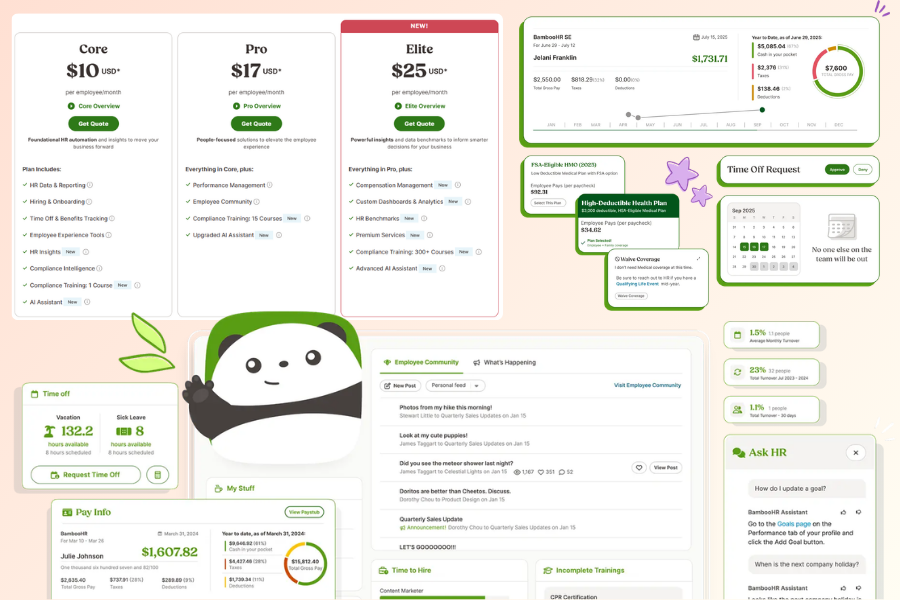
Key Features:
| Category | Key Feature | Description |
|---|---|---|
| HR Core | Employee Profiles | Centralized employee data management |
| Onboarding | Onboarding Process | Automate the onboarding process |
| Recruitment | ATS | Candidate and recruitment management |
| Time & Attendance | Time & Attendance | Track work hours and leave |
| Payroll | Payroll | Payroll management and reporting |
| Performance | Performance | Employee evaluation and development |
| Employee Experience | Employee Experience | Increase engagement, self-service |
| Reporting & Analytics | HR Analytics | Dashboards, data insights |
| Compliance | Compliance | Regulation & training management |
| HR Support Services | Training & Consulting | Consulting, training, data management |
Zoho People HR Management System
Suitable for: Businesses that already use or are planning to use other Zoho products.
Estimated cost: Contact for pricing
Zoho People is a cloud-based human resource management software from Zoho, built to help businesses manage HR, work time, performance, and employee experience on a single system. This is a practical choice for businesses looking for online, flexible software that can scale with the Zoho ecosystem.
| Category | Key Features | Description |
|---|---|---|
| Recruitment (Talent Acquisition) | ATS, CV parsing | Source candidates, manage pipeline, analyze CVs |
| Onboarding | Orientation & offer | Manage offer letters, e-signatures, employee onboarding |
| HR Core | Profiles & employee lifecycle | Manage employee information on a single platform |
| Self-service | Employee self-service | Request leave, update information, internal requests |
| Timekeeping & Leave | Time & Attendance | Track working hours and absences |
| Communication & Collaboration | Collaboration | Support internal work, HR helpdesk |
| AI & Automation | Zia AI, chatbot | Automate workflows, reminders, approvals |
| Custom Workflows | Custom HRMS | Design HR processes according to business needs |
| Data Analytics | HR Analytics | Recruitment, cost, and performance reports |
| Scalability & Integration | Scalable platform | Scale with growth, connect with multiple systems |
What Criteria Are Needed to Choose HRM Software?
Choosing human resource management software shouldn’t just be about the number of features. It’s more important to consider whether the software truly fits the way the business operates, is easy to use, and has the capability to be a long-term partner. Here are the criteria businesses should prioritize when evaluating an HRM solution.
Suitable for Company Size and Industry Specifics
Each business has different HR challenges. Small businesses often need simple, easy-to-implement HRM software that handles basic tasks well. In contrast, large enterprises require a system capable of managing multiple departments, branches, approval levels, or more complex HR policies.
- Small businesses should prioritize user-friendly, cost-effective, and quickly implemented software.
- Medium and large enterprises should focus on scalability, user permissions, and centralized management.
- Industries like manufacturing, retail, F&B, and logistics should prioritize software that supports shift work, flexible timekeeping, and a distributed workforce.
Features That Meet Current and Future Needs
Many businesses choose software just to solve immediate needs, but after a while, they have to replace the system because it no longer meets their requirements. Therefore, when choosing, businesses should consider both current needs and future development plans.
- Basic features usually include employee profiles, timekeeping, leave management, payroll, and reporting.
- If the business wants more systematic management, it should consider adding recruitment, performance evaluation, training, and an employee portal.
- Choose software that can scale as the number of employees grows.
Integration Capability with Other Systems
Professional human resource management software is much more effective if it can connect with the systems a business is already using. When data is interconnected, the business can reduce repetitive data entry and minimize errors between departments.
User Interface and User Experience
Software with many features but a difficult user interface is likely to be abandoned after implementation. Therefore, the user experience is a factor that needs to be carefully evaluated from the beginning.
- The interface should be clear, easy to navigate, and make information easy to find.
- HR, accounting, managers, and employees should all be able to use it conveniently.
- A mobile app or an employee self-service portal is a major plus.
The easier the software is to use, the shorter the training time and the higher the practical application rate.
Customization Capability
Not every business has the same HR processes. Each organization may have different methods for calculating payroll, approval levels, forms, or internal procedures. Therefore, the software should offer an appropriate level of customization.
- Prioritize systems that allow customization of forms, workflows, and approval levels.
- Flexible software adapts more easily to actual operational practices.
- Customization helps businesses avoid having to change their entire processes just to fit the software.
Implementation and Operating Costs
When choosing software, businesses shouldn’t just look at the initial purchase price of the human resource management software. The actual cost often includes many other expenses such as implementation, training, maintenance, upgrades, and internal resources for operation.
- Calculate the total cost of ownership, not just the license or subscription fee.
- Cheap software that lacks features or is difficult to scale can end up costing the business more in the long run.
- Compare the cost with the long-term value the software provides.
Data Security and Legal Compliance
HR data is sensitive, directly related to personal information, compensation, contracts, and insurance. Therefore, security is not a “nice-to-have” criterion, but a mandatory one.
- The software must have a clear permission system and good access control.
- Prioritize systems that can back up data and protect information during storage and use.
- The software should also help the business meet requirements related to labor, payroll, and data storage.
A good security system will help reduce operational risks and increase peace of mind for long-term use.
How to choose an HRM software that fits your organization’s needs and criteria is a question many people are still wondering about. If your business is still struggling to find an HRM software, let’s explore some criteria below:
Customization and Scalability
This is an important factor you should consider when choosing software. Flexible customization helps us create a systematic human resource management model with clear functions. This allows the business to easily evaluate and develop in parallel with the company’s workforce.
Intuitive and Easy to Use
No matter how well-rated a software is, if it lacks an intuitive, dynamic, and user-friendly interface, it will be difficult to implement for the company’s staff. Each company has various employee groups with different ages and cognitive approaches, so each person’s learning ability will differ. If the software is too difficult to use, the business will spend a lot of time training and guiding staff without a clear understanding of the software’s potential results for the business.
Cost-Effective and Within Budget
Each business will have a certain budget to invest in HRM software. Therefore, consider whether the various HRM tools on the market fit your company’s price point and budget before making a decision.
24/7 Support
During the software implementation process, technical issues and glitches are inevitable. Therefore, you should carefully consider choosing a provider that offers 24/7 customer support to promptly resolve any problems your business encounters.
Types of HRM Software
| Criteria | On-premise | Cloud-based | Open Source |
| Initial Cost | High (infrastructure investment, maintenance) | Low (monthly/annual service fee) | Low (no license fee) |
| Security | Complete control, high security | Depends on the service provider | Must manage security yourself |
| Scalability | Limited, requires infrastructure upgrades | Easy, flexible according to needs | Flexible, depends on the development team |
| Management and Maintenance | Self-managed by the business, requires a technical team | Managed and maintained by the service provider | Self-managed by the business, requires a technical team |
| Customization | Flexible to needs, but complex requirements | Limited, depends on the provider | Very flexible, customizable on demand |
| Application | Large enterprises with high security requirements | Businesses looking to save costs and time | Businesses with a strong technical team |
On-Premise HRM Software
On-Premise HRM software is software installed directly on a company’s servers and systems. Users can manage and operate the software entirely in-house, without depending on an external provider.
Key characteristics:
- Internal installation: The software is deployed on the company’s servers and requires its own technology infrastructure.
- Data control: The company has full rights to manage and control its data.
- Security: The company is solely responsible for data security and backups.
- Maintenance: Software maintenance and upgrades are the company’s responsibility, requiring an in-house technical team.
Benefits:
- High security: Data is stored locally, giving the company complete control.
- Flexible customization: The software can be customized to meet the specific requirements of the business.
- Suitable for large-scale enterprises: Large organizations with high security requirements often choose this solution to protect internal data.
Cloud-based HRM Software
Cloud-based HRM Software, also known as cloud-based software, is provided as a service over the Internet. Instead of installing it on internal servers, businesses use the software via an Internet connection, with all data stored and managed on the service provider’s system.

Key characteristics:
- Access anywhere: Since the software operates on the cloud, users can access and work from anywhere with an Internet connection.
- No separate infrastructure needed: Businesses do not need to invest in servers or hardware; everything is managed by the provider.
- Automatic backups: Data is backed up automatically and can be easily restored in case of an incident.
- Scalability: It can be easily expanded and customized as the business grows, without worrying about upgrading the internal system.
Benefits:
- Low initial investment cost: Since there’s no need to invest in infrastructure, businesses only need to pay a monthly or annual service fee.
- Easy customization and expansion: Businesses can flexibly and easily add or remove service users according to their needs.
- Quick access: All employees can work remotely, making it easy to monitor and manage anytime, anywhere.
Open Source HRM Software
Open Source HRM Software is software developed and distributed in an open-source format. With this type of software, users can freely customize and develop it according to their needs without paying licensing fees. Businesses can download, customize, and deploy the software on their own systems.
Key features:
- Open source code: Businesses have full access to the software’s source code, making it easy to customize and develop additional features as needed.
- No licensing fees: This software is often free or has a lower cost compared to commercial solutions.
- Technical team: Requires the business to have a technical team to deploy, install, maintain, and secure the system.
- Community support: There is a large community of users and developers to help support and develop the software.
Benefits:
- Low cost: With no licensing fees, businesses only need to invest in infrastructure and technical personnel.
- Flexible customization: The software can be easily customized to fit the specific needs of the business.
- Opportunity for learning and development: Businesses can participate in the open-source community to develop the software and share experiences.
Besides identifying internal needs, referencing solutions chosen by many businesses will give you a more realistic perspective and make comparisons easier. Popular HRM software today has been optimized in terms of features, processes, and scalability, making it suitable for various operational models.
Why do businesses need to use HRM software applications?
- 1Office HRM Human Resource Management Software
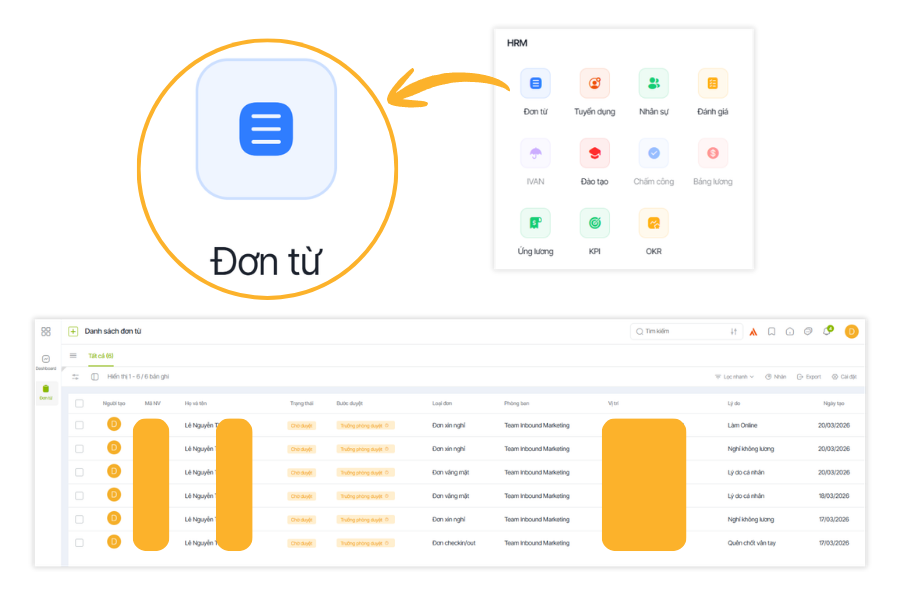
A modern business that uses technology in its management will significantly outperform those using manual, traditional methods and will be more optimized in its operations. Businesses will achieve excellent results by using HRM software in their management processes. These benefits include:
- Improve personnel productivity and quality
Time-consuming tasks in human resource management, such as timekeeping, payroll calculation, and related paperwork, are now handled by HRM software. This is an advantage that allows HR staff to focus on finding ways to optimize and increase productivity for the business.
- Reduce costs for the business
Using software in the human resource management process will save money on paperwork and records. It can also optimize personnel as machines take over tasks.
- Bring efficiency to the management process
Work efficiency becomes most apparent when management can simply look at the tasks employees are doing to know if they are meeting job requirements, or check the KPI dashboard on the application for control. From this information, they can devise better management methods for the business.
- Minimize risks
Businesses often face risks in human resource management related to contracts or policies on paper. If those paper documents are lost, it would be a significant loss. Therefore, storing information on HRM software helps businesses save information without fear of loss.
With the benefits mentioned above, it is clear that HRM software plays a crucial role and brings many practical benefits to businesses, helping them increase work efficiency and enhance the quality of professional personnel.
See more:
- Top 12 effective human resource management methods
- The process of building effective human resource management software for businesses
What features does a standard Human Resource Management (HRM) software need?
- Essential features when looking for a human resource management software
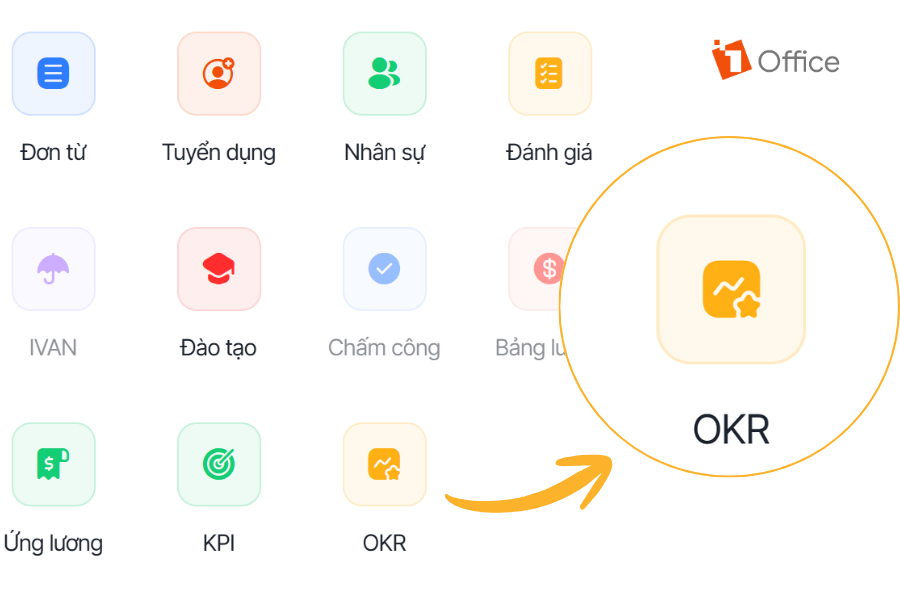
A standard HRM software not only helps businesses store personnel information but also supports connecting and managing key operations seamlessly, such as timekeeping, payroll, recruitment, evaluation, and training. When choosing an HRM solution, businesses should prioritize the core features below.
Personnel Record Management
- Centrally store all personnel information such as personal profiles, labor contracts, work history, degrees, certificates, and insurance information.
- Businesses can easily look up, update, and track the record status of each employee on a single system. This limits the situation where data is scattered across multiple files or different departments.
See more: 10 Highly-rated, quality human resource management certifications
Timekeeping and Work Time Management
- Supports tracking of clock-in/out times, late arrivals, early departures, overtime, leave, and employee work schedules.
- Allows setting up various timekeeping methods such as time clocks, mobile apps, or online check-ins.
Read more: What to do if a business wants to build its own HR software?
Payroll and Benefits Management
- Supports setting up salary formulas suitable for each position, department, or the company’s specific policies.
- Automatically links timekeeping data with salary, allowances, bonuses, deductions, insurance, and personal income tax.
Recruitment Management
- Supports managing the entire recruitment process from posting jobs, receiving applications, and screening candidates to interviewing and evaluating.
- Helps businesses track recruitment progress clearly instead of managing it disjointedly through email or Excel.
Performance Management
- Allows setting goals, tracking work results, and conducting periodic performance reviews.
- Helps store the evaluation history of each employee, providing a basis for the business to track long-term development.
Training and Development Management
- Supports building training plans for each personnel group, department, or job position.
- Tracks the training participation process, learning outcomes, and development roadmap of each employee. Helps businesses identify skill gaps to create suitable development plans.
Reporting, Data Analysis, and Admin Dashboard
- Provides key reports on personnel fluctuations, timekeeping, salary costs, recruitment, training, and work performance.
- Supports data presentation in a visual dashboard format for managers to easily monitor and understand the situation.
Employee Portal and Mobile App
- Allows employees to proactively view personal information, payslips, leave days, timekeeping history, and internal announcements.
- Supports actions such as requesting leave, submitting proposals, updating profiles, or registering for training directly on the system.
Common Mistakes Businesses Make When Choosing HRM Software
When choosing HRM software, many businesses make mistakes due to a lack of realistic needs assessment or by following big brand names. Here are common errors and their specific consequences:
Choosing Software Unsuitable for the Business Scale
If small businesses choose complex HRM software with many modules (recruitment, KPI, OKR, training, competency management, etc.), they will incur high costs without fully utilizing the features.
Conversely, if large enterprises use simple software lacking integration capabilities, it will disrupt workflows and make it difficult to expand when adding new branches.
Not Assessing Real Needs Before Choosing a Solution
Many companies choose HRM software just because they “heard it was good,” without defining their implementation goals: Automating payroll? Standardizing employee records? Or supporting performance management?
Without clear criteria, the software is easily misused or abandoned halfway through.
No Internal HRM System Administrator
After implementation, if there is no dedicated personnel to manage and update HRM data, the system can easily fall into a state of “clinical death”:
- Data is not updated in real-time.
- Discrepancies in employee data, workdays, and compensation.
- Loss of user trust, causing departments to revert to manual processes.
Skipping Employee Training
Implementing HRM without training employees means users won’t understand the operational procedures, leading to incorrect data entry or omission of important data.
This reduces the return on investment and turns the software into a “technical burden” instead of a supportive tool.
Not Considering Scalability and Integration
Another common mistake is choosing an HRM system that cannot connect with other systems like CRM, accounting, KPI, or OKR.
When the business scales, a lack of integration will lead to fragmented processes and siloed data — resulting in wasted resources and difficulty in making strategic decisions.
HRM Software Implementation Process for Businesses
Below are 6 common steps for implementing HRM software that businesses should consider.
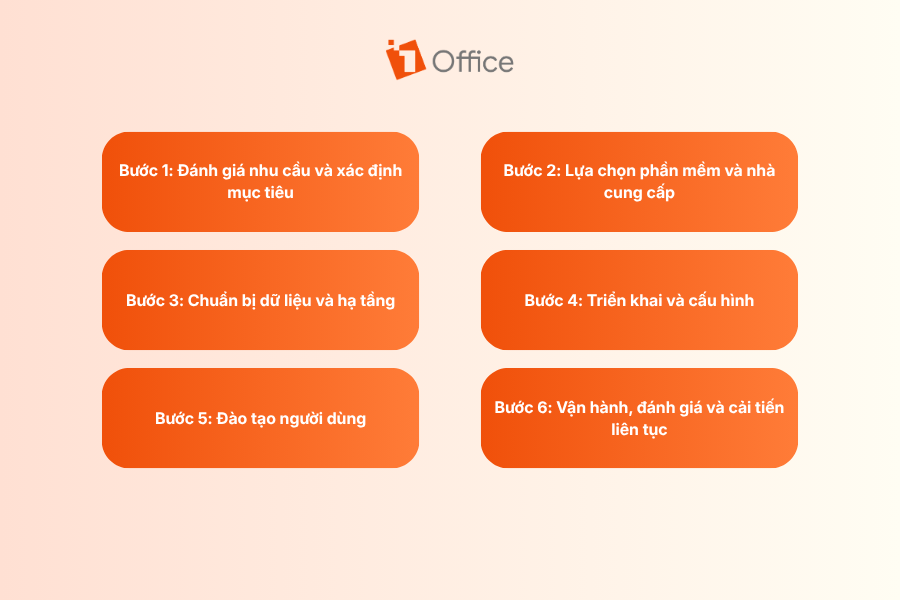
Step 1: Assess Needs and Define Objectives
Before choosing software, businesses need to clarify what problems they are facing in HR management. These could be scattered data, manual timekeeping, time-consuming payroll calculations, difficulty tracking performance, or a lack of connection between departments.
- Clearly define the problem to be solved before implementation.
- Clarify objectives such as saving time, reducing errors, standardizing data, or improving management efficiency.
This step helps businesses choose the right software and avoid ineffective investments.
Step 2: Select Software and a Vendor
After identifying their needs, businesses must evaluate suitable software and choose a vendor with strong implementation capabilities. A suitable solution is not just about features, but also about the level of support, implementation experience, and the ability to be a long-term partner.
- Compare software based on criteria such as features, cost, scalability, and integration capabilities.
- Thoroughly research the vendor’s implementation experience, support team, and warranty and maintenance policies.
- Prioritize vendors who can provide consultation tailored to the business’s specific needs rather than just selling software.
- You should request a demo or trial before making a final decision.
Step 3: Prepare data and infrastructure
If the input data is incomplete or the infrastructure is not ready, the implementation process will be prone to errors and affect the user experience later on.
- Review and standardize data on personnel, contracts, timekeeping, salary and bonuses, insurance, and other related information.
- Eliminate duplicate, incorrect, or inconsistent data before importing it into the system.
- Check the technical infrastructure such as network, devices, time clocks, or any software that needs integration.
Step 4: Implementation and configuration
Once the data and infrastructure are ready, the business can begin setting up the software for actual use. In this stage, the system will be configured according to the company’s organizational structure, internal processes, approval levels, and HR policies.
- Set up the structure of departments, job titles, management levels, and access permissions.
- Configure processes such as timekeeping, leave requests, payroll calculation, approvals, and performance reviews.
- Connect with related systems like time clocks, accounting software, or other management software if needed.
Implementation should be done in phases to easily control and handle any issues that arise.
Step 5: User training
Training is a mandatory step to help the HR department, managers, and employees get familiar with the new system.
- Organize training for each user group, such as HR, accountants, managers, and employees.
- Provide clear instructions on common operations and processing workflows within the system.
- Prepare documents, videos, or internal guides for users to easily reference when needed.
Step 6: Operation, evaluation, and continuous improvement
This stage helps the business identify what is working well and what needs adjustment to enhance the software’s value.
- Monitor the actual usage level of each department after implementation.
- Evaluate effectiveness based on metrics such as processing time, data accuracy, and user satisfaction.
- Record any issues that arise to adjust processes, configurations, or usage methods.
Businesses can start with 1Office HRM for a free initial consultation, demo, and implementation. We will support you from building processes to training users, ensuring the system operates smoothly from the very beginning or a fresh start!
Register for a free feature demo!
Features of HRM software
HRM software was created to help businesses operate more effectively and address the challenges of human resource management. The features that HRM software provides to facilitate the management process for businesses are:
Personnel system management
HRM software helps businesses store all employee information, including resumes, contracts, insurance details, etc. It manages aspects like experience, professionalism, and employee competencies within the company.
Create an intelligent recruitment process
The software supports businesses throughout the recruitment process, from simple steps like creating recruitment proposals on the system to screening suitable candidate profiles. It can also connect with job boards or recruitment websites to find qualified candidates.
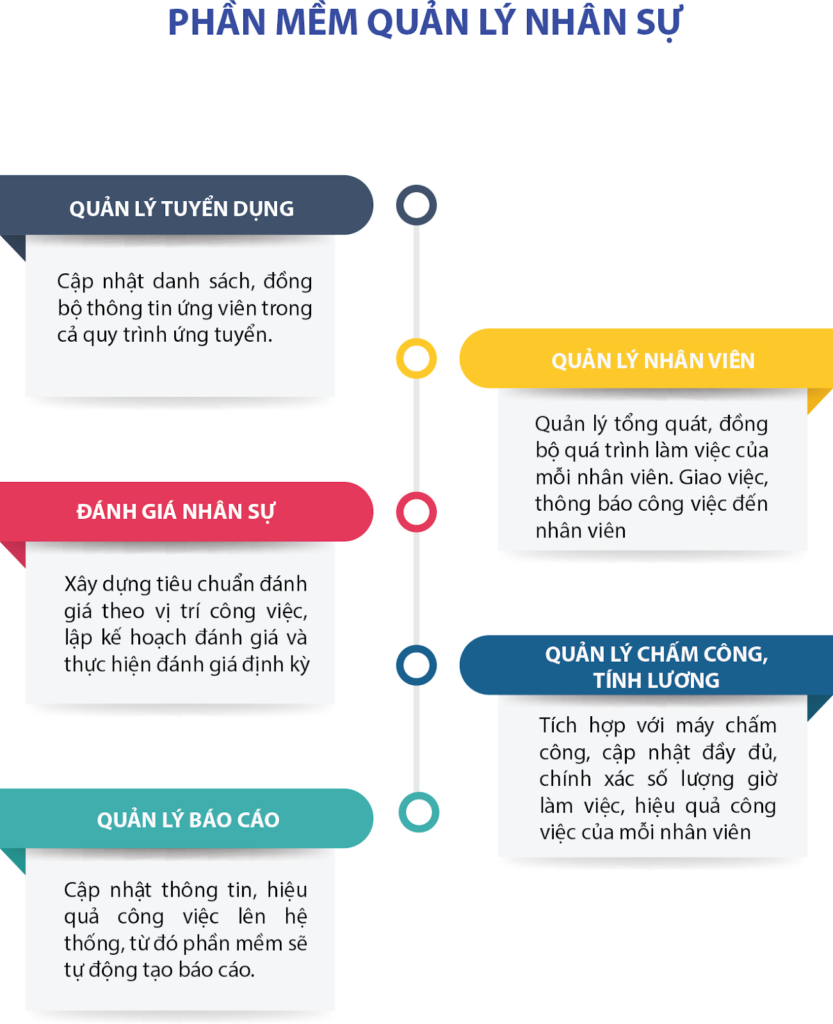
Manage, evaluate, and rank employee performance
Businesses can fully manage, evaluate, and rank employee performance through HRM software. Users can set up evaluations based on job tasks, review training progress, and analyze KPI results to make decisions about salary increases, deductions, or bonuses for employees.
Manage timekeeping and calculate payroll accurately
It’s a hassle when HR has to spend time every month manually calculating payroll and tracking workdays and days off for each employee. This has been quickly resolved by HRM software. It connects to time clocks to receive daily data, sets up work shifts, leave schedules, and creates timesheets for each department.
Based on the timekeeping data, the payroll software automatically calculates salaries. It automatically deducts for leave days, late arrivals, calculates income tax or salary advances, and sends payslips to employees. This feature helps reduce the time HR spends on timekeeping and payroll calculation each month, allowing them to focus on optimizing operational processes.
Report on the company’s personnel situation
Based on the factors evaluated by the HRM software, the management can assess the competency of each employee and monitor the company’s overall personnel situation.
Future Trends in Human Resource Management (HRM) Software
While in the past, HRM software was mainly used for storing records, timekeeping, and calculating payroll, businesses now expect more: the software must be smarter, more user-friendly, better connected, and provide more effective management support. In the near future, these will be the prominent trends for HRM software.

Application of Artificial Intelligence (AI)
AI is gradually becoming a crucial part of HR software. Instead of just storing data, modern HRM systems can help businesses process tasks faster and reduce manual operations.
- Automatically answer frequently asked HR questions.
- Suggest candidate profile screening and support faster recruitment.
- Automatically compile data, send reminders, and assist in report generation.
- Help the HR department reduce repetitive tasks to focus on more important work.
In-depth HR data analysis
In the future, HRM software will not just store information but also help businesses better understand their internal workforce. HR data will become the basis for making more accurate decisions.
- Track personnel fluctuations, turnover rates, and recruitment status.
- Analyze the work performance of each department or team.
- Support forecasting future recruitment needs and team development, helping leaders make data-driven decisions instead of relying on intuition.
Deep integration with the business ecosystem
HR software will increasingly need to connect with other systems within the business. When data is interconnected, management becomes faster, more accurate, and less redundant.
- Connect with timekeeping machines, accounting software, payroll systems, and work management tools.
- Synchronize data between HR, finance, operations, and internal administration.
- Reduce manual data entry across multiple departments.
- Help businesses build a synchronized management system.
Employee-centric design
A very clear trend is that HRM software will no longer serve only the HR department. Future systems need to be easy for both employees and managers to use, so everyone can perform tasks quickly and conveniently.
- Interfaces are becoming simpler, more intuitive, and easier to use.
- Employees can view their payslips, request leave, and update personal information directly on the system.
- Managers can approve requests quickly and track information more easily.
A better experience will help increase actual usage within the business.
Support for remote work models
Remote and flexible work are becoming long-term trends in many businesses. Therefore, HR management software must also adapt to better manage teams in this new environment.
- Support remote timekeeping via phone or GPS.
- Allow employees to access the system anytime, anywhere.
- Help managers track progress, work hours, and interact with remote employees.
- Suitable for businesses with multiple branches, work locations, or a hybrid model.
Discover 1Office’s AI-integrated HRM software
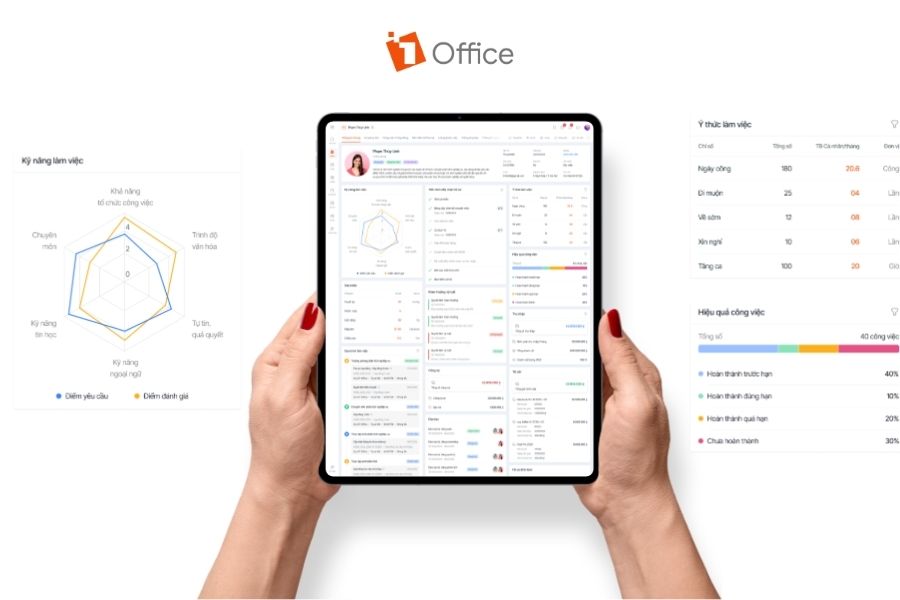
1Office’s 1HRM is a professional HR management solution that supports operations such as profile management, timekeeping, payroll, recruitment, evaluation, and training. The software is integrated with AI to help businesses automate many repetitive tasks, process data faster, and enhance HR management efficiency. Instead of spending a lot of time compiling information, tracking data, or handling manual tasks, the HR department can leverage AI to:
- Support faster data lookup and compilation
- Reduce repetitive tasks in HR processes
- Assist in information analysis to monitor the HR situation more clearly
- Accelerate task processing and improve user experience
Furthermore, 1HRM has the advantage of being part of the 1Office business management ecosystem. This ensures that HR data is not isolated but can be connected to tasks, processes, operations, and other internal activities on a single platform. For businesses, this is a much more effective approach than using multiple disparate software. If your business is looking to learn about or purchase a modern, scalable HRM software with smart AI integration, explore 1Office’s 1HRM now to automate HR processes, optimize team management, and prepare for the next stage of growth.
Frequently Asked Questions about HR Management Software
What is the difference between HRIS, HRMS, and HCM?
These three concepts all relate to HR management software, but their scope of use differs. HRIS typically focuses on storing and managing HR data such as profiles, contracts, timekeeping, and payroll. HRMS has a broader scope, supporting operations like recruitment, evaluation, training, and performance management in addition to data management. Meanwhile, HCM is often understood as a more strategic approach, focusing on human capital management, talent development, and long-term resource optimization.
What are the benefits of AI-integrated HRM software?
AI-integrated HRM software helps businesses reduce repetitive tasks and process data faster. AI can assist in compiling information, suggesting reports, shortening data lookup times, and helping the HR department work more efficiently. More importantly, AI helps businesses make faster decisions thanks to data that is processed clearly, promptly, and more systematically.
How to choose the right HRM software?
First, you need to clearly identify the problem you need to solve, such as profile management, timekeeping, payroll, recruitment, or performance evaluation. Then, you should evaluate the software based on criteria such as its suitability for your business size, scalability, ease of use, integration capabilities with other systems, implementation costs, and data security level.
Which businesses should use HRM software?
Most businesses can benefit from HRM software, especially those currently managing HR with Excel or multiple separate tools. For small businesses, the software helps reduce administrative workload and minimize errors. For medium and large enterprises, HRM helps standardize processes, centralize data management, and support more efficient operations as the number of employees grows.
How long does it take to implement HRM software?
It depends on the size of the business and the number of features being implemented. For small businesses, it might take about 2-4 weeks, while for large enterprises or those requiring integration with multiple systems, it could take from 1-3 months.
Conclusion
As this article shows, human resource management software is no longer a tool just for large enterprises, but has become a necessary solution for most organizations that want to operate more systematically and efficiently. Hopefully, the information in this article will provide a useful basis for businesses to evaluate, compare, and make more suitable decisions during their HR digital transformation process.
If your business is looking for a comprehensive, easy-to-implement, and scalable HRM solution, 1HRM by 1Office is a worthy option to consider.
Businesses can start with a consultation and a free demo, and also receive implementation support, training, and system optimization right from the initial stage, helping to shorten the transition time and quickly bring the software into effective operation.
















